
Overview
ABB DC522 1SAP240600R0001 Migration-Ready Digital I/O Module for Legacy AC500 Control Systems
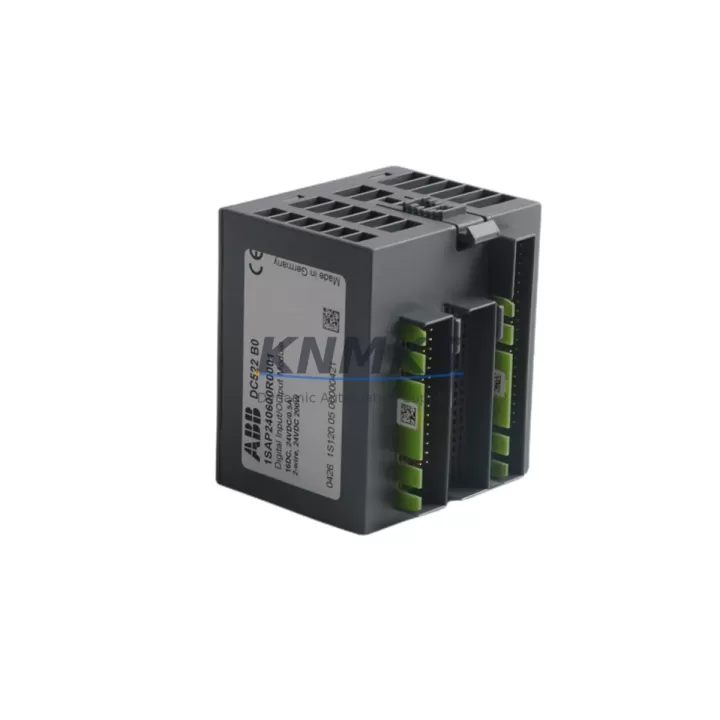
The ABB DC522 (order reference 1SAP240600R0001) is a 32-channel digital combination I/O module designed for the ABB AC500 PLC platform. As legacy control systems built around earlier AC500 CPU generations — including the PM554, PM564, and PM583 — reach end-of-service milestones, the DC522 has become a critical retrofit component for engineers managing panel upgrades, I/O expansion, and discontinued spare replacement programs. KNMKS maintains verified in-stock inventory of the DC522 1SAP240600R0001, fully tested and backed by a support terms confirmed by quotation, to support planned and emergency retrofit projects worldwide.
The DC522 provides 16 digital inputs (24 V DC) and 16 digital outputs (transistor, 24 V DC / 0.5 A per channel), housed in a compact S500 I/O form factor that mounts directly onto AC500 expansion backplanes. Its plug-and-play compatibility with the AC500 I/O bus means that in most retrofit scenarios, the module can be installed without modifying the existing PLC program logic — a critical advantage when downtime windows are measured in hours, not days.
Migration Compatibility Table
| Parameter | DC522 1SAP240600R0001 | Retrofit Notes |
|---|---|---|
| Digital Inputs | 16 × 24 V DC | Compatible with existing field wiring; verify terminal polarity before reconnection |
| Digital Outputs | 16 × Transistor, 24 V DC / 0.5 A | Confirm load current per channel does not exceed 0.5 A; replace relay-output predecessors with interposing relays if needed |
| Backplane Interface | AC500 S500 I/O Bus | Direct slot replacement on TB511, TB521, TB541 terminal bases; no adapter required |
| Module Addressing | Automatic via AC500 CPU configuration | Re-assign module slot address in Automation Builder if slot position changes |
| Communication Protocol | AC500 internal I/O bus (proprietary) | No fieldbus adapter needed for local I/O; PROFIBUS/PROFINET expansion via CM modules |
| Power Supply Requirement | 24 V DC system bus (from CPU or PS501 power supply) | Verify PS501 or PS502 power supply capacity when adding DC522 to existing rack |
| Installation Space | S500 single-slot footprint | Confirm DIN rail space and cabinet depth; standard 35 mm DIN rail mounting |
| Firmware Compatibility | AC500 V2.x and V3.x firmware | Update CPU firmware to latest stable release before commissioning new I/O modules |
| Replacement Scope | Direct replacement for DC522 variants; functional upgrade from DC511/DC512 | Validate I/O count and channel type before substituting lower-density predecessors |
| Commissioning | Automation Builder IEC 61131-3 configuration | Import existing project; verify I/O mapping; perform forced I/O test before live handover |
| Support terms | support terms confirmed by quotation — all units shipped from KNMKS are tested prior to dispatch | |
Retrofit Planning for Existing Automation Systems
Successful integration of the DC522 1SAP240600R0001 into an aging control system begins well before the module arrives on site. Engineers should start by auditing the existing AC500 rack configuration: confirm the terminal base model (TB511-ETH, TB521, or TB541 are the most common in legacy panels), verify that the PS501 or PS502 power supply module has sufficient headroom to support the additional I/O load, and document the current slot assignments used in the Automation Builder project file.
In systems where the original I/O was handled by earlier-generation DC511 or DC512 modules — both of which are now discontinued — the DC522 provides a direct functional upgrade with doubled channel density. This means a single DC522 can consolidate the I/O previously spread across two DC511 slots, freeing backplane space for communication expansion modules such as the CM572-DP (PROFIBUS DP master/slave) or CM589-PNIO (PROFINET I/O adapter), which are frequently added during legacy system modernization to bridge older field devices to Ethernet-based supervisory networks.
For panels that include an ABB CP600 or CP620 HMI, the retrofit process should include a review of HMI screen tag bindings. When I/O module slot addresses shift during a rack reorganization, HMI variable links tied to physical I/O addresses must be updated in the Panel Builder 600 project to prevent alarm and status display errors after commissioning. This step is often overlooked and is a leading cause of extended commissioning time on retrofit projects.
Wiring adaptation is another key planning checkpoint. The DC522 uses a 40-pin front connector (compatible with the TB511/TB521 terminal base wiring system), so existing field cables terminated on the original terminal base can typically be retained without re-termination — a significant time saving when working with multi-conductor control cables in congested cabinets. However, engineers should verify conductor cross-section compatibility and inspect terminal condition before reuse, particularly in installations older than ten years.
Where the legacy system includes a CI501-PNIO or CI502-PNIO communication interface module for PROFINET connectivity, confirm that the updated I/O configuration is reflected in the PROFINET GSD file and that the controller’s PROFINET device name and IP address assignments remain consistent after the retrofit. Mismatched device names are a common source of communication faults during first power-up after a module swap.
Finally, if the retrofit involves replacing a failed DC522 as an emergency spare, KNMKS recommends requesting a pre-shipment function test report. All DC522 1SAP240600R0001 units dispatched from KNMKS undergo bench testing against AC500 CPU before shipment, and a support terms confirmed by quotation cover any latent defects identified after installation.
Downtime Control During System Migration
Minimizing production downtime during a DC522 retrofit requires a structured pre-outage preparation protocol. Before the scheduled maintenance window, the site engineer should export and archive the current Automation Builder project, including all POU (Program Organization Unit) source files, hardware configuration, and I/O variable declarations. This backup ensures that if the retrofit encounters an unexpected compatibility issue, the original program can be restored to the previous hardware configuration within minutes rather than hours.
During the physical swap, the recommended sequence is: de-energize the 24 V DC field supply to the I/O section first (leaving the CPU powered if the system architecture permits hot-rack partial shutdown), remove the terminal base front connector to preserve field wiring integrity, extract the old module, insert the DC522 1SAP240600R0001, and reconnect the front connector. This sequence protects field devices from transient voltage spikes and preserves the wiring harness for immediate reuse.
After module insertion, power the rack and allow the AC500 CPU to perform its automatic I/O bus scan. In most AC500 V2 and V3 firmware versions, a newly inserted module that matches the hardware configuration stored in the project will be recognized automatically without requiring a full program download — meaning the PLC can return to RUN mode within the same maintenance window. If the module type or slot position has changed, a partial hardware configuration download (without program overwrite) is sufficient to update the CPU’s I/O map while preserving all existing program logic and retentive data.
For critical processes where even a brief I/O interruption is unacceptable, consider staging the retrofit during a planned production changeover or shift break, and coordinate with the operations team to confirm that all field devices connected to the DC522 outputs are in a safe de-energized state before the swap begins. Document the forced I/O test results and sign off the commissioning checklist before returning the system to automatic control — this record supports both internal quality assurance and any future support requests.
Retrofit Support FAQ
Q1: Is the DC522 1SAP240600R0001 a direct drop-in replacement for a failed DC522 in my existing AC500 rack?
Yes. The DC522 1SAP240600R0001 is the standard order reference for the DC522 module and is fully interchangeable with any previously installed DC522 unit. No hardware modification or program change is required when replacing a like-for-like failed module in the same slot position. KNMKS ships all units with a pre-dispatch function test and a support terms confirmed by quotation.
Q2: Can the DC522 replace older DC511 or DC512 modules in my legacy panel?
Functionally yes, with planning. The DC522 provides 16 DI + 16 DO versus the DC511’s 8 DI + 8 DO, so a single DC522 can replace two DC511 slots. You will need to update the hardware configuration in Automation Builder to reflect the new module type and adjust I/O variable addresses accordingly. KNMKS can provide a migration checklist on request.
Q3: What commissioning steps are required after installing the DC522 in a running AC500 system?
After physical installation, power the rack and verify that the AC500 CPU recognizes the module (check the I/O bus status LED and Automation Builder online diagnostics). If the module matches the existing hardware configuration, no program download is needed. Perform a forced I/O test on all 32 channels to confirm field wiring continuity before returning to automatic mode. Update the Automation Builder project archive to reflect the new hardware.
Q4: Does KNMKS hold stock of the DC522 1SAP240600R0001, and what is the lead time?
Yes. KNMKS maintains verified in-stock inventory of the DC522 1SAP240600R0001. Standard orders are processed and dispatched within 1–3 business days. All units are tested prior to shipment and covered by a support terms confirmed by quotation. Contact admin@knmks.com or +86 18359268345 for availability confirmation and volume pricing.
© 2026 KNMKS. All rights reserved.
Original Source: https://knmks.com
Contact: admin@knmks.com | +86 18359268345
Product Identification
- Brand / Ecosystem
-
ABB
ABB - Model / Series
-
DC522 1SAP240600R0001
AC500 Series - Product Family
- PLCs & Controllers
- Availability Status
- Available on request after model and quantity confirmation
- Inquiry Type
- B2B RFQ, replacement inquiry and project spare-part request
- Pre-Quote Check
- Exact SKU, brand, series, quantity, nameplate photos and destination country are checked before quotation
System Path
Where this product fits in the KNMKS automation structure.
Specification & Inquiry Focus
- Control platform
- PLC, PAC and modular controllers
- Common needs
- CPU, rack, power and I/O expansion
- Project support
- Replacement, cabinet build and maintenance
Buyer Confirmation
Information KNMKS checks before replying.
- Exact model
- DC522 1SAP240600R0001
- Brand / ecosystem
- ABB
- Product family
- PLCs & Controllers
- Application note
- Replacement, maintenance, project build or spare-part list
- Useful photos
- Nameplate, installed unit, cabinet layout or connector side
- Delivery details
- Quantity, destination country and target schedule
Document Support
Files and notes can be confirmed during quotation.
- Product photos or nameplate confirmation when available
- Packing and delivery notes before quotation confirmation
- Support scope and delivery terms confirmed per inquiry
- Export document coordination for qualified B2B requests
Inquiry Support
- Model cross-checking before quotation
- CPU, power, rack and expansion module matching
- Support for replacement and project inquiry
What to Send Us
- Brand and exact model number: ABB DC522 1SAP240600R0001
- Quantity and required delivery time
- Application, replacement requirement or nameplate photo
- Destination country and shipping preference
RFQ Preparation
This is a product inquiry page built for RFQ communication.
Fast Model Check
Send this model to KNMKS for confirmation.
Include quantity, destination country and photos if this is a maintenance replacement. The inquiry will be saved with a reference number after submission.
Brand & Compatibility Note
KNMKS displays automation product information for well-known industrial brand ecosystems and compatible replacement references. Brand names are used for product identification and compatibility reference only; final availability and commercial terms are confirmed per quotation.
 Manufacturing
 Machine Tools
 Packaging
 Energy & Power



 HMI & Displays
 Servo Systems
 Variable Frequency Drives
 Sensors