
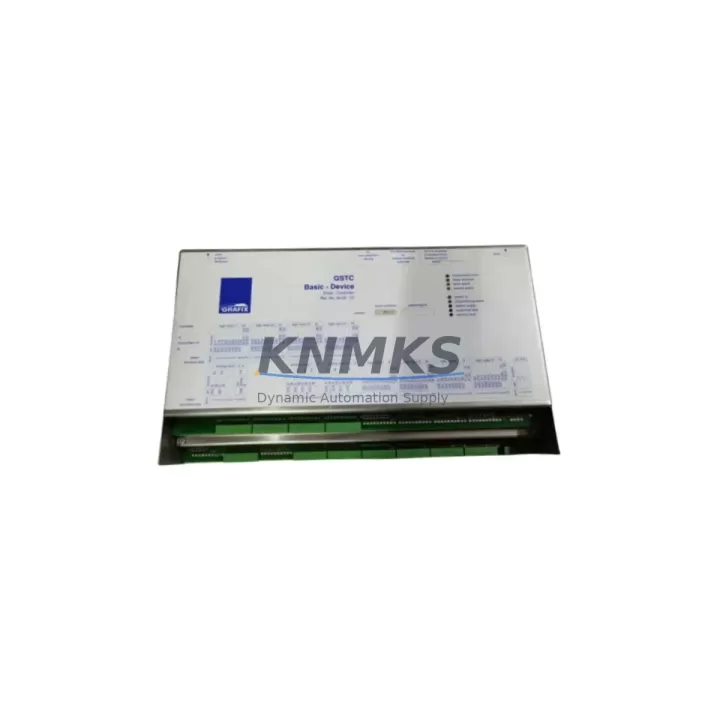
Overview
ABB DAI01 P37131-4-0369628 Migration-Ready Analog Input for Legacy Control Systems
The ABB DAI01 P37131-4-0369628 is a high-precision analog input module engineered for the AC500 PLC platform, and it remains one of the most sought-after components in legacy system migration and control cabinet modernization projects. Whether you are replacing a discontinued analog input card in an aging production line, expanding I/O capacity in an existing AC500 rack, or executing a full control system upgrade from an older S500 or Advant-era platform, the DAI01 delivers the signal accuracy, terminal compatibility, and firmware stability that retrofit engineers depend on.
This module supports standard 4–20 mA and 0–10 V analog input signals across multiple channels, making it directly applicable to process control loops involving pressure transmitters, flow meters, temperature sensors, and level transducers. Before committing to a replacement, engineers should verify the existing terminal block wiring layout against the DAI01’s screw terminal pitch and channel assignment map. In most AC500 rack configurations, the DAI01 slots into the same backplane position as its predecessor without requiring mechanical modification, but the channel address offset in the PLC program must be confirmed against the original I/O mapping table to avoid signal inversion or scaling errors during commissioning.
When integrating the DAI01 into a retrofit project, the power budget of the AC500 CPU module — typically the PM573, PM583, or PM595 — must be reviewed to confirm that the additional module load does not exceed the internal bus current rating. In multi-rack configurations using the TB521 or TB541 expansion backplanes, the total analog module count per segment should be validated against the rack’s power supply capacity, particularly when the existing installation uses a PS501 or PS502 power supply module that may already be operating near its rated output.
Communication protocol continuity is another critical checkpoint. The DAI01 communicates over the AC500’s internal I/O bus rather than a fieldbus, so there is no protocol migration required when replacing a like-for-like analog input card. However, if the retrofit involves transitioning from a legacy Modbus RTU or PROFIBUS DP architecture to a newer PROFINET or EtherNet/IP topology — often driven by the addition of a CM589 or CM579 communication module — the DAI01’s channel data addresses must be remapped in the application program to align with the new network variable structure. This remapping should be completed and validated in a simulation environment before live commissioning to protect the integrity of the existing control logic.
HMI screen updates are frequently overlooked during analog input module replacements. If the plant’s operator interface — whether a CP600 panel or a third-party SCADA system — references specific I/O tags tied to the original module’s channel addresses, those tag bindings must be updated in parallel with the PLC program changes. Failing to synchronize HMI tag updates with the new I/O mapping is a common source of post-commissioning alarms and process deviations that extend planned maintenance windows unnecessarily.
Installation space confirmation is straightforward for standard AC500 rack installations, as the DAI01 occupies a single slot in the S500 I/O rail. However, in compact control cabinet designs where the rack is mounted alongside a DC551 or DC532 digital output module and a CI590 fieldbus coupler, the available slot count should be physically verified before ordering to avoid delays caused by rack reconfiguration. Firmware version compatibility between the DAI01 and the installed CPU firmware should also be checked in the AC500 release notes, particularly for installations running firmware versions below 2.x, where certain analog module features may require a CPU firmware update before the module is recognized correctly.
Pre-shipment testing is performed on every DAI01 unit we supply. Each module is powered up, channel-verified against factory calibration tolerances, and inspected for terminal integrity before dispatch. Units are shipped with original or equivalent protective packaging to prevent ESD damage during transit. Stock is available for immediate dispatch, and our standard lead time for confirmed orders is 1–3 business days.
Migration Compatibility Table
| Parameter | Details |
|---|---|
| SKU / Part Number | DAI01 / P37131-4-0369628 |
| Compatible Platform | ABB AC500 PLC (S500 I/O Rail) |
| Signal Type | 4–20 mA / 0–10 V Analog Input |
| Backplane Interface | AC500 S500 I/O Bus (single slot) |
| Communication | Internal AC500 I/O Bus (no fieldbus required) |
| Compatible CPUs | PM573, PM583, PM595 and AC500 family |
| Installation | Single slot, S500 I/O rail, DIN rail mountable |
| Replacement Guidance | Verify channel address mapping and terminal wiring before swap |
| Firmware Compatibility | Check AC500 CPU firmware ≥ 2.x for full feature support |
| Pre-Shipment Testing | Yes — powered, channel-verified, calibration checked |
| Origin | Germany (DE) |
| Support terms | support terms confirmed by quotation included |
Retrofit Planning for Existing Automation Systems
A successful DAI01 retrofit begins well before the module arrives on site. The first step is a full audit of the existing AC500 rack configuration — documenting every occupied slot, the installed CPU variant, and the current power supply loading. In systems where the rack already carries a mix of digital and analog I/O alongside a CI590 PROFIBUS coupler or a CM589 PROFINET communication module, the available bus current margin must be calculated before adding any new analog module. If the audit reveals that the existing PS501 power supply is already at or above 80% load, a parallel PS502 or an upgraded power supply should be included in the retrofit bill of materials.
Terminal wiring adaptation is the most time-sensitive task during a live system cutover. The DAI01 uses a standard removable screw terminal block, which allows the existing field wiring to be transferred directly if the terminal pitch matches the predecessor module. In cases where the legacy module used a different connector format — common in older S400 or Advant OCS installations — a terminal adapter or rewiring of the field cable ends will be required. This work should be completed during a planned maintenance window, with the field signals temporarily routed through a signal isolator or loop calibrator to maintain process continuity where safety permits.
Program compatibility verification should be performed using a backup copy of the existing PLC project in Automation Builder. The DAI01’s I/O variables should be mapped to the same symbolic addresses used by the original module, and a full offline simulation run should be completed before the live cutover. If the project includes function blocks referencing specific hardware-dependent scaling parameters, those blocks should be reviewed against the DAI01’s input range specifications to confirm that no recalibration of the analog scaling factors is required.
Downtime Control During System Migration
Minimizing unplanned downtime during an analog input module replacement requires a structured cutover plan. The recommended approach is to prepare the replacement DAI01 in a bench test environment — powered from a temporary 24 VDC supply, with a loop calibrator connected to each input channel — and verify all channel readings against expected values before the module is installed in the live rack. This pre-installation verification step eliminates the most common source of post-cutover delays: discovering a channel fault or calibration deviation only after the system has been returned to automatic control.
During the physical swap, the PLC should be placed in STOP mode and the field signals isolated at the marshalling cabinet before the module is removed. The replacement DAI01 should be inserted into the same rack slot, the terminal block reconnected, and the CPU returned to RUN mode with the program in manual override. A channel-by-channel signal verification — comparing live field readings against the expected process values — should be completed before releasing the system to automatic control. The entire cutover sequence, from STOP to verified automatic operation, can typically be completed within 15–30 minutes for a single module replacement when the pre-installation bench test has been completed successfully.
Protecting the original program logic is non-negotiable. Before any hardware change, a full project backup — including the PLC program, HMI project, and network configuration — should be archived to a secure location. If the retrofit involves a firmware update to the AC500 CPU, the firmware upgrade should be performed as a separate maintenance activity, not concurrent with the module replacement, to isolate any potential compatibility issues and simplify fault diagnosis if problems arise.
Retrofit Support FAQ
Q: Is the ABB DAI01 P37131-4-0369628 a direct drop-in replacement for the original DAI01 installed in my AC500 rack?
A: In most AC500 installations, yes. The DAI01 occupies a standard single slot on the S500 I/O rail and uses the same backplane interface. You should verify the channel address assignment in your PLC program and confirm that the terminal block wiring matches the DAI01 pinout before completing the swap. We recommend a bench test before live installation.
Q: What pre-shipment testing is performed on each unit?
A: Every DAI01 unit is powered up, all input channels are verified against factory calibration tolerances using a calibrated loop source, and the terminal block and backplane connector are inspected for mechanical integrity. A test record is available on request. Units are shipped with ESD-protective packaging.
Q: Do you hold stock for immediate dispatch?
A: Yes. The DAI01 P37131-4-0369628 is held availability confirmed by RFQ and available for immediate dispatch. Standard lead time for confirmed orders is 1–3 business days. For urgent requirements, please contact us directly to confirm same-day or next-day dispatch availability.
Q: What support terms is included with this module?
A: All DAI01 units supplied by KNMKS are covered by a support terms confirmed by quotation from the date of dispatch. The support terms covers manufacturing defects and verified functional failures under normal operating conditions. Support requests are supported by our technical team, and replacement units are dispatched promptly upon fault confirmation.
© 2026 KNMKS. All rights reserved.
Original Source: https://knmks.com
Contact: admin@knmks.com | +86 18359268345
Product Identification
- Brand / Ecosystem
-
ABB
ABB - Model / Series
-
GSTC/48E/16A/3EW/8AW-4.3
AC500 Series - Product Family
- PLCs & Controllers
- Availability Status
- Available on request after model and quantity confirmation
- Inquiry Type
- B2B RFQ, replacement inquiry and project spare-part request
- Pre-Quote Check
- Exact SKU, brand, series, quantity, nameplate photos and destination country are checked before quotation
System Path
Where this product fits in the KNMKS automation structure.
Specification & Inquiry Focus
- Control platform
- PLC, PAC and modular controllers
- Common needs
- CPU, rack, power and I/O expansion
- Project support
- Replacement, cabinet build and maintenance
Buyer Confirmation
Information KNMKS checks before replying.
- Exact model
- GSTC/48E/16A/3EW/8AW-4.3
- Brand / ecosystem
- ABB
- Product family
- PLCs & Controllers
- Application note
- Replacement, maintenance, project build or spare-part list
- Useful photos
- Nameplate, installed unit, cabinet layout or connector side
- Delivery details
- Quantity, destination country and target schedule
Document Support
Files and notes can be confirmed during quotation.
- Product photos or nameplate confirmation when available
- Packing and delivery notes before quotation confirmation
- Support scope and delivery terms confirmed per inquiry
- Export document coordination for qualified B2B requests
Inquiry Support
- Model cross-checking before quotation
- CPU, power, rack and expansion module matching
- Support for replacement and project inquiry
What to Send Us
- Brand and exact model number: ABB GSTC/48E/16A/3EW/8AW-4.3
- Quantity and required delivery time
- Application, replacement requirement or nameplate photo
- Destination country and shipping preference
RFQ Preparation
This is a product inquiry page built for RFQ communication.
Fast Model Check
Send this model to KNMKS for confirmation.
Include quantity, destination country and photos if this is a maintenance replacement. The inquiry will be saved with a reference number after submission.
Brand & Compatibility Note
KNMKS displays automation product information for well-known industrial brand ecosystems and compatible replacement references. Brand names are used for product identification and compatibility reference only; final availability and commercial terms are confirmed per quotation.
 Manufacturing
 Machine Tools
 Packaging
 Energy & Power



 HMI & Displays
 Servo Systems
 Variable Frequency Drives
 Sensors