
Overview
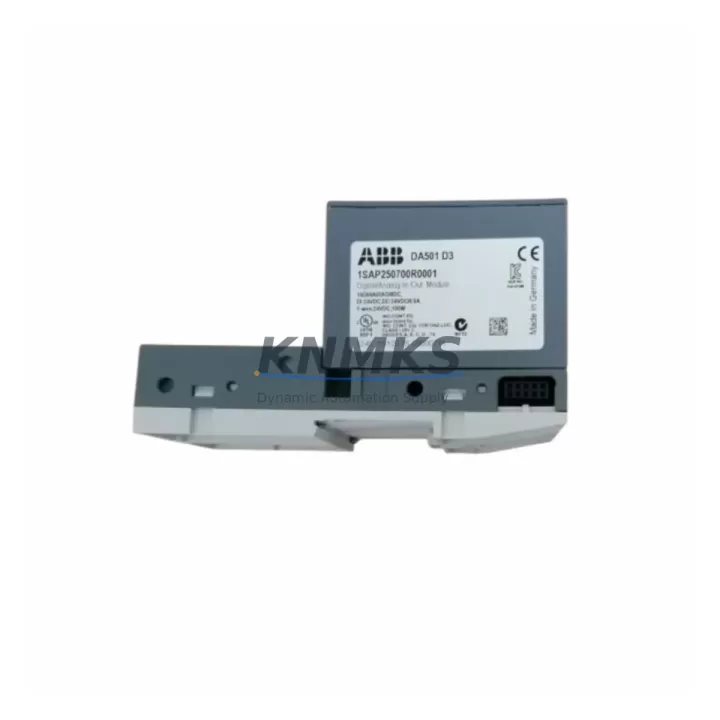
ABB DA501 1SAP250700R0001 Maintenance-Proven Spare Part for Factory Uptime
The ABB DA501 (1SAP250700R0001) is a mixed digital/analog I/O module designed for the ABB AC500 PLC platform — one of the most widely deployed modular programmable logic controller families in industrial automation. As a maintenance-proven spare part, the DA501 is a critical component for facilities that depend on continuous production, precise process control, and rapid fault recovery. Whether you are managing a scheduled annual overhaul, responding to an unplanned line stoppage, or building a strategic spare parts inventory, having a verified DA501 unit on hand is essential for minimising mean time to repair (MTTR) and protecting factory uptime.
Sourced from authorised supply channels and shipped with full functional verification, each DA501 unit supplied by KNMKS is tested prior to dispatch and backed by a support terms confirmed by quotation. Our inventory is maintained to support both urgent single-unit replacement orders and long-term blanket procurement agreements for MRO and capital spares programmes.
Spare Maintenance Table
| Part Number | DA501 / 1SAP250700R0001 |
| Brand | ABB |
| Series | AC500 |
| Module Type | Mixed Digital/Analog I/O Module |
| Product Category | PLC Mixed I/O Module |
| Country of Origin | Germany (DE) |
| Compatible Platform | ABB AC500 PLC (PM5xx / PM5xx-ETH CPU families) |
| Mounting | DIN Rail, AC500 I/O bus backplane |
| Operating Temperature | -25 °C to +60 °C (standard industrial range) |
| Protection Class | IP20 (panel/cabinet installation) |
| Application Environment | Discrete manufacturing, process control, utilities, water treatment, building automation |
| Maintenance Recommendation | Inspect terminal connections and bus connector annually; replace on first sign of I/O fault or communication error |
| Support terms | 12 Months from date of shipment |
| Pre-shipment Testing | Functional I/O verification performed on every unit |
| Lead Time | In-stock units ship within 1–3 business days |
Maintenance Planning for Continuous Operation
Effective maintenance planning for an AC500-based control system extends well beyond the DA501 module itself. During a scheduled cabinet inspection or emergency fault-isolation procedure, maintenance engineers should treat the DA501 replacement as an opportunity to audit the health of the surrounding electrical circuit and control architecture.
Begin with the AC500 CPU module (such as the PM564 or PM573 series) to confirm firmware version compatibility and verify that the I/O bus is communicating correctly after module swap. Check the TB521 or TB523 terminal base that the DA501 seats into — worn or corroded bus connectors are a common root cause of intermittent I/O faults that are incorrectly attributed to the module itself.
Inspect the 24 VDC power supply module feeding the I/O rack. Voltage sag or ripple on the supply rail can cause false I/O readings and premature module failure. ABB CP series power supplies or equivalent industrial SMPS units should be load-tested during the same maintenance window. If the cabinet includes a DC505 or DC532 digital output module in the same I/O rack, verify output channel integrity and fuse continuity — mixed I/O faults often cascade across adjacent modules.
For systems with fieldbus communication, inspect the CI502 or CI504 PROFIBUS/PROFINET communication module for connector wear and address conflicts. A DA501 replacement that is not followed by a bus health check can result in repeated faults if the underlying network issue is not resolved. Similarly, review any AI523 analog input modules sharing the same rack for signal drift or grounding issues that may have contributed to the original fault condition.
At the field wiring level, check terminal blocks and wiring ferrules on the I/O circuit for loose connections, insulation degradation, or incorrect wire gauge. Loose field wiring is the leading cause of I/O module damage in high-vibration industrial environments. Finally, confirm that any signal isolators or surge protection devices on the input/output circuits are functioning correctly before returning the system to service. A complete, documented replacement workflow — covering the DA501 and all associated components — is the foundation of a robust spare parts and maintenance strategy.
Site Replacement Workflow
Replacing the ABB DA501 on-site is a straightforward procedure when the correct spare is available and the replacement workflow is followed systematically. The steps below are designed to minimise downtime and ensure full system compatibility after the swap.
Step 1 — Preparation: Confirm the replacement unit SKU (DA501 / 1SAP250700R0001) matches the installed module label. Cross-reference the AC500 system configuration in Automation Builder to verify the I/O address mapping assigned to the DA501 slot. Download and retain the current PLC project backup before beginning work.
Step 2 — Safe Isolation: Follow site LOTO (Lockout/Tagout) procedures. De-energise the I/O rack power supply. The AC500 hot-swap capability (where configured) may allow module replacement without full CPU shutdown — confirm this with your site’s safety protocol before proceeding.
Step 3 — Module Removal: Disconnect field wiring from the terminal base (TB). Remove the DA501 from the terminal base by releasing the module latch. Do not remove the terminal base from the DIN rail unless it also requires replacement — this preserves field wiring continuity.
Step 4 — Module Installation: Seat the new DA501 onto the terminal base until the bus connector clicks into place. Verify the module address selector (if applicable) matches the original configuration. Reconnect field wiring and confirm terminal torque to specification.
Step 5 — System Verification: Re-energise the rack and observe the DA501 status LEDs. In Automation Builder, confirm the module is recognised and all I/O channels report correctly. Run a functional test of connected field devices before returning the line to production.
This workflow applies equally to planned replacement during annual shutdown maintenance and to emergency replacement following an unplanned fault. Keeping a pre-configured DA501 spare — with the terminal base address pre-set — in the local cabinet spares kit reduces emergency replacement time to under 15 minutes.
Spare Parts Support FAQ
Q1: Is the DA501 (1SAP250700R0001) compatible with all AC500 CPU versions?
The DA501 is designed for the ABB AC500 modular PLC platform and is compatible with PM5xx series CPU modules when used with the corresponding TB5xx terminal base. Compatibility with specific CPU firmware versions should be verified in the ABB AC500 system manual or by contacting our technical support team before ordering. KNMKS provides pre-shipment compatibility confirmation on request.
Q2: What support terms and testing does KNMKS provide with each DA501 unit?
Every DA501 unit shipped by KNMKS is functionally tested prior to dispatch and covered by a support terms confirmed by quotation from the date of shipment. In the event of a support terms claim, we provide rapid replacement to minimise any impact on your production schedule. Test reports are available on request for critical MRO procurement.
Q3: Can KNMKS support long-term or blanket purchase agreements for the DA501?
Yes. KNMKS maintains strategic inventory of high-demand AC500 spare parts including the DA501 to support both spot purchases and long-term supply agreements. For facilities managing multi-site AC500 installations or annual MRO budgets, we offer volume pricing, reserved stock allocation, and scheduled delivery programmes. Contact admin@knmks.com to discuss your requirements.
Q4: What should I do if the replacement DA501 does not resolve the original fault?
If the fault persists after DA501 replacement, the issue is likely in the terminal base (TB), field wiring, power supply, or the AC500 CPU/bus communication layer. Refer to the Maintenance Planning section above for a structured diagnostic checklist. KNMKS technical support can assist with fault isolation guidance and can supply additional AC500 spare components — including terminal bases, power supply modules, and communication modules — to support a complete cabinet restoration.
© 2026 KNMKS. All rights reserved.
Original Source: https://knmks.com
Contact: admin@knmks.com | +86 18359268345
Product Identification
- Brand / Ecosystem
-
ABB
ABB - Model / Series
-
DA501 1SAP250700R0001
AC500 Series - Product Family
- PLCs & Controllers
- Availability Status
- Available on request after model and quantity confirmation
- Inquiry Type
- B2B RFQ, replacement inquiry and project spare-part request
- Pre-Quote Check
- Exact SKU, brand, series, quantity, nameplate photos and destination country are checked before quotation
System Path
Where this product fits in the KNMKS automation structure.
Specification & Inquiry Focus
- Control platform
- PLC, PAC and modular controllers
- Common needs
- CPU, rack, power and I/O expansion
- Project support
- Replacement, cabinet build and maintenance
Buyer Confirmation
Information KNMKS checks before replying.
- Exact model
- DA501 1SAP250700R0001
- Brand / ecosystem
- ABB
- Product family
- PLCs & Controllers
- Application note
- Replacement, maintenance, project build or spare-part list
- Useful photos
- Nameplate, installed unit, cabinet layout or connector side
- Delivery details
- Quantity, destination country and target schedule
Document Support
Files and notes can be confirmed during quotation.
- Product photos or nameplate confirmation when available
- Packing and delivery notes before quotation confirmation
- Support scope and delivery terms confirmed per inquiry
- Export document coordination for qualified B2B requests
Inquiry Support
- Model cross-checking before quotation
- CPU, power, rack and expansion module matching
- Support for replacement and project inquiry
What to Send Us
- Brand and exact model number: ABB DA501 1SAP250700R0001
- Quantity and required delivery time
- Application, replacement requirement or nameplate photo
- Destination country and shipping preference
RFQ Preparation
This is a product inquiry page built for RFQ communication.
Fast Model Check
Send this model to KNMKS for confirmation.
Include quantity, destination country and photos if this is a maintenance replacement. The inquiry will be saved with a reference number after submission.
Brand & Compatibility Note
KNMKS displays automation product information for well-known industrial brand ecosystems and compatible replacement references. Brand names are used for product identification and compatibility reference only; final availability and commercial terms are confirmed per quotation.
 Manufacturing
 Machine Tools
 Packaging
 Energy & Power



 HMI & Displays
 Servo Systems
 Variable Frequency Drives
 Sensors