
Overview
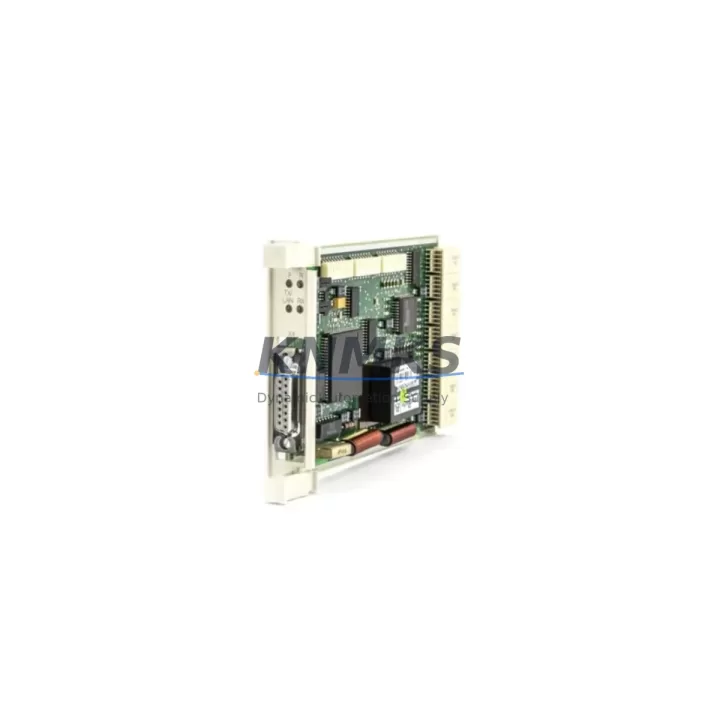
ABB CS513 Migration-Ready Ethernet LAN Module for AC500: Legacy System Retrofit & Upgrade
The ABB CS513 is a dedicated Ethernet LAN communication module designed for the ABB AC500 PLC platform. As industrial facilities accelerate the retirement of aging control architectures, the CS513 has become a critical component in migration projects that demand reliable network connectivity, minimal downtime, and verified backward compatibility. Whether you are replacing a failed communication card in an existing AC500 rack or upgrading a legacy control cabinet from an earlier generation of ABB programmable controllers, the CS513 provides a direct, engineering-validated path forward.
The CS513 supports standard 10/100 Mbps Ethernet and is compatible with the AC500 backplane architecture, allowing it to be installed alongside CPU modules such as the PM573, PM583, and PM595 without requiring rack replacement or structural modification to the control cabinet. In retrofit scenarios where the original communication module has been discontinued or is no longer available through standard supply channels, the CS513 serves as the recommended migration-ready replacement, maintaining the same slot footprint and backplane interface as earlier AC500 communication options.
Before committing to a retrofit using the CS513, engineers should verify several key parameters on the existing installation. Power budget on the AC500 rack must be confirmed, as adding or replacing a communication module affects the total current draw from the backplane power supply — typically an ABB PS501 or equivalent power supply module. Terminal wiring for the Ethernet port should be reviewed against the existing network topology, particularly if the legacy system used a proprietary fieldbus such as PROFIBUS or Modbus RTU that is being migrated to Ethernet-based protocols including PROFINET or Modbus TCP.
Module addressing must also be reconfigured in Automation Builder, ABB’s engineering software environment, to reflect the new slot assignment and communication parameters. If the original program logic references specific I/O addresses or communication channel identifiers tied to the previous module, those references must be updated before the new configuration is downloaded to the CPU. Failure to align module addresses with the program logic is one of the most common causes of extended commissioning time during AC500 retrofit projects.
HMI screen updates are frequently overlooked in communication module replacement projects. If the existing HMI — whether a CP600 panel or a third-party SCADA system — communicates with the PLC via a specific IP address or OPC-UA endpoint, those connection parameters must be updated to reflect the new CS513 network configuration. This step should be completed and tested in a staging environment before the cutover window begins on the production line.
Firmware compatibility is another checkpoint that should not be skipped. The CS513 requires a minimum firmware version on the AC500 CPU to operate correctly. Engineers should confirm the installed CPU firmware version in Automation Builder and apply any required updates during the planned maintenance window, prior to installing the CS513. This avoids the risk of discovering a firmware incompatibility during the live commissioning phase, which can significantly extend unplanned downtime.
Physical installation space should be confirmed before ordering. The CS513 occupies a standard AC500 communication slot and does not require additional DIN rail space, but the control cabinet layout should be reviewed to ensure adequate clearance for the Ethernet cable routing and connector access. In dense cabinet configurations, cable management accessories may be required to maintain signal integrity and meet IP rating requirements for the enclosure.
Migration Compatibility Table
| Parameter | Details |
|---|---|
| Compatible Platform | ABB AC500 PLC series (PM573, PM583, PM595 and compatible CPUs) |
| Interface | 10/100 Mbps Ethernet (RJ45), AC500 backplane slot |
| Communication Protocols | Modbus TCP, PROFINET, EtherNet/IP (firmware dependent) |
| Installation Requirement | Standard AC500 communication slot; no rack modification required |
| Power Consumption | Verify available backplane budget against PS501 or installed power supply |
| Firmware Prerequisite | Minimum AC500 CPU firmware version required — confirm in Automation Builder before installation |
| Replacement Scope | Direct replacement for discontinued AC500 Ethernet communication modules |
| Commissioning Tool | ABB Automation Builder (programming cable or Ethernet download) |
| Pre-Shipment Testing | Function-tested before dispatch |
| Support terms | support terms confirmed by quotation |
Retrofit Planning for Existing Automation Systems
A successful CS513 retrofit begins with a structured audit of the existing AC500 installation. The first step is to document the current rack configuration, including the CPU module type, the position and model of all installed I/O modules such as DC532 digital I/O modules and AX522 analog I/O modules, and the location of any existing communication modules. This baseline inventory allows the retrofit team to plan the slot assignment for the CS513 without disrupting adjacent modules or requiring a full rack reconfiguration.
If the legacy system relied on a serial communication link — for example, a Modbus RTU connection via an RS485 interface module — the migration to Ethernet using the CS513 will require updates to both the PLC program and the connected devices. Field instruments, drives, and remote I/O stations that previously communicated over serial links may need gateway devices or updated firmware to participate in the new Ethernet network. This is particularly relevant in installations where ABB CI590 PROFIBUS DP communication modules or similar fieldbus interfaces were used alongside the original communication architecture.
Power supply capacity must be recalculated as part of the retrofit plan. The AC500 backplane distributes power to all installed modules, and adding the CS513 increases the total load. If the existing PS501 power supply module is already operating near its rated output, a higher-capacity power supply may need to be specified before the CS513 can be installed. This calculation should be completed during the planning phase, not during the commissioning window.
For sites where the AC500 system interfaces with a CP600 series HMI panel, the Ethernet network configuration on the HMI must be updated to reflect the CS513’s IP address and communication parameters. If the HMI project file is stored on the panel without a backup, a project export should be completed before the retrofit begins to protect against data loss during the cutover. Similarly, if a programming cable such as the TK501 USB programming cable was used for the original system configuration, engineers should confirm that the Automation Builder project file is current and backed up before proceeding.
Downtime Control During System Migration
Minimizing production downtime during a CS513 installation requires careful pre-staging and a clearly defined cutover sequence. The replacement module should be configured and tested offline before the maintenance window begins. Using Automation Builder, the updated PLC project — with the CS513 communication parameters, module address assignments, and network configuration — should be compiled, verified, and saved to a portable storage device or network location accessible from the plant floor.
During the cutover, the sequence should follow a defined order: power down the AC500 rack, remove the legacy communication module, install the CS513 in the correct slot, restore power, and download the updated program from Automation Builder. If the CPU retains the previous program in non-volatile memory, a forced download should be performed to ensure the new configuration is active. After the download, the communication link between the CS513 and the network should be verified using a ping test and, where applicable, a protocol-level handshake confirmation with connected devices.
To protect the original program logic, a full project backup should be exported from Automation Builder before any changes are made to the live system. This backup preserves the existing I/O mapping, function block logic, and HMI variable bindings, providing a recovery point if the retrofit encounters unexpected compatibility issues. In safety-critical applications, a parallel run period — where the new configuration is validated against the original system outputs before full cutover — is strongly recommended to maintain control continuity and reduce retrofit risk.
Retrofit Support FAQ
Q: Is the CS513 a direct drop-in replacement for the previous AC500 Ethernet communication module?
A: The CS513 is designed for the AC500 backplane and occupies a standard communication slot. In most AC500 installations, it can be installed without rack modification. However, the PLC program must be updated in Automation Builder to reflect the new module’s communication parameters and slot address before the system is restarted.
Q: What commissioning steps are required after installing the CS513?
A: After physical installation, connect to the AC500 CPU via Automation Builder, update the hardware configuration to include the CS513, assign the correct IP address and protocol settings, download the updated project to the CPU, and verify the Ethernet link status. HMI connection parameters should also be updated if the panel communicates directly with the CS513 network interface.
Q: How do I confirm wiring and terminal compatibility before installation?
A: The CS513 uses a standard RJ45 Ethernet connector. Verify that the existing network infrastructure — switches, patch panels, and cable runs — supports the required Ethernet standard. No special terminal adapters are required for the backplane connection, as the module seats directly into the AC500 rack slot.
Q: What support terms and pre-shipment testing does this unit include?
A: Every CS513 unit is function-tested before dispatch to verify communication interface integrity and backplane compatibility. A support terms confirmed by quotation is included from the date of shipment, covering manufacturing defects and functional failures under normal operating conditions. In-stock units are available for fast dispatch to minimize lead time on urgent retrofit projects.
© 2026 KNMKS. All rights reserved. Original Source: https://knmks.com | Contact: admin@knmks.com | +86 18359268345
Product Identification
- Brand / Ecosystem
-
ABB
ABB - Model / Series
-
CS513
AC500 Series - Product Family
- PLCs & Controllers
- Availability Status
- Available on request after model and quantity confirmation
- Inquiry Type
- B2B RFQ, replacement inquiry and project spare-part request
- Pre-Quote Check
- Exact SKU, brand, series, quantity, nameplate photos and destination country are checked before quotation
System Path
Where this product fits in the KNMKS automation structure.
Specification & Inquiry Focus
- Control platform
- PLC, PAC and modular controllers
- Common needs
- CPU, rack, power and I/O expansion
- Project support
- Replacement, cabinet build and maintenance
Buyer Confirmation
Information KNMKS checks before replying.
- Exact model
- CS513
- Brand / ecosystem
- ABB
- Product family
- PLCs & Controllers
- Application note
- Replacement, maintenance, project build or spare-part list
- Useful photos
- Nameplate, installed unit, cabinet layout or connector side
- Delivery details
- Quantity, destination country and target schedule
Document Support
Files and notes can be confirmed during quotation.
- Product photos or nameplate confirmation when available
- Packing and delivery notes before quotation confirmation
- Support scope and delivery terms confirmed per inquiry
- Export document coordination for qualified B2B requests
Inquiry Support
- Model cross-checking before quotation
- CPU, power, rack and expansion module matching
- Support for replacement and project inquiry
What to Send Us
- Brand and exact model number: ABB CS513
- Quantity and required delivery time
- Application, replacement requirement or nameplate photo
- Destination country and shipping preference
RFQ Preparation
This is a product inquiry page built for RFQ communication.
Fast Model Check
Send this model to KNMKS for confirmation.
Include quantity, destination country and photos if this is a maintenance replacement. The inquiry will be saved with a reference number after submission.
Brand & Compatibility Note
KNMKS displays automation product information for well-known industrial brand ecosystems and compatible replacement references. Brand names are used for product identification and compatibility reference only; final availability and commercial terms are confirmed per quotation.
 Manufacturing
 Machine Tools
 Packaging
 Energy & Power



 HMI & Displays
 Servo Systems
 Variable Frequency Drives
 Sensors