
Overview
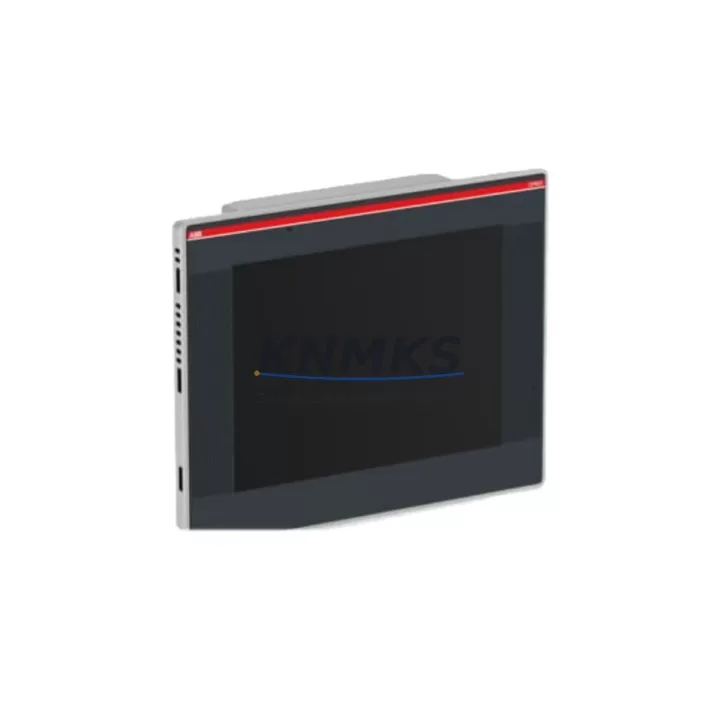
ABB CP651-WEB 1SAP551200R0001 Maintenance-Proven Spare Part for Factory Uptime
The ABB CP651-WEB (part number 1SAP551200R0001) is a 10.4-inch TFT color touchscreen HMI operator panel engineered for the ABB AC500 PLC platform and the CP600 series control architecture. In industrial environments where continuous production is non-negotiable, maintaining a verified spare of the CP651-WEB is a front-line strategy against unplanned downtime. This unit ships tested, inspected, and backed by a support terms confirmed by quotation — giving maintenance engineers and procurement teams the confidence to act fast when a panel failure occurs on the production floor.
Whether you are managing a water treatment facility, a packaging line, a power distribution substation, or a process automation cell, the CP651-WEB serves as the primary human-machine interface between operators and the AC500 CPU. A failed or degraded HMI panel can blind operators to process states, alarm conditions, and interlock status — making rapid spare availability a critical element of any maintenance readiness plan. Sourcing a pre-tested CP651-WEB 1SAP551200R0001 from verified stock eliminates the lead-time risk associated with OEM procurement channels, particularly for legacy installations where the panel may no longer be in active production.
From a procurement engineering perspective, the CP651-WEB 1SAP551200R0001 is a direct form-fit-function replacement for existing CP651-WEB installations. No firmware re-flashing of the CPU is required when swapping panels of the same revision, and project files created in ABB Automation Builder can be re-downloaded to the replacement unit via Ethernet or USB without modification. This makes the CP651-WEB one of the most field-serviceable HMI components in the AC500 ecosystem.
Spare Maintenance Table
| Part Number | 1SAP551200R0001 |
| Model | CP651-WEB |
| Brand | ABB |
| Series | AC500 / CP600 |
| Display Size | 10.4″ TFT Color Touchscreen |
| Resolution | 800 × 600 (SVGA) |
| Supply Voltage | 24 V DC (18–30 V DC operating range) |
| Communication Interfaces | Ethernet (RJ45), USB Host, USB Device, RS-232/RS-485 |
| Web Server | Built-in (CP651-WEB variant) |
| Operating Temperature | 0 °C to +55 °C |
| Protection Rating | IP65 (front panel) |
| Mounting | Panel cut-out, rear-mount clips |
| Country of Origin | Germany |
| Compatibility | ABB AC500 PLC family (PM571/PM573/PM581/PM583/PM591/PM595), CP600 series HMI line |
| Programming Tool | ABB Automation Builder / Panel Builder 600 |
| Support terms | 12 Months — tested before shipment |
| Condition | Original spare, new or refurbished-to-spec |
Maintenance Planning for Continuous Operation
When a CP651-WEB panel is scheduled for replacement during a planned shutdown or emergency callout, experienced maintenance engineers know that the HMI is rarely the only component that needs attention. A systematic inspection of the surrounding electrical environment is essential to prevent repeat failures and ensure the replacement panel operates reliably from day one.
Begin with the 24 V DC power supply feeding the CP651-WEB. ABB’s CP600 series panels are sensitive to voltage ripple and transient spikes; a degraded DIN-rail power supply can cause intermittent panel resets or touchscreen calibration drift. Verify output voltage under load and replace the power supply if ripple exceeds specification. At the same time, inspect the terminal blocks and field wiring on the control cabinet backplane — loose or corroded terminals on the 24 V feed are a common root cause of HMI brownouts that are misdiagnosed as panel failures.
Check the Ethernet communication cable and switch port connecting the CP651-WEB to the AC500 CPU — for example, a PM573-ETH or PM591-ETH CPU module. A degraded Cat5e/Cat6 cable or a faulty managed switch port can cause Modbus TCP or PROFINET communication timeouts that manifest as blank screens or frozen displays. If the installation uses RS-485 serial communication for legacy device integration, inspect the termination resistors and shielding continuity on the serial cable run.
For cabinets that also house ABB I/O modules such as the DC532 digital input module or the AX522 analog I/O module, verify that the backplane bus connectors are fully seated and free of oxidation. A loose I/O bus connection can cause the AC500 CPU to generate fault codes that appear on the HMI as process alarms — leading maintenance teams to suspect the panel rather than the I/O subsystem. Similarly, inspect any signal isolators or barriers on 4–20 mA analog loops connected to the AC500 system, as degraded isolation can introduce ground loops that affect panel display stability.
Do not overlook the cabinet fusing and circuit protection. The 24 V DC circuit feeding the CP651-WEB should be protected by a dedicated miniature circuit breaker or fuse rated to the panel’s inrush current specification. A fuse that has been operating near its rated current for an extended period may have degraded rupture capacity and should be replaced as a matter of course during any HMI swap. Finally, if the installation includes a UPS module for ride-through during mains interruptions, verify battery health and transfer time — a UPS that fails to hold voltage during a mains dip can corrupt the panel’s project file and require a full re-download from Automation Builder.
Site Replacement Workflow
Replacing a CP651-WEB 1SAP551200R0001 in the field is a structured process that, when executed correctly, can restore operator visibility within 30 to 60 minutes of panel arrival at the cabinet. The following workflow is designed to minimize downtime and eliminate configuration errors during the swap.
Step 1 — Backup and documentation. Before de-energizing the cabinet, use ABB Panel Builder 600 or Automation Builder to export the current project file from the existing panel via USB or Ethernet. Store the backup on a local engineering laptop and a network share. Photograph the existing wiring, cable routing, and label positions on the rear of the panel.
Step 2 — De-energize and remove. Isolate the 24 V DC supply to the panel using the dedicated MCB. Disconnect the Ethernet cable, USB connections, and any serial communication cables. Release the rear-mount panel clips using the appropriate tool and carefully extract the panel from the cut-out. Note the gasket condition — replace the IP65 gasket if it shows compression set or cracking.
Step 3 — Inspect and prepare the replacement unit. Verify the replacement CP651-WEB carries part number 1SAP551200R0001 and matches the firmware revision of the removed unit where possible. If firmware versions differ, plan for a project re-download rather than a direct file transfer. Power the replacement panel on the bench using a bench 24 V DC supply to confirm display operation before installation.
Step 4 — Install and commission. Fit the replacement panel into the cut-out, secure the rear clips, and reconnect all cables in reverse order. Re-energize the 24 V DC supply and download the project file from Automation Builder. Verify all process screens, alarm pages, and communication status indicators are functioning correctly before returning the system to operator control.
Step 5 — Document and stock. Update the maintenance management system (CMMS) with the replacement date, part number, and firmware version. Flag the removed panel for bench evaluation — many CP651-WEB units removed for display degradation or communication faults can be refurbished and returned to the spare parts pool, reducing long-term procurement costs.
Spare Parts Support FAQ
Q1: Is the CP651-WEB 1SAP551200R0001 compatible with all AC500 CPU variants?
The CP651-WEB communicates via Ethernet (Modbus TCP or PROFINET depending on CPU variant). It is compatible with PM571, PM573, PM581, PM583, PM591, and PM595 CPU modules when configured correctly in Automation Builder. Always verify the communication protocol and IP addressing scheme matches the existing installation before commissioning the replacement panel.
Q2: What testing is performed before shipment?
Each CP651-WEB 1SAP551200R0001 unit is powered on and subjected to a functional display test, touchscreen calibration check, and communication port verification before dispatch. Units that do not pass all test criteria are not shipped. A test report is available on request for critical applications.
Q3: What is the support terms coverage and what does it include?
All CP651-WEB units supplied by KNMKS carry a support terms confirmed by quotation from the date of shipment. The support terms covers manufacturing defects and functional failures under normal operating conditions. It does not cover damage resulting from incorrect installation voltage, physical impact, or operation outside the specified temperature range. Support requests are processed with a target response time of 48 hours.
Q4: Can you support long-term or blanket stock requirements for the CP651-WEB?
Yes. KNMKS maintains regional stock of high-demand AC500 HMI and CPU spare parts to support maintenance programs with predictable annual consumption. Blanket purchase orders and consignment stock arrangements are available for facilities that require guaranteed availability of the CP651-WEB 1SAP551200R0001 across multiple maintenance cycles. Contact our sales team to discuss volume pricing and stock reservation terms.
© 2026 KNMKS. All rights reserved.
Original Source: https://knmks.com
Contact: admin@knmks.com | +86 18359268345
Product Identification
- Brand / Ecosystem
-
ABB
ABB - Model / Series
-
CP651-WEB-1SAP551200R0001
AC500 Series - Product Family
- PLCs & Controllers
- Availability Status
- Available on request after model and quantity confirmation
- Inquiry Type
- B2B RFQ, replacement inquiry and project spare-part request
- Pre-Quote Check
- Exact SKU, brand, series, quantity, nameplate photos and destination country are checked before quotation
System Path
Where this product fits in the KNMKS automation structure.
Specification & Inquiry Focus
- Control platform
- PLC, PAC and modular controllers
- Common needs
- CPU, rack, power and I/O expansion
- Project support
- Replacement, cabinet build and maintenance
Buyer Confirmation
Information KNMKS checks before replying.
- Exact model
- CP651-WEB-1SAP551200R0001
- Brand / ecosystem
- ABB
- Product family
- PLCs & Controllers
- Application note
- Replacement, maintenance, project build or spare-part list
- Useful photos
- Nameplate, installed unit, cabinet layout or connector side
- Delivery details
- Quantity, destination country and target schedule
Document Support
Files and notes can be confirmed during quotation.
- Product photos or nameplate confirmation when available
- Packing and delivery notes before quotation confirmation
- Support scope and delivery terms confirmed per inquiry
- Export document coordination for qualified B2B requests
Inquiry Support
- Model cross-checking before quotation
- CPU, power, rack and expansion module matching
- Support for replacement and project inquiry
What to Send Us
- Brand and exact model number: ABB CP651-WEB-1SAP551200R0001
- Quantity and required delivery time
- Application, replacement requirement or nameplate photo
- Destination country and shipping preference
RFQ Preparation
This is a product inquiry page built for RFQ communication.
Fast Model Check
Send this model to KNMKS for confirmation.
Include quantity, destination country and photos if this is a maintenance replacement. The inquiry will be saved with a reference number after submission.
Brand & Compatibility Note
KNMKS displays automation product information for well-known industrial brand ecosystems and compatible replacement references. Brand names are used for product identification and compatibility reference only; final availability and commercial terms are confirmed per quotation.
 Manufacturing
 Machine Tools
 Packaging
 Energy & Power



 HMI & Displays
 Servo Systems
 Variable Frequency Drives
 Sensors