
Overview
ABB CP651 1SAP551100R0001 Maintenance-Proven Spare Part for Factory Uptime
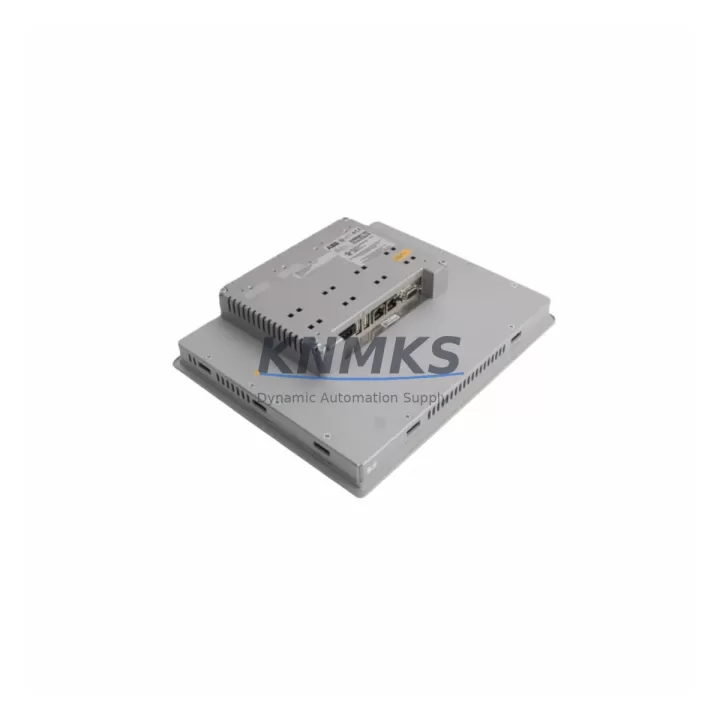
The ABB CP651 (part number 1SAP551100R0001) is a 10.4-inch color touch panel operator interface belonging to ABB’s CP600 HMI series, engineered for seamless integration with AC500 PLC systems and third-party controllers via standard communication protocols. In process plants, discrete manufacturing lines, water treatment facilities, and energy distribution substations, the CP651 serves as the primary human-machine interface for real-time visualization, alarm management, recipe control, and operator interaction. When this panel fails or degrades — whether from display backlight aging, touchscreen calibration drift, firmware corruption, or power surge damage — production visibility is lost and safe manual override becomes impossible. Maintaining a verified spare unit on-site is the single most effective strategy to eliminate unplanned downtime caused by HMI failure.
This listing supplies an original ABB CP651 1SAP551100R0001 spare panel, sourced from authorized distribution channels, pre-shipment tested for display integrity, touch response, communication port function, and power-on self-diagnostics. Every unit ships with a support terms confirmed by quotation and full traceability documentation, supporting both emergency replacement and planned maintenance rotation programs.
Spare Maintenance Table
| Parameter | Specification |
|---|---|
| Part Number | 1SAP551100R0001 |
| Model | CP651 |
| Series | CP600 HMI |
| Brand | ABB |
| Display Size | 10.4-inch TFT Color LCD |
| Touch Technology | Resistive Touchscreen |
| Resolution | 640 × 480 (VGA) |
| Supply Voltage | 24 V DC (18–30 V DC range) |
| Power Consumption | ≤ 20 W typical |
| Communication Interfaces | Ethernet (RJ45), RS-232, RS-485, USB Host/Device |
| PLC Compatibility | ABB AC500, third-party via Modbus RTU/TCP, PROFIBUS, EtherNet/IP |
| Operating Temperature | 0 °C to +50 °C |
| Storage Temperature | −20 °C to +70 °C |
| Protection Rating | IP65 (front panel) |
| Mounting | Panel cut-out, rear-mount clips |
| Weight | Approx. 2.16 kg |
| Country of Origin | Germany |
| Support terms | 12 Months |
| Pre-Shipment Test | Yes — display, touch, comms, power-on diagnostics |
| Condition | Original / New Old Stock / Refurbished (as labeled) |
Maintenance Planning for Continuous Operation
Replacing the CP651 in a live AC500 control cabinet is rarely an isolated task. Maintenance engineers who have performed CP600 panel swaps consistently report that adjacent components should be inspected and, where necessary, replaced concurrently to prevent repeat call-outs within the same maintenance window.
Begin with the 24 V DC panel power supply feeding the CP651. ABB’s CP-E 24/5.0 or equivalent DIN-rail power supply units are common in AC500 cabinets; verify output voltage under load and check for capacitor bulge or thermal discoloration before reconnecting a new HMI panel. A marginal power supply that delivers 22 V under load will shorten the replacement panel’s service life and may cause intermittent reboot faults that are difficult to diagnose remotely.
Inspect the Ethernet patch cable and RJ45 cabinet gland connecting the CP651 to the AC500 CPU module (such as the PM573 or PM591). Industrial-grade shielded Cat5e or Cat6 cables with locking connectors are recommended; standard office-grade patch cables are a frequent source of communication dropouts in vibration-prone environments. If the cabinet uses a managed Ethernet switch (e.g., ABB’s EKS series or a third-party Hirschmann unit), verify port configuration and VLAN assignment after panel replacement.
Check the AC500 CPU communication module — particularly any CM579 PROFIBUS master or CM589 EtherNet/IP adapter — for firmware version compatibility with the replacement CP651’s Automation Builder project file. Mismatched firmware between the HMI and the CPU’s communication stack is a leading cause of post-replacement tag mapping failures.
Review the 24 V DC distribution terminal blocks and fuse holders (such as ABB’s ST or UK series terminals with associated miniature fuse inserts) that protect the HMI power branch. A blown or weakened fuse in the HMI supply branch may have been the root cause of the original panel failure; replacing the fuse and verifying the branch circuit for short-circuit conditions before energizing the new panel is standard practice.
If the CP651 is used for alarm annunciation tied to digital input modules (e.g., ABB DC532 or DC522 I/O modules), verify that all DI wiring terminations are secure and that the I/O module’s LED status indicators confirm correct signal states after the HMI is back online. Loose terminations on 24 V digital inputs are a common source of spurious alarms that appear immediately after an HMI replacement and are incorrectly attributed to the new panel.
Finally, if the installation includes a UPS module or battery-backed 24 V buffer (such as the ABB CP-B 24/1.0 buffer module), test the UPS hold-up time and battery condition. An aging buffer battery that cannot sustain the CP651 through a 200 ms mains dip will cause repeated unexpected shutdowns and potential project file corruption on the HMI’s internal flash storage.
Site Replacement Workflow
Step 1 — Pre-replacement backup: Using ABB Automation Builder or Panel Builder 600 software, export the current CP651 project file (.zip archive) to a USB drive or network share. Confirm the backup includes all screen pages, tag definitions, alarm configurations, and communication driver settings. Document the firmware version currently running on the panel (accessible via the panel’s System menu).
Step 2 — Power isolation: De-energize the HMI supply branch at the cabinet’s 24 V distribution fuse or MCB. Verify zero voltage at the CP651 power terminals with a calibrated multimeter before disconnecting any cables. Label all connectors (power, Ethernet, RS-232/485, USB) with adhesive tags before removal to prevent reconnection errors.
Step 3 — Physical removal: Release the rear-mount panel clips using the supplied tool or a flat-blade screwdriver. Slide the CP651 rearward through the panel cut-out. Inspect the cut-out gasket for compression set or damage; replace the gasket if the IP65 seal integrity is in doubt.
Step 4 — Replacement installation: Insert the new CP651 into the cut-out, engage all mounting clips evenly to ensure uniform gasket compression, and reconnect all labeled cables. Restore 24 V DC power and verify the panel completes its power-on self-test without error codes.
Step 5 — Project restore and commissioning: Load the backed-up project file via USB or Automation Builder remote download. Confirm firmware version compatibility; update panel firmware if required before project download. Verify all HMI tags are communicating correctly with the AC500 CPU, check alarm history for any residual faults, and obtain operator sign-off before returning the line to production.
This workflow minimizes downtime to under two hours for a prepared maintenance team and eliminates the risk of configuration loss that occurs when panels are replaced without prior project backup.
Spare Parts Support FAQ
Q1: Is the CP651 1SAP551100R0001 compatible with all AC500 CPU variants?
The CP651 communicates with AC500 CPUs (PM554 through PM595 series) via Ethernet using the Panel Builder 600 runtime. Compatibility depends on the Automation Builder / Panel Builder 600 project version rather than the CPU hardware revision. Verify that your project file was created with Panel Builder 600 v2.x or later for full CP651 feature support. Third-party PLC connectivity is supported via Modbus TCP, Modbus RTU, and optional communication drivers.
Q2: What is the lead time and how is the unit tested before shipment?
In-stock units are dispatched within 1–3 business days of order confirmation. Each CP651 undergoes a pre-shipment test protocol covering: 24 V DC power-on self-test, display pixel uniformity check, touchscreen calibration verification, Ethernet port link negotiation, and USB host/device enumeration. A test report is available upon request. Units are packed in anti-static foam with corner protection for safe international transit.
Q3: What does the support terms confirmed by quotation cover?
The support terms confirmed by quotation cover manufacturing defects, component failure under normal operating conditions, and DOA (dead-on-arrival) units. It does not cover physical damage caused by incorrect installation voltage, reverse polarity, or environmental exposure beyond the rated IP65 / 50 °C limits. Support requests are processed with a replacement-first policy to minimize your downtime; return logistics are coordinated by our support team.
Q4: Can you support long-term supply for multi-site maintenance programs?
Yes. We maintain buffer stock of the CP651 1SAP551100R0001 and related CP600 series panels to support annual maintenance contracts, multi-site spare parts standardization programs, and OEM service depots. Blanket purchase orders with scheduled releases are accepted. Contact our sales team to discuss volume pricing, consignment stock arrangements, and documentation packages (CoC, test reports, country-of-origin certificates) required for your procurement compliance process.
© 2026 KNMKS. All rights reserved.
Original Source: https://knmks.com
Contact: admin@knmks.com | +86 18359268345
Product Identification
- Brand / Ecosystem
-
ABB
ABB - Model / Series
-
CP651 1SAP551100R0001
AC500 Series - Product Family
- PLCs & Controllers
- Availability Status
- Available on request after model and quantity confirmation
- Inquiry Type
- B2B RFQ, replacement inquiry and project spare-part request
- Pre-Quote Check
- Exact SKU, brand, series, quantity, nameplate photos and destination country are checked before quotation
System Path
Where this product fits in the KNMKS automation structure.
Specification & Inquiry Focus
- Control platform
- PLC, PAC and modular controllers
- Common needs
- CPU, rack, power and I/O expansion
- Project support
- Replacement, cabinet build and maintenance
Buyer Confirmation
Information KNMKS checks before replying.
- Exact model
- CP651 1SAP551100R0001
- Brand / ecosystem
- ABB
- Product family
- PLCs & Controllers
- Application note
- Replacement, maintenance, project build or spare-part list
- Useful photos
- Nameplate, installed unit, cabinet layout or connector side
- Delivery details
- Quantity, destination country and target schedule
Document Support
Files and notes can be confirmed during quotation.
- Product photos or nameplate confirmation when available
- Packing and delivery notes before quotation confirmation
- Support scope and delivery terms confirmed per inquiry
- Export document coordination for qualified B2B requests
Inquiry Support
- Model cross-checking before quotation
- CPU, power, rack and expansion module matching
- Support for replacement and project inquiry
What to Send Us
- Brand and exact model number: ABB CP651 1SAP551100R0001
- Quantity and required delivery time
- Application, replacement requirement or nameplate photo
- Destination country and shipping preference
RFQ Preparation
This is a product inquiry page built for RFQ communication.
Fast Model Check
Send this model to KNMKS for confirmation.
Include quantity, destination country and photos if this is a maintenance replacement. The inquiry will be saved with a reference number after submission.
Brand & Compatibility Note
KNMKS displays automation product information for well-known industrial brand ecosystems and compatible replacement references. Brand names are used for product identification and compatibility reference only; final availability and commercial terms are confirmed per quotation.
 Manufacturing
 Machine Tools
 Packaging
 Energy & Power



 HMI & Displays
 Servo Systems
 Variable Frequency Drives
 Sensors