
Overview
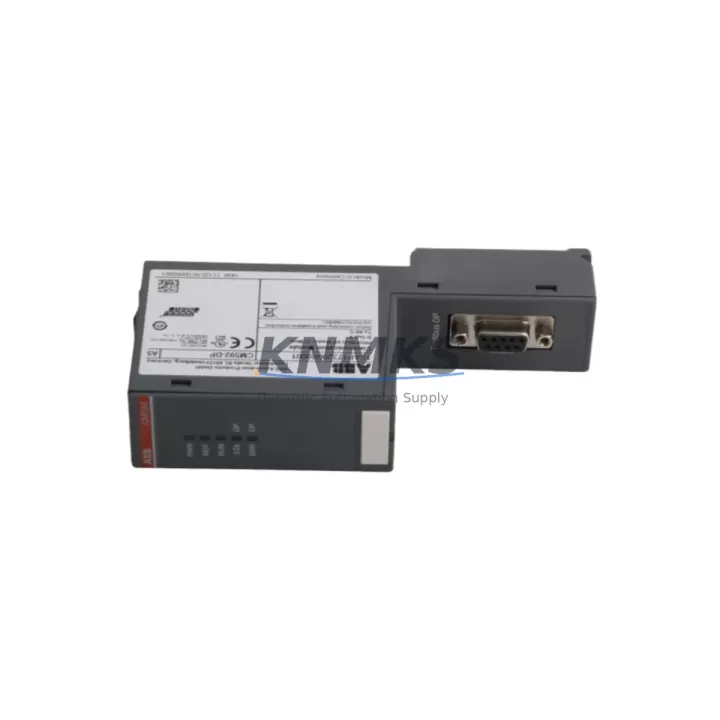
ABB CM592-DP 1SAP173200R0001 Spare Part for Factory Uptime
The ABB CM592-DP (order number 1SAP173200R0001) is an original PROFIBUS DP communication module designed for the ABB AC500 PLC platform. As a field-proven industrial spare part, it enables seamless PROFIBUS DP master and slave communication within distributed control architectures found in manufacturing, process automation, material handling, and energy management facilities. Maintaining a verified stock of the CM592-DP is a cornerstone of any proactive maintenance strategy for plants running ABB AC500 systems — minimizing unplanned downtime, accelerating fault recovery, and protecting long-term production continuity.
For maintenance engineers managing aging or active AC500 installations, the CM592-DP represents a critical node in the communication backbone. A failed or degraded PROFIBUS DP module can cascade into full line stoppages, loss of I/O visibility, and extended troubleshooting cycles. Having a pre-tested, support terms-backed replacement on the shelf reduces mean time to repair (MTTR) from hours to minutes.
Spare Maintenance Table
| Parameter | Specification |
|---|---|
| Part Number | CM592-DP |
| Order Number | 1SAP173200R0001 |
| Brand | ABB |
| Series | AC500 |
| Product Type | PROFIBUS DP Communication Module |
| Protocol | PROFIBUS DP (Master / Slave) |
| Compatible CPUs | AC500 PM5xx / PM5xx-ETH series (standard backplane) |
| Backplane Interface | AC500 internal bus (right-side expansion slot) |
| PROFIBUS Speed | 9.6 kbps – 12 Mbps (auto-detect) |
| Max DP Slaves (Master mode) | Up to 125 slaves |
| Supply Voltage | Via AC500 backplane (3.3 V / 5 V internal) |
| Operating Temperature | 0 °C to +60 °C |
| Storage Temperature | -25 °C to +70 °C |
| Humidity | 5 % – 95 % RH, non-condensing |
| Protection Class | IP20 (panel-mount installation) |
| Country of Origin | Germany |
| Weight | 320 g |
| Support terms | 12 Months — Pre-shipment functional test included |
| Condition | Original spare, new or refurbished-to-spec |
Maintenance Planning for Continuous Operation
When a CM592-DP module is flagged during routine control cabinet inspection or fails during a fault isolation cycle, the replacement workflow extends beyond the module itself. A disciplined maintenance engineer will simultaneously verify the health of adjacent components to prevent repeat failures and ensure full system restoration.
Start with the AC500 CPU module (PM5xx series) — confirm firmware version compatibility with the CM592-DP and check for any active diagnostic flags on the CPU’s status LEDs. Next, inspect the AC500 backplane (TB5xx series) for physical damage, oxidized contacts, or loose module seating, as backplane integrity directly affects communication module stability. Review the 24 VDC power supply module (PS5xx series) powering the AC500 rack: voltage ripple, load capacity, and output stability should be verified with a multimeter before inserting the replacement CM592-DP.
On the PROFIBUS network side, check the PROFIBUS DP cable termination resistors at both ends of the segment — improper termination is a leading cause of intermittent communication errors that are often misdiagnosed as module failure. Inspect the PROFIBUS connector (DB9 type, e.g., ABB or Phoenix Contact shielded connectors) for pin damage or shield continuity issues. If the installation includes PROFIBUS repeaters or optical fiber converters for long-distance or electrically noisy segments, verify their operational status as part of the same maintenance event.
For plants using the CM592-DP in conjunction with distributed I/O stations (e.g., ABB S500 I/O modules on PROFIBUS), confirm that each remote I/O node responds correctly after module swap by running a full DP bus scan from the engineering tool. Additionally, review any signal isolators or surge protection devices installed on the PROFIBUS segment — these components absorb electrical transients that can degrade communication modules over time and should be part of the annual inspection checklist.
Finally, update the AC500 project configuration in Automation Builder to confirm the CM592-DP slot assignment, GSD file version, and DP master parameters match the replacement unit’s firmware. A configuration mismatch is a common source of post-replacement startup delays.
Site Replacement Workflow
Step 1 — Pre-replacement verification: Before powering down, document the current PROFIBUS network topology, slave addresses, and baud rate settings from the Automation Builder project or the existing module’s configuration backup. Photograph the wiring and connector orientation.
Step 2 — Safe removal: Follow AC500 hot-swap guidelines. If the CPU supports online module replacement, initiate the procedure via Automation Builder. Otherwise, perform a controlled shutdown of the affected PLC rack. Remove the CM592-DP by pressing the release latch and sliding the module out of the backplane slot.
Step 3 — Replacement installation: Insert the new CM592-DP into the correct backplane slot. Ensure the module clicks firmly into the backplane connector. Reconnect the PROFIBUS DB9 cable, verifying termination switch position (ON at segment ends, OFF at intermediate nodes).
Step 4 — Configuration restore: Power up the rack. Use Automation Builder to download the existing project configuration to the CPU. Verify the CM592-DP is recognized in the hardware configuration tree and that all DP slaves report online status.
Step 5 — Functional test: Run a live I/O test across all PROFIBUS slave nodes. Confirm cyclic data exchange is active, error counters are at zero, and the module’s RUN LED is steady green. Log the replacement event in the plant maintenance record.
This workflow is compatible with legacy AC500 V2 and current AC500 V3 installations, making the CM592-DP a reliable cross-generation spare that protects both existing and upgraded control architectures.
Spare Parts Support FAQ
Q1: Is the CM592-DP (1SAP173200R0001) compatible with all AC500 CPU variants?
The CM592-DP is designed for the standard AC500 backplane and is compatible with PM5xx and PM5xx-ETH CPU modules. It is not compatible with the AC500-S safety CPU or AC500-XC extreme condition variants without confirming the specific hardware generation. Always cross-reference the CPU’s hardware compatibility matrix in the ABB AC500 system manual before installation.
Q2: What pre-shipment testing is performed on each CM592-DP unit?
Every CM592-DP dispatched from our inventory undergoes a functional bench test that verifies PROFIBUS DP communication initialization, backplane interface integrity, and LED status indication. Units are shipped with a test report reference and are covered by a support terms confirmed by quotation from the date of dispatch.
Q3: Can you support long-term or blanket purchase orders for the CM592-DP?
Yes. We support 12–36 month supply agreements for the CM592-DP and related AC500 spare parts. Long-term agreements include reserved stock allocation, priority dispatch, and fixed pricing to protect against market volatility. Contact admin@knmks.com to discuss volume and lead time requirements.
Q4: What should I do if the replacement CM592-DP does not come online after installation?
First, verify the module is fully seated in the backplane slot and the PROFIBUS cable termination is correct. Check the CPU diagnostic buffer in Automation Builder for hardware fault codes. Confirm the GSD file version in the project matches the module’s firmware. If the issue persists, the CPU’s internal bus or backplane connector may require inspection. Our technical support team is available at admin@knmks.com to assist with remote diagnostics.
© 2026 KNMKS. All rights reserved.
Original Source: https://knmks.com
Contact: admin@knmks.com | +86 18359268345
Product Identification
- Brand / Ecosystem
-
ABB
ABB - Model / Series
-
CM592-DP-1SAP173200R0001
AC500 Series - Product Family
- PLCs & Controllers
- Availability Status
- Available on request after model and quantity confirmation
- Inquiry Type
- B2B RFQ, replacement inquiry and project spare-part request
- Pre-Quote Check
- Exact SKU, brand, series, quantity, nameplate photos and destination country are checked before quotation
System Path
Where this product fits in the KNMKS automation structure.
Specification & Inquiry Focus
- Control platform
- PLC, PAC and modular controllers
- Common needs
- CPU, rack, power and I/O expansion
- Project support
- Replacement, cabinet build and maintenance
Buyer Confirmation
Information KNMKS checks before replying.
- Exact model
- CM592-DP-1SAP173200R0001
- Brand / ecosystem
- ABB
- Product family
- PLCs & Controllers
- Application note
- Replacement, maintenance, project build or spare-part list
- Useful photos
- Nameplate, installed unit, cabinet layout or connector side
- Delivery details
- Quantity, destination country and target schedule
Document Support
Files and notes can be confirmed during quotation.
- Product photos or nameplate confirmation when available
- Packing and delivery notes before quotation confirmation
- Support scope and delivery terms confirmed per inquiry
- Export document coordination for qualified B2B requests
Inquiry Support
- Model cross-checking before quotation
- CPU, power, rack and expansion module matching
- Support for replacement and project inquiry
What to Send Us
- Brand and exact model number: ABB CM592-DP-1SAP173200R0001
- Quantity and required delivery time
- Application, replacement requirement or nameplate photo
- Destination country and shipping preference
RFQ Preparation
This is a product inquiry page built for RFQ communication.
Fast Model Check
Send this model to KNMKS for confirmation.
Include quantity, destination country and photos if this is a maintenance replacement. The inquiry will be saved with a reference number after submission.
Brand & Compatibility Note
KNMKS displays automation product information for well-known industrial brand ecosystems and compatible replacement references. Brand names are used for product identification and compatibility reference only; final availability and commercial terms are confirmed per quotation.
 Manufacturing
 Machine Tools
 Packaging
 Energy & Power



 HMI & Displays
 Servo Systems
 Variable Frequency Drives
 Sensors