
Overview
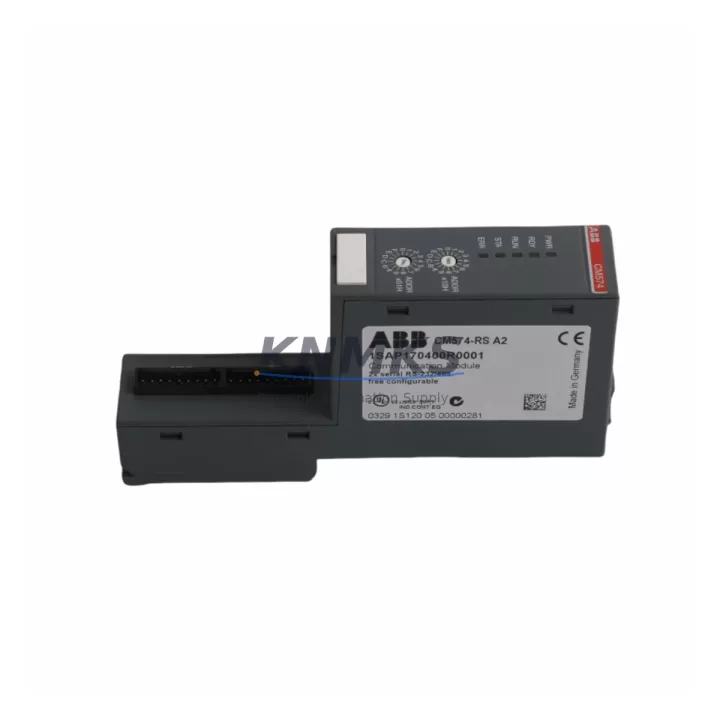
ABB CM574-RS 1SAP170400R0001 Migration-Ready RS-485 Module for Legacy Control Systems
The ABB CM574-RS (order reference 1SAP170400R0001) is a serial communication module designed for the AC500 PLC platform, providing RS-485 and RS-232 interface capability for legacy fieldbus and point-to-point serial link integration. As industrial facilities transition away from end-of-life Modbus RTU networks, proprietary serial protocols, and aging DCS serial bridges, the CM574-RS serves as a validated drop-in replacement and migration bridge — enabling engineers to preserve existing wiring infrastructure while upgrading the control backbone to a modern, supportable platform.
In retrofit scenarios, the CM574-RS is typically installed into an AC500 CPU rack alongside the PM573, PM583, or PM595 central processing units, occupying a standard left-side expansion slot. Before installation, engineers must confirm available slot count on the existing backplane, verify that the CPU firmware version supports the CM574-RS module descriptor, and check that the serial port configuration — baud rate, parity, stop bits, and termination resistor state — matches the legacy device network. Mismatched termination is one of the most common commissioning errors in RS-485 retrofit projects and can cause intermittent communication faults that are difficult to diagnose under live plant conditions.
When replacing an older ABB CI590-CS31-HA or a third-party serial gateway previously used to bridge Modbus RTU devices into a legacy S500 or Advant OCS system, the CM574-RS eliminates the need for an external protocol converter. The module’s dual-port architecture allows simultaneous RS-485 and RS-232 connections, which is particularly valuable in control cabinets where a local HMI panel — such as a CP600 or CP620 operator panel — must maintain a dedicated serial link while the RS-485 bus continues to poll field instruments, drives, or energy meters.
Migration Compatibility Table
| Parameter | CM574-RS (1SAP170400R0001) | Notes / Retrofit Guidance |
|---|---|---|
| Compatible CPU Platform | AC500 (PM573, PM583, PM595) | Verify CPU firmware ≥ V2.x for full module support |
| Serial Interfaces | RS-485 + RS-232 (dual port) | Replaces external serial gateways in legacy cabinets |
| Supported Protocols | Modbus RTU, ASCII, free serial | Confirm protocol mapping in existing PLC program |
| Backplane Slot Type | AC500 left-side expansion slot | Check available slots; TB541-ETH or CM572-DP may occupy adjacent slots |
| Power Consumption | Supplied via backplane (AC500 PS501 or PS502 power supply) | Verify total backplane load does not exceed PS501/PS502 rated output |
| Terminal Wiring | 9-pin D-Sub (RS-232) + screw terminal block (RS-485) | Re-use existing RS-485 cable pair; confirm shield grounding at one end only |
| Termination Resistor | Software-selectable (120 Ω) | Enable only at physical bus endpoints; disable on intermediate nodes |
| Address / Node Config | Configured via Automation Builder (COM_INIT function block) | Preserve existing Modbus slave address map from legacy program |
| HMI Compatibility | CP600, CP620 series via RS-232 port | Update HMI communication driver if migrating from older CP400 panels |
| Firmware Compatibility | Automation Builder V2.x / V3.x | Re-compile project after module insertion; validate I/O mapping |
| Installation Space | Standard AC500 module width (1 slot) | Measure cabinet DIN rail space; confirm clearance for D-Sub connector |
| Pre-Shipment Testing | Yes — functional loop test performed | Serial port continuity and protocol handshake verified before dispatch |
| Support terms | 12 Months | Covers manufacturing defects; DOA replacement within 7 business days |
Retrofit Planning for Existing Automation Systems
A successful CM574-RS retrofit begins with a thorough audit of the existing control cabinet. Engineers should document every serial device on the RS-485 bus — variable frequency drives, smart meters, flow transmitters, and remote I/O nodes — along with their Modbus addresses, baud rates, and cable lengths. In many legacy installations, the RS-485 network was originally wired to a standalone serial master card inside an older S500 rack or routed through a CI590-CS31-HA communication interface. Replacing that path with the CM574-RS requires updating the COM_INIT and MODBUS_MASTER function blocks in the Automation Builder project to reference the new module’s physical slot address.
Power budget verification is a non-negotiable step. The AC500 backplane power supply — typically a PS501-POW or PS502-POW — must have sufficient headroom to support the CM574-RS alongside any co-installed modules such as the TB541-ETH Ethernet communication module, DC532 or DC522 digital I/O modules, and AX522 analog I/O modules. If the existing power supply is already near its rated capacity, a second PS501-POW may need to be added or the rack configuration redesigned before the CM574-RS is inserted.
For cabinets that also host a CP620 HMI panel communicating over RS-232, the dual-port architecture of the CM574-RS is particularly efficient: the RS-232 port handles the HMI link while the RS-485 port manages the field device network, eliminating the need for a separate serial splitter or protocol bridge. Engineers should also verify that the programming cable — typically a USB-to-RS-232 adapter used with Automation Builder — is not left connected to the RS-232 port during live operation, as this will conflict with the HMI communication link.
Where the retrofit involves migrating from a legacy Advant OCS or MOD 300 serial network, the CM574-RS can serve as the termination point for the existing twisted-pair RS-485 cable, provided the cable impedance and total bus length remain within RS-485 specification (typically ≤ 1200 m at 9600 baud). Signal isolators should be inserted at the CM574-RS end of the bus if the legacy cable runs through electrically noisy environments such as motor control centers or high-voltage switchgear panels.
Downtime Control During System Migration
Minimizing unplanned downtime is the primary concern in any live-plant serial communication retrofit. The recommended approach is to pre-configure the CM574-RS in a bench environment using a duplicate Automation Builder project before the scheduled maintenance window. This allows engineers to validate the COM_INIT parameters, confirm Modbus polling cycles, and test communication with a representative field device — such as a spare ACS580 drive or a Modbus RTU simulator — before the module is installed in the production rack.
During the cutover window, the original PLC program logic should be exported and archived before any hardware changes are made. If the existing serial master was a standalone gateway device, its configuration file should also be saved. Once the CM574-RS is physically installed and the Automation Builder project is downloaded to the CPU, engineers should perform a cold-start sequence and monitor the module’s status LEDs: a steady green RUN indicator confirms that the module has initialized correctly and the serial bus is active.
To protect original program logic, the retrofit should be executed as a module addition rather than a full program replacement wherever possible. Existing function block instances, variable declarations, and HMI tag mappings should be preserved and only the communication-specific blocks updated. This approach reduces the risk of introducing unintended changes to interlock logic, safety shutdowns, or alarm setpoints during the migration. Post-cutover, a 30-minute supervised run at reduced production rate is recommended to confirm stable Modbus polling and verify that all field devices are responding correctly before returning to full capacity.
Retrofit Support FAQ
Q1: Is the CM574-RS a direct replacement for the CI590-CS31-HA serial interface used in older S500 systems?
The CM574-RS is not a pin-compatible drop-in for the CI590-CS31-HA, as the two modules use different backplane architectures (AC500 vs. S500). However, the CM574-RS serves as the functional replacement when the control system is being migrated from an S500 or Advant OCS platform to the AC500. The existing RS-485 field wiring can typically be re-terminated directly to the CM574-RS screw terminal block, preserving the cable investment while upgrading the control backbone.
Q2: What commissioning steps are required after installing the CM574-RS?
After physical installation, download the updated Automation Builder project to the CPU and perform a cold start. Verify the module status LED shows steady green. Open the COM_INIT function block and confirm baud rate, parity, and stop bit settings match the field device network. Use the Modbus diagnostic function blocks to poll each slave address individually and confirm response. Check the RS-485 termination resistor state at both physical bus endpoints. Finally, monitor the HMI communication link if the RS-232 port is in use and confirm screen refresh is stable.
Q3: Can the CM574-RS handle both RS-485 and RS-232 simultaneously in a live production environment?
Yes. The CM574-RS supports simultaneous operation of both serial ports, each configured independently via Automation Builder. The RS-485 port is typically used for the Modbus RTU field device network, while the RS-232 port handles a local HMI panel or a legacy printer/logger connection. Both ports operate concurrently without mutual interference, provided the baud rates and buffer settings are configured correctly in the COM_INIT function blocks for each port instance.
Q4: What does the support terms confirmed by quotation cover, and what is the stock availability?
The support terms confirmed by quotation cover manufacturing defects and functional failures under normal operating conditions. Dead-on-arrival units are replaced within 7 business days. Each CM574-RS (1SAP170400R0001) unit undergoes a pre-shipment functional test — including serial port continuity verification and protocol handshake confirmation — before dispatch. Stock is maintained across multiple warehouse locations to support emergency replacement requirements, with global dispatch available. Contact admin@knmks.com or +86 18359268345 for lead time confirmation and volume pricing.
© 2026 KNMKS. All rights reserved.
Original Source: https://knmks.com
Contact: admin@knmks.com | +86 18359268345
Product Identification
- Brand / Ecosystem
-
ABB
ABB - Model / Series
-
CM574-RS 1SAP170400R0001
AC500 Series - Product Family
- PLCs & Controllers
- Availability Status
- Available on request after model and quantity confirmation
- Inquiry Type
- B2B RFQ, replacement inquiry and project spare-part request
- Pre-Quote Check
- Exact SKU, brand, series, quantity, nameplate photos and destination country are checked before quotation
System Path
Where this product fits in the KNMKS automation structure.
Specification & Inquiry Focus
- Control platform
- PLC, PAC and modular controllers
- Common needs
- CPU, rack, power and I/O expansion
- Project support
- Replacement, cabinet build and maintenance
Buyer Confirmation
Information KNMKS checks before replying.
- Exact model
- CM574-RS 1SAP170400R0001
- Brand / ecosystem
- ABB
- Product family
- PLCs & Controllers
- Application note
- Replacement, maintenance, project build or spare-part list
- Useful photos
- Nameplate, installed unit, cabinet layout or connector side
- Delivery details
- Quantity, destination country and target schedule
Document Support
Files and notes can be confirmed during quotation.
- Product photos or nameplate confirmation when available
- Packing and delivery notes before quotation confirmation
- Support scope and delivery terms confirmed per inquiry
- Export document coordination for qualified B2B requests
Inquiry Support
- Model cross-checking before quotation
- CPU, power, rack and expansion module matching
- Support for replacement and project inquiry
What to Send Us
- Brand and exact model number: ABB CM574-RS 1SAP170400R0001
- Quantity and required delivery time
- Application, replacement requirement or nameplate photo
- Destination country and shipping preference
RFQ Preparation
This is a product inquiry page built for RFQ communication.
Fast Model Check
Send this model to KNMKS for confirmation.
Include quantity, destination country and photos if this is a maintenance replacement. The inquiry will be saved with a reference number after submission.
Brand & Compatibility Note
KNMKS displays automation product information for well-known industrial brand ecosystems and compatible replacement references. Brand names are used for product identification and compatibility reference only; final availability and commercial terms are confirmed per quotation.
 Manufacturing
 Machine Tools
 Packaging
 Energy & Power



 HMI & Displays
 Servo Systems
 Variable Frequency Drives
 Sensors