
Overview
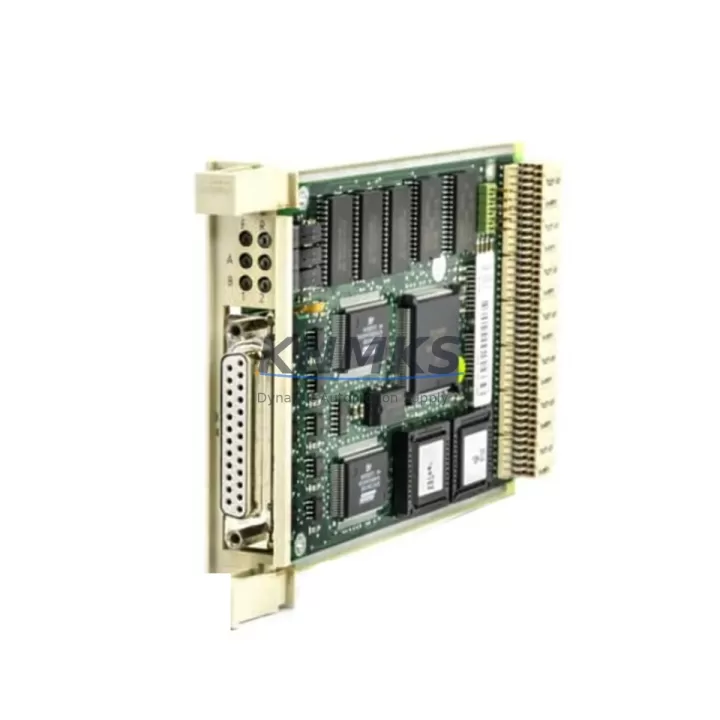
ABB CI590 3BHT340092R1 Maintenance-Proven Spare Part: Keeping AC500 Systems Running Without Interruption
The ABB CI590 (3BHT340092R1) is a SERCOS interface communication module designed for the ABB AC500 PLC platform — one of the most widely deployed modular automation controllers in industrial manufacturing, process control, and machine automation environments. When a SERCOS communication link fails or degrades, the entire motion control or drive coordination loop is at risk. Holding a verified spare of the CI590 in your maintenance inventory is a direct investment in factory uptime and production continuity.
At KNMKS, every CI590 3BHT340092R1 unit is sourced from authorized supply channels, individually inspected against ABB’s original specifications, and dispatched with a 12-month quality support terms. Whether you are responding to an unplanned shutdown, executing a scheduled annual overhaul, or building a strategic spare parts buffer for a multi-line facility, this module ships ready for immediate installation.
Spare Maintenance Table
| Parameter | Specification |
|---|---|
| Part Number | CI590 / 3BHT340092R1 |
| Brand | ABB |
| Series | AC500 |
| Module Type | SERCOS Interface Communication Module |
| Communication Protocol | SERCOS II (Serial Real-time Communication System) |
| Compatible CPU Modules | AC500 PM5xx / PM5xx-ETH series |
| Backplane Interface | AC500 S500 I/O bus |
| Fiber Optic Ports | 2 × SERCOS ring ports (F-SMA) |
| Transmission Rate | 2 / 4 / 8 / 16 Mbit/s selectable |
| Max. Drives per Ring | Up to 254 SERCOS slaves |
| Supply Voltage | Via AC500 backplane (24 V DC internal bus) |
| Operating Temperature | 0 °C to +60 °C |
| Storage Temperature | −25 °C to +70 °C |
| Humidity | 5–95% RH, non-condensing |
| Protection Class | IP20 |
| Weight | Approx. 120 g |
| Country of Origin | Germany |
| Support terms | 12 Months |
| Condition | Original New / Tested Surplus |
| Dispatch | Pre-shipment functional test included |
Maintenance Planning for Continuous Operation
The CI590 sits at the heart of any SERCOS-based motion network within an AC500 control cabinet. When planning a replacement or conducting a routine cabinet inspection, maintenance engineers should treat this module as part of a broader system health review — not an isolated swap.
Begin with the AC500 CPU module (such as the PM564-T or PM591) to confirm firmware compatibility with the CI590 revision installed. A firmware mismatch between the CPU and the SERCOS interface module is a common root cause of intermittent communication faults that are often misdiagnosed as drive or cable issues. Verify the CPU’s project file and ensure the CI590 is correctly parameterized in the hardware configuration before powering up.
Inspect the fiber optic cables connecting the CI590 to the SERCOS ring. F-SMA connectors are susceptible to contamination, bending stress, and connector wear in high-vibration environments. Dirty or cracked fiber ends will cause ring initialization failures even with a brand-new CI590 installed. Clean and test each fiber segment before commissioning the replacement module.
Check the 24 V DC panel power supply feeding the AC500 backplane. Voltage ripple or transient dips during motor starts can corrupt SERCOS cycle timing and trigger spurious faults on the CI590. A stable, industrial-grade DIN-rail power supply with adequate current headroom is essential for reliable SERCOS communication.
Review the S500 I/O modules installed on the same backplane. If the CI590 failure was preceded by I/O errors or unexpected output states, inspect the digital and analog I/O modules for signs of overvoltage damage or loose terminal connections. Modules such as the DC532 (digital input) or DA501 (analog output) should be verified for correct addressing and signal integrity.
For systems that also use PROFIBUS or Modbus communication modules (e.g., CI501 or CI502) in the same cabinet, confirm that the communication load on the CPU is within specification after the CI590 is restored. Overloaded CPU scan cycles can cause SERCOS timing violations that appear as module faults.
Finally, inspect the terminal blocks and grounding conductors within the control cabinet. Poor cabinet grounding is a leading cause of EMI-induced communication errors on fiber-based SERCOS rings, particularly in environments with large VFDs or servo drives. Ensure all shield terminations and PE connections meet ABB’s installation guidelines before closing the cabinet.
Site Replacement Workflow
Step 1 — Safe Isolation: Place the AC500 CPU in STOP mode via the programming tool (Automation Builder or PS501 Control Builder). Confirm all SERCOS drives are in a safe, de-energized state before opening the control cabinet.
Step 2 — Document Current Configuration: Record the existing CI590’s slot position, SERCOS baud rate DIP switch settings, and ring topology. Take a photograph of the fiber connections before disconnecting. This eliminates re-commissioning errors.
Step 3 — Module Removal: Disconnect the F-SMA fiber connectors. Release the module locking mechanism and slide the CI590 out of the backplane slot. Handle the replacement unit by its edges to avoid ESD damage.
Step 4 — Install Replacement CI590 3BHT340092R1: Seat the new module firmly into the same backplane slot. Set the SERCOS baud rate DIP switches to match the original configuration. Reconnect the fiber optic cables in the correct ring order (TX → RX).
Step 5 — Power-Up and Verification: Apply power and observe the CI590 status LEDs. A solid green SERCOS LED indicates successful ring initialization. Use Automation Builder to confirm all SERCOS slaves are online and the drive topology matches the project configuration.
Step 6 — Functional Test: Execute a controlled test cycle at reduced speed to verify motion coordination before returning the line to full production. Log the replacement in the maintenance record with the new module’s serial number and date.
This workflow minimizes downtime to under 30 minutes for experienced maintenance teams and eliminates the most common re-commissioning errors associated with SERCOS interface replacements.
Spare Parts Support FAQ
Q1: Is the CI590 3BHT340092R1 compatible with all AC500 CPU generations?
The CI590 is designed for the ABB AC500 platform and is compatible with PM5xx series CPUs. Compatibility with specific CPU firmware versions should be verified against ABB’s hardware compatibility matrix. KNMKS recommends confirming your CPU firmware revision before ordering to ensure seamless integration.
Q2: What pre-shipment testing does KNMKS perform on the CI590?
Each unit undergoes a functional power-on test and visual inspection for physical integrity, connector condition, and label verification against the 3BHT340092R1 part number. Units that do not pass inspection are not dispatched. A support terms confirmed by quotation cover any manufacturing or latent defects identified after installation.
Q3: How should the CI590 be stored as a long-term cabinet spare?
Store the module in its original anti-static packaging in a dry environment between −25 °C and +70 °C with humidity below 75% RH. Avoid storing near strong magnetic fields or in environments with corrosive gases. Inspect the module annually and verify the fiber connector caps are in place to prevent contamination.
Q4: Can KNMKS support long-term or repeat supply of the CI590 3BHT340092R1?
Yes. KNMKS maintains ongoing sourcing relationships for ABB AC500 series components, including the CI590. For facilities managing multiple AC500 systems or planning multi-year maintenance contracts, we recommend discussing a blanket order or reserved stock arrangement. Contact our team at admin@knmks.com to discuss volume pricing and lead time commitments.
© 2026 KNMKS. All rights reserved.
Original Source: https://knmks.com
Contact: admin@knmks.com | +86 18359268345
Product Identification
- Brand / Ecosystem
-
ABB
ABB - Model / Series
-
CI590 3BHT340092R1
AC500 Series - Product Family
- PLCs & Controllers
- Availability Status
- Available on request after model and quantity confirmation
- Inquiry Type
- B2B RFQ, replacement inquiry and project spare-part request
- Pre-Quote Check
- Exact SKU, brand, series, quantity, nameplate photos and destination country are checked before quotation
System Path
Where this product fits in the KNMKS automation structure.
Specification & Inquiry Focus
- Control platform
- PLC, PAC and modular controllers
- Common needs
- CPU, rack, power and I/O expansion
- Project support
- Replacement, cabinet build and maintenance
Buyer Confirmation
Information KNMKS checks before replying.
- Exact model
- CI590 3BHT340092R1
- Brand / ecosystem
- ABB
- Product family
- PLCs & Controllers
- Application note
- Replacement, maintenance, project build or spare-part list
- Useful photos
- Nameplate, installed unit, cabinet layout or connector side
- Delivery details
- Quantity, destination country and target schedule
Document Support
Files and notes can be confirmed during quotation.
- Product photos or nameplate confirmation when available
- Packing and delivery notes before quotation confirmation
- Support scope and delivery terms confirmed per inquiry
- Export document coordination for qualified B2B requests
Inquiry Support
- Model cross-checking before quotation
- CPU, power, rack and expansion module matching
- Support for replacement and project inquiry
What to Send Us
- Brand and exact model number: ABB CI590 3BHT340092R1
- Quantity and required delivery time
- Application, replacement requirement or nameplate photo
- Destination country and shipping preference
RFQ Preparation
This is a product inquiry page built for RFQ communication.
Fast Model Check
Send this model to KNMKS for confirmation.
Include quantity, destination country and photos if this is a maintenance replacement. The inquiry will be saved with a reference number after submission.
Brand & Compatibility Note
KNMKS displays automation product information for well-known industrial brand ecosystems and compatible replacement references. Brand names are used for product identification and compatibility reference only; final availability and commercial terms are confirmed per quotation.
 Manufacturing
 Machine Tools
 Packaging
 Energy & Power



 HMI & Displays
 Servo Systems
 Variable Frequency Drives
 Sensors