
Overview
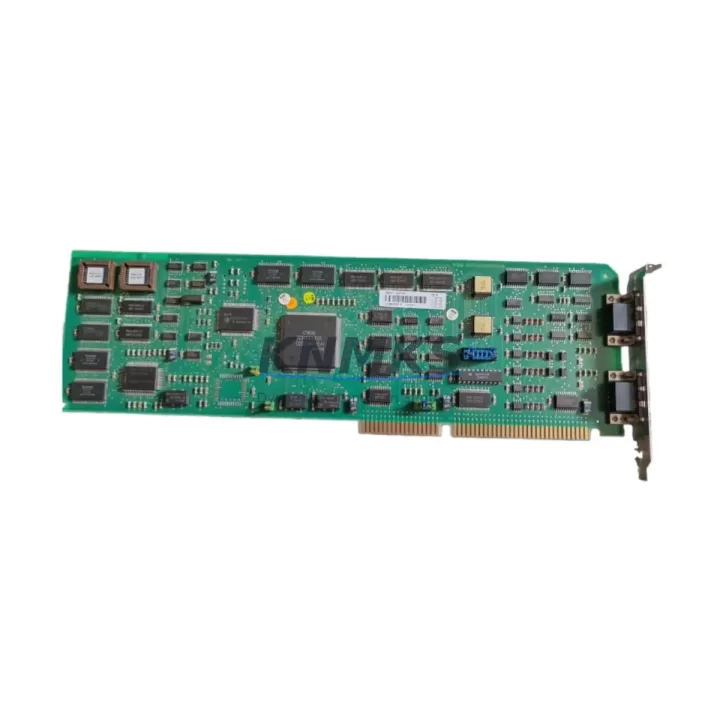
ABB CI526V1 3BSE012870R1 Migration-Ready PROFIBUS DP Module: Legacy System Migration and Compatible Upgrade
The ABB CI526V1 (part number 3BSE012870R1) is a PROFIBUS DP communication interface module designed for the ABB AC500 PLC platform. As legacy automation systems reach end-of-life and spare parts become increasingly scarce, the CI526V1 3BSE012870R1 serves as a critical migration-ready replacement for aging PROFIBUS DP communication nodes across energy, petrochemical, manufacturing, and infrastructure control environments. Whether you are replacing a failed communication module, upgrading a legacy control cabinet, or executing a phased system modernization, this module provides the protocol compatibility, rack integration, and firmware alignment required for a reliable retrofit.
The CI526V1 supports PROFIBUS DP-V0 and DP-V1 communication, enabling seamless integration with existing field device networks including distributed I/O stations, variable frequency drives, and remote sensor clusters. Its compatibility with the AC500 backplane architecture means that engineers can slot the module directly into existing PM5xx or PM5xx-ETH CPU racks without mechanical modification, significantly reducing installation time and downtime exposure during planned maintenance windows.
Migration Compatibility Table
| Parameter | CI526V1 3BSE012870R1 | Notes / Retrofit Guidance |
|---|---|---|
| Communication Protocol | PROFIBUS DP-V0 / DP-V1 | Verify master/slave configuration matches legacy setup |
| Compatible CPU Platform | ABB AC500 (PM551, PM554, PM564, PM581, PM591) | Confirm CPU firmware version supports CI526V1 |
| Backplane Interface | AC500 internal bus connector | Direct slot-in replacement; no adapter required |
| Max PROFIBUS Nodes | Up to 125 slave nodes | Verify node address assignments before commissioning |
| Baud Rate Support | 9.6 kbps – 12 Mbps | Match to existing network baud rate setting |
| Power Supply | Via AC500 backplane (5 VDC internal) | No external power wiring required |
| Terminal / Connector | DB9 female PROFIBUS connector | Reuse existing PROFIBUS cable with standard termination |
| Installation Space | Single slot on AC500 rack | Confirm available slot position in existing cabinet |
| Firmware Compatibility | AC500 V2.x and V3.x firmware | Update CPU firmware if running pre-V2.3 versions |
| GSD File | Required for master configuration | Download from ABB library; import into STEP 7 or PS501 |
| Commissioning Tool | ABB Automation Builder / PS501 | Use existing project file; re-map module slot if changed |
| Support terms | support terms confirmed by quotation | Covers hardware defects; includes pre-shipment function test |
Retrofit Planning for Existing Automation Systems
Successful integration of the CI526V1 3BSE012870R1 into a legacy control system requires a structured pre-retrofit assessment. Engineers should begin by auditing the existing AC500 rack configuration, confirming the slot position currently occupied by the outgoing communication module and verifying that the replacement CI526V1 will not conflict with adjacent modules such as the TB521-ETH terminal base or any installed DC532 digital I/O modules occupying neighboring slots.
Power budget verification is a mandatory step. Although the CI526V1 draws power exclusively from the AC500 backplane, the total current consumption of all installed modules — including any AI523 analog input modules, AO523 analog output modules, and the CPU itself — must remain within the rated backplane supply capacity. If the existing PS501 power supply module is already operating near its ceiling, a power supply audit should precede the retrofit to avoid instability after the new module is installed.
For sites running mixed communication architectures, where PROFIBUS DP coexists with Modbus RTU or PROFINET segments, the CI526V1 handles only the PROFIBUS DP layer. Separate communication modules handle other protocol stacks, and their slot assignments and address configurations must remain undisturbed during the CI526V1 swap. Engineers should document all module addresses, GSD file versions, and slave device configurations before beginning physical replacement.
Wiring adaptation is typically straightforward. The CI526V1 uses a standard DB9 PROFIBUS connector, allowing direct reuse of existing shielded PROFIBUS cables. Termination resistors at both ends of the PROFIBUS segment should be verified and re-enabled after reconnection. If the legacy installation used non-standard cable routing or shared grounding with other signal circuits, a cable integrity check using a PROFIBUS tester is recommended before powering up the new module.
HMI screen mapping should also be reviewed. If the existing SCADA or HMI system — whether running on a CP600 operator panel or a third-party visualization platform — references specific PROFIBUS device addresses or data block offsets, any changes to the slave node list or GSD configuration must be reflected in the HMI project before go-live. Failure to synchronize HMI data mappings with the updated PROFIBUS configuration is a common source of post-retrofit alarms and communication faults.
Downtime Control During System Migration
Minimizing production downtime during a PROFIBUS DP module replacement requires careful pre-staging and a disciplined changeover sequence. Before the maintenance window opens, the replacement CI526V1 3BSE012870R1 should be bench-tested using a spare AC500 rack or a portable test fixture to confirm that the module powers up correctly, responds to the Automation Builder configuration tool, and communicates with at least one known-good PROFIBUS slave device.
The existing PLC program should be exported and backed up in full — including all hardware configuration files, symbol tables, and communication parameter sets — before any physical work begins. This backup serves as the rollback baseline if the retrofit encounters unexpected compatibility issues. In AC500 systems, the hardware configuration is stored separately from the application program, and both must be archived to ensure a complete restore capability.
During the physical swap, the PROFIBUS network should be taken offline in a controlled sequence: first suspending master polling, then powering down the affected rack section, then removing the legacy module and inserting the CI526V1. After mechanical installation, the hardware configuration should be downloaded to the CPU before re-enabling PROFIBUS communication. This sequence prevents the master from generating spurious fault messages that could trigger downstream safety interlocks or process alarms.
Post-installation verification should include a full PROFIBUS diagnostic scan to confirm that all slave devices are responding at their expected addresses, that data exchange is active on all configured I/O areas, and that no communication errors are logged in the CPU diagnostic buffer. Field commissioning typically takes 30 to 90 minutes for a single-module replacement on a well-documented system, with the majority of time spent on diagnostic verification rather than physical installation.
All units supplied by KNMKS undergo pre-shipment functional testing to confirm communication initialization, backplane interface integrity, and basic PROFIBUS DP data exchange. This reduces on-site commissioning risk and supports the support terms confirmed by quotation coverage provided with every shipment.
Retrofit Support FAQ
Q1: Is the CI526V1 3BSE012870R1 a direct drop-in replacement for older ABB PROFIBUS modules used in AC500 systems?
A: Yes. The CI526V1 is designed for the AC500 rack architecture and uses the same backplane connector and slot form factor as other AC500 communication modules. In most cases, the module can be installed in the same slot as the outgoing unit without mechanical modification. However, engineers should verify that the CPU firmware version is compatible with the CI526V1 and that the hardware configuration in Automation Builder is updated to reflect the new module before downloading to the controller.
Q2: What commissioning steps are required after installing the CI526V1 in an existing PROFIBUS network?
A: After physical installation, open the existing Automation Builder project and confirm that the CI526V1 is correctly assigned in the hardware configuration at the appropriate rack slot. Download the updated hardware configuration to the CPU. Re-enable PROFIBUS master polling and use the built-in diagnostic tools to verify that all slave devices are communicating at their configured addresses. Check the CPU diagnostic buffer for any communication errors and resolve address conflicts before returning the system to automatic operation.
Q3: Can the CI526V1 3BSE012870R1 operate on a PROFIBUS segment that also includes third-party slave devices not originally configured with ABB tools?
A: Yes. The CI526V1 operates as a standard PROFIBUS DP master and is compatible with any slave device that conforms to the PROFIBUS DP-V0 or DP-V1 specification. Third-party slave devices require their GSD files to be imported into the Automation Builder hardware configuration. Baud rate, termination, and cable length must comply with PROFIBUS network design rules regardless of device manufacturer.
Q4: What does the support terms confirmed by quotation cover, and what is the typical lead time for shipment?
A: The support terms confirmed by quotation cover hardware defects in materials and workmanship under normal operating conditions. Each unit is pre-tested before shipment to verify power-up, backplane communication, and basic PROFIBUS DP initialization. Stock items typically ship within 2–5 business days. For urgent replacement requirements, expedited shipping options are available. Contact the sales team to confirm current inventory status and delivery schedule for your specific requirement.
© 2026 KNMKS. All rights reserved.
Original Source: https://knmks.com
Contact: admin@knmks.com | +86 18359268345
Product Identification
- Brand / Ecosystem
-
ABB
ABB - Model / Series
-
CI526V1 3BSE012870R1
AC500 Series - Product Family
- PLCs & Controllers
- Availability Status
- Available on request after model and quantity confirmation
- Inquiry Type
- B2B RFQ, replacement inquiry and project spare-part request
- Pre-Quote Check
- Exact SKU, brand, series, quantity, nameplate photos and destination country are checked before quotation
System Path
Where this product fits in the KNMKS automation structure.
Specification & Inquiry Focus
- Control platform
- PLC, PAC and modular controllers
- Common needs
- CPU, rack, power and I/O expansion
- Project support
- Replacement, cabinet build and maintenance
Buyer Confirmation
Information KNMKS checks before replying.
- Exact model
- CI526V1 3BSE012870R1
- Brand / ecosystem
- ABB
- Product family
- PLCs & Controllers
- Application note
- Replacement, maintenance, project build or spare-part list
- Useful photos
- Nameplate, installed unit, cabinet layout or connector side
- Delivery details
- Quantity, destination country and target schedule
Document Support
Files and notes can be confirmed during quotation.
- Product photos or nameplate confirmation when available
- Packing and delivery notes before quotation confirmation
- Support scope and delivery terms confirmed per inquiry
- Export document coordination for qualified B2B requests
Inquiry Support
- Model cross-checking before quotation
- CPU, power, rack and expansion module matching
- Support for replacement and project inquiry
What to Send Us
- Brand and exact model number: ABB CI526V1 3BSE012870R1
- Quantity and required delivery time
- Application, replacement requirement or nameplate photo
- Destination country and shipping preference
RFQ Preparation
This is a product inquiry page built for RFQ communication.
Fast Model Check
Send this model to KNMKS for confirmation.
Include quantity, destination country and photos if this is a maintenance replacement. The inquiry will be saved with a reference number after submission.
Brand & Compatibility Note
KNMKS displays automation product information for well-known industrial brand ecosystems and compatible replacement references. Brand names are used for product identification and compatibility reference only; final availability and commercial terms are confirmed per quotation.
 Manufacturing
 Machine Tools
 Packaging
 Energy & Power



 HMI & Displays
 Servo Systems
 Variable Frequency Drives
 Sensors