
Overview
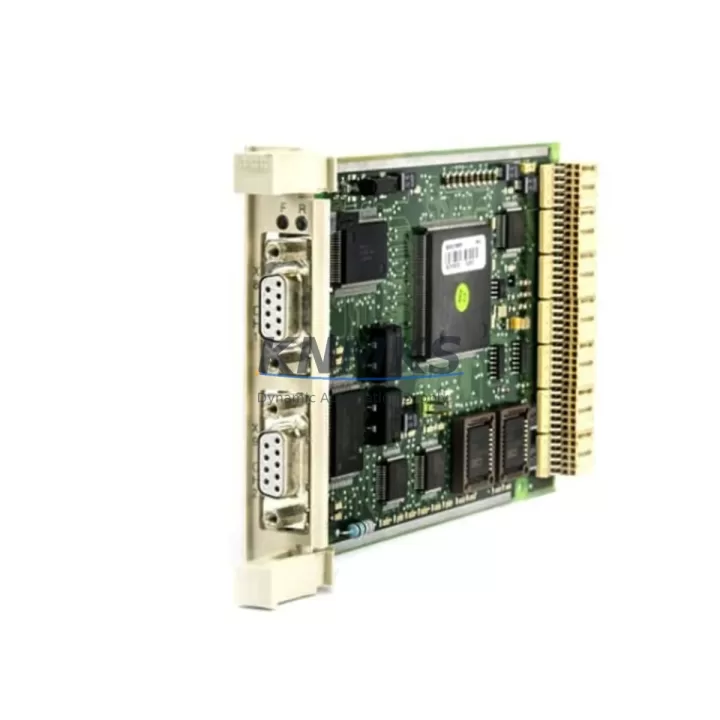
ABB CI520V1 3BSE012869R1 Migration-Ready AF100 Interface for Legacy Control Systems
The ABB CI520V1 (catalog number 3BSE012869R1) is a fieldbus interface module designed for the ABB AC500 PLC platform, providing AF100 optical fieldbus connectivity for legacy automation architectures. As industrial facilities face the challenge of maintaining aging distributed control systems, the CI520V1 serves as a critical bridge component — enabling engineers to extend the operational life of existing control cabinets, migrate from discontinued communication protocols, and integrate modern I/O expansions without a full system overhaul.
This module is particularly relevant in retrofit scenarios where the original AF100 fieldbus infrastructure remains in place but the master controller or interface card has reached end-of-life. The CI520V1 slots directly into the AC500 CPU rack, occupying a standard module bay and communicating via the internal backplane bus. Before installation, engineers must verify available power budget on the existing power supply module — typically an AC500 PM series unit — as adding a fieldbus interface increases the rack’s total current draw. Confirm that the power supply’s 24 VDC output capacity accommodates the CI520V1’s rated consumption alongside co-installed I/O modules such as the SM560 digital I/O or AI523 analog input modules.
Terminal wiring for the AF100 optical fiber connections requires careful attention to TX/RX polarity and fiber type compatibility. The CI520V1 supports plastic optical fiber (POF) at standard AF100 baud rates. During a retrofit, technicians should document the existing fiber routing, connector condition, and segment lengths before disconnecting the legacy interface. If the original fiber runs exceed recommended distances, signal repeaters or fiber converters may need to be incorporated into the migration plan.
Module addressing is configured via the AC500 programming environment (Automation Builder or PS501 Control Builder). When replacing a failed or discontinued AF100 interface in an existing project, the replacement CI520V1 must be assigned the same module slot address as the original to preserve program variable mapping. Failure to match the slot address will cause the CPU to report configuration faults and may prevent the control program from entering RUN mode. Always back up the existing project file before making hardware changes.
Program compatibility is a key concern in any legacy migration. The CI520V1 is compatible with AC500 firmware versions that support the AF100 fieldbus library. If the host CPU — for example a PM554 or PM564 — is running an older firmware revision, verify that the fieldbus function blocks used in the existing program are supported. In some cases, a firmware update to the CPU module is required before the new interface card will be recognized correctly. Coordinate firmware updates during planned maintenance windows to minimize unplanned downtime.
HMI screen updates are often overlooked during fieldbus interface replacements. If the control system includes an ABB CP600 or CP400 series operator panel communicating over the same AF100 network, verify that the HMI project’s communication driver settings reference the correct node address after the module swap. Mismatched node addresses will cause the HMI to lose live data, triggering alarm floods that can disrupt operations even when the PLC logic itself is running correctly.
Communication link integrity should be validated using the AC500 diagnostic tools available in Automation Builder. After installing the CI520V1, perform a full network scan to confirm that all AF100 slave nodes — including remote I/O stations and drives connected via the fieldbus — are visible and responding. Pay particular attention to any ABB ACS series drives or S800 I/O stations that rely on the AF100 link for process data exchange.
Installation space confirmation is straightforward for standard AC500 rack configurations. The CI520V1 occupies one module slot in the TB511, TB521, or TB541 backplane. If the existing rack is fully populated, a rack expansion or module consolidation may be necessary before the retrofit can proceed. In compact control cabinet installations, also verify that the optical fiber connectors on the front face of the module have adequate clearance for the fiber bend radius.
Field commissioning should include a structured test sequence: power-on self-test verification, AF100 network scan, I/O force testing for critical signals, and a full program cycle test under simulated process conditions. Document all test results and retain them as part of the retrofit project record.
KNMKS maintains verified stock of the CI520V1 3BSE012869R1 and ships from Xiamen with full pre-shipment functional testing. Each unit is covered by a support terms confirmed by quotation against manufacturing defects.
Migration Compatibility Table
| Parameter | Details |
|---|---|
| SKU / Part Number | CI520V1 / 3BSE012869R1 |
| Compatible Platform | ABB AC500 PLC Series |
| Fieldbus Protocol | AF100 Optical Fieldbus |
| Fiber Type | Plastic Optical Fiber (POF) |
| Backplane Interface | AC500 Internal Bus (TB511 / TB521 / TB541) |
| Module Slot Requirement | 1 standard AC500 module slot |
| Power Supply Compatibility | AC500 PM Series (24 VDC rack power) |
| Programming Environment | ABB Automation Builder / PS501 Control Builder |
| Replacement for Legacy Units | CI520 (earlier revision), discontinued AF100 interface cards |
| Communication Validation | AF100 network scan via Automation Builder diagnostics |
| Pre-Shipment Testing | Full functional test performed before dispatch |
| Support terms | 12 Months |
| Origin | Germany (OEM) |
| Ship From | Xiamen, China |
Retrofit Planning for Existing Automation Systems
A successful CI520V1 retrofit begins with a thorough audit of the existing control architecture. In a typical legacy AC500 installation, the control cabinet may house a PM554 or PM564 CPU module alongside multiple SM560 digital I/O modules and AI523 analog input modules, all mounted on a TB521 backplane. The CI520V1 integrates into this existing rack structure without requiring mechanical modifications, provided a free module slot is available.
For systems where the AF100 fieldbus connects to remote I/O stations or ABB ACS800 drives, the interface module’s node address must be configured to match the existing network topology before the system is brought back online. In multi-drop AF100 configurations, each node — including the CI520V1 — must have a unique address to prevent bus conflicts. Use the Automation Builder hardware configuration editor to assign and verify addresses before powering the rack.
If the retrofit scope includes expanding I/O capacity alongside the interface replacement, consider whether the existing TB521 backplane has sufficient slots or whether migration to a TB541 extended backplane is warranted. Adding a DC532 digital combination module or AO523 analog output module to the rack at the same time as the CI520V1 replacement can consolidate multiple maintenance actions into a single planned outage, reducing total lifecycle downtime.
For systems communicating with an ABB CP635 HMI panel, update the panel’s communication configuration in Panel Builder 600 to reflect any node address changes made during the retrofit. Export and archive the updated HMI project before going live to ensure a rollback path is available if commissioning issues arise.
Where the control system includes a programming cable connection for on-site firmware updates or program uploads, verify that the USB or serial programming cable used with the AC500 CPU is compatible with the installed firmware version. Some older CPU revisions require a specific cable driver version to establish a reliable connection with Automation Builder running on a Windows 10 or Windows 11 engineering workstation.
Downtime Control During System Migration
Minimizing downtime during a CI520V1 replacement requires preparation before the maintenance window begins. The most effective approach is to pre-configure the replacement module offline using Automation Builder’s hardware configuration import function. Load the existing project file, verify that the CI520V1 is correctly represented in the hardware tree, and export a configuration backup. This ensures that when the physical swap occurs, the new module can be brought online without requiring on-site programming changes.
Protect the original program logic by maintaining at least two independent backups: one on the engineering workstation and one on removable media stored separately from the control cabinet. If the AC500 CPU supports SD card program storage, verify that the card contains the current program version before beginning the hardware swap.
To maintain field control continuity during the transition, coordinate with the process team to identify which AF100-connected devices are critical to ongoing production. Where possible, place drives and remote I/O stations in local control mode before disconnecting the fieldbus interface. This prevents uncontrolled process upsets during the module swap interval.
After installing the CI520V1 and restoring power, follow a structured restart sequence: confirm CPU self-test passes, verify AF100 network scan shows all expected nodes, check I/O status in Automation Builder’s online monitoring view, and perform a controlled transfer from local to remote control for each field device before returning the system to automatic operation. Document the actual downtime and any deviations from the planned procedure for the project record.
Retrofit Support FAQ
Q: Is the CI520V1 3BSE012869R1 a direct replacement for the earlier CI520 revision?
A: Yes. The CI520V1 is the current production revision of the CI520 AF100 interface module and is designed as a drop-in replacement for earlier CI520 variants within the AC500 platform. Slot position and backplane connector are identical. Verify firmware compatibility with your CPU revision before installation.
Q: What wiring changes are required when replacing a legacy AF100 interface with the CI520V1?
A: The CI520V1 uses the same plastic optical fiber connectors as the original CI520. No wiring changes are required if the existing fiber runs are intact and within specification. Inspect connector end-faces for contamination and clean if necessary before reconnecting.
Q: How is the CI520V1 tested before shipment?
A: Each CI520V1 unit supplied by KNMKS undergoes a full functional test prior to dispatch, including power-on self-test verification and AF100 communication link validation. A test report is available on request. All units are covered by a support terms confirmed by quotation from the date of shipment.
Q: What is the typical lead time and do you maintain stock?
A: KNMKS maintains verified inventory of the CI520V1 3BSE012869R1 at our Xiamen facility. In-stock orders are typically dispatched within 1–3 business days. Contact admin@knmks.com or call +86 18359268345 to confirm current availability before placing your order.
© 2026 KNMKS. All rights reserved.
Original Source: https://knmks.com
Contact: admin@knmks.com | +86 18359268345
Product Identification
- Brand / Ecosystem
-
ABB
ABB - Model / Series
-
CI520V1 3BSE012869R1
AC500 Series - Product Family
- PLCs & Controllers
- Availability Status
- Available on request after model and quantity confirmation
- Inquiry Type
- B2B RFQ, replacement inquiry and project spare-part request
- Pre-Quote Check
- Exact SKU, brand, series, quantity, nameplate photos and destination country are checked before quotation
System Path
Where this product fits in the KNMKS automation structure.
Specification & Inquiry Focus
- Control platform
- PLC, PAC and modular controllers
- Common needs
- CPU, rack, power and I/O expansion
- Project support
- Replacement, cabinet build and maintenance
Buyer Confirmation
Information KNMKS checks before replying.
- Exact model
- CI520V1 3BSE012869R1
- Brand / ecosystem
- ABB
- Product family
- PLCs & Controllers
- Application note
- Replacement, maintenance, project build or spare-part list
- Useful photos
- Nameplate, installed unit, cabinet layout or connector side
- Delivery details
- Quantity, destination country and target schedule
Document Support
Files and notes can be confirmed during quotation.
- Product photos or nameplate confirmation when available
- Packing and delivery notes before quotation confirmation
- Support scope and delivery terms confirmed per inquiry
- Export document coordination for qualified B2B requests
Inquiry Support
- Model cross-checking before quotation
- CPU, power, rack and expansion module matching
- Support for replacement and project inquiry
What to Send Us
- Brand and exact model number: ABB CI520V1 3BSE012869R1
- Quantity and required delivery time
- Application, replacement requirement or nameplate photo
- Destination country and shipping preference
RFQ Preparation
This is a product inquiry page built for RFQ communication.
Fast Model Check
Send this model to KNMKS for confirmation.
Include quantity, destination country and photos if this is a maintenance replacement. The inquiry will be saved with a reference number after submission.
Brand & Compatibility Note
KNMKS displays automation product information for well-known industrial brand ecosystems and compatible replacement references. Brand names are used for product identification and compatibility reference only; final availability and commercial terms are confirmed per quotation.
 Manufacturing
 Machine Tools
 Packaging
 Energy & Power



 HMI & Displays
 Servo Systems
 Variable Frequency Drives
 Sensors