
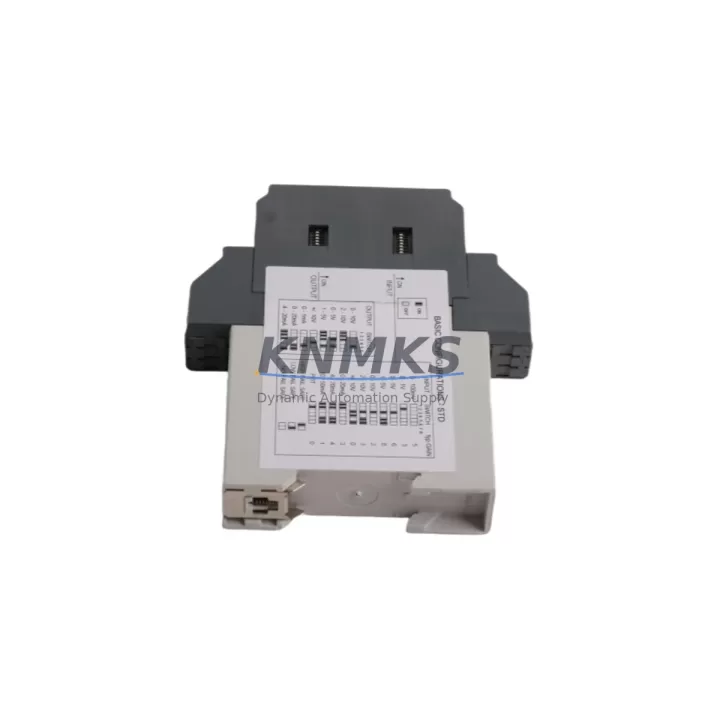
Overview
ABB CC-U/STD 1SVP040000R1700 Migration-Ready Control Unit: Legacy System Retrofit & Compatibility Upgrade
The ABB CC-U/STD 1SVP040000R1700 is a standard CPU module from ABB’s AC500 PLC series, engineered to serve as a migration-ready replacement for aging control units in legacy automation environments. Whether you are managing an end-of-life control cabinet, replacing a discontinued CPU in a petrochemical plant, or upgrading a manufacturing line’s control architecture, the 1SVP040000R1700 provides a reliable, field-proven path forward without requiring a full system redesign.
This control unit is fully compatible with ABB’s Automation Builder and Compact Control Builder (CCB) programming environments, enabling engineers to retain existing IEC 61131-3 program logic — including Ladder Diagram, Function Block Diagram, and Structured Text — with minimal rework. For facilities running legacy ABB PM5xx or PM5x3 series CPUs, the 1SVP040000R1700 offers a direct upgrade path with backward-compatible communication protocols and I/O addressing structures.
Before initiating a retrofit, engineers should verify the following critical parameters: supply voltage compatibility (24 VDC nominal), terminal block wiring layout against the existing cabinet drawings, backplane slot assignment and module addressing, available rack space within the existing DIN-rail or panel-mount enclosure, and firmware version alignment with the target Automation Builder release. Mismatched firmware between the CPU and connected I/O modules — such as the ABB TU515 or TU516 terminal units — can cause initialization faults that extend commissioning time.
Migration Compatibility Table
| Parameter | Details |
|---|---|
| SKU / Part Number | CC-U/STD 1SVP040000R1700 |
| Series | ABB AC500 |
| CPU Type | Standard Control Unit (CC-U/STD) |
| Supply Voltage | 24 VDC |
| Programming Environment | Automation Builder / Compact Control Builder (IEC 61131-3) |
| Communication Interfaces | PROFIBUS DP, Modbus RTU/TCP, CANopen (via expansion modules) |
| Backplane / Rack Compatibility | AC500 standard backplane; compatible with TB521, TB541 terminal bases |
| Legacy Replacement Targets | ABB PM554, PM564, PM571 series CPUs |
| Installation Format | DIN-rail or panel-mount; standard AC500 form factor |
| Firmware Compatibility | Verify against Automation Builder version prior to deployment |
| Commissioning Notes | Confirm module address, I/O mapping, and HMI variable binding before power-on |
| Support terms | support terms confirmed by quotation — covers manufacturing defects and functional failures |
Retrofit Planning for Existing Automation Systems
A successful retrofit using the CC-U/STD 1SVP040000R1700 requires systematic pre-migration planning. Begin by auditing the existing control cabinet for available backplane slots and verifying that the installed AC500 rack — typically a TB521 or TB541 terminal base — can accommodate the replacement CPU without mechanical interference. If the legacy system uses an older PM5xx CPU with a non-standard backplane, a rack replacement may be necessary before the new control unit can be seated.
Power budget verification is a critical step that is frequently overlooked. The 1SVP040000R1700 draws power from the backplane bus; engineers must confirm that the existing ABB PS501 or PS502 power supply module can sustain the combined load of the CPU, all installed I/O modules, and any communication expansion cards. Overloading the power rail during migration is a common cause of intermittent faults in the first weeks of operation.
For systems that include digital and analog I/O modules — such as the ABB DI524 digital input module or AI523 analog input module — engineers must validate that the I/O channel addresses defined in the original program match the physical slot assignments in the new configuration. Any mismatch between the program’s hardware configuration tree and the physical rack layout will prevent the CPU from entering RUN mode.
Communication link continuity is equally important. If the legacy system communicates with upstream SCADA or DCS platforms via PROFIBUS DP or Modbus RTU, the replacement CPU must be configured with the same station address and baud rate settings. For systems that include an ABB CM572-DP PROFIBUS master module or a CM589-PNIO PROFINET adapter, these modules must be re-registered in the new Automation Builder project and their GSD/GSDML files re-imported to restore full network visibility.
HMI screen variable binding is another migration checkpoint. If the plant uses an ABB CP600 or CP620 operator panel connected to the legacy CPU via Ethernet or serial link, all HMI variable tags must be re-mapped to the new CPU’s symbol table after the program is transferred. Failure to update HMI bindings results in blank or frozen display values, which can mislead operators during the initial post-migration period.
Finally, if the retrofit involves replacing a CPU that also served as a programming cable gateway — for example, systems where a USB-to-serial programming cable was the only access point — engineers should confirm that the new 1SVP040000R1700 unit supports the same programming interface or plan for an alternative connection method before the legacy unit is removed from service.
Downtime Control During System Migration
Minimizing unplanned downtime is the primary operational concern during any PLC CPU replacement. For the CC-U/STD 1SVP040000R1700, the recommended approach is a staged migration: first, create a full backup of the existing CPU program, hardware configuration, and retain data using Compact Control Builder’s online backup function. Store this backup on an isolated engineering workstation — not on the plant network — to protect against accidental overwrite.
Before removing the legacy CPU, document the physical wiring of all terminal blocks, including signal names, wire colors, and terminal numbers. Photograph the cabinet interior from multiple angles. This documentation serves as the authoritative reference if wiring discrepancies are discovered during commissioning of the replacement unit.
Power down the control cabinet using the correct isolation sequence: first disable field outputs, then de-energize the I/O bus, and finally remove power from the CPU backplane. Reverse this sequence during power-up after the new 1SVP040000R1700 is installed. This sequence protects both the new CPU and connected field devices from voltage transients during the switchover.
After installing the replacement unit and restoring the program, perform a cold-start test with all field outputs disabled. Verify that the CPU enters RUN mode, that all I/O modules report healthy status in the Automation Builder diagnostics view, and that communication links to SCADA and HMI systems are re-established before re-enabling field outputs. This staged power-up procedure typically reduces total commissioning time to under four hours for a standard cabinet retrofit, compared to eight or more hours for an unplanned emergency replacement.
All units supplied by KNMKS are pre-tested prior to shipment. Each CC-U/STD 1SVP040000R1700 undergoes functional verification to confirm power-on behavior, communication port integrity, and firmware version consistency before dispatch. This pre-shipment testing reduces the risk of receiving a non-functional unit and supports the goal of completing the migration within a single planned maintenance window.
Retrofit Support FAQ
Q1: Is the CC-U/STD 1SVP040000R1700 a direct drop-in replacement for the ABB PM554 or PM564 CPU?
The 1SVP040000R1700 is compatible with the AC500 platform and can replace PM554 and PM564 series CPUs in most configurations. However, engineers must verify backplane compatibility, firmware version alignment, and I/O module addressing before finalizing the replacement. In some cases, a hardware configuration update in Automation Builder is required to reflect the new CPU type before the existing program can be downloaded.
Q2: What commissioning steps are required after installing the replacement CPU?
After physical installation, connect the engineering workstation via USB or Ethernet, open the existing project in Automation Builder, update the hardware configuration to match the 1SVP040000R1700, download the program, and perform a cold-start. Verify I/O module status, communication link health, and HMI variable binding before enabling field outputs. Document all configuration changes for the plant maintenance record.
Q3: Can the existing PROFIBUS or Modbus wiring be reused without modification?
In most cases, yes. The existing field wiring to PROFIBUS DP or Modbus RTU devices can be reused provided the new CPU is configured with the same station address and communication parameters as the legacy unit. If the system uses a dedicated communication module such as the CM572-DP, this module can typically be retained in its existing backplane slot and re-registered in the new project without rewiring.
Q4: What does the support terms confirmed by quotation cover, and what is the supply lead time?
The support terms confirmed by quotation cover manufacturing defects and functional failures under normal operating conditions. It does not cover damage resulting from incorrect installation, overvoltage, or unauthorized modification. KNMKS maintains stock of the CC-U/STD 1SVP040000R1700 for immediate dispatch; standard lead time for in-stock units is 3–7 business days to most destinations. Contact admin@knmks.com or +86 18359268345 to confirm current stock availability before placing a time-critical order.
© 2026 KNMKS. All rights reserved.
Original Source: https://knmks.com
Contact: admin@knmks.com | +86 18359268345
Product Identification
- Brand / Ecosystem
-
ABB
ABB - Model / Series
-
CC-U/STD 1SVP040000R1700
AC500 Series - Product Family
- PLCs & Controllers
- Availability Status
- Available on request after model and quantity confirmation
- Inquiry Type
- B2B RFQ, replacement inquiry and project spare-part request
- Pre-Quote Check
- Exact SKU, brand, series, quantity, nameplate photos and destination country are checked before quotation
System Path
Where this product fits in the KNMKS automation structure.
Specification & Inquiry Focus
- Control platform
- PLC, PAC and modular controllers
- Common needs
- CPU, rack, power and I/O expansion
- Project support
- Replacement, cabinet build and maintenance
Buyer Confirmation
Information KNMKS checks before replying.
- Exact model
- CC-U/STD 1SVP040000R1700
- Brand / ecosystem
- ABB
- Product family
- PLCs & Controllers
- Application note
- Replacement, maintenance, project build or spare-part list
- Useful photos
- Nameplate, installed unit, cabinet layout or connector side
- Delivery details
- Quantity, destination country and target schedule
Document Support
Files and notes can be confirmed during quotation.
- Product photos or nameplate confirmation when available
- Packing and delivery notes before quotation confirmation
- Support scope and delivery terms confirmed per inquiry
- Export document coordination for qualified B2B requests
Inquiry Support
- Model cross-checking before quotation
- CPU, power, rack and expansion module matching
- Support for replacement and project inquiry
What to Send Us
- Brand and exact model number: ABB CC-U/STD 1SVP040000R1700
- Quantity and required delivery time
- Application, replacement requirement or nameplate photo
- Destination country and shipping preference
RFQ Preparation
This is a product inquiry page built for RFQ communication.
Fast Model Check
Send this model to KNMKS for confirmation.
Include quantity, destination country and photos if this is a maintenance replacement. The inquiry will be saved with a reference number after submission.
Brand & Compatibility Note
KNMKS displays automation product information for well-known industrial brand ecosystems and compatible replacement references. Brand names are used for product identification and compatibility reference only; final availability and commercial terms are confirmed per quotation.
 Manufacturing
 Machine Tools
 Packaging
 Energy & Power



 HMI & Displays
 Servo Systems
 Variable Frequency Drives
 Sensors