
Overview
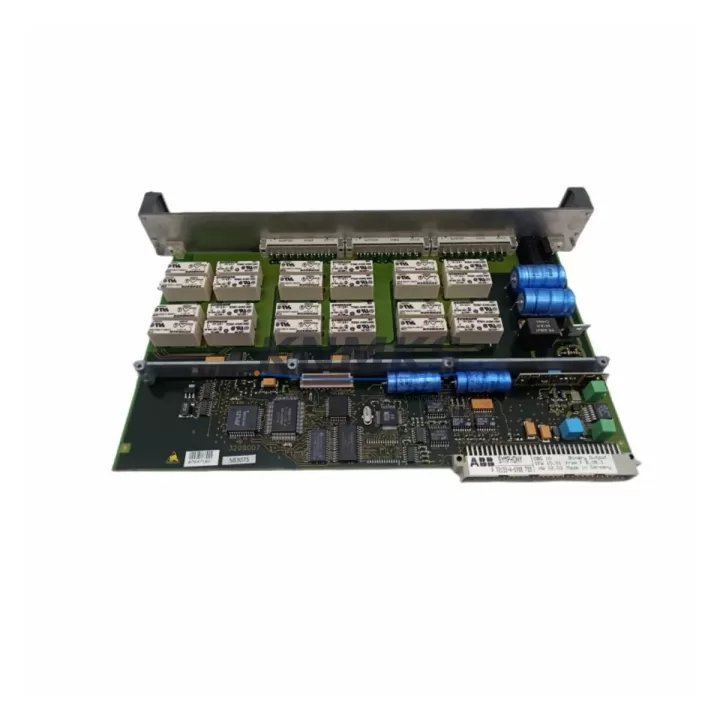
ABB CBO10-P 3BDH000733R1 Migration-Ready Digital Output Module for Legacy Control Systems
The ABB CBO10-P (3BDH000733R1) is a digital output module designed for the ABB AC500 PLC platform, widely deployed across energy, petrochemical, water treatment, and discrete manufacturing facilities. As legacy control systems approach end-of-life and OEM support windows close, the CBO10-P has become a critical spare and retrofit component for engineers managing aging automation infrastructure. Whether you are replacing a failed module in an existing AC500 rack or executing a planned migration from an earlier-generation ABB S500 or CS31 system, the CBO10-P 3BDH000733R1 provides a verified, drop-in compatible upgrade path that minimizes engineering rework and field downtime.
Sourced directly from authorized distribution channels and subject to pre-shipment functional verification, each unit is inspected for firmware integrity, terminal block condition, and backplane connector alignment before dispatch. Stock is maintained on a rolling basis to support both emergency breakdown orders and scheduled maintenance windows. All units ship with a support terms confirmed by quotation covering manufacturing defects and functional failure under normal operating conditions.
Migration Compatibility Table
| Parameter | Details |
|---|---|
| Module SKU | CBO10-P / 3BDH000733R1 |
| Platform | ABB AC500 PLC Series |
| Module Type | Digital Output (DO) |
| Backplane Interface | AC500 S-Series terminal unit compatible |
| Output Channels | 16 x digital outputs (transistor, 24 VDC) |
| Power Supply Compatibility | 24 VDC system bus; verify CP600/CP620 CPU power budget |
| Communication Protocol | Internal AC500 backplane bus; compatible with PROFIBUS-DP, Modbus RTU, CANopen via CPU module |
| Replacement Candidates | Legacy ABB S500 DO modules, CS31 digital output cards |
| Installation Requirement | Mounts on TA526 or TA527 terminal unit; confirm rail spacing and DIN rail depth |
| Firmware Compatibility | Compatible with AC500 V2.x and V3.x firmware; verify CPU firmware version before hot-swap |
| Commissioning Note | Module address auto-assigned by slot position; verify I/O mapping in Automation Builder project |
| Support terms | 12 months from shipment date |
Retrofit Planning for Existing Automation Systems
Successful integration of the CBO10-P 3BDH000733R1 into an existing control cabinet requires a structured pre-retrofit assessment. Begin by auditing the current rack configuration: confirm the available slot count on the AC500 backplane, verify that the terminal unit (TA526 or TA527) is present and undamaged, and check that the existing field wiring gauge and terminal torque specifications match the CBO10-P terminal block ratings. In many legacy installations, the original wiring was sized for older S500 modules with different terminal pitch — a wiring adapter or re-termination may be required.
Power budget verification is a frequently overlooked step. The AC500 CPU module — typically a CP604, CP605, or CP607 — supplies backplane power to all I/O modules in the rack. Adding or replacing a digital output module changes the total current draw on the 24 VDC bus. Before installation, calculate the aggregate current consumption of all modules in the rack and confirm it remains within the CPU’s rated output capacity. If the budget is tight, a supplementary PS501 or PS502 power supply module can be inserted to offload the backplane supply.
For systems migrating from CS31 fieldbus architecture, the transition to AC500 backplane I/O requires remapping all CS31 node addresses to AC500 slot-based I/O addresses within the Automation Builder programming environment. The CBO10-P outputs will appear as standard %Q byte addresses; update all POU (Program Organization Unit) variable declarations accordingly. If the site uses a CI590-CS31-HA communication interface module for legacy CS31 device integration, retain it in the rack alongside the new CBO10-P to maintain continuity for any remaining CS31 field devices during a phased migration.
HMI screen updates are a parallel workload. If the plant uses an ABB CP600 or CP620 operator panel connected via Ethernet or serial link to the AC500 CPU, verify that all output status tags mapped to the replaced module are re-linked to the new I/O addresses. Failure to update HMI tag bindings is a common source of post-retrofit alarm nuisance and operator confusion. Where PROFIBUS-DP is used for distributed I/O, confirm that the GSD file for the AC500 master is current and that the DP slave address table reflects any slot changes introduced during the retrofit.
Signal isolation requirements should also be reviewed. In high-noise environments — common in petrochemical and heavy manufacturing — output signals from the CBO10-P may benefit from inline signal isolators or relay output modules between the PLC output terminals and field actuators. This is particularly relevant when driving solenoid valves or motor contactors with long cable runs. Ensure that flyback diodes or surge suppressors are fitted at inductive loads to protect the transistor outputs of the CBO10-P from voltage spikes.
Downtime Control During System Migration
Minimizing production downtime during a module replacement or system migration is the primary operational concern for maintenance engineers. For the CBO10-P 3BDH000733R1, the recommended approach is a cold-swap procedure during a planned maintenance window: power down the affected rack section, remove the failed or legacy module, seat the replacement CBO10-P on the terminal unit, and restore power. The AC500 CPU will automatically recognize the module by slot position and restore I/O mapping without requiring a full program download — provided the project configuration in Automation Builder matches the physical slot assignment.
Before powering down, export and archive the current PLC program from the CPU using Automation Builder’s online backup function. This protects the existing ladder logic, function block diagrams, and variable tables against accidental overwrite during the recommissioning process. If the CPU retains program memory through a power cycle (standard for AC500 CPUs with onboard flash), the program will reload automatically on restart. Verify this behavior against the specific CPU firmware version in use at the site.
For critical processes where even a brief interruption is unacceptable, consider a parallel commissioning approach: install the new CBO10-P in an adjacent spare slot, configure it as a shadow output in the PLC program, verify output behavior against the live process signals, and then cut over by reassigning the primary output addresses to the new module slot. This technique requires an available spare slot in the rack and careful program version management, but it eliminates the cold-swap downtime window entirely.
Post-swap, conduct a structured loop check: force each output channel individually from the Automation Builder online monitor, confirm field device response at the actuator, and log the result. This verification step typically takes 15–30 minutes for a 16-channel module and provides documented evidence of successful commissioning for maintenance records and safety audits.
Retrofit Support FAQ
Q1: Is the CBO10-P 3BDH000733R1 a direct replacement for older ABB S500 digital output modules?
The CBO10-P is designed for the AC500 platform and mounts on AC500-compatible terminal units (TA526/TA527). It is not a direct plug-in replacement for S500 modules, which use a different terminal unit form factor. However, it is the correct upgrade target when migrating an S500 rack to AC500 architecture. The field wiring can be re-terminated to the TA526/TA527 terminal unit, and the I/O addresses must be remapped in the Automation Builder project.
Q2: What commissioning steps are required after installing the CBO10-P?
After physical installation, power up the rack and confirm the module status LED indicates normal operation (green). Connect to the CPU via Automation Builder, go online, and verify that the module appears in the I/O configuration tree at the correct slot address. Force-test each output channel and confirm field device response. If the module does not appear, check that the terminal unit is correctly seated and that the project hardware configuration matches the physical slot assignment.
Q3: Can the CBO10-P be used in a mixed rack alongside legacy AC500 V2 modules?
Yes. The AC500 backplane supports mixed module generations within the same rack, provided the CPU firmware is V2.4.0 or later. Confirm the CPU firmware version using Automation Builder’s device information dialog before mixing module generations. If a firmware update is required, schedule it as a separate maintenance activity and validate the updated project against the full I/O configuration before returning the system to production.
Q4: What does the support terms confirmed by quotation cover, and what is the shipping lead time?
Each CBO10-P 3BDH000733R1 unit is covered by a support terms confirmed by quotation from the shipment date, covering manufacturing defects and functional failure under normal operating conditions. Units are pre-tested before dispatch. Standard lead time for in-stock units is 3–7 business days for international shipments. Express dispatch is available for emergency breakdown orders. Contact admin@knmks.com or call +86 18359268345 to confirm current stock availability and shipping options.
© 2026 KNMKS. All rights reserved.
Original Source: https://knmks.com
Contact: admin@knmks.com | +86 18359268345
Product Identification
- Brand / Ecosystem
-
ABB
ABB - Model / Series
-
CBO10-P 3BDH000733R1
AC500 Series - Product Family
- PLCs & Controllers
- Availability Status
- Available on request after model and quantity confirmation
- Inquiry Type
- B2B RFQ, replacement inquiry and project spare-part request
- Pre-Quote Check
- Exact SKU, brand, series, quantity, nameplate photos and destination country are checked before quotation
System Path
Where this product fits in the KNMKS automation structure.
Specification & Inquiry Focus
- Control platform
- PLC, PAC and modular controllers
- Common needs
- CPU, rack, power and I/O expansion
- Project support
- Replacement, cabinet build and maintenance
Buyer Confirmation
Information KNMKS checks before replying.
- Exact model
- CBO10-P 3BDH000733R1
- Brand / ecosystem
- ABB
- Product family
- PLCs & Controllers
- Application note
- Replacement, maintenance, project build or spare-part list
- Useful photos
- Nameplate, installed unit, cabinet layout or connector side
- Delivery details
- Quantity, destination country and target schedule
Document Support
Files and notes can be confirmed during quotation.
- Product photos or nameplate confirmation when available
- Packing and delivery notes before quotation confirmation
- Support scope and delivery terms confirmed per inquiry
- Export document coordination for qualified B2B requests
Inquiry Support
- Model cross-checking before quotation
- CPU, power, rack and expansion module matching
- Support for replacement and project inquiry
What to Send Us
- Brand and exact model number: ABB CBO10-P 3BDH000733R1
- Quantity and required delivery time
- Application, replacement requirement or nameplate photo
- Destination country and shipping preference
RFQ Preparation
This is a product inquiry page built for RFQ communication.
Fast Model Check
Send this model to KNMKS for confirmation.
Include quantity, destination country and photos if this is a maintenance replacement. The inquiry will be saved with a reference number after submission.
Brand & Compatibility Note
KNMKS displays automation product information for well-known industrial brand ecosystems and compatible replacement references. Brand names are used for product identification and compatibility reference only; final availability and commercial terms are confirmed per quotation.
 Manufacturing
 Machine Tools
 Packaging
 Energy & Power



 HMI & Displays
 Servo Systems
 Variable Frequency Drives
 Sensors