
Overview
ABB CBO10 Maintenance-Proven Spare Part for Factory Uptime
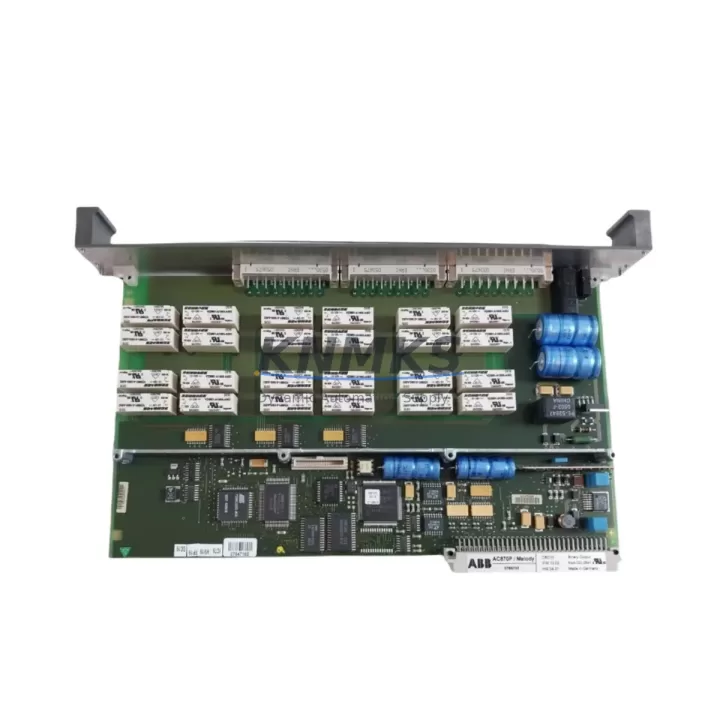
The ABB CBO10 is a 16-channel digital output module engineered for the AC500 programmable logic controller platform. Designed for demanding industrial environments, the CBO10 delivers reliable transistor-based signal switching across a wide range of process automation, machine control, and utility applications. For maintenance engineers managing aging AC500 installations, securing a verified CBO10 spare is a direct investment in production continuity — eliminating the risk of extended downtime caused by module failure or obsolescence-driven supply gaps.
Each CBO10 unit supplied by KNMKS is sourced from authorized distribution channels or verified surplus stock, subjected to functional bench testing prior to dispatch, and covered by a 12-month replacement support terms. Whether you are building a critical-spares buffer for a PM5xx-based control cabinet, responding to an unplanned I/O fault, or executing a scheduled annual overhaul, the CBO10 is available for immediate shipment from regional warehouse stock.
Spare Maintenance Table
| Parameter | Specification / Detail |
|---|---|
| Part Number / SKU | CBO10 |
| Brand | ABB |
| Series | AC500 |
| Module Type | Digital Output Module (16-channel) |
| Output Type | Transistor (solid-state), sourcing |
| Rated Output Voltage | 24 V DC |
| Output Current per Channel | 0.5 A (typical) |
| Compatible CPUs | PM5xx series (PM554, PM564, PM572, PM581, PM582, PM591, PM592) |
| Backplane Interface | AC500 I/O bus (direct plug-in to TB5xx terminal base) |
| Terminal Base Required | TB5xx (e.g., TB511, TB521, TB541) |
| Protection Class | IP20 |
| Operating Temperature | -25 °C to +60 °C |
| Country of Origin | Germany (DE) |
| Weight | 240 g (approx.) |
| Condition | Original, function-tested before shipment |
| Support terms | 12 months from date of shipment |
| Lead Time | In-stock: same-day or next business day dispatch |
| Application | Process automation, machine control, utility, water treatment, packaging lines |
Maintenance Planning for Continuous Operation
When a CBO10 digital output module is flagged during routine cabinet inspection or fails under load, the replacement scope rarely ends at the module itself. A disciplined maintenance engineer will treat the CBO10 fault as a trigger for a broader cabinet health check to prevent cascading failures and avoid repeat call-outs.
Start with the TB5xx terminal base that the CBO10 plugs into — inspect the connector pins for oxidation, mechanical damage, or loose seating. A worn TB511 or TB521 base can cause intermittent contact faults that mimic module failure and will recur even after a new CBO10 is installed. Alongside the terminal base, verify the 24 V DC power supply rail feeding the output field side: voltage sag, ripple, or inadequate current capacity will stress transistor outputs and shorten module life. If the cabinet uses an ABB CP-E or CP-S series power supply, check its output voltage under load and inspect the fuse or circuit breaker protecting the 24 V bus.
For cabinets where the CBO10 drives relay coils or solenoid valves, inspect the freewheeling diodes or surge suppressors on each inductive load. Missing or failed suppressors generate voltage spikes that degrade transistor output stages over time. If the AC500 system includes a CI5xx or CI590-CS31 communication module for PROFIBUS or CS31 fieldbus connectivity, verify that the communication module is still responding correctly after the I/O module swap — a module replacement can occasionally trigger a bus configuration mismatch that requires a cold restart or re-download of the hardware configuration from PS501 Control Builder Plus.
Where the CBO10 controls critical process outputs, consider also reviewing the DI5xx digital input modules in the same rack for any latched fault states or diagnostic alarms that may have been masked by the output fault. For systems with signal isolation requirements — particularly in environments with high common-mode noise or long cable runs to field devices — a signal isolator or relay output barrier between the CBO10 and the field device is a worthwhile addition to the maintenance BOM. Finally, check the SD card or memory module in the PM5xx CPU to confirm the application program and hardware configuration backup is current before returning the system to service.
Site Replacement Workflow
Step 1 — Isolate and document. Before removing the CBO10, record the current output states and any active alarms in the PS501 Control Builder Plus online monitor or via the AC500 web server. Photograph the wiring layout on the TB5xx terminal base for reference during reinstallation.
Step 2 — Power down the field side. Switch off the 24 V DC supply to the output field circuit. The AC500 backplane can remain powered during a hot-swap if the CPU supports it, but for safety-critical outputs, a full cabinet de-energization is recommended per site LOTO procedures.
Step 3 — Remove and inspect. Slide the CBO10 out of the TB5xx base. Inspect the base connector and the module edge connector for contamination or damage. Clean with isopropyl alcohol if required.
Step 4 — Insert the replacement CBO10. Seat the new module firmly into the TB5xx base until the locking tab clicks. No DIP switch or address configuration is required — the AC500 CPU auto-detects the module type via the I/O bus.
Step 5 — Restore power and verify. Re-energize the field supply and perform a forced output test from the Control Builder Plus online mode or the AC500 HMI (e.g., CP600 series panel) to confirm all 16 channels are switching correctly. Clear any residual diagnostic alarms in the CPU.
Step 6 — Update maintenance records. Log the replacement date, module serial number, and test results in the site CMMS. Order a replacement CBO10 to restore your critical-spares buffer.
This workflow is compatible with all PM5xx CPU variants and supports backward compatibility with earlier AC500 V1 hardware configurations, making the CBO10 a reliable drop-in replacement that does not require a program re-download in most standard installations.
Spare Parts Support FAQ
Q1: Is the CBO10 still in production, and can KNMKS guarantee long-term supply?
The CBO10 is part of the ABB AC500 V2 I/O range, which remains in active production. KNMKS maintains regional buffer stock and works with multiple authorized distribution channels to ensure consistent availability. For customers with annual maintenance contracts or blanket-stock requirements, we offer scheduled delivery programs to eliminate lead-time risk.
Q2: How is each CBO10 tested before shipment?
Every unit undergoes a functional bench test that verifies all 16 output channels switch correctly under a 24 V DC load, the I/O bus interface communicates correctly with a reference PM5xx CPU, and no diagnostic faults are present. A test report is available on request. All units are shipped in anti-static packaging with a support terms confirmed by quotation from the date of dispatch.
Q3: Can the CBO10 replace older AC500 V1 digital output modules?
In most cases, yes. The CBO10 is designed for the AC500 V2 platform but is backward-compatible with V1 TB5xx terminal bases and PM5xx CPUs running firmware that supports V2 I/O modules. We recommend verifying the CPU firmware version against the ABB AC500 compatibility matrix before ordering if your installation predates 2012. Our technical team can assist with compatibility confirmation at no charge.
Q4: What is covered under the support terms confirmed by quotation?
The support terms covers manufacturing defects and functional failures under normal operating conditions. It does not cover damage caused by incorrect installation, overvoltage, reverse polarity, or environmental conditions outside the rated specification. In the event of a support terms claim, KNMKS will arrange a replacement unit dispatch within 5 business days of fault confirmation, minimizing the impact on your production schedule.
© 2026 KNMKS. All rights reserved.
Original Source: https://knmks.com
Contact: admin@knmks.com | +86 18359268345
Product Identification
- Brand / Ecosystem
-
ABB
ABB - Model / Series
-
CBO10
AC500 Series - Product Family
- PLCs & Controllers
- Availability Status
- Available on request after model and quantity confirmation
- Inquiry Type
- B2B RFQ, replacement inquiry and project spare-part request
- Pre-Quote Check
- Exact SKU, brand, series, quantity, nameplate photos and destination country are checked before quotation
System Path
Where this product fits in the KNMKS automation structure.
Specification & Inquiry Focus
- Control platform
- PLC, PAC and modular controllers
- Common needs
- CPU, rack, power and I/O expansion
- Project support
- Replacement, cabinet build and maintenance
Buyer Confirmation
Information KNMKS checks before replying.
- Exact model
- CBO10
- Brand / ecosystem
- ABB
- Product family
- PLCs & Controllers
- Application note
- Replacement, maintenance, project build or spare-part list
- Useful photos
- Nameplate, installed unit, cabinet layout or connector side
- Delivery details
- Quantity, destination country and target schedule
Document Support
Files and notes can be confirmed during quotation.
- Product photos or nameplate confirmation when available
- Packing and delivery notes before quotation confirmation
- Support scope and delivery terms confirmed per inquiry
- Export document coordination for qualified B2B requests
Inquiry Support
- Model cross-checking before quotation
- CPU, power, rack and expansion module matching
- Support for replacement and project inquiry
What to Send Us
- Brand and exact model number: ABB CBO10
- Quantity and required delivery time
- Application, replacement requirement or nameplate photo
- Destination country and shipping preference
RFQ Preparation
This is a product inquiry page built for RFQ communication.
Fast Model Check
Send this model to KNMKS for confirmation.
Include quantity, destination country and photos if this is a maintenance replacement. The inquiry will be saved with a reference number after submission.
Brand & Compatibility Note
KNMKS displays automation product information for well-known industrial brand ecosystems and compatible replacement references. Brand names are used for product identification and compatibility reference only; final availability and commercial terms are confirmed per quotation.
 Manufacturing
 Machine Tools
 Packaging
 Energy & Power



 HMI & Displays
 Servo Systems
 Variable Frequency Drives
 Sensors