
Overview
ABB CBI21 Migration-Ready Digital Input for AC500: Legacy System Retrofit & Compatibility Upgrade
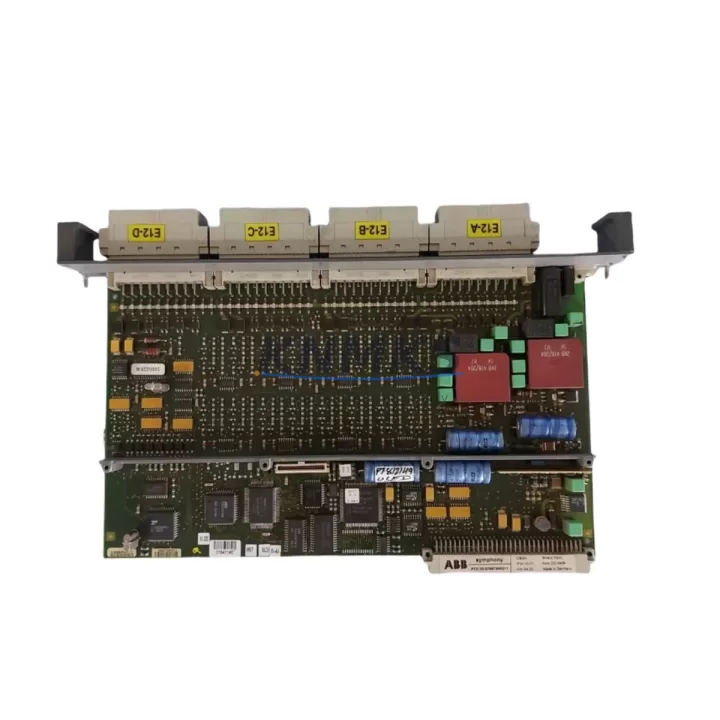
The ABB CBI21 is a 16-channel 24 VDC digital input module engineered for the AC500 programmable logic controller platform. As legacy AC500 installations approach end-of-support milestones and original CBI21 units become increasingly difficult to source through standard distribution channels, plant engineers and system integrators are turning to migration-ready replacements to extend operational life without triggering a full control-system overhaul. The CBI21 slots directly into the existing AC500 backplane, preserving terminal wiring assignments, module addressing, and CPU program logic — eliminating the need for hardware re-engineering or PLC re-programming in most retrofit scenarios.
Each unit supplied by KNMKS is sourced from verified industrial channels, subjected to functional power-on and I/O channel verification testing prior to shipment, and covered by a support terms confirmed by quotation against manufacturing defects and operational failure. Stock is maintained across regional warehouses to support urgent maintenance requirements and planned shutdown windows.
Migration Compatibility Table
| Parameter | ABB CBI21 (This Unit) | Retrofit Notes |
|---|---|---|
| Input Channels | 16 × 24 VDC Digital Input | Channel-for-channel compatible with original CBI21 wiring |
| Backplane Interface | AC500 S500 I/O Bus | Direct slot-in replacement; no backplane adapter required |
| Module Addressing | Rotary switch, hardware-set | Retain original address setting; no CPU configuration change needed |
| Terminal Wiring | 20-pin front connector | Existing field wiring re-connects without modification |
| Power Supply Requirement | 24 VDC via backplane | Verify PS501 or PS502 power module capacity before installation |
| Communication Protocol | S500 I/O Bus (proprietary) | Compatible with PM571, PM581, PM591, PM595 CPUs |
| Firmware Compatibility | AC500 V2.x / V3.x | Confirm CPU firmware version; no module firmware update required |
| Installation Space | Standard S500 module width | Fits TB511, TB521, TB541 terminal base units |
| Replacement Scope | Direct drop-in for CBI21 | Also applicable where CI501 or CI502 coupler configurations are in use |
| Support terms | 12 Months | Covers manufacturing defects and operational failure from date of shipment |
Retrofit Planning for Existing Automation Systems
A successful CBI21 retrofit begins well before the module arrives on site. The first step is a backplane audit: confirm that the TB511 or TB521 terminal base currently seating the failed or end-of-life CBI21 is undamaged and that the S500 I/O bus connector shows no corrosion or mechanical wear. If the terminal base itself is compromised, a replacement TB511 should be ordered alongside the CBI21 to avoid a second maintenance window.
Power budget verification is equally critical. The AC500 rack is typically powered by a PS501-ETH or PS502 power supply module, and adding or replacing I/O modules can shift the total current draw. Calculate the aggregate 24 VDC consumption across all installed S500 modules — including any CBQ21 digital output modules, CAI01 analog input modules, or CAO01 analog output modules sharing the same rack — and confirm the power supply has sufficient headroom before energizing the replacement CBI21.
For systems where the AC500 CPU communicates upstream via a CI501 PROFIBUS coupler or a CI502 CANopen coupler, verify that the coupler’s GSD or EDS configuration file still reflects the correct I/O map after the module swap. In most direct CBI21-to-CBI21 replacements the I/O map is unchanged, but if the retrofit is part of a broader rack reorganization — for example, consolidating two partial racks into one — the coupler configuration and the CPU program’s symbolic address assignments must be reviewed in Automation Builder before going live.
HMI screens connected to the AC500 via Modbus TCP or PROFINET should also be validated. If the CBI21 input states are mapped to HMI tags by absolute I/O address rather than symbolic variable, a rack slot change will require a tag remap in the HMI project. Documenting the original slot position and address before removal prevents this from becoming a commissioning delay.
Finally, confirm installation clearance. The CBI21 occupies a standard S500 module footprint, but control cabinet thermal management should be reviewed if the retrofit is being performed in a high-ambient-temperature environment. Adequate spacing between modules and functional cabinet ventilation directly affect long-term reliability of the replacement unit.
Downtime Control During System Migration
Minimizing unplanned downtime during a CBI21 replacement requires a structured pre-outage preparation protocol. Before the maintenance window opens, export and archive the current AC500 CPU program from Automation Builder, including all variable declarations, task configurations, and communication settings. This backup serves as the recovery baseline if commissioning reveals an unexpected compatibility issue.
During the physical swap, label all field wiring connected to the 20-pin front connector before disconnection. The CBI21’s terminal layout is consistent across production batches, but field wiring labels in older installations are sometimes worn or absent. A photograph of the wiring and a written terminal map take less than five minutes and eliminate the most common source of post-swap commissioning errors.
After seating the replacement CBI21 and reconnecting field wiring, power the rack and observe the module’s status LED. A steady green indicates successful backplane communication. If the LED shows a fault pattern, verify the rotary address switch matches the original module’s setting before escalating to a CPU diagnostic read. In the majority of direct replacement scenarios, the CPU recognizes the new module without a program download, and the system returns to normal operation within the maintenance window.
For installations where zero-unplanned-downtime is a contractual requirement, KNMKS recommends maintaining one CBI21 as a cold-standby spare. Given the extended lead times now associated with legacy AC500 I/O modules through standard distribution, holding a tested spare on-site is the most reliable way to guarantee a sub-hour recovery time for any future digital input fault.
Retrofit Support FAQ
Q1: Is the KNMKS-supplied CBI21 a direct replacement for the original ABB CBI21 without any program changes?
In a like-for-like slot replacement, no CPU program changes are required. The module address, I/O channel mapping, and backplane interface are identical to the original. Program changes are only needed if the retrofit involves a slot reassignment or a rack consolidation that alters the absolute I/O address structure.
Q2: What pre-shipment testing is performed on each CBI21 unit?
Each unit undergoes power-on verification and individual channel functional testing before dispatch. Test records are available on request. All units are covered by a support terms confirmed by quotation from the date of shipment.
Q3: Can the CBI21 be used with both AC500 V2 and AC500 V3 CPU generations?
Yes. The CBI21 is compatible with the full range of AC500 CPUs including PM571, PM581, PM591, and PM595 across both V2 and V3 firmware generations. Confirm the CPU firmware version in Automation Builder prior to installation to ensure no S500 bus firmware conflicts exist.
Q4: What is the typical lead time and do you hold stock?
KNMKS maintains regional warehouse stock of the CBI21 to support urgent maintenance and planned shutdown schedules. Standard orders ship within 3–5 business days. For blanket-stock or consignment arrangements supporting ongoing maintenance programs, contact the sales team directly to discuss volume and lead-time commitments.
© 2026 KNMKS. All rights reserved.
Original Source: https://knmks.com
Contact: admin@knmks.com | +86 18359268345
Product Identification
- Brand / Ecosystem
-
ABB
ABB - Model / Series
-
CBI21
AC500 Series - Product Family
- PLCs & Controllers
- Availability Status
- Available on request after model and quantity confirmation
- Inquiry Type
- B2B RFQ, replacement inquiry and project spare-part request
- Pre-Quote Check
- Exact SKU, brand, series, quantity, nameplate photos and destination country are checked before quotation
System Path
Where this product fits in the KNMKS automation structure.
Specification & Inquiry Focus
- Control platform
- PLC, PAC and modular controllers
- Common needs
- CPU, rack, power and I/O expansion
- Project support
- Replacement, cabinet build and maintenance
Buyer Confirmation
Information KNMKS checks before replying.
- Exact model
- CBI21
- Brand / ecosystem
- ABB
- Product family
- PLCs & Controllers
- Application note
- Replacement, maintenance, project build or spare-part list
- Useful photos
- Nameplate, installed unit, cabinet layout or connector side
- Delivery details
- Quantity, destination country and target schedule
Document Support
Files and notes can be confirmed during quotation.
- Product photos or nameplate confirmation when available
- Packing and delivery notes before quotation confirmation
- Support scope and delivery terms confirmed per inquiry
- Export document coordination for qualified B2B requests
Inquiry Support
- Model cross-checking before quotation
- CPU, power, rack and expansion module matching
- Support for replacement and project inquiry
What to Send Us
- Brand and exact model number: ABB CBI21
- Quantity and required delivery time
- Application, replacement requirement or nameplate photo
- Destination country and shipping preference
RFQ Preparation
This is a product inquiry page built for RFQ communication.
Fast Model Check
Send this model to KNMKS for confirmation.
Include quantity, destination country and photos if this is a maintenance replacement. The inquiry will be saved with a reference number after submission.
Brand & Compatibility Note
KNMKS displays automation product information for well-known industrial brand ecosystems and compatible replacement references. Brand names are used for product identification and compatibility reference only; final availability and commercial terms are confirmed per quotation.
 Manufacturing
 Machine Tools
 Packaging
 Energy & Power



 HMI & Displays
 Servo Systems
 Variable Frequency Drives
 Sensors