
Overview
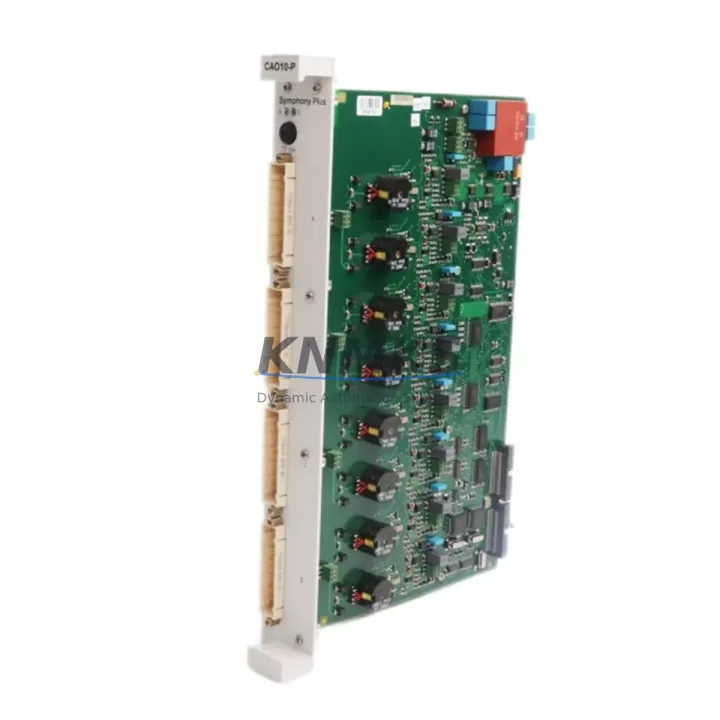
ABB CAO10-P 3BDH000723R1 Maintenance-Proven Spare Part: Reliable Analog Output for Factory Uptime
The ABB CAO10-P (part number 3BDH000723R1) is an original analog output module designed for the ABB AC500 PLC platform — one of the most widely deployed programmable logic controller series in process automation, machine control, and critical infrastructure applications worldwide. For maintenance engineers managing aging control systems or procurement engineers building strategic spare parts inventories, the CAO10-P represents a high-priority stocking item: it is a direct-fit replacement for failed or degraded analog output channels, and its availability directly determines how quickly a production line can be restored after an unplanned shutdown.
In industrial environments where analog output signals drive variable-speed drives, control valves, positioners, and process transmitters, a single failed output channel can cascade into full-line downtime. The CAO10-P delivers stable 0–10 V or 4–20 mA analog output signals across its channels, maintaining signal integrity under the electrical noise conditions typical of motor control centers and high-density control cabinets. Its compatibility with the AC500 CPU modules — including the PM573, PM583, and PM595 families — means it can be hot-swapped into an existing rack without firmware reconfiguration in most standard installations, dramatically reducing mean time to repair (MTTR).
Sourced directly from authorized supply chains and tested before shipment, every CAO10-P unit supplied by KNMKS undergoes functional verification to confirm channel accuracy, output linearity, and communication integrity with the AC500 backplane. Each unit ships with a support terms confirmed by quotation covering manufacturing defects and functional failures under normal operating conditions.
Spare Maintenance Table
| Parameter | Specification |
|---|---|
| Part Number | 3BDH000723R1 |
| Model | CAO10-P |
| Brand | ABB |
| Series | AC500 |
| Module Type | Analog Output Module |
| Output Channels | 8 channels (configurable per channel) |
| Output Signal | 0–10 V / 4–20 mA (per channel) |
| Resolution | 12-bit |
| Supply Voltage | 24 V DC (via AC500 backplane) |
| Compatible CPUs | AC500 PM573, PM583, PM595 and compatible variants |
| Backplane Interface | AC500 S500 I/O bus |
| Operating Temperature | 0°C to +60°C |
| Protection Class | IP20 |
| Country of Origin | Germany |
| Weight | 940 g |
| Support terms | 12 Months — tested before shipment |
| Condition | Original, new or refurbished-to-spec |
| Delivery | DHL / FedEx express, worldwide |
Maintenance Planning for Continuous Operation
When replacing or inspecting the CAO10-P in the field, a disciplined maintenance workflow extends beyond the module itself. Maintenance engineers should treat the replacement as an opportunity to audit the surrounding electrical environment to prevent repeat failures and ensure long-term system stability.
Power supply integrity is the first checkpoint. The AC500 rack relies on a stable 24 V DC bus; a degraded ABB CP-E 24/10.0 power supply or equivalent rail-mount PSU can introduce voltage ripple that corrupts analog output accuracy. Verify input voltage at the backplane connector before commissioning the new CAO10-P.
Backplane and rack condition should be inspected next. The AC500 S500 expansion bus connector pins are subject to oxidation in humid or chemically aggressive environments. If the CAO10-P was showing intermittent faults rather than hard failures, the AC500 TB521-ETH or TB511 terminal base may be the root cause rather than the module itself — inspect and clean or replace as needed.
Field wiring and terminal blocks connected to the analog output channels should be checked for loose terminations, insulation breakdown, and ground loops. In installations where the CAO10-P drives 4–20 mA loops to remote positioners or transmitters, a broken shield or floating ground can introduce offset errors that mimic module failure. Inspect Phoenix Contact or Weidmüller terminal blocks and cable shields at both ends of the signal run.
Communication and CPU health should be confirmed after module replacement. If the AC500 system uses PROFIBUS DP or Modbus TCP communication modules such as the CM572-DP or CM579-ETHCAT, verify that the I/O configuration in Automation Builder reflects the new module and that no address conflicts exist. A mismatch between the hardware configuration and the CPU program can prevent the new CAO10-P from initializing correctly.
Signal isolation and protection is particularly important in mixed-signal cabinets. If the analog outputs share a cabinet with variable-frequency drives or high-current contactors, consider installing signal isolators or surge protection barriers on the output channels to protect the new module from induced transients. Fuse protection on the 24 V supply rail should also be verified — a blown or undersized fuse is a common cause of module power loss that is frequently misdiagnosed as module failure.
Finally, if the system includes an ABB CP600 or CP620 HMI panel, confirm that analog output trend displays and alarm setpoints are functioning correctly after the replacement, as these provide the fastest visual confirmation that the new module is operating within specification.
Site Replacement Workflow
Step 1 — Isolation and safety: Place the AC500 CPU in STOP mode via the programming tool (Automation Builder) or the CPU keyswitch. De-energize the 24 V supply to the I/O rack segment containing the CAO10-P. Follow local LOTO (Lockout/Tagout) procedures before opening the cabinet.
Step 2 — Documentation: Photograph the existing wiring at the terminal base before disconnection. Record the slot position and any DIP switch or jumper settings on the outgoing module. The CAO10-P uses software configuration for channel mode selection, but physical jumpers may be present on older revisions.
Step 3 — Module removal: Disconnect the field wiring at the terminal base. Release the module locking tab and slide the CAO10-P out of the terminal base. The terminal base (TB521 or equivalent) remains in the rack — this is a key advantage of the AC500 architecture, as field wiring does not need to be disturbed during module replacement.
Step 4 — Replacement installation: Insert the new CAO10-P 3BDH000723R1 into the terminal base until the locking tab engages. Reconnect field wiring according to the documented terminal assignments. Restore 24 V power to the rack.
Step 5 — Commissioning: Place the CPU back in RUN mode. Monitor the I/O status in Automation Builder or the HMI to confirm all eight output channels are active and within expected signal ranges. Perform a loop check on each channel connected to a critical actuator before returning the system to automatic control.
This workflow is compatible with both new CAO10-P units and verified refurbished-to-spec units supplied by KNMKS, and typically achieves full system restoration within 30–60 minutes for a prepared maintenance team.
Spare Parts Support FAQ
Q1: Is the CAO10-P 3BDH000723R1 still available as a new part, or only as a refurbished unit?
KNMKS maintains stock of both new and refurbished-to-specification CAO10-P units. All refurbished units are fully tested to original ABB performance specifications and carry the same support terms confirmed by quotation as new stock. Availability is confirmed at the time of inquiry — contact admin@knmks.com for current stock status.
Q2: How do I verify compatibility with my existing AC500 system before ordering?
Provide your CPU part number (e.g., PM573-ETH, PM583, PM595) and your current Automation Builder project version. KNMKS will confirm hardware revision compatibility and advise on any firmware considerations. In most AC500 installations, the CAO10-P is a direct plug-in replacement without software changes.
Q3: What testing is performed before shipment?
Each CAO10-P unit undergoes functional testing covering power-on self-test, channel output accuracy across the full 0–10 V and 4–20 mA ranges, backplane communication verification, and visual inspection for physical damage. A test report is available upon request for critical infrastructure procurement.
Q4: Can KNMKS support long-term supply for multi-site maintenance programs?
Yes. KNMKS offers blanket order arrangements and reserved stock programs for customers managing multiple AC500 installations. Long-term supply agreements include priority allocation, fixed pricing for the contract period, and dedicated account support. Contact admin@knmks.com or call +86 18359268345 to discuss your program requirements.
© 2026 KNMKS. All rights reserved.
Original Source: https://knmks.com
Contact: admin@knmks.com | +86 18359268345
Product Identification
- Brand / Ecosystem
-
ABB
ABB - Model / Series
-
CAO10-P 3BDH000723R1
AC500 Series - Product Family
- PLCs & Controllers
- Availability Status
- Available on request after model and quantity confirmation
- Inquiry Type
- B2B RFQ, replacement inquiry and project spare-part request
- Pre-Quote Check
- Exact SKU, brand, series, quantity, nameplate photos and destination country are checked before quotation
System Path
Where this product fits in the KNMKS automation structure.
Specification & Inquiry Focus
- Control platform
- PLC, PAC and modular controllers
- Common needs
- CPU, rack, power and I/O expansion
- Project support
- Replacement, cabinet build and maintenance
Buyer Confirmation
Information KNMKS checks before replying.
- Exact model
- CAO10-P 3BDH000723R1
- Brand / ecosystem
- ABB
- Product family
- PLCs & Controllers
- Application note
- Replacement, maintenance, project build or spare-part list
- Useful photos
- Nameplate, installed unit, cabinet layout or connector side
- Delivery details
- Quantity, destination country and target schedule
Document Support
Files and notes can be confirmed during quotation.
- Product photos or nameplate confirmation when available
- Packing and delivery notes before quotation confirmation
- Support scope and delivery terms confirmed per inquiry
- Export document coordination for qualified B2B requests
Inquiry Support
- Model cross-checking before quotation
- CPU, power, rack and expansion module matching
- Support for replacement and project inquiry
What to Send Us
- Brand and exact model number: ABB CAO10-P 3BDH000723R1
- Quantity and required delivery time
- Application, replacement requirement or nameplate photo
- Destination country and shipping preference
RFQ Preparation
This is a product inquiry page built for RFQ communication.
Fast Model Check
Send this model to KNMKS for confirmation.
Include quantity, destination country and photos if this is a maintenance replacement. The inquiry will be saved with a reference number after submission.
Brand & Compatibility Note
KNMKS displays automation product information for well-known industrial brand ecosystems and compatible replacement references. Brand names are used for product identification and compatibility reference only; final availability and commercial terms are confirmed per quotation.
 Manufacturing
 Machine Tools
 Packaging
 Energy & Power



 HMI & Displays
 Servo Systems
 Variable Frequency Drives
 Sensors