
Overview
ABB CAO10 Migration-Ready Analog Output Module for AC500: Legacy System Retrofit and Compatibility Upgrade
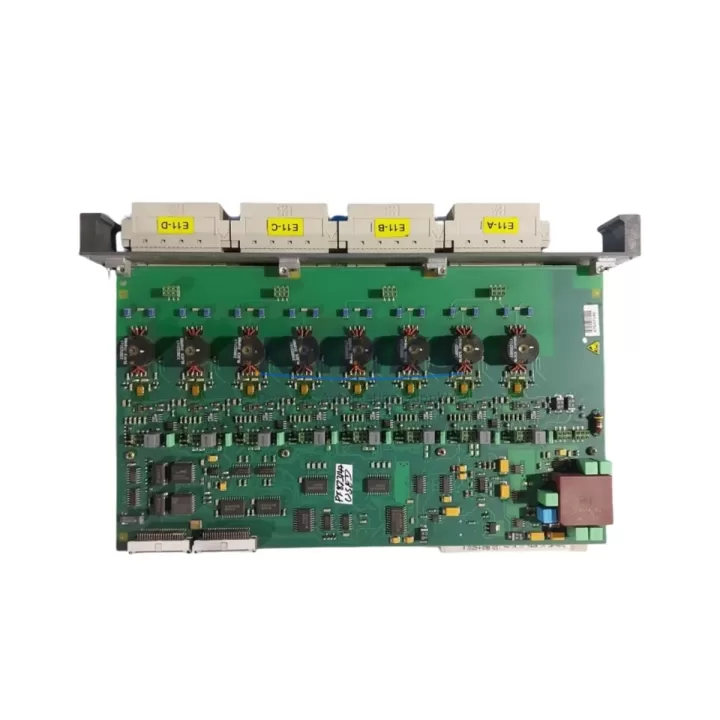
The ABB CAO10 is a 2-channel analog output module designed for the ABB AC500 programmable logic controller platform. As industrial facilities worldwide accelerate the retirement of aging DCS and PLC infrastructure, the CAO10 has become a critical component in structured migration programs — particularly for plants running legacy ABB Advant, AC31, or early-generation AC500 control architectures that require a verified, drop-in analog output solution without full system redesign.
In retrofit scenarios, the CAO10 is typically deployed to replace discontinued or end-of-life analog output cards where the original module is no longer available through standard distribution channels. Its compatibility with the AC500 backplane and CPU families — including the PM571, PM581, and PM591 — makes it a preferred choice for maintenance engineers who need to restore analog control loops without modifying existing ladder logic or function block programs. The module supports both current (4–20 mA) and voltage (0–10 V) output modes, which directly maps to the signal ranges used in legacy field instrumentation such as control valves, variable frequency drives, and positioners.
Before deploying the CAO10 as a replacement, engineers should verify several key parameters. Power supply capacity at the rack level must be confirmed — the AC500 system bus draws cumulative current from the CPU power supply, and adding or swapping analog modules can shift the total load. Terminal wiring compatibility should be checked against the original module’s I/O terminal assignment; in most AC500 installations, the CAO10 uses a standard removable terminal block that allows direct re-termination without rewiring field cables. Backplane slot addressing must be validated in the CPU configuration tool (ABB Automation Builder or PS501 Control Builder), as the module address is determined by physical slot position and must match the hardware configuration stored in the project file.
Program compatibility is generally maintained when replacing a like-for-like analog output module within the same AC500 generation, but engineers should confirm that the function block instances referencing the analog output channels — typically AO_WRITE or equivalent IEC 61131-3 blocks — are mapped to the correct I/O addresses. If the replacement involves a slot change or a different module variant, the hardware configuration in Automation Builder must be updated and re-downloaded to the CPU before the new module will respond correctly.
HMI screen updates are often overlooked during analog output module replacements. If the original system uses an ABB CP600 or CP400 series operator panel, or a third-party SCADA system connected via Modbus TCP or PROFIBUS DP, the tag database should be reviewed to confirm that analog output channel references remain valid after the hardware swap. Communication links between the AC500 CPU and upstream DCS or SCADA hosts — including OPC DA/UA servers and Ethernet/IP adapters — should be tested under live conditions before returning the loop to automatic control.
Installation space is rarely a constraint when replacing within the same AC500 rack, as the CAO10 occupies a standard single-slot position. However, in mixed-generation installations where the original rack includes modules from the AC500 V2 or V3 series alongside older variants, firmware version alignment between the CPU and I/O modules should be verified. ABB periodically releases firmware updates that affect module recognition and diagnostic behavior; running mismatched firmware versions can result in configuration errors or reduced diagnostic visibility in the engineering tool.
For facilities managing a broader control system upgrade, the CAO10 is frequently deployed alongside complementary AC500 I/O modules. Digital input modules such as the DI581-S and digital output modules such as the DO581-S are commonly replaced in the same maintenance window to consolidate the upgrade scope and reduce future downtime exposure. Analog input modules — particularly the CAI01 — are often replaced in parallel with the CAO10 when the control loop requires both measurement and actuation at the same field device. In installations where communication infrastructure is also being modernized, the CM589-PNIO PROFINET I/O communication module or the CM572-DP PROFIBUS DP master module may be included in the same retrofit package to support protocol migration from legacy fieldbus architectures.
All CAO10 units supplied by KNMKS are sourced from verified industrial channels, functionally tested prior to shipment, and covered by a support terms confirmed by quotation against manufacturing defects and operational failure. Stock is maintained across regional warehouses to support urgent replacement requirements with short lead times. Export documentation, including commercial invoices and packing lists, is prepared to support international customs clearance for global maintenance programs.
Migration Compatibility Table
| Parameter | Details |
|---|---|
| Module SKU | CAO10 |
| Platform Compatibility | ABB AC500 (PM571, PM581, PM591 and compatible CPUs) |
| Output Channels | 2 analog output channels |
| Signal Range | 4–20 mA / 0–10 V (configurable per channel) |
| Backplane Interface | AC500 standard I/O bus, single-slot installation |
| Terminal Wiring | Removable screw terminal block; field wiring re-terminates directly |
| Communication Compatibility | PROFIBUS DP, PROFINET I/O, Modbus TCP (via CPU communication modules) |
| Engineering Tool | ABB Automation Builder / PS501 Control Builder |
| Replacement Recommendation | Direct replacement for end-of-life AC500 analog output modules in same slot position |
| Commissioning Notes | Verify slot address, re-download hardware config, test loop under manual mode before auto |
| Firmware Alignment | Match CPU and I/O module firmware versions in Automation Builder before download |
| Support terms | 12 months from shipment date, covers manufacturing defects and operational failure |
Retrofit Planning for Existing Automation Systems
A structured retrofit plan for an AC500-based control system typically begins with a full audit of installed I/O modules across all racks. In a typical process control cabinet, the CAO10 analog output module works in conjunction with the CAI01 analog input module to form closed-loop control pairs for temperature, pressure, and flow regulation. Digital I/O modules — including the DI581-S for discrete sensor inputs and the DO581-S for relay or transistor outputs — are assessed in the same audit to identify modules approaching end-of-life or already discontinued.
Power distribution within the control cabinet must be reviewed before any module swap. The AC500 CPU power supply module — such as the PS501 or equivalent — has a defined current budget for the I/O bus. Adding or replacing analog modules with different power consumption profiles can push the rack beyond its rated capacity, requiring either a power supply upgrade or load redistribution across multiple racks. This is particularly relevant in dense installations where the rack is already near its current limit.
Communication infrastructure upgrades often accompany analog output module replacements. If the existing system uses PROFIBUS DP as the primary fieldbus, the CM572-DP communication module must be present and correctly configured in the CPU rack. For facilities migrating to Ethernet-based protocols, the CM589-PNIO PROFINET I/O module provides the network interface required to connect the AC500 to modern SCADA systems and distributed I/O stations. Signal isolators may be required at the field terminal level when replacing modules with different output impedance characteristics or when extending cable runs beyond the original design specification.
Programming cable and laptop access to the CPU is required during commissioning. The TK501 USB programming cable or equivalent Ethernet connection to the CPU’s built-in programming port is used to download the updated hardware configuration and verify I/O channel mapping before the system is returned to service. Commissioning engineers should retain a backup of the original project file before making any hardware configuration changes.
Downtime Control During System Migration
Minimizing unplanned downtime during an analog output module replacement requires a disciplined pre-outage preparation process. Before the maintenance window opens, the replacement CAO10 module should be bench-tested using a portable loop calibrator to verify that both output channels respond correctly across the full 4–20 mA range. This eliminates the risk of discovering a faulty replacement unit after the original module has already been removed from the rack.
The original PLC program should be backed up to a secure location — both the project file in Automation Builder and a binary backup from the CPU memory — before any hardware changes are made. If the CPU supports online program modification, non-critical analog output channels can sometimes be placed in manual hold mode, allowing the field device to maintain its last commanded position while the module is swapped. This technique is particularly effective for slow-responding processes such as temperature control loops where a brief interruption in the analog output signal does not immediately affect product quality or process safety.
After the CAO10 is installed and the hardware configuration is re-downloaded, each analog output channel should be verified in manual mode before switching the control loop back to automatic. The output value should be stepped across the full range — 4 mA, 12 mA, and 20 mA — while observing the field device response to confirm correct wiring polarity, signal scaling, and actuator direction. Only after all channels pass this verification should the CPU be returned to RUN mode with automatic control re-enabled.
For multi-rack installations or systems with redundant CPU configurations, the migration sequence should be planned to maintain at least one active control path throughout the maintenance window. Coordinating the module swap with the process control team to identify the lowest-risk time window — typically during a scheduled production break or shift changeover — further reduces the operational impact of the retrofit activity.
Retrofit Support FAQ
Q: Is the CAO10 a direct drop-in replacement for the previous analog output module in my AC500 rack?
A: In most AC500 installations, yes. The CAO10 uses the standard AC500 backplane interface and removable terminal block, so field wiring can be re-terminated directly without modification. The hardware configuration in Automation Builder must be updated to reflect the new module if the original module was a different variant, and the updated configuration must be downloaded to the CPU before the module will be recognized correctly.
Q: What pre-shipment testing is performed on CAO10 units?
A: All CAO10 modules supplied by KNMKS are functionally tested prior to shipment. Each unit is powered and both analog output channels are verified across the full output range. Test records are available upon request for quality-critical applications.
Q: How do I confirm wiring compatibility before removing the original module?
A: Document the existing terminal wiring using the original module’s I/O terminal diagram from the AC500 hardware manual. Compare the terminal assignment of the CAO10 against the original module. In standard AC500 configurations, the terminal block layout is consistent across analog output module variants, but this should always be verified against the specific module datasheets before proceeding.
Q: What support terms coverage applies to the CAO10?
A: KNMKS provides a support terms confirmed by quotation from the shipment date covering manufacturing defects and operational failure under normal industrial operating conditions. Support requests are supported with replacement or repair, subject to inspection of the returned unit. Contact admin@knmks.com to initiate a support terms claim or request technical support documentation.
© 2026 KNMKS. All rights reserved.
Original Source: https://knmks.com
Contact: admin@knmks.com | +86 18359268345
Product Identification
- Brand / Ecosystem
-
ABB
ABB - Model / Series
-
CAO10
AC500 Series - Product Family
- PLCs & Controllers
- Availability Status
- Available on request after model and quantity confirmation
- Inquiry Type
- B2B RFQ, replacement inquiry and project spare-part request
- Pre-Quote Check
- Exact SKU, brand, series, quantity, nameplate photos and destination country are checked before quotation
System Path
Where this product fits in the KNMKS automation structure.
Specification & Inquiry Focus
- Control platform
- PLC, PAC and modular controllers
- Common needs
- CPU, rack, power and I/O expansion
- Project support
- Replacement, cabinet build and maintenance
Buyer Confirmation
Information KNMKS checks before replying.
- Exact model
- CAO10
- Brand / ecosystem
- ABB
- Product family
- PLCs & Controllers
- Application note
- Replacement, maintenance, project build or spare-part list
- Useful photos
- Nameplate, installed unit, cabinet layout or connector side
- Delivery details
- Quantity, destination country and target schedule
Document Support
Files and notes can be confirmed during quotation.
- Product photos or nameplate confirmation when available
- Packing and delivery notes before quotation confirmation
- Support scope and delivery terms confirmed per inquiry
- Export document coordination for qualified B2B requests
Inquiry Support
- Model cross-checking before quotation
- CPU, power, rack and expansion module matching
- Support for replacement and project inquiry
What to Send Us
- Brand and exact model number: ABB CAO10
- Quantity and required delivery time
- Application, replacement requirement or nameplate photo
- Destination country and shipping preference
RFQ Preparation
This is a product inquiry page built for RFQ communication.
Fast Model Check
Send this model to KNMKS for confirmation.
Include quantity, destination country and photos if this is a maintenance replacement. The inquiry will be saved with a reference number after submission.
Brand & Compatibility Note
KNMKS displays automation product information for well-known industrial brand ecosystems and compatible replacement references. Brand names are used for product identification and compatibility reference only; final availability and commercial terms are confirmed per quotation.
 Manufacturing
 Machine Tools
 Packaging
 Energy & Power



 HMI & Displays
 Servo Systems
 Variable Frequency Drives
 Sensors