
Overview
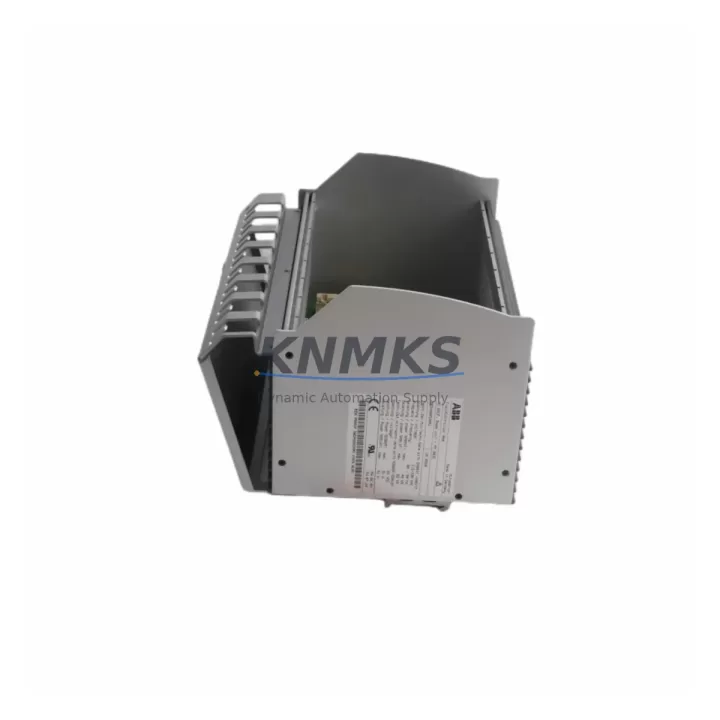
ABB BP03 7760052242 Migration-Ready I/O Base for S500: Legacy System Retrofit and Compatibility Upgrade
The ABB BP03 7760052242 is a proven I/O base unit designed for the ABB S500 and AC500 automation platform. As legacy control systems approach end-of-life and spare parts become increasingly difficult to source, the BP03 7760052242 serves as a reliable, migration-ready replacement for aging I/O infrastructure in manufacturing, process control, and building automation environments. Whether you are upgrading a distributed control cabinet, expanding an existing S500 rack, or restoring a system after an unplanned failure, this base unit provides the mechanical and electrical compatibility required to minimize engineering rework and reduce total downtime.
The BP03 base unit accommodates S500 series I/O modules and integrates directly into standard DIN-rail or panel-mount configurations. Its terminal layout and backplane interface are fully compatible with the AC500 controller family, including the PM554, PM564, and PM583 CPU modules. When replacing an older base unit in an existing installation, engineers should verify the terminal wiring map against the original I/O assignment list, confirm that the module address settings on the replacement unit match the legacy configuration, and check that the AC500 firmware version supports the specific I/O module types installed. Mismatched firmware can cause initialization errors that delay commissioning, so downloading the latest firmware from the ABB Library prior to site work is strongly recommended.
For installations that include communication modules such as the CI502-PNIO PROFINET adapter or the CI504-PNIO interface card, the BP03 base slot assignment must be consistent with the network node address configured in the PLC program. Any change to slot position will require a corresponding update in the hardware configuration within Automation Builder, ABB’s engineering software for the AC500 platform. If the original program was developed in an earlier version of Automation Builder, a project migration step may be necessary before the updated hardware configuration can be compiled and downloaded.
In retrofit projects involving older S500 racks with the TB521 or TB523 terminal base variants, the BP03 7760052242 provides a compatible upgrade path that preserves the existing field wiring. Technicians should document all terminal connections before removal, use the original I/O list as a reference during reinstallation, and perform a point-by-point continuity check before powering the system. Where the original installation used a PS501 or PS502 power supply module, verify that the total current draw of the new I/O configuration does not exceed the rated output of the existing power supply. If the load budget is marginal, replacing the power supply with a higher-capacity unit such as the PS560 should be considered as part of the upgrade scope.
HMI integration is another critical checkpoint during migration. If the control system includes a CP600 or CP620 operator panel connected via Modbus TCP or PROFINET, the I/O variable mapping in the HMI project must be validated against the updated PLC program after the hardware change. Screen objects linked to I/O addresses that have shifted due to slot reassignment will display incorrect values or fail to respond until the HMI project is updated and re-downloaded. Scheduling HMI validation as a dedicated step in the commissioning checklist prevents this from becoming a source of unplanned downtime after the physical installation is complete.
All units supplied by KNMKS are sourced from verified channels, inspected prior to shipment, and covered by a support terms confirmed by quotation. Pre-shipment functional testing is performed to confirm that the base unit passes power-on diagnostics and that all module slots are mechanically sound. Stock is maintained to support both immediate replacement needs and longer-term spare parts agreements, with supply commitments available for 12 to 36 months to support multi-site maintenance programs.
Migration Compatibility Table
| Parameter | Details |
|---|---|
| Compatible Platform | ABB S500 / AC500 |
| Compatible CPUs | PM554, PM564, PM573, PM583 |
| Backplane Interface | S500 standard backplane bus |
| Terminal Compatibility | Compatible with TB521, TB523 terminal base wiring |
| Communication Modules | CI502-PNIO, CI504-PNIO (slot assignment must match PLC config) |
| Installation Type | DIN-rail or panel mount |
| Firmware Requirement | Verify AC500 firmware version supports installed I/O module types |
| Engineering Software | ABB Automation Builder (project migration may be required for older versions) |
| Replacement Recommendation | Direct drop-in for legacy BP03 base units; verify slot address and wiring map |
| Pre-Shipment Testing | Power-on diagnostics and slot integrity check performed on all units |
| Support terms | 12 months from date of shipment |
| Origin | Germany (DE) |
Retrofit Planning for Existing Automation Systems
A successful retrofit begins with a complete audit of the existing control cabinet. For systems built around the ABB AC500 platform, this means documenting the current rack layout, recording the I/O module types and their slot positions, and capturing the terminal wiring assignments for every field device connected to the base unit being replaced. The BP03 7760052242 base unit is mechanically compatible with standard S500 I/O modules including digital input modules such as the DI524 and digital output modules such as the DO524. Analog modules in the AI523 and AO523 families are also supported, making the BP03 a versatile base for mixed I/O configurations common in process and machine control applications.
Where the existing installation includes a CI502-PNIO or CI504-PNIO communication module for PROFINET connectivity, the network configuration in Automation Builder must reflect the updated slot assignment after the base unit replacement. If the system also uses a CM589-PNIO coupler for distributed I/O over PROFINET, the device name and IP address settings should be verified in the network scan before the system is returned to service. For installations with Modbus RTU communication via a CI501-MODTCP or similar adapter, the baud rate, parity, and station address settings should be recorded before the hardware change and restored afterward.
Power budget verification is essential when adding I/O modules to the new base unit. The PS560 power supply module provides sufficient capacity for most expanded configurations, but installations with a high density of analog or specialty modules should calculate the total current draw before finalizing the module selection. Signal isolators may be required where field wiring runs are long or where electrical noise from variable frequency drives or other high-power equipment could affect signal integrity on analog input channels.
Downtime Control During System Migration
Minimizing production downtime during a control system migration requires careful pre-planning and a structured commissioning sequence. Before any hardware is removed, the existing PLC program should be backed up from the AC500 CPU using Automation Builder, and the backup file should be stored in a location accessible to the commissioning engineer during the site work. If the system is running a time-critical process, coordinating the changeover with the production schedule to align with a planned maintenance window is strongly preferred over an emergency replacement scenario.
During the physical swap, labeling all field wiring terminals before disconnection eliminates the risk of miswiring during reinstallation. Using the original I/O list as a cross-reference during reconnection and performing a continuity check before power-up adds a layer of verification that reduces the likelihood of a fault on first power-on. After the new BP03 base unit is installed and the I/O modules are seated, the PLC program should be downloaded fresh from the backup rather than relying on the residual program in the CPU, particularly if the CPU was also replaced as part of the upgrade.
Once the system is powered, a structured I/O test using the force function in Automation Builder allows each input and output to be verified against the physical field device before the system is handed back to operations. This step is especially important for safety-related outputs and for analog channels where scaling and offset values must be confirmed. Documenting the commissioning results and updating the as-built drawings to reflect the new hardware configuration completes the migration and provides a reliable reference for future maintenance activities.
Retrofit Support FAQ
Q: Is the ABB BP03 7760052242 a direct replacement for older S500 base units?
A: Yes. The BP03 7760052242 is designed as a compatible replacement for legacy S500 base units within the AC500 platform. Verify the slot address configuration and terminal wiring map against the original installation before powering up.
Q: What commissioning steps are required after installing the BP03 in an existing system?
A: After physical installation, download the backed-up PLC program to the AC500 CPU, verify the hardware configuration in Automation Builder matches the installed module types and slot positions, and perform a point-by-point I/O test using the force function before returning the system to service.
Q: Does KNMKS provide pre-shipment testing for the BP03 7760052242?
A: Yes. All units undergo power-on diagnostics and slot integrity checks before shipment. Each unit is covered by a support terms confirmed by quotation from the date of shipment, and stock availability can be confirmed for both immediate orders and long-term spare parts agreements.
Q: What should I check regarding firmware compatibility before installing the BP03?
A: Confirm that the AC500 CPU firmware version supports the specific I/O module types you plan to install in the BP03 base. If the existing Automation Builder project was created in an older software version, a project migration step may be required before the updated hardware configuration can be compiled and downloaded to the controller.
© 2026 KNMKS. All rights reserved.
Original Source: https://knmks.com
Contact: admin@knmks.com | +86 18359268345
Product Identification
- Brand / Ecosystem
-
ABB
ABB - Model / Series
-
BP03 7760052242
AC500 Series - Product Family
- PLCs & Controllers
- Availability Status
- Available on request after model and quantity confirmation
- Inquiry Type
- B2B RFQ, replacement inquiry and project spare-part request
- Pre-Quote Check
- Exact SKU, brand, series, quantity, nameplate photos and destination country are checked before quotation
System Path
Where this product fits in the KNMKS automation structure.
Specification & Inquiry Focus
- Control platform
- PLC, PAC and modular controllers
- Common needs
- CPU, rack, power and I/O expansion
- Project support
- Replacement, cabinet build and maintenance
Buyer Confirmation
Information KNMKS checks before replying.
- Exact model
- BP03 7760052242
- Brand / ecosystem
- ABB
- Product family
- PLCs & Controllers
- Application note
- Replacement, maintenance, project build or spare-part list
- Useful photos
- Nameplate, installed unit, cabinet layout or connector side
- Delivery details
- Quantity, destination country and target schedule
Document Support
Files and notes can be confirmed during quotation.
- Product photos or nameplate confirmation when available
- Packing and delivery notes before quotation confirmation
- Support scope and delivery terms confirmed per inquiry
- Export document coordination for qualified B2B requests
Inquiry Support
- Model cross-checking before quotation
- CPU, power, rack and expansion module matching
- Support for replacement and project inquiry
What to Send Us
- Brand and exact model number: ABB BP03 7760052242
- Quantity and required delivery time
- Application, replacement requirement or nameplate photo
- Destination country and shipping preference
RFQ Preparation
This is a product inquiry page built for RFQ communication.
Fast Model Check
Send this model to KNMKS for confirmation.
Include quantity, destination country and photos if this is a maintenance replacement. The inquiry will be saved with a reference number after submission.
Brand & Compatibility Note
KNMKS displays automation product information for well-known industrial brand ecosystems and compatible replacement references. Brand names are used for product identification and compatibility reference only; final availability and commercial terms are confirmed per quotation.
 Manufacturing
 Machine Tools
 Packaging
 Energy & Power



 HMI & Displays
 Servo Systems
 Variable Frequency Drives
 Sensors