
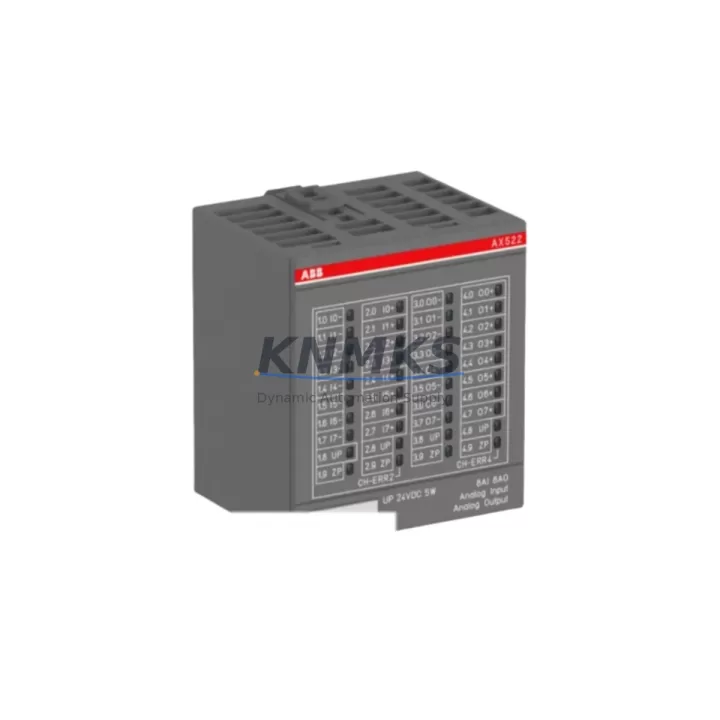
Overview
ABB AX522 Migration-Ready PROFIBUS DP Module for AC500: Legacy System Retrofit & Compatibility Upgrade
The ABB AX522 is a PROFIBUS DP communication module designed for the ABB AC500 PLC platform, widely deployed in industrial automation environments across manufacturing, process control, water treatment, and energy sectors. As legacy PROFIBUS DP networks age and original hardware reaches end-of-life, the AX522 serves as a critical migration-ready replacement component — enabling engineers to restore, extend, and modernize existing control architectures without requiring a full system overhaul.
Whether you are replacing a failed communication module in a running production line, upgrading a legacy AC500 V1 rack to support expanded I/O, or migrating from an older third-party PROFIBUS master to an ABB-native solution, the AX522 provides a reliable, field-proven path forward. Its compatibility with the AC500 CPU modules — including the PM554, PM564, and PM583 series — means that in most retrofit scenarios, the module can be installed into an existing backplane slot without requiring structural changes to the control cabinet.
Before beginning any retrofit or replacement project involving the AX522, engineers should verify several key parameters on-site. Power supply capacity is the first checkpoint: the AC500 rack’s internal bus must be able to support the additional current draw of the AX522 alongside existing I/O modules such as the DC532 digital input module or the AO523 analog output module. Terminal wiring on the PROFIBUS connector must be confirmed against the original network topology — particularly the bus termination resistors at both ends of the PROFIBUS segment, which are critical for signal integrity at higher baud rates.
Backplane interface compatibility should be confirmed by checking the AC500 rack generation. The AX522 is designed for the standard AC500 backplane and is not directly interchangeable with older S500 I/O bus architectures without an appropriate coupler. Module addressing must be configured via the programming tool — typically ABB Automation Builder or the legacy PS501 Control Builder — to ensure the PROFIBUS DP master address does not conflict with existing network nodes. If the original system was programmed using an older version of Control Builder, a firmware compatibility check on the CPU module is recommended before commissioning the AX522.
HMI screen updates are often overlooked during PROFIBUS module replacements. If the existing HMI — such as an ABB CP600 panel or a third-party SCADA terminal — communicates with the PLC via a separate Ethernet or serial link, the communication link itself may not be affected. However, if the HMI reads process data tags that are sourced from PROFIBUS slave devices, engineers should verify that the tag mapping remains intact after the AX522 is commissioned and the PROFIBUS network is re-established. A full I/O force test and tag scan is recommended before returning the system to automatic mode.
Installation space confirmation is essential in densely populated control cabinets. The AX522 occupies a single slot on the AC500 backplane. If the existing rack is fully populated, a rack expansion using an additional TB523 or TB524 terminal base may be required. In such cases, the physical dimensions of the expanded rack must be verified against the available DIN rail space inside the cabinet before ordering.
Firmware version alignment is a common source of commissioning delays. The AX522 module firmware must be compatible with the installed CPU firmware version. ABB publishes compatibility matrices in the AC500 system documentation; engineers should cross-reference the CPU firmware version — readable via Automation Builder’s online device view — against the AX522 firmware release notes before installation. In most cases, a firmware update can be performed via the USB programming port on the CPU without removing the module from the rack.
Field commissioning of the AX522 typically involves configuring the PROFIBUS DP master parameters — including baud rate, station address, and GSD file assignment for each slave device — within the Automation Builder hardware configuration editor. After downloading the updated configuration to the CPU, a PROFIBUS diagnostic scan should be performed to confirm that all slave devices are responding correctly. Common slave devices in AC500-based systems include ABB ACSM1 and ACS880 variable frequency drives, remote I/O stations using the DP/DP coupler, and third-party instruments with PROFIBUS DP interfaces.
Migration Compatibility Table
| Parameter | Details |
|---|---|
| Module SKU | AX522 |
| Brand / Series | ABB / AC500 |
| Communication Protocol | PROFIBUS DP (Master/Slave) |
| Backplane Interface | AC500 standard backplane (not compatible with S500 I/O bus without coupler) |
| Compatible CPUs | PM554, PM564, PM572, PM583, PM591, PM592 series |
| Installation | Single slot, DIN rail mounted via AC500 rack (TB523 / TB524 terminal base) |
| Programming Tool | ABB Automation Builder / PS501 Control Builder |
| Baud Rate Support | 9.6 kbps – 12 Mbps |
| Replacement Recommendation | Direct slot replacement for failed or obsolete AX522 units in existing AC500 racks |
| Commissioning Checklist | Verify bus termination, GSD file assignment, station address, firmware version, I/O force test |
| Support terms | 12 months from date of shipment |
| Origin | Germany |
Retrofit Planning for Existing Automation Systems
A successful AX522 retrofit begins with a thorough audit of the existing control architecture. In a typical AC500-based control cabinet, the AX522 sits alongside a mix of digital and analog I/O modules — commonly the DC532 24 VDC digital input module and the DA501 digital output module — all mounted on a shared backplane powered by a dedicated 24 VDC power supply unit. Before removing the failed or obsolete communication module, engineers should document the current PROFIBUS network topology, including the number of active slave stations, their GSD file versions, and the current baud rate setting.
In systems where the AC500 CPU communicates with an ABB ACS880 variable frequency drive via PROFIBUS DP, the AX522 acts as the DP master, polling the drive’s process data objects (PDOs) on a cyclic basis. After replacing the AX522, the drive’s PROFIBUS node address and parameter set should be verified using the drive’s local keypad or the DriveStudio commissioning tool before re-enabling automatic control. Similarly, if the system includes a CI590-CS31-HA CS31 bus coupler for remote I/O expansion, the coupler’s configuration must be re-validated after the PROFIBUS master is restored.
For systems that also require Ethernet connectivity alongside PROFIBUS DP, the CM589-PNIO PROFINET I/O communication module can be installed in a parallel slot on the same AC500 rack, allowing simultaneous PROFIBUS DP and PROFINET communication without replacing the CPU. This dual-protocol approach is particularly useful in phased migration projects where some field devices have already been upgraded to PROFINET while legacy PROFIBUS slaves remain in service.
Signal isolation requirements should also be assessed during retrofit planning. In environments with significant electrical noise — such as those with large motor drives or welding equipment — a signal isolator or PROFIBUS repeater may be required between the AX522 and the field device segment to maintain reliable communication. The programming cable connection to the CPU’s USB or serial port should be tested prior to the retrofit to ensure that the Automation Builder project can be downloaded without interruption during the commissioning window.
Downtime Control During System Migration
Minimizing unplanned downtime is the primary operational concern in any PROFIBUS module replacement. The AX522 retrofit process is designed to be completed within a planned maintenance window, typically two to four hours for an experienced automation engineer familiar with the AC500 platform and Automation Builder toolchain.
The recommended approach is to prepare the replacement AX522 offline before the maintenance window begins. This includes pre-loading the correct firmware version, importing the existing Automation Builder project, and verifying the hardware configuration offline against the documented network topology. Having the GSD files for all PROFIBUS slave devices pre-loaded into the Automation Builder project library eliminates one of the most common sources of commissioning delay.
During the physical swap, the existing CPU program is preserved in the CPU’s non-volatile memory — the AC500 CPU retains its program and data even when the communication module is removed, provided the CPU power supply remains uninterrupted. This means that in most cases, the PROFIBUS module can be replaced without losing the control program, significantly reducing the risk of data loss or configuration errors during the retrofit.
After installing the AX522 and downloading the updated hardware configuration, a structured commissioning sequence should be followed: first, verify that the PROFIBUS diagnostic LED on the AX522 indicates a healthy bus; second, confirm that all slave devices are visible in the Automation Builder online device view; third, perform a controlled I/O force test on a representative sample of inputs and outputs to verify end-to-end signal integrity; and finally, return the system to automatic mode under close supervision for the first production cycle. This structured approach protects the original program logic, maintains field control continuity, and reduces the risk of undetected wiring or configuration errors causing a secondary fault after the maintenance window closes.
All units shipped from our inventory undergo pre-shipment functional testing to verify communication interface integrity and module identification. Stock is available for immediate dispatch, supporting urgent replacement requirements with short lead times.
Retrofit Support FAQ
Q1: Is the AX522 a direct drop-in replacement for an existing AX522 in an AC500 rack?
Yes. The AX522 is a slot-compatible replacement for existing AX522 units installed in AC500 racks. After physical installation, the existing Automation Builder hardware configuration can be downloaded to the CPU without modification, provided the firmware versions are compatible. A PROFIBUS diagnostic scan is recommended after commissioning to confirm all slave devices are responding correctly.
Q2: What commissioning steps are required after installing the AX522?
After physical installation, connect to the CPU via Automation Builder, download the hardware configuration, and perform a PROFIBUS bus scan to verify slave device connectivity. Check the AX522 diagnostic LEDs for bus status, confirm baud rate and station address settings, and perform an I/O force test before returning the system to automatic mode. If any slave devices are not responding, verify bus termination at both ends of the PROFIBUS segment.
Q3: What is the support terms coverage for the AX522?
All AX522 units supplied by KNMKS carry a support terms confirmed by quotation from the date of shipment. This covers manufacturing defects and functional failures under normal operating conditions. Pre-shipment functional testing is performed on all units prior to dispatch. For support requests or technical support, contact admin@knmks.com.
Q4: Is stock available for immediate shipment?
Yes. The AX522 is held availability confirmed by RFQ across multiple warehouse locations to support urgent replacement requirements. Orders placed before the daily dispatch cutoff are typically shipped the same business day. Global shipping is available with tracking. Contact admin@knmks.com or call +86 18359268345 to confirm current stock levels and lead times for your region.
© 2026 KNMKS. All rights reserved.
Original Source: https://knmks.com
Contact: admin@knmks.com | +86 18359268345
Product Identification
- Brand / Ecosystem
-
ABB
ABB - Model / Series
-
AX522
AC500 Series - Product Family
- PLCs & Controllers
- Availability Status
- Available on request after model and quantity confirmation
- Inquiry Type
- B2B RFQ, replacement inquiry and project spare-part request
- Pre-Quote Check
- Exact SKU, brand, series, quantity, nameplate photos and destination country are checked before quotation
System Path
Where this product fits in the KNMKS automation structure.
Specification & Inquiry Focus
- Control platform
- PLC, PAC and modular controllers
- Common needs
- CPU, rack, power and I/O expansion
- Project support
- Replacement, cabinet build and maintenance
Buyer Confirmation
Information KNMKS checks before replying.
- Exact model
- AX522
- Brand / ecosystem
- ABB
- Product family
- PLCs & Controllers
- Application note
- Replacement, maintenance, project build or spare-part list
- Useful photos
- Nameplate, installed unit, cabinet layout or connector side
- Delivery details
- Quantity, destination country and target schedule
Document Support
Files and notes can be confirmed during quotation.
- Product photos or nameplate confirmation when available
- Packing and delivery notes before quotation confirmation
- Support scope and delivery terms confirmed per inquiry
- Export document coordination for qualified B2B requests
Inquiry Support
- Model cross-checking before quotation
- CPU, power, rack and expansion module matching
- Support for replacement and project inquiry
What to Send Us
- Brand and exact model number: ABB AX522
- Quantity and required delivery time
- Application, replacement requirement or nameplate photo
- Destination country and shipping preference
RFQ Preparation
This is a product inquiry page built for RFQ communication.
Fast Model Check
Send this model to KNMKS for confirmation.
Include quantity, destination country and photos if this is a maintenance replacement. The inquiry will be saved with a reference number after submission.
Brand & Compatibility Note
KNMKS displays automation product information for well-known industrial brand ecosystems and compatible replacement references. Brand names are used for product identification and compatibility reference only; final availability and commercial terms are confirmed per quotation.
 Manufacturing
 Machine Tools
 Packaging
 Energy & Power



 HMI & Displays
 Servo Systems
 Variable Frequency Drives
 Sensors