
Overview
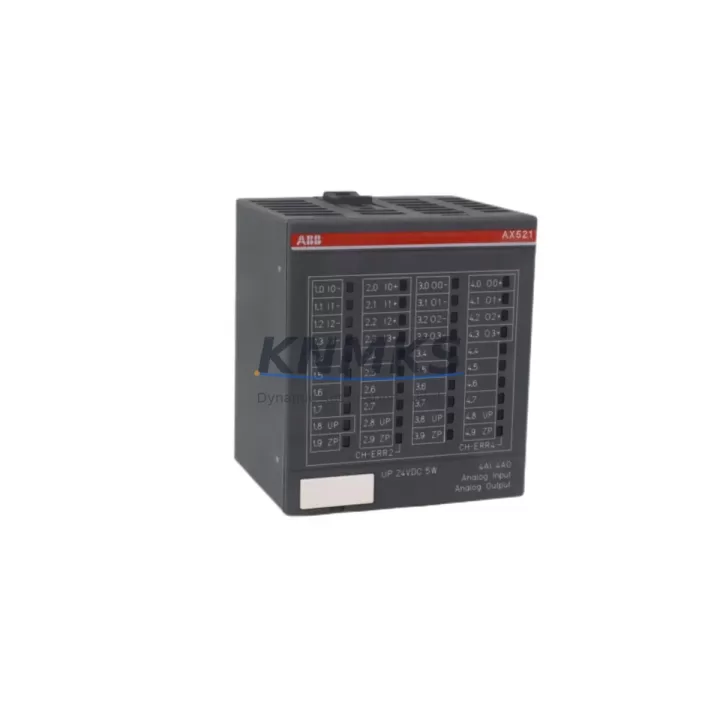
ABB AX521 Migration-Ready Analog I/O for Legacy Control Systems
The ABB AX521 is a high-precision analog I/O module designed for the ABB AC500 PLC platform, offering 8 analog inputs and 4 analog outputs with support for 4–20 mA current loops and ±10 V voltage signals. As legacy control systems built around earlier ABB Advant, S500, or third-party analog I/O platforms approach end-of-life, the AX521 provides a validated migration path that preserves signal integrity, reduces rewiring effort, and maintains compatibility with existing AC500 CPU modules such as the PM571, PM581, and PM591.
For engineers managing brownfield retrofits, the AX521 is frequently selected as a direct functional replacement for discontinued analog modules in aging control cabinets. Its compact DIN-rail form factor and standard terminal block layout allow it to be installed within existing panel space without structural modification, which is a critical consideration when downtime windows are measured in hours rather than days.
Migration Compatibility Table
| Parameter | Details |
|---|---|
| Module Type | Analog I/O — 8AI / 4AO |
| Signal Range | 4–20 mA / ±10 V (configurable per channel) |
| Backplane Interface | AC500 S500 I/O bus (compatible with TB511, TB521 terminal units) |
| Communication Compatibility | PROFIBUS-DP, Modbus RTU, CANopen via AC500 CPU |
| Power Supply Requirement | 24 V DC via backplane; verify PS501/PS502 power module capacity before installation |
| Installation Footprint | Standard S500 slot; confirm rack slot availability on TB511 or TB521 |
| Firmware Compatibility | Compatible with AC500 firmware V2.x and above; verify CPU firmware version before commissioning |
| Replacement Recommendation | Suitable replacement for legacy ABB S500 AI810, AI820, and equivalent third-party analog modules |
| Commissioning Notes | Module address set via hardware DIP switch; update I/O configuration in PS501 Control Builder Plus |
| Support terms | support terms confirmed by quotation — tested and verified before shipment |
Retrofit Planning for Existing Automation Systems
A successful AX521 retrofit begins well before the module arrives on site. The first step is a thorough audit of the existing control cabinet: confirm that the TB521 terminal unit or TB511 base unit is present and undamaged, and verify that the AC500 CPU — typically a PM571 or PM581 — has sufficient firmware version to recognize the AX521 without a software patch. In many legacy installations, the CPU firmware has not been updated since initial commissioning, and an incompatible firmware version is one of the most common causes of failed module recognition during startup.
Power budget verification is equally important. The PS501 or PS502 power supply module feeding the S500 I/O bus must have sufficient headroom to support the AX521’s 24 V DC draw alongside existing digital I/O modules such as the DC532 or DA501. Overloaded power supplies are a frequent but preventable cause of intermittent faults in retrofitted systems.
Terminal wiring should be mapped channel by channel before removal of the legacy module. The AX521 uses a standard screw-terminal layout on the TB521 terminal unit, and in most cases field wiring can be transferred directly without re-labeling, provided the original wiring documentation is available. Where documentation is missing, a signal tracer or loop calibrator should be used to verify each channel’s source and range before reconnection.
For systems communicating over PROFIBUS-DP or Modbus RTU, the module address must be confirmed against the existing network configuration. The AX521’s hardware address is set via DIP switch on the module body, and it must match the address assigned in the PLC program within Control Builder Plus. Mismatched addresses will cause the CPU to report a configuration fault on startup, which can be resolved without a full system restart in most AC500 firmware versions.
HMI screens referencing analog values from the replaced module should be reviewed in parallel. If the original system used an ABB CP600 or CP620 operator panel, verify that the tag addresses mapped to the legacy analog module are updated to reflect the AX521’s new I/O mapping. In systems where the HMI communicates directly with the CPU over Ethernet IP or serial RS-232, this update can typically be completed offline and downloaded during the same maintenance window as the module swap.
Finally, signal isolators or barriers installed upstream of the legacy analog module — particularly in hazardous area applications — should be checked for compatibility with the AX521’s input impedance. In some installations, a Zener barrier or galvanic isolator may need to be reconfigured or replaced to maintain loop accuracy within the ±0.1% specification of the AX521.
Downtime Control During System Migration
Minimizing downtime during an AX521 migration requires a structured pre-commissioning approach. Before the maintenance window opens, the replacement module should be bench-tested using a loop calibrator to verify all 8 analog input channels and 4 analog output channels against their configured ranges. This pre-shipment verification — which is standard practice for all modules supplied by KNMKS — eliminates the risk of discovering a faulty module after the legacy unit has already been removed from the rack.
The original PLC program should be exported and archived before any hardware change is made. In AC500 systems, this is done through Control Builder Plus by exporting the full project including I/O configuration, symbol tables, and HMI tag lists. This archive serves as the recovery baseline if the migration encounters an unexpected compatibility issue.
Where process continuity is critical — for example, in temperature control loops or flow measurement applications — consider placing the affected control loops in manual mode before removing the legacy module. This prevents the CPU from generating spurious output signals during the module swap interval. Once the AX521 is seated and the terminal unit is reconnected, the loops can be returned to automatic mode after a brief signal verification step.
In multi-rack AC500 installations, the AX521 can be hot-inserted in some firmware configurations, allowing the swap to be completed without a full CPU restart. Confirm this capability against the specific CPU firmware version in use before relying on hot-insertion during a live migration. Where hot-insertion is not supported, a controlled CPU restart with a pre-verified program download is the safest approach and typically adds fewer than 10 minutes to the total migration window.
Retrofit Support FAQ
Q: Is the AX521 a direct drop-in replacement for the ABB AI810 or AI820 analog input modules?
A: The AX521 is functionally compatible with the AI810 and AI820 in most AC500 applications, but it is a combined analog I/O module (8AI + 4AO) rather than a pure input module. Verify that the TB521 terminal unit is installed, as the AX521 requires the TB521 base rather than the TB511 used by some legacy input-only modules. No wiring changes are required if the terminal unit is already present.
Q: What commissioning steps are required after installing the AX521?
A: After physical installation, set the module address via the DIP switch on the module body to match the address defined in the Control Builder Plus I/O configuration. Power up the rack and confirm that the CPU recognizes the module without a configuration fault. Perform a channel-by-channel signal verification using a loop calibrator before returning the system to automatic operation.
Q: Can the AX521 operate on the same PROFIBUS-DP network as the legacy module it replaces?
A: Yes. The AX521 communicates with the AC500 CPU over the S500 I/O bus, not directly over PROFIBUS-DP. The CPU handles all fieldbus communication, so the PROFIBUS-DP network configuration does not need to be modified when replacing an analog I/O module within the same rack.
Q: What support terms and testing does KNMKS provide for the AX521?
A: All AX521 modules supplied by KNMKS are tested and verified before shipment, covering signal accuracy across all channels, backplane communication, and power consumption. A support terms confirmed by quotation is provided from the date of delivery. In-stock units are available for immediate dispatch, and expedited shipping is available for urgent retrofit projects.
© 2026 KNMKS. All rights reserved.
Original Source: https://knmks.com
Contact: admin@knmks.com | +86 18359268345
Product Identification
- Brand / Ecosystem
-
ABB
ABB - Model / Series
-
AX521
AC500 Series - Product Family
- PLCs & Controllers
- Availability Status
- Available on request after model and quantity confirmation
- Inquiry Type
- B2B RFQ, replacement inquiry and project spare-part request
- Pre-Quote Check
- Exact SKU, brand, series, quantity, nameplate photos and destination country are checked before quotation
System Path
Where this product fits in the KNMKS automation structure.
Specification & Inquiry Focus
- Control platform
- PLC, PAC and modular controllers
- Common needs
- CPU, rack, power and I/O expansion
- Project support
- Replacement, cabinet build and maintenance
Buyer Confirmation
Information KNMKS checks before replying.
- Exact model
- AX521
- Brand / ecosystem
- ABB
- Product family
- PLCs & Controllers
- Application note
- Replacement, maintenance, project build or spare-part list
- Useful photos
- Nameplate, installed unit, cabinet layout or connector side
- Delivery details
- Quantity, destination country and target schedule
Document Support
Files and notes can be confirmed during quotation.
- Product photos or nameplate confirmation when available
- Packing and delivery notes before quotation confirmation
- Support scope and delivery terms confirmed per inquiry
- Export document coordination for qualified B2B requests
Inquiry Support
- Model cross-checking before quotation
- CPU, power, rack and expansion module matching
- Support for replacement and project inquiry
What to Send Us
- Brand and exact model number: ABB AX521
- Quantity and required delivery time
- Application, replacement requirement or nameplate photo
- Destination country and shipping preference
RFQ Preparation
This is a product inquiry page built for RFQ communication.
Fast Model Check
Send this model to KNMKS for confirmation.
Include quantity, destination country and photos if this is a maintenance replacement. The inquiry will be saved with a reference number after submission.
Brand & Compatibility Note
KNMKS displays automation product information for well-known industrial brand ecosystems and compatible replacement references. Brand names are used for product identification and compatibility reference only; final availability and commercial terms are confirmed per quotation.
 Manufacturing
 Machine Tools
 Packaging
 Energy & Power



 HMI & Displays
 Servo Systems
 Variable Frequency Drives
 Sensors