
Overview
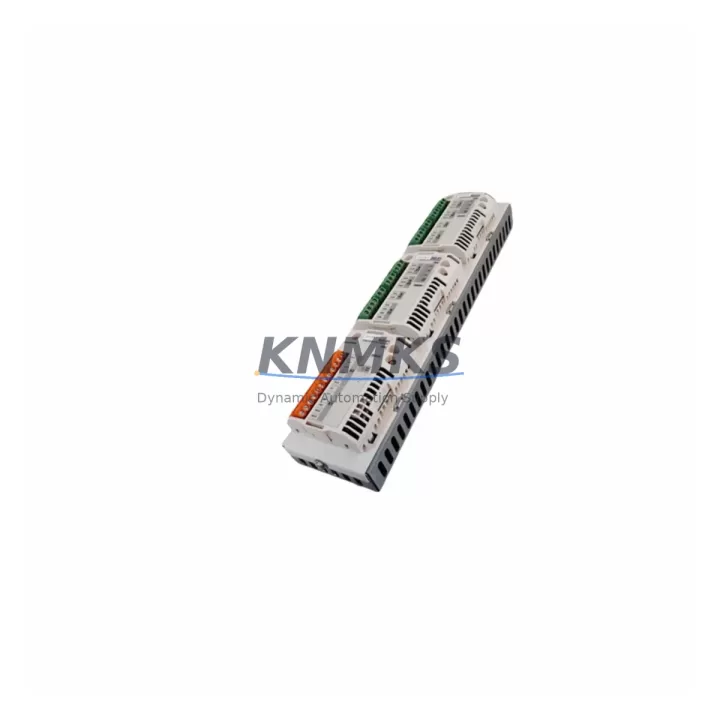
ABB AIMA-01 64535943D Migration-Ready I/O Adapter for Legacy Control Systems
The ABB AIMA-01 (part number 64535943D) is a migration-ready I/O module adapter engineered for seamless integration into ABB AC500 PLC platforms and legacy distributed control architectures. As automation facilities face increasing pressure to modernize aging control infrastructure, the AIMA-01 64535943D serves as a critical interface component that bridges discontinued I/O modules with current-generation AC500 CPUs and communication backplanes. Whether you are executing a phased plant-wide upgrade or responding to an emergency spare parts shortage, this adapter provides the electrical and mechanical compatibility required to restore system continuity with minimal downtime.
The AIMA-01 64535943D is specifically designed to address the challenges that arise when legacy ABB I/O modules reach end-of-life or end-of-support status. Engineering teams frequently encounter situations where original equipment is no longer available through standard distribution channels, leaving critical production lines exposed to unplanned outages. This adapter enables facilities to retain existing field wiring, terminal blocks, and cabinet layouts while upgrading the control layer — a significant advantage when rerouting field cables is cost-prohibitive or operationally impractical.
Each unit is pre-tested prior to shipment, verified against ABB AC500 compatibility specifications, and backed by a support terms confirmed by quotation. Multi-region stock is maintained to support fast global dispatch for both emergency replacements and scheduled maintenance windows.
Migration Compatibility Table
| Parameter | Specification / Recommendation |
|---|---|
| Compatible Platform | ABB AC500 PLC Series (PM571, PM581, PM591, PM595) |
| Part Number | AIMA-01 / 64535943D |
| Module Function | I/O Interface Adapter for AC500 Backplane Integration |
| Backplane Interface | AC500 S500 I/O bus; verify slot addressing before installation |
| Terminal Wiring | Retain existing field terminal blocks where possible; verify conductor cross-section compliance |
| Power Supply Requirement | 24 VDC via AC500 backplane; confirm rack power budget before adding modules |
| Communication Compatibility | PROFIBUS DP, Modbus RTU, CS31 (platform-dependent); verify CPU firmware version |
| Installation Space | Standard AC500 DIN rail mounting; confirm cabinet depth and rail spacing |
| Firmware Compatibility | Confirm AC500 CPU firmware ≥ minimum supported version for AIMA-01 hardware revision D |
| Replacement Recommendation | Direct drop-in for legacy AIMA-01 variants; re-parameterize module address in Automation Builder |
| Commissioning Focus | Module address assignment, I/O mapping verification, HMI tag re-binding, loop test |
| Support terms | 12 Months — covers manufacturing defects; pre-shipment functional test included |
Retrofit Planning for Existing Automation Systems
Successful integration of the AIMA-01 64535943D into an existing AC500 control system requires a structured retrofit plan that accounts for both hardware and software dependencies. Before removing the legacy adapter, engineering teams should document the current module address configuration within ABB Automation Builder and export a backup of the active PLC program. This ensures that the replacement module can be assigned the identical logical address, preserving I/O mapping without requiring changes to the control application.
On the hardware side, the AC500 backplane — typically a TB521 or TB541 terminal base — must be inspected for mechanical condition and connector integrity. If the terminal base shows signs of wear or oxidation, replacing it alongside the AIMA-01 adapter is strongly recommended to avoid intermittent signal faults after commissioning. The AC500 power supply module (for example, the CP502 or CP503 series) should also be evaluated: adding or replacing I/O adapters changes the total current draw on the 24 VDC backplane bus, and exceeding the rated output of the power supply module will cause unpredictable system behavior.
For facilities running PROFIBUS DP networks, the AIMA-01 retrofit must be coordinated with the PROFIBUS master configuration. If the legacy adapter was registered as a GSD device in the master (such as an ABB AC500 CPU acting as DP master or a third-party PROFIBUS master), the GSD file and station address assignment must be updated to reflect the new hardware revision. Similarly, installations using CS31 serial bus communication should verify that the CS31 coupler module — often a CI590-CS31-HA — is configured to recognize the updated I/O adapter address range.
HMI integration is another critical checkpoint. Operator panels connected via Modbus RTU or OPC-UA to the AC500 CPU may reference specific I/O register addresses that correspond to the AIMA-01 channel assignments. After replacing the adapter, HMI tag databases should be audited to confirm that all analog and digital I/O tags resolve correctly. In systems using ABB CP600 or CP620 operator panels, this verification can be performed through the Panel Builder 600 engineering tool before the system is returned to service.
Signal isolation requirements should also be reviewed during retrofit planning. In mixed-signal environments where the AIMA-01 handles both analog process signals and discrete digital I/O, signal isolators or barriers may be required to prevent ground loops or noise interference — particularly in installations adjacent to variable frequency drives or high-current motor starters.
Downtime Control During System Migration
Minimizing unplanned downtime during an AIMA-01 64535943D replacement is achievable through disciplined pre-migration preparation. The most effective approach is to complete all software and documentation tasks — program backup, module address recording, HMI tag audit, and PROFIBUS configuration export — during normal production hours, so that the physical swap can be executed within a single planned maintenance window.
During the physical replacement, the AC500 CPU should be placed in STOP mode before removing the legacy adapter. This prevents the CPU from generating I/O fault alarms that could trigger downstream safety interlocks or process shutdowns. Once the AIMA-01 64535943D is seated on the terminal base and the backplane is powered, the CPU should be brought online in a controlled sequence: first verify that the module is recognized in the hardware configuration tree within Automation Builder, then perform a forced I/O test on each channel before releasing the system to automatic control.
For critical processes where even a brief interruption is unacceptable, a parallel commissioning strategy can be employed: the replacement AIMA-01 is pre-configured and tested on a bench setup or spare rack before the live system is touched. This approach — sometimes called hot-swap staging — allows the engineering team to validate firmware compatibility, channel mapping, and communication link integrity in advance, reducing the live cutover to a simple module swap and program download.
Maintaining field control continuity also requires attention to the watchdog timer settings in the AC500 CPU. If the CPU is configured with a short I/O watchdog timeout, the brief interruption during module replacement may trigger a CPU fault. Temporarily extending the watchdog timeout — and restoring it after commissioning — is a standard precaution that prevents nuisance faults during the cutover window.
Retrofit Support FAQ
Q1: Is the AIMA-01 64535943D a direct replacement for earlier AIMA-01 hardware revisions?
Yes. The 64535943D revision is mechanically and electrically compatible with earlier AIMA-01 variants used in AC500 S500 I/O systems. The module address and channel configuration are retained from the legacy unit. Re-parameterization in Automation Builder is required only if the hardware configuration file references a specific revision code. Pre-shipment testing confirms functional equivalence before dispatch.
Q2: What commissioning steps are required after installing the replacement adapter?
After seating the AIMA-01 64535943D on the terminal base, place the AC500 CPU in STOP mode, download the existing program, and perform a hardware scan in Automation Builder to confirm module recognition. Verify I/O channel mapping, check PROFIBUS or CS31 communication status, and conduct a loop test on all connected field instruments before returning the system to RUN mode. HMI tag bindings should be validated as a final step.
Q3: How do I confirm firmware compatibility between the AIMA-01 64535943D and my AC500 CPU?
Check the firmware version of your AC500 CPU (PM571, PM581, PM591, or PM595) against the minimum firmware requirement listed in the AIMA-01 hardware revision D release notes. ABB Automation Builder will flag a hardware mismatch during the configuration download if the CPU firmware is below the minimum supported version. Firmware updates for AC500 CPUs are available through ABB’s software portal and can be applied without replacing the CPU hardware.
Q4: What does the support terms confirmed by quotation cover, and is inventory available for urgent orders?
The support terms confirmed by quotation cover manufacturing defects and functional failures under normal operating conditions. Each unit undergoes a pre-shipment functional test to verify channel integrity, communication response, and backplane interface performance. Multi-region stock is maintained to support fast global dispatch — including emergency same-day or next-day shipment for critical plant outages. Contact the sales team directly for urgent order processing and lead time confirmation.
© 2026 KNMKS. All rights reserved.
Original Source: https://knmks.com
Contact: admin@knmks.com | +86 18359268345
Product Identification
- Brand / Ecosystem
-
ABB
ABB - Model / Series
-
AIMA-01 64535943D
AC500 Series - Product Family
- PLCs & Controllers
- Availability Status
- Available on request after model and quantity confirmation
- Inquiry Type
- B2B RFQ, replacement inquiry and project spare-part request
- Pre-Quote Check
- Exact SKU, brand, series, quantity, nameplate photos and destination country are checked before quotation
System Path
Where this product fits in the KNMKS automation structure.
Specification & Inquiry Focus
- Control platform
- PLC, PAC and modular controllers
- Common needs
- CPU, rack, power and I/O expansion
- Project support
- Replacement, cabinet build and maintenance
Buyer Confirmation
Information KNMKS checks before replying.
- Exact model
- AIMA-01 64535943D
- Brand / ecosystem
- ABB
- Product family
- PLCs & Controllers
- Application note
- Replacement, maintenance, project build or spare-part list
- Useful photos
- Nameplate, installed unit, cabinet layout or connector side
- Delivery details
- Quantity, destination country and target schedule
Document Support
Files and notes can be confirmed during quotation.
- Product photos or nameplate confirmation when available
- Packing and delivery notes before quotation confirmation
- Support scope and delivery terms confirmed per inquiry
- Export document coordination for qualified B2B requests
Inquiry Support
- Model cross-checking before quotation
- CPU, power, rack and expansion module matching
- Support for replacement and project inquiry
What to Send Us
- Brand and exact model number: ABB AIMA-01 64535943D
- Quantity and required delivery time
- Application, replacement requirement or nameplate photo
- Destination country and shipping preference
RFQ Preparation
This is a product inquiry page built for RFQ communication.
Fast Model Check
Send this model to KNMKS for confirmation.
Include quantity, destination country and photos if this is a maintenance replacement. The inquiry will be saved with a reference number after submission.
Brand & Compatibility Note
KNMKS displays automation product information for well-known industrial brand ecosystems and compatible replacement references. Brand names are used for product identification and compatibility reference only; final availability and commercial terms are confirmed per quotation.
 Manufacturing
 Machine Tools
 Packaging
 Energy & Power



 HMI & Displays
 Servo Systems
 Variable Frequency Drives
 Sensors