
Overview
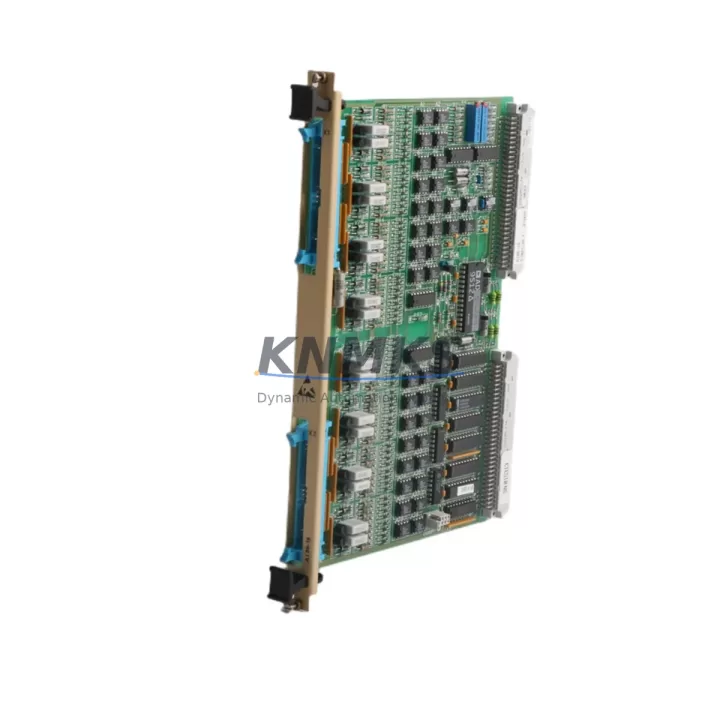
ABB AI86-16 57087196 Migration-Ready Analog Input for AC500 Control Systems
The ABB AI86-16 (order number 57087196) is a 16-channel analog input module designed for the ABB AC500 PLC platform. As legacy control systems approach end-of-life and production lines require modernization, the AI86-16 serves as a reliable, drop-in-compatible replacement for aging analog input hardware within existing AC500 control cabinets. Whether you are replacing a failed module, extending the service life of a legacy automation system, or executing a phased migration from an older control architecture, the AI86-16 provides the signal acquisition performance and backplane compatibility required to maintain operational continuity.
This module supports standard analog signal ranges including 0–10 V, ±10 V, 0–20 mA, and 4–20 mA, making it directly interchangeable with earlier-generation analog input modules used across AC500 installations. Its 16-channel capacity allows engineers to consolidate I/O density during cabinet retrofits, reducing the number of occupied backplane slots and freeing space for additional communication modules or power supply units.
Migration Compatibility Table
| Parameter | Details |
|---|---|
| Compatible Platform | ABB AC500 PLC (PM571, PM581, PM591, PM595 CPUs) |
| Backplane Interface | AC500 S500 I/O bus — direct slot insertion, no adapter required |
| Signal Types Supported | 0–10 V, ±10 V, 0–20 mA, 4–20 mA (per channel configurable) |
| Channel Count | 16 analog input channels |
| Legacy Replacement | Suitable replacement for AI810, AI820, and earlier AC500 analog input variants |
| Terminal Wiring | Compatible with standard AC500 terminal base TB511-ETH / TB521-ETH; verify terminal base model before installation |
| Communication Protocol | AC500 internal I/O bus; compatible with PROFIBUS DP, Modbus RTU, and EtherNet/IP via CPU configuration |
| Firmware Compatibility | Supported under Automation Builder 1.x and 2.x; verify CPU firmware version ≥ 2.4.0 |
| Installation Space | Standard AC500 S500 module footprint; confirm rack slot availability before ordering |
| Retrofit Recommendation | Retain existing terminal base where possible; re-use field wiring to minimize downtime |
| Commissioning Focus | Module address assignment, channel scaling, and HMI tag remapping required post-installation |
| Support terms | support terms confirmed by quotation — tested and verified before shipment |
Retrofit Planning for Existing Automation Systems
Successful integration of the AI86-16 into a legacy control system requires systematic pre-migration planning. Before removing the existing analog input module, engineers should document all channel assignments, signal ranges, and scaling parameters stored in the Automation Builder project file. If the existing CPU is a PM571 or PM581, confirm that the installed firmware supports 16-channel analog input addressing without requiring a project recompile that could affect other I/O modules on the same rack.
Power supply capacity is a critical checkpoint. The AC500 PS501 or PS502 power supply modules must provide sufficient current headroom to support the AI86-16 alongside other installed modules. In high-density cabinets where multiple S500 I/O modules share a single power rail, a current audit should be performed before installation to avoid undervoltage conditions that can cause intermittent module faults.
Terminal base compatibility must be confirmed prior to ordering. The AI86-16 mounts onto a dedicated terminal base — typically the TB511 or TB521 series — and field wiring connects directly to the terminal base rather than the module itself. In most retrofit scenarios, the existing terminal base can be retained and the module swapped without disturbing field wiring, which significantly reduces installation time and the risk of miswiring during the changeover.
For systems that include a CP600 or CP400 series HMI panel, analog input tag addresses must be verified against the HMI project database after module replacement. If the new module occupies a different rack address than its predecessor, all associated HMI display elements, trend screens, and alarm thresholds referencing those analog channels will require remapping before the system is returned to service.
In installations where the AC500 communicates with a SCADA system via PROFIBUS DP or Modbus RTU using a CM572-DP or CM577-ETHIP communication module, the GSD file or Modbus register map should be reviewed to confirm that analog input data offsets remain consistent after the module swap. Misaligned register mappings are a common source of post-retrofit data errors that can be difficult to diagnose under time pressure during a planned maintenance window.
Where I/O expansion is part of the retrofit scope, the AI86-16 can be installed alongside DC532 digital output modules or AO810 analog output modules on the same S500 rack, allowing engineers to address both analog input replacement and output channel expansion within a single cabinet intervention.
Downtime Control During System Migration
Minimizing unplanned downtime is the primary operational constraint in any legacy system retrofit. For the AI86-16 replacement, the recommended approach is to complete all pre-migration tasks — firmware verification, project backup, terminal base inspection, and spare parts staging — during a scheduled maintenance window rather than during an emergency repair.
Before powering down the rack, export a full backup of the Automation Builder project, including all variable declarations, POU logic, and communication configurations. This backup serves as the recovery baseline if the new module requires a project modification that introduces unexpected behavior. Store the backup on an isolated engineering laptop and a secondary network location to ensure availability during the commissioning phase.
During the physical swap, label all field wiring connections at the terminal base before disconnection, even if the terminal base is being retained. This practice protects against wiring errors introduced by vibration-loosened terminals or previous undocumented field modifications. After installing the AI86-16, perform a cold start of the CPU and verify that the module is recognized in the I/O configuration tree before downloading the project.
Post-installation commissioning should include a channel-by-channel signal verification using a calibrated signal source to confirm that each of the 16 analog input channels reads within the expected engineering unit range. This step catches any terminal base contact issues or channel configuration mismatches before the system is returned to automatic control. All modules supplied by KNMKS are tested and verified prior to shipment, reducing the probability of DOA failures that extend unplanned downtime.
Retrofit Support FAQ
Q: Is the ABB AI86-16 (57087196) a direct replacement for older AC500 analog input modules?
A: The AI86-16 is compatible with the AC500 S500 I/O bus and can replace earlier analog input modules of the same form factor. However, channel count, signal range configuration, and terminal base model should be verified against the existing installation before ordering. Our technical team can assist with compatibility confirmation based on your current module part number and rack configuration.
Q: What commissioning steps are required after installing the AI86-16 in an existing AC500 system?
A: After physical installation, verify module recognition in Automation Builder, confirm channel address assignments, check signal range configuration for each channel, and perform a live signal test using a calibrated source. If the module address differs from the replaced unit, update the I/O configuration in the project and re-download to the CPU. HMI tag remapping may also be required if analog channel addresses have changed.
Q: Can the AI86-16 be used with both older and newer AC500 CPU generations?
A: The AI86-16 is supported across the AC500 platform including PM571, PM581, PM591, and PM595 CPUs. Firmware version compatibility should be confirmed — Automation Builder 2.x is recommended for full feature support. For older PM571 installations running firmware below version 2.4.0, a firmware update may be required before the module is recognized correctly.
Q: What support terms and pre-shipment testing does KNMKS provide for the AI86-16?
A: All AI86-16 modules supplied by KNMKS carry a support terms confirmed by quotation from the date of shipment. Each unit undergoes functional testing and verification before dispatch to confirm correct operation across all 16 analog input channels. In-stock units are available for immediate shipment, supporting urgent replacement requirements with minimal lead time.
© 2026 KNMKS. All rights reserved.
Original Source: https://knmks.com
Contact: admin@knmks.com | +86 18359268345
Product Identification
- Brand / Ecosystem
-
ABB
ABB - Model / Series
-
AI86-16 57087196
AC500 Series - Product Family
- PLCs & Controllers
- Availability Status
- Available on request after model and quantity confirmation
- Inquiry Type
- B2B RFQ, replacement inquiry and project spare-part request
- Pre-Quote Check
- Exact SKU, brand, series, quantity, nameplate photos and destination country are checked before quotation
System Path
Where this product fits in the KNMKS automation structure.
Specification & Inquiry Focus
- Control platform
- PLC, PAC and modular controllers
- Common needs
- CPU, rack, power and I/O expansion
- Project support
- Replacement, cabinet build and maintenance
Buyer Confirmation
Information KNMKS checks before replying.
- Exact model
- AI86-16 57087196
- Brand / ecosystem
- ABB
- Product family
- PLCs & Controllers
- Application note
- Replacement, maintenance, project build or spare-part list
- Useful photos
- Nameplate, installed unit, cabinet layout or connector side
- Delivery details
- Quantity, destination country and target schedule
Document Support
Files and notes can be confirmed during quotation.
- Product photos or nameplate confirmation when available
- Packing and delivery notes before quotation confirmation
- Support scope and delivery terms confirmed per inquiry
- Export document coordination for qualified B2B requests
Inquiry Support
- Model cross-checking before quotation
- CPU, power, rack and expansion module matching
- Support for replacement and project inquiry
What to Send Us
- Brand and exact model number: ABB AI86-16 57087196
- Quantity and required delivery time
- Application, replacement requirement or nameplate photo
- Destination country and shipping preference
RFQ Preparation
This is a product inquiry page built for RFQ communication.
Fast Model Check
Send this model to KNMKS for confirmation.
Include quantity, destination country and photos if this is a maintenance replacement. The inquiry will be saved with a reference number after submission.
Brand & Compatibility Note
KNMKS displays automation product information for well-known industrial brand ecosystems and compatible replacement references. Brand names are used for product identification and compatibility reference only; final availability and commercial terms are confirmed per quotation.
 Manufacturing
 Machine Tools
 Packaging
 Energy & Power



 HMI & Displays
 Servo Systems
 Variable Frequency Drives
 Sensors