
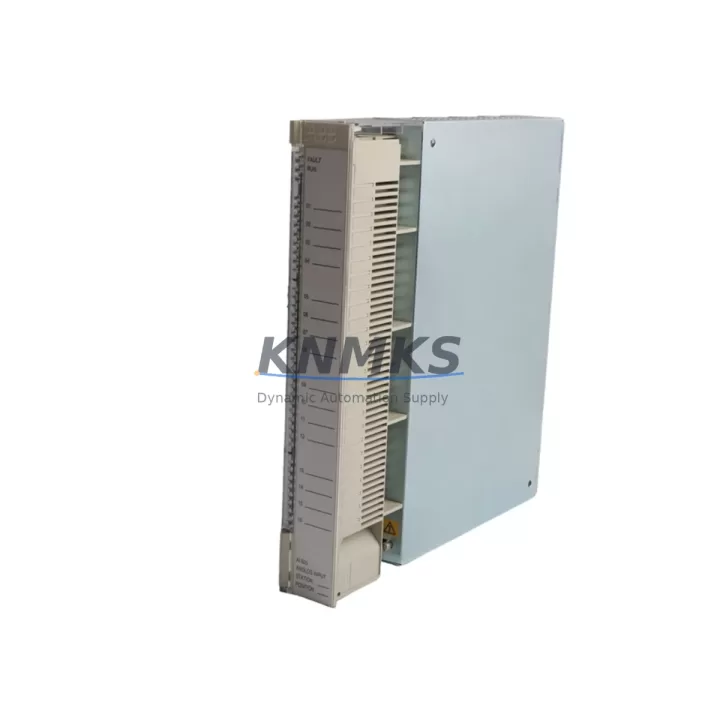
Overview
ABB AI625 3BHT300036R1 Migration-Ready Analog Input for Legacy Control Systems
The ABB AI625 (3BHT300036R1) is an 8-channel, 16-bit analog input module designed for the ABB AC500 PLC platform. As industrial facilities accelerate the retirement of aging control architectures — including legacy S500, Advant OCS, and early AC500 V1 installations — the AI625 serves as a validated, drop-in replacement that preserves existing I/O wiring, signal ranges, and program logic without requiring a full system redesign. Whether you are upgrading a distributed control cabinet, expanding an existing AC500 rack, or restoring a system after a module failure, the AI625 delivers the signal fidelity and protocol compatibility required for uninterrupted production continuity.
Each unit is sourced from verified supply channels, undergoes pre-shipment functional testing, and is backed by a support terms confirmed by quotation covering manufacturing defects and operational failures under normal industrial conditions. Stock is maintained for immediate dispatch to minimize unplanned downtime during emergency replacements.
Migration Compatibility Table
| Parameter | AI625 3BHT300036R1 | Notes for Migration |
|---|---|---|
| Channels | 8 x Analog Input | Matches legacy 8-ch AI module pinout |
| Resolution | 16-bit | Higher resolution than older 12-bit predecessors |
| Signal Range | 0–10 V / 0–20 mA / 4–20 mA | Verify field wiring signal type before swap |
| Backplane Interface | AC500 S-Bus / internal bus | Compatible with TB511, TB521, TB541 CPUs |
| Module Address | Configurable via PS501 / Automation Builder | Re-import existing project; verify I/O mapping |
| Communication Protocol | AC500 internal S-Bus | No protocol conversion required for AC500 racks |
| Installation | DIN rail / AC500 rack slot | Confirm slot width and rack generation (V1 vs V2) |
| Firmware Compatibility | AC500 FW ≥ 2.x recommended | Update CPU firmware before commissioning if on V1 |
| Replacement Candidates | AI610, AI615, AI620 series | Confirm terminal block type (TU505 / TU516) |
| Support terms | 12 Months | Covers manufacturing defects under normal use |
Retrofit Planning for Existing Automation Systems
A successful retrofit begins well before the module arrives on site. Engineers replacing an AI610 or AI615 with the AI625 3BHT300036R1 should first audit the existing terminal block configuration. The AI625 is designed for use with the TU516 or TU505 terminal units — if the legacy installation uses an older terminal block variant, a terminal unit swap must be planned in parallel. This is a common oversight that extends commissioning time unnecessarily.
Power budget verification is equally critical. The AC500 rack’s PM573 or PM591 power supply module must have sufficient headroom to support the AI625’s current draw alongside other installed modules such as the DI524 digital input module and the DO524 digital output module. In high-density cabinets where multiple I/O modules share a single rack, adding the AI625 without recalculating the power budget can cause intermittent faults or module resets under load.
For systems that include communication modules such as the CI590-CS31-HA or CI501-PNIO PROFINET adapter, verify that the module address assignments in the Automation Builder project file do not conflict with the new AI625 slot position. Slot renumbering after a physical swap is a frequent source of commissioning errors, particularly in systems where the original project documentation is incomplete or outdated.
HMI screens connected via CP600 or CP400 series panels that display analog process values sourced from the replaced module will require tag remapping if the I/O address changes. Where possible, preserve the original module slot to avoid cascading HMI and SCADA reconfiguration. If the rack layout must change, document all affected tags before the maintenance window begins.
In systems where signal isolation is required — for example, when the AI625 receives signals from field transmitters sharing a common ground with high-voltage equipment — installing a signal isolator or barrier upstream of the module terminals is recommended. This protects the module from ground loop interference and extends service life in electrically noisy environments typical of motor control centers and variable frequency drive cabinets.
Finally, if the legacy system includes a programming cable such as the TK501 USB programming cable for direct CPU connection, ensure the Automation Builder version installed on the engineering workstation supports the target CPU firmware. Mismatched toolchain versions are a leading cause of failed downloads during time-sensitive maintenance windows.
Downtime Control During System Migration
Minimizing production interruption during an analog input module replacement requires a structured pre-outage preparation protocol. Before the maintenance window opens, download and archive the complete Automation Builder project from the target CPU. Verify that the archived project compiles without errors on the engineering workstation and that all I/O force values are documented. This ensures that if the replacement module requires a full project reload, the process can be completed within the planned outage window without diagnostic delays.
Where the process allows, place the affected analog loops in manual control mode at the DCS or SCADA level before removing the AI625’s predecessor module. This prevents false alarms, interlock trips, and uncontrolled process responses during the physical swap. For critical loops — such as temperature or pressure inputs feeding safety instrumented functions — coordinate with the safety system engineer before proceeding.
The AI625 3BHT300036R1 is designed for hot-rack insertion on supported AC500 configurations, but this capability must be confirmed against the specific CPU and firmware version in use. On systems where hot-swap is not supported, a controlled CPU stop followed by a cold restart after module insertion is the safest approach. After restart, verify all 8 channels report expected process values before returning the system to automatic control.
Pre-shipment functional testing performed on each AI625 unit reduces the risk of receiving a non-functional module during a live maintenance event. Units are tested for channel-to-channel isolation, signal linearity across the full input range, and correct communication with the AC500 backplane before dispatch. Combined with the support terms confirmed by quotation, this testing protocol provides confidence that the replacement module will perform correctly from first power-on.
Retrofit Support FAQ
Q: Is the AI625 3BHT300036R1 a direct replacement for the AI615 or AI610?
A: The AI625 is functionally compatible with AI610 and AI615 in most AC500 rack configurations. The primary differences are resolution (16-bit vs 12-bit on older models) and terminal unit compatibility. Confirm that the installed terminal block (TU505 or TU516) matches the AI625 requirements before ordering. In most cases, the field wiring does not need to be changed.
Q: What commissioning steps are required after installing the AI625?
A: After physical installation, open the Automation Builder project, verify the module is recognized in the hardware configuration at the correct rack slot, and download the project to the CPU. Check all 8 analog input channels for correct signal readings using the online monitoring function. If channel values are unexpected, verify terminal wiring polarity and signal range configuration in the module parameters.
Q: Does each unit undergo pre-shipment testing?
A: Yes. Every AI625 3BHT300036R1 unit is functionally tested prior to dispatch, including channel isolation verification, signal range accuracy, and backplane communication checks. A support terms confirmed by quotation is included covering manufacturing defects and operational failures under normal industrial use conditions.
Q: What is the typical lead time and do you maintain stock?
A: Stock is maintained for immediate dispatch. Orders confirmed before the daily cut-off are typically shipped the same business day. For large-quantity orders or urgent emergency replacements, contact the sales team directly to confirm availability and expedited shipping options.
© 2026 KNMKS. All rights reserved.
Original Source: https://knmks.com
Contact: admin@knmks.com | +86 18359268345
Product Identification
- Brand / Ecosystem
-
ABB
ABB - Model / Series
-
AI625 3BHT300036R1
AC500 Series - Product Family
- PLCs & Controllers
- Availability Status
- Available on request after model and quantity confirmation
- Inquiry Type
- B2B RFQ, replacement inquiry and project spare-part request
- Pre-Quote Check
- Exact SKU, brand, series, quantity, nameplate photos and destination country are checked before quotation
System Path
Where this product fits in the KNMKS automation structure.
Specification & Inquiry Focus
- Control platform
- PLC, PAC and modular controllers
- Common needs
- CPU, rack, power and I/O expansion
- Project support
- Replacement, cabinet build and maintenance
Buyer Confirmation
Information KNMKS checks before replying.
- Exact model
- AI625 3BHT300036R1
- Brand / ecosystem
- ABB
- Product family
- PLCs & Controllers
- Application note
- Replacement, maintenance, project build or spare-part list
- Useful photos
- Nameplate, installed unit, cabinet layout or connector side
- Delivery details
- Quantity, destination country and target schedule
Document Support
Files and notes can be confirmed during quotation.
- Product photos or nameplate confirmation when available
- Packing and delivery notes before quotation confirmation
- Support scope and delivery terms confirmed per inquiry
- Export document coordination for qualified B2B requests
Inquiry Support
- Model cross-checking before quotation
- CPU, power, rack and expansion module matching
- Support for replacement and project inquiry
What to Send Us
- Brand and exact model number: ABB AI625 3BHT300036R1
- Quantity and required delivery time
- Application, replacement requirement or nameplate photo
- Destination country and shipping preference
RFQ Preparation
This is a product inquiry page built for RFQ communication.
Fast Model Check
Send this model to KNMKS for confirmation.
Include quantity, destination country and photos if this is a maintenance replacement. The inquiry will be saved with a reference number after submission.
Brand & Compatibility Note
KNMKS displays automation product information for well-known industrial brand ecosystems and compatible replacement references. Brand names are used for product identification and compatibility reference only; final availability and commercial terms are confirmed per quotation.
 Manufacturing
 Machine Tools
 Packaging
 Energy & Power



 HMI & Displays
 Servo Systems
 Variable Frequency Drives
 Sensors