
Overview
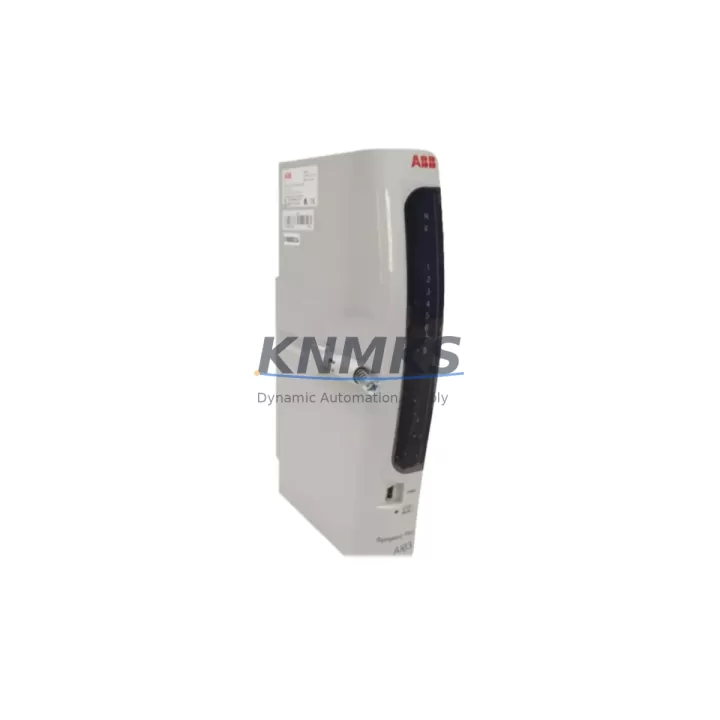
ABB AI03 Migration-Ready Analog Input Module for AC500 Legacy Control Systems
The ABB AI03 is an 8-channel analog input module engineered for the AC500 and S500 automation platform, and it remains one of the most sought-after components in legacy DCS/PLC retrofit programs across process industries, utilities, and discrete manufacturing. As ABB progressively phases out older S500 I/O variants, the AI03 continues to serve as a direct migration-ready replacement that preserves existing wiring infrastructure, terminal assignments, and backplane slot addressing — dramatically reducing the engineering effort and downtime risk associated with control system modernization projects.
Whether your facility is upgrading from an earlier AC500 generation, migrating from a third-party PLC platform, or simply restocking critical spare parts to extend the operational life of an existing control cabinet, the AI03 delivers the signal conditioning, resolution, and protocol compatibility required for uninterrupted process control. Each unit shipped by KNMKS is fully tested against ABB factory specifications and covered by a support terms confirmed by quotation, giving maintenance engineers and procurement teams the confidence to plan long-lead replacement cycles without compromising system availability.
Migration Compatibility Table
| Parameter | Detail |
|---|---|
| Module SKU | AI03 |
| Brand / Platform | ABB / AC500 S500 |
| Channel Count | 8 Analog Input Channels |
| Signal Types | 0–10 V, 0–20 mA, 4–20 mA (configurable per channel) |
| Resolution | 12-bit (standard); firmware-dependent extended modes |
| Backplane Interface | S500 I/O bus — compatible with TB511, TB521, TB541 terminal bases |
| Installation Slot | Any S500 I/O slot on AC500 CPU rack or remote I/O station |
| Communication Compatibility | PROFIBUS-DP, Modbus RTU, CANopen (via AC500 CPU coupling) |
| Wiring Compatibility | Direct terminal-for-terminal replacement; no rewiring required for standard 4–20 mA loops |
| Replacement Recommendation | Drop-in replacement for discontinued S500 analog input variants; verify firmware version on AC500 CPU before commissioning |
| Commissioning Notes | Confirm module address via PS501 Control Builder; validate channel scaling in application program; check HMI tag mapping for analog process values |
| Support terms | 12 Months — covers manufacturing defects and functional failures under normal operating conditions |
| Origin | Germany (DE) |
Retrofit Planning for Existing Automation Systems
A successful AI03 retrofit begins well before the module arrives on site. Maintenance engineers should start by auditing the existing S500 rack configuration — documenting the slot positions of all installed I/O modules, including any AI890 or AI895 analog input cards that the AI03 is intended to replace. In multi-rack installations where a TB541 terminal base is used, the physical footprint and DIN rail spacing must be confirmed to ensure the AI03 seats correctly without mechanical interference from adjacent modules such as the DI524 digital input module or the AO523 analog output module sharing the same backplane segment.
Power budget verification is a critical pre-installation step that is frequently overlooked in fast-track retrofit projects. The S500 bus coupler — typically a CI501, CI502, or CI504 PROFIBUS coupler depending on the communication architecture — supplies backplane power to all connected I/O modules. Adding or replacing analog input modules changes the aggregate current draw on the 5 V backplane rail, and engineers must confirm that the existing power supply module (PS501 or PS502) has sufficient headroom to support the AI03 alongside other active modules in the rack. Failure to validate this can result in intermittent module faults or unexpected CPU resets during commissioning.
For facilities migrating from a PROFIBUS-DP topology to a newer Ethernet-based architecture using the AC500 eCo or AC500-S safety platform, the AI03 remains compatible as a local I/O module connected directly to the CPU’s S500 bus, even when the primary communication backbone has been upgraded. This hybrid approach allows phased migration — retaining proven analog input wiring and field instrumentation while progressively modernizing the controller and HMI layers. Engineers should update the HMI screen tags in Panel Builder 600 or CP600 operator panels to reflect any channel renumbering that occurs when the AI03 replaces a module with a different slot address.
Signal isolation requirements should also be reviewed during retrofit planning. In applications where field transmitters share a common ground reference with the control cabinet, the AI03’s differential input configuration provides adequate common-mode rejection for most 4–20 mA loop installations. However, in environments with significant ground potential differences — common in large motor control centers or substations — supplementary signal isolators or loop-powered barriers may be required between the field transmitter and the AI03 terminal base to prevent measurement errors and protect module inputs from transient overvoltage events.
Downtime Control During System Migration
Minimizing unplanned downtime during an AI03 module swap requires a structured hot-swap or cold-swap protocol depending on the AC500 CPU firmware version and the criticality of the process loop being interrupted. For non-critical analog monitoring loops — such as ambient temperature sensing or tank level indication with independent high-level alarms — a cold-swap during a scheduled maintenance window is the preferred approach. The CPU should be placed in STOP mode, the application program downloaded and archived to a USB memory stick or the PS501 project file server, and the module replaced before restarting the CPU and verifying analog values against field reference instruments.
For critical process control loops — such as flow control, pressure regulation, or reactor temperature monitoring — the migration strategy should include a parallel signal routing phase where the existing module remains in service while the AI03 is pre-configured and validated in a bench test environment. Using a spare S500 rack with a PM573 or PM591 CPU, engineers can verify that the AI03 reads correctly across the full 4–20 mA input range, that channel scaling parameters in the Control Builder application match the field transmitter’s engineering unit range, and that the module address resolves correctly in the I/O configuration tree before the live cutover is attempted.
During the actual cutover, the sequence should follow a defined loop-by-loop transfer protocol: isolate the field transmitter, transfer the signal wiring to the AI03 terminal base, restore the transmitter, and verify the process value reading in the SCADA or DCS historian before moving to the next channel. This channel-by-channel approach limits the exposure window for any single process variable and allows the control room operator to confirm normal readings before the next loop is transferred. Post-migration, a 24-hour monitoring period with enhanced alarm sensitivity is recommended to detect any latent wiring issues or scaling discrepancies that may not be immediately apparent during the initial commissioning check.
Retrofit Support FAQ
Q1: Is the ABB AI03 a direct drop-in replacement for discontinued S500 analog input modules?
Yes. The AI03 is designed to occupy the same S500 backplane slot and terminal base as earlier ABB analog input variants. In most standard 4–20 mA wiring configurations, no rewiring is required. Engineers should verify the module address assignment in PS501 Control Builder and confirm that the application program’s I/O mapping references the correct slot position after replacement.
Q2: What firmware version is required on the AC500 CPU to support the AI03?
The AI03 is compatible with AC500 CPU firmware versions from V2.x onwards, covering PM554, PM564, PM573, PM581, PM582, PM583, PM591, and PM592 CPU variants. For installations running older firmware, ABB recommends a firmware update via the PS501 programming environment before commissioning the AI03 to ensure full channel configuration and diagnostic support.
Q3: Does KNMKS provide pre-shipment testing for the AI03?
Yes. Every AI03 unit dispatched by KNMKS undergoes functional verification against ABB factory test parameters prior to shipment. Test records are available upon request. All units are covered by a support terms confirmed by quotation from the date of delivery, covering manufacturing defects and functional failures under normal industrial operating conditions.
Q4: What is the typical lead time and stock availability for the AI03?
KNMKS maintains regional buffer stock of the AI03 to support urgent replacement requirements. Standard orders are dispatched within 1–3 business days. For bulk procurement or blanket stock programs supporting multi-site maintenance contracts, contact our sales team to discuss allocation, pricing, and consignment stock arrangements.
© 2026 KNMKS. All rights reserved.
Original Source: https://knmks.com
Contact: admin@knmks.com | +86 18359268345
Product Identification
- Brand / Ecosystem
-
ABB
ABB - Model / Series
-
AI03
AC500 Series - Product Family
- PLCs & Controllers
- Availability Status
- Available on request after model and quantity confirmation
- Inquiry Type
- B2B RFQ, replacement inquiry and project spare-part request
- Pre-Quote Check
- Exact SKU, brand, series, quantity, nameplate photos and destination country are checked before quotation
System Path
Where this product fits in the KNMKS automation structure.
Specification & Inquiry Focus
- Control platform
- PLC, PAC and modular controllers
- Common needs
- CPU, rack, power and I/O expansion
- Project support
- Replacement, cabinet build and maintenance
Buyer Confirmation
Information KNMKS checks before replying.
- Exact model
- AI03
- Brand / ecosystem
- ABB
- Product family
- PLCs & Controllers
- Application note
- Replacement, maintenance, project build or spare-part list
- Useful photos
- Nameplate, installed unit, cabinet layout or connector side
- Delivery details
- Quantity, destination country and target schedule
Document Support
Files and notes can be confirmed during quotation.
- Product photos or nameplate confirmation when available
- Packing and delivery notes before quotation confirmation
- Support scope and delivery terms confirmed per inquiry
- Export document coordination for qualified B2B requests
Inquiry Support
- Model cross-checking before quotation
- CPU, power, rack and expansion module matching
- Support for replacement and project inquiry
What to Send Us
- Brand and exact model number: ABB AI03
- Quantity and required delivery time
- Application, replacement requirement or nameplate photo
- Destination country and shipping preference
RFQ Preparation
This is a product inquiry page built for RFQ communication.
Fast Model Check
Send this model to KNMKS for confirmation.
Include quantity, destination country and photos if this is a maintenance replacement. The inquiry will be saved with a reference number after submission.
Brand & Compatibility Note
KNMKS displays automation product information for well-known industrial brand ecosystems and compatible replacement references. Brand names are used for product identification and compatibility reference only; final availability and commercial terms are confirmed per quotation.
 Manufacturing
 Machine Tools
 Packaging
 Energy & Power



 HMI & Displays
 Servo Systems
 Variable Frequency Drives
 Sensors