
Overview
ABB AGH150W-4 Migration-Ready PROFIBUS DP Coupler: Legacy System Retrofit & Compatibility Upgrade
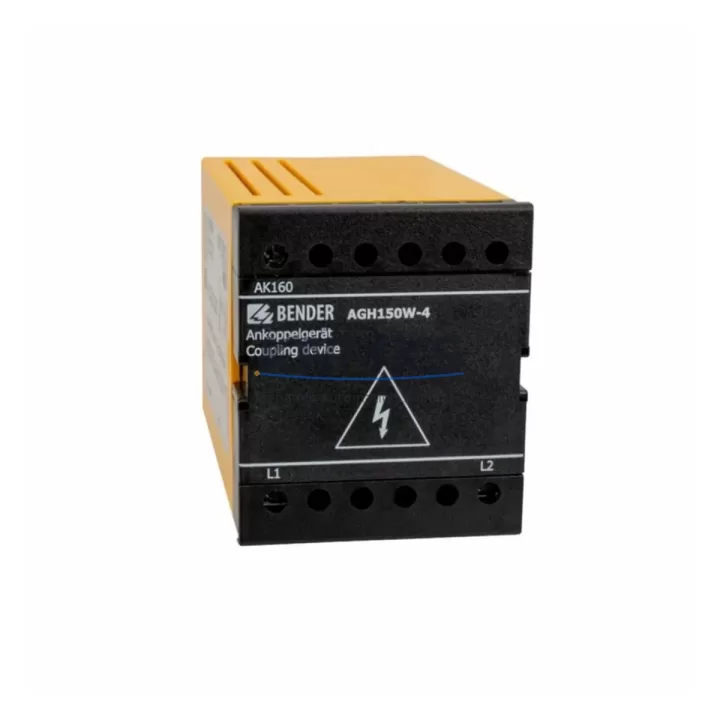
The ABB AGH150W-4 is a PROFIBUS DP Network Coupler engineered for the AC500 and S500 control platforms, widely deployed in process automation, machine control, and distributed I/O architectures across manufacturing, energy, and utilities sectors. As legacy PROFIBUS DP infrastructure ages and original couplers reach end-of-life, the AGH150W-4 serves as a migration-ready replacement that preserves existing wiring topology, communication addressing, and fieldbus segment integrity — minimizing retrofit risk and downtime during system modernization.
For facilities operating aging AC500 racks with original coupler modules approaching obsolescence, the AGH150W-4 provides a verified drop-in upgrade path. It maintains backward compatibility with established PROFIBUS DP segment configurations, supports standard GSD file integration, and requires no changes to master controller logic when substituting failed or discontinued coupler units. Engineers planning control cabinet upgrades or I/O expansion projects can integrate the AGH150W-4 alongside existing S500 I/O modules — including digital and analog signal modules — without restructuring the backplane or modifying terminal wiring assignments.
Before installation, maintenance teams should confirm available 24 VDC power supply capacity on the rack, verify backplane slot compatibility within the AC500 CPU carrier, and review PROFIBUS DP segment load calculations to ensure the coupler’s node count and cable length remain within specification. Terminal block wiring from the previous coupler can typically be transferred directly, but technicians should cross-reference the AGH150W-4 terminal layout against the original module’s wiring diagram to confirm pin-for-pin compatibility. Any deviation in terminal assignment must be corrected before energizing the segment.
Migration Compatibility Table
| Parameter | AGH150W-4 Specification | Retrofit Notes |
|---|---|---|
| Communication Protocol | PROFIBUS DP (EN 50170) | Compatible with existing DP master configurations; no GSD re-import required if segment unchanged |
| Host Platform | ABB AC500 / S500 | Verify CPU firmware version supports coupler module; update if below minimum release |
| Backplane Interface | AC500 S500 I/O bus connector | Confirm slot position and rack generation; mixed-generation racks may require adapter |
| Power Supply | 24 VDC via backplane | Audit total rack current draw before adding coupler; ensure PSU headroom ≥ 15% |
| Terminal Wiring | Standard screw terminals | Transfer existing field wiring; verify terminal numbering against original module datasheet |
| PROFIBUS Address | Configurable via Automation Builder / PS501 | Retain original DP slave address to avoid master reconfiguration |
| Installation Footprint | Standard S500 module width | No cabinet modification required for like-for-like slot replacement |
| Firmware Compatibility | Supported under current AC500 firmware | Confirm Automation Builder project version; re-download configuration after replacement |
| Support terms | 12 Months | Covered from dispatch date; pre-shipment functional test included |
Retrofit Planning for Existing Automation Systems
Successful integration of the AGH150W-4 into an existing control architecture requires a structured pre-retrofit assessment. Begin by documenting the current PROFIBUS DP segment topology — including all slave devices, their addresses, and cable routing — before removing the original coupler. This baseline ensures that the replacement module can be configured to match the existing network map without triggering master-side alarms or requiring full segment recommissioning.
In multi-rack AC500 installations, the AGH150W-4 typically operates alongside the AC500 PM573 or PM583 CPU modules, sharing the S500 I/O bus with digital input/output modules such as the DC532 and DA501 analog output modules. Where the control system also manages remote I/O over PROFIBUS DP, the coupler’s slave address must be coordinated with the DP master’s configuration table — typically managed through ABB Automation Builder or the legacy PS501 Control Builder environment. If the existing project was compiled under an older toolchain version, verify that the GSD file for the AGH150W-4 is recognized before attempting online download.
For control cabinets that also house communication gateways or protocol converters — such as units bridging PROFIBUS DP to Modbus RTU or PROFINET — confirm that the AGH150W-4’s segment does not introduce address conflicts with adjacent network nodes. In systems where the AC500 communicates upstream to a DCS via an FBP FieldBusPlug or CI590 PROFIBUS interface, the coupler replacement should be treated as a segment-level event and coordinated with the DCS operator to avoid spurious alarms during the changeover window.
Power supply integrity is a critical checkpoint. The S500 rack’s 24 VDC power supply module — such as the CP405 or equivalent — must be verified for sufficient current margin before the AGH150W-4 is inserted. If the rack is already operating near rated capacity due to dense I/O population, a supplementary power feed or load redistribution may be required prior to coupler installation.
Downtime Control During System Migration
Minimizing production interruption during a PROFIBUS DP coupler replacement requires advance preparation and a disciplined changeover sequence. Before the maintenance window opens, back up the full AC500 project — including hardware configuration, program logic, and variable tables — using Automation Builder’s project archive function. This backup serves as the recovery baseline if the replacement introduces unexpected behavior during commissioning.
Where possible, pre-configure the AGH150W-4 offline by loading the hardware configuration to a bench test setup and verifying that the module responds correctly to the DP master’s polling cycle. This offline validation step can reduce on-site commissioning time from hours to minutes, particularly in facilities where access to the control cabinet is restricted during production shifts.
During the physical swap, label all field wiring before disconnection and photograph the original terminal layout. Re-terminate wiring to the AGH150W-4 in sequence, then perform a continuity check before energizing the rack. After power-up, monitor the PROFIBUS DP diagnostic LEDs and confirm that the coupler achieves data exchange status within the expected initialization window. If the DP master reports a configuration mismatch, compare the active GSD parameters against the original module’s configuration and adjust as needed before releasing the system to production.
For facilities with redundant control paths or hot-standby CPU configurations, coordinate the coupler replacement with the redundancy switchover procedure to ensure that the standby controller assumes control cleanly during the maintenance interval. This approach eliminates process interruption entirely in systems where redundancy has been properly commissioned.
Retrofit Support FAQ
Q: Is the AGH150W-4 a direct replacement for the original ABB PROFIBUS DP coupler in AC500 systems?
A: Yes. The AGH150W-4 is designed as a compatible replacement for PROFIBUS DP coupler modules in the AC500 and S500 platform. It uses the same backplane interface and terminal layout, allowing direct substitution in most installations. Confirm the firmware version of the host CPU and the Automation Builder project version before proceeding.
Q: Does the replacement require reprogramming the AC500 CPU or reconfiguring the PROFIBUS DP master?
A: In most cases, no. If the AGH150W-4 is assigned the same DP slave address as the original module and the GSD file parameters are unchanged, the DP master will recognize the replacement without requiring a full reconfiguration. A project re-download to the CPU is recommended after hardware replacement to ensure configuration consistency.
Q: What pre-shipment testing is performed on the AGH150W-4?
A: Each unit undergoes functional verification prior to dispatch, including power-up testing and communication interface checks. Units are supplied with a support terms confirmed by quotation from the dispatch date, covering manufacturing defects and functional failures under normal operating conditions.
Q: What is the typical lead time and stock availability?
A: The AGH150W-4 is maintained availability confirmed by RFQ for immediate dispatch. For urgent replacement requirements, same-day or next-business-day shipping is available subject to order confirmation. Contact our team to confirm current inventory levels and delivery options for your region.
© 2026 KNMKS. All rights reserved.
Original Source: https://knmks.com
Contact: admin@knmks.com | +86 18359268345
Product Identification
- Brand / Ecosystem
-
ABB
ABB - Model / Series
-
AGH150W-4
AC500 Series - Product Family
- PLCs & Controllers
- Availability Status
- Available on request after model and quantity confirmation
- Inquiry Type
- B2B RFQ, replacement inquiry and project spare-part request
- Pre-Quote Check
- Exact SKU, brand, series, quantity, nameplate photos and destination country are checked before quotation
System Path
Where this product fits in the KNMKS automation structure.
Specification & Inquiry Focus
- Control platform
- PLC, PAC and modular controllers
- Common needs
- CPU, rack, power and I/O expansion
- Project support
- Replacement, cabinet build and maintenance
Buyer Confirmation
Information KNMKS checks before replying.
- Exact model
- AGH150W-4
- Brand / ecosystem
- ABB
- Product family
- PLCs & Controllers
- Application note
- Replacement, maintenance, project build or spare-part list
- Useful photos
- Nameplate, installed unit, cabinet layout or connector side
- Delivery details
- Quantity, destination country and target schedule
Document Support
Files and notes can be confirmed during quotation.
- Product photos or nameplate confirmation when available
- Packing and delivery notes before quotation confirmation
- Support scope and delivery terms confirmed per inquiry
- Export document coordination for qualified B2B requests
Inquiry Support
- Model cross-checking before quotation
- CPU, power, rack and expansion module matching
- Support for replacement and project inquiry
What to Send Us
- Brand and exact model number: ABB AGH150W-4
- Quantity and required delivery time
- Application, replacement requirement or nameplate photo
- Destination country and shipping preference
RFQ Preparation
This is a product inquiry page built for RFQ communication.
Fast Model Check
Send this model to KNMKS for confirmation.
Include quantity, destination country and photos if this is a maintenance replacement. The inquiry will be saved with a reference number after submission.
Brand & Compatibility Note
KNMKS displays automation product information for well-known industrial brand ecosystems and compatible replacement references. Brand names are used for product identification and compatibility reference only; final availability and commercial terms are confirmed per quotation.
 Manufacturing
 Machine Tools
 Packaging
 Energy & Power



 HMI & Displays
 Servo Systems
 Variable Frequency Drives
 Sensors