
Overview
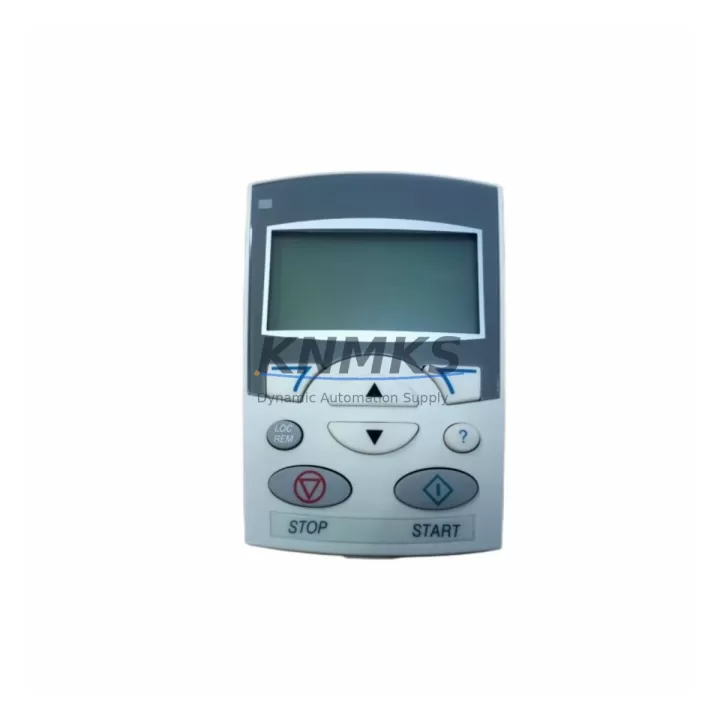
ABB ACS-CP-A Migration-Ready Operator Panel for ACS Drives: Legacy System Retrofit and Compatibility Upgrade
The ABB ACS-CP-A is a migration-ready operator control panel engineered for direct replacement and retrofit integration across the ACS series variable frequency drive platform. Whether you are decommissioning an aging ACS355 installation, upgrading a production line built around the ACS550, or restoring a critical ACS800 drive after a panel failure, the ACS-CP-A provides a verified drop-in solution that eliminates the need for full drive replacement. With pre-shipment functional testing, confirmed protocol compatibility, and a support terms confirmed by quotation, this panel is a reliable choice for maintenance engineers managing legacy automation infrastructure.
Migration Compatibility Table
| Parameter | Details |
|---|---|
| Compatible Drive Models | ABB ACS355, ACS550, ACS550-01, ACS800, ACS800-01, ACS800-04 |
| Panel Interface | RJ-45 drive panel port (standard ACS series connector) |
| Communication Protocol | ABB Drive Panel Bus (proprietary serial, panel-to-drive) |
| Display | Alphanumeric LCD, parameter navigation, fault code readout |
| Installation Type | Direct panel-door mount or remote mounting with extension cable |
| Mounting Dimensions | Compatible with standard ACS series panel cutout; no modification required |
| Firmware Compatibility | Compatible with ACS355 firmware v2.x+, ACS550 v4.x+, ACS800 v7.x+ |
| Replacement Recommendation | Direct drop-in for OEM ACS-CP-A; verify firmware version before commissioning |
| Commissioning Note | Restore parameter backup from original panel before first power-on |
| Pre-Shipment Testing | Full functional test performed on each unit before dispatch |
| Support terms | support terms confirmed by quotation — covers manufacturing defects and operational failure |
Retrofit Planning for Existing Automation Systems
Successful integration of the ACS-CP-A into a legacy control system requires a structured pre-retrofit assessment. Before removing the failed or obsolete panel, engineers should document the existing parameter set using the ABB Drive Composer PC tool or a compatible parameter backup device. This ensures that motor control settings, ramp times, PID configurations, and fieldbus addresses are preserved and can be restored to the replacement panel without manual re-entry.
In installations where the ACS-CP-A is mounted remotely — for example, on a control cabinet door separate from the drive enclosure — the ABB ACS-CP-C remote mounting kit and the appropriate panel bus extension cable must be confirmed as part of the retrofit bill of materials. Cable length and routing should be verified against the drive’s maximum panel cable specification to avoid communication errors during operation.
For systems where the ACS355 or ACS550 drive communicates upstream via PROFIBUS-DP or Modbus RTU, the fieldbus adapter module — such as the FPBA-01 PROFIBUS adapter or FMBA-01 Modbus adapter — remains installed in the drive’s option slot and is unaffected by the panel replacement. The ACS-CP-A interfaces exclusively with the drive’s local panel port and does not interact with the fieldbus layer, which simplifies the retrofit scope considerably.
In multi-drive cabinet installations, where several ACS800 units share a common DC bus and are managed through a coordinated control architecture, the panel replacement can typically be performed drive-by-drive without interrupting adjacent drives. Engineers should confirm that the control cabinet’s 24 VDC auxiliary power supply — often sourced from an ABB CP-D or equivalent DIN-rail power supply — remains stable during the panel swap, as momentary supply interruptions can trigger drive fault logs that complicate post-retrofit commissioning.
I/O wiring at the drive’s terminal block is not affected by the ACS-CP-A replacement. Analog input signals, digital input assignments, relay output wiring, and the safe torque off (STO) circuit remain connected throughout the panel exchange. However, engineers should verify that the drive’s digital input DI6 — commonly used for panel/remote control source selection — is correctly configured in parameter 11.02 after the new panel is connected, to ensure the control source switches correctly between local panel mode and remote fieldbus command.
Where the existing installation includes an ABB ACS-AP-I or ACS-AP-W assistant control panel, the ACS-CP-A serves as a cost-effective basic panel alternative for sites where advanced parameter wizards are not required. For installations requiring Bluetooth connectivity or the ABB Drive Composer mobile interface, the ACS-AP-W remains the appropriate choice, and the ACS-CP-A is best suited for fixed-panel, parameter-stable applications where the primary requirement is fault monitoring and basic speed reference adjustment.
Downtime Control During System Migration
Minimizing production downtime during an operator panel replacement on an ACS series drive requires preparation before the maintenance window begins. The recommended sequence is: (1) export a full parameter backup using ABB Drive Composer or the panel’s parameter copy function; (2) record all active fault history and warning codes from the existing panel; (3) power down the drive following the correct isolation procedure, including confirmation that the DC bus has discharged to a safe voltage level; (4) replace the ACS-CP-A; (5) restore the parameter backup; (6) perform a no-load test run to confirm motor direction, speed reference response, and fault-free operation before returning the drive to production.
For critical process applications — such as pump stations, compressor drives, or conveyor systems where unplanned stops carry significant operational cost — it is advisable to pre-configure the replacement ACS-CP-A with the parameter set in a workshop environment before the maintenance window. This approach reduces on-site commissioning time to a panel swap and a brief verification run, typically achievable within a single planned maintenance shift.
Where the drive is integrated into a SCADA or DCS system via the FPBA-01 PROFIBUS adapter or an FENA-21 Ethernet adapter, the fieldbus node address and communication timeout settings should be verified post-replacement to confirm that the upstream control system re-establishes communication without requiring a PLC program modification. In most ACS series installations, these parameters are stored in the drive’s non-volatile memory and are unaffected by the panel replacement, but confirmation is recommended as part of the post-retrofit checklist.
Retrofit Support FAQ
Q1: Is the ACS-CP-A a direct replacement for the original ABB operator panel on ACS355 and ACS550 drives?
Yes. The ACS-CP-A is the standard ABB operator panel for the ACS355, ACS550, and ACS800 drive families. It connects via the drive’s standard RJ-45 panel port and requires no wiring modification. Confirm the drive firmware version is within the supported range before installation.
Q2: Will my existing parameter settings be retained after replacing the panel?
Parameters are stored in the drive’s internal memory, not in the panel itself. Replacing the ACS-CP-A does not erase drive parameters. However, ABB recommends performing a parameter backup before any maintenance intervention as a precaution against unexpected drive resets during the panel exchange.
Q3: Does each unit undergo testing before shipment?
Yes. Every ACS-CP-A unit is functionally tested before dispatch to verify display operation, keypad response, and panel bus communication. Units are shipped with protective packaging to prevent transit damage. A support terms confirmed by quotation cover manufacturing defects and operational failure from the date of delivery.
Q4: What is the typical lead time and stock availability?
The ACS-CP-A is maintained availability confirmed by RFQ to support urgent replacement requirements. Orders are processed and dispatched promptly. For volume procurement or long-term spare parts agreements covering 12–36 months of supply, contact our sales team to discuss dedicated stock allocation and pricing.
© 2026 KNMKS. All rights reserved.
Original Source: https://knmks.com
Contact: admin@knmks.com | +86 18359268345
Product Identification
- Brand / Ecosystem
-
ABB
ABB - Model / Series
-
ACS-CP-A
S800 Series - Product Family
- HMI & Displays
- Availability Status
- Available on request after model and quantity confirmation
- Inquiry Type
- B2B RFQ, replacement inquiry and project spare-part request
- Pre-Quote Check
- Exact SKU, brand, series, quantity, nameplate photos and destination country are checked before quotation
System Path
Where this product fits in the KNMKS automation structure.
Specification & Inquiry Focus
- Display range
- Operator panels and touch screens
- Common needs
- Screen size, interface and version matching
- Project support
- Retrofit, spare unit and panel replacement
Buyer Confirmation
Information KNMKS checks before replying.
- Exact model
- ACS-CP-A
- Brand / ecosystem
- ABB
- Product family
- HMI & Displays
- Application note
- Replacement, maintenance, project build or spare-part list
- Useful photos
- Nameplate, installed unit, cabinet layout or connector side
- Delivery details
- Quantity, destination country and target schedule
Document Support
Files and notes can be confirmed during quotation.
- Product photos or nameplate confirmation when available
- Packing and delivery notes before quotation confirmation
- Support scope and delivery terms confirmed per inquiry
- Export document coordination for qualified B2B requests
Inquiry Support
- Panel size and interface confirmation
- Replacement unit inquiry for discontinued HMIs
- Protective packaging for display shipment
What to Send Us
- Brand and exact model number: ABB ACS-CP-A
- Quantity and required delivery time
- Application, replacement requirement or nameplate photo
- Destination country and shipping preference
RFQ Preparation
This is a product inquiry page built for RFQ communication.
Fast Model Check
Send this model to KNMKS for confirmation.
Include quantity, destination country and photos if this is a maintenance replacement. The inquiry will be saved with a reference number after submission.
Brand & Compatibility Note
KNMKS displays automation product information for well-known industrial brand ecosystems and compatible replacement references. Brand names are used for product identification and compatibility reference only; final availability and commercial terms are confirmed per quotation.
 Manufacturing
 Machine Tools
 Packaging
 Energy & Power
 PLCs & Controllers
 Servo Systems
 Variable Frequency Drives
 Sensors