
Overview
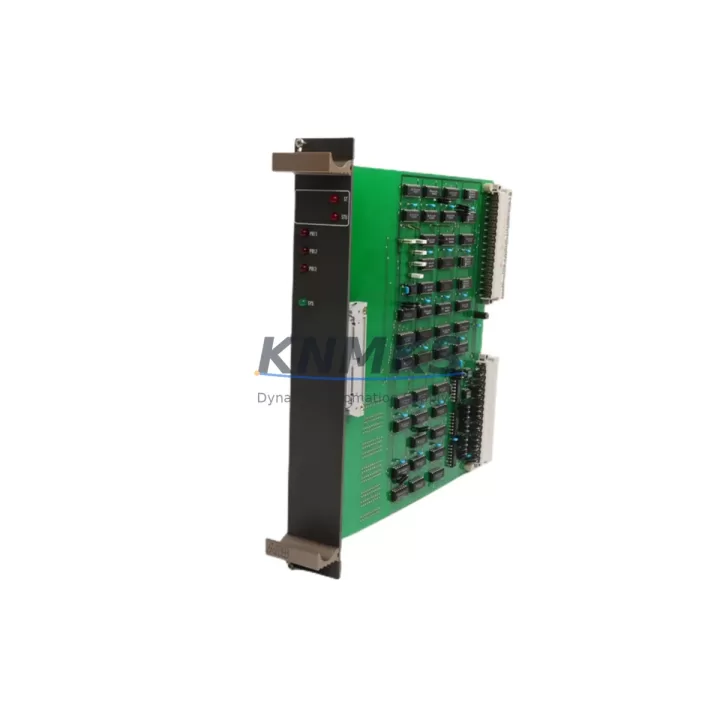
ABB 88VU01B-E GJR2326500R1011 Migration-Ready Coupling Module for Legacy Control Systems
The ABB 88VU01B-E (catalog reference GJR2326500R1011) is a coupling module designed for the ABB AC500 PLC platform, serving as a critical interface between the CPU module and I/O expansion units on the AC500 backplane. As legacy AC500 installations age and original spare parts become increasingly difficult to source, this module has become a primary target for retrofit and modernization projects across process automation, machine control, and infrastructure applications.
For engineers managing aging control cabinets originally built around the AC500 V1 or early V2 architecture, the 88VU01B-E provides a verified drop-in replacement path. Before proceeding with any swap, site teams must confirm the backplane slot assignment, terminal wiring layout, and the firmware version running on the paired CPU — typically a PM571, PM581, or PM591 — to ensure full register-level compatibility. Mismatched firmware revisions between the CPU and coupling layer can cause initialization faults that delay commissioning and extend planned downtime windows.
Power budget verification is equally important. The AC500 system bus draws distributed power across all installed modules; adding or replacing a coupling module without recalculating the total current draw on the PS501 or PS502 power supply module can trigger undervoltage trips during startup. Always cross-reference the updated module list against the power supply’s rated output before energizing the rack.
Migration Compatibility Table
| Parameter | Detail |
|---|---|
| Part Number | 88VU01B-E |
| Catalog / Order Code | GJR2326500R1011 |
| Platform | ABB AC500 PLC Series |
| Module Function | CPU–I/O Coupling / Backplane Interface |
| Backplane Interface | AC500 internal system bus (parallel backplane) |
| Compatible CPUs | PM571, PM581, PM591 (firmware verification required) |
| Installation | DIN-rail mounted backplane slot; tool-free module insertion |
| Terminal Wiring | Retain original field wiring; confirm terminal block pitch matches replacement unit |
| Communication Compatibility | PROFIBUS DP, Modbus RTU (via paired communication module) |
| Replacement Recommendation | Direct replacement for discontinued 88VU01B-E variants; verify R-suffix revision |
| Commissioning Focus | Firmware sync, I/O address mapping, HMI tag re-binding |
| Country of Origin | Germany |
| Weight | 760 g |
| Support terms | support terms confirmed by quotation — functional test report available on request |
Retrofit Planning for Existing Automation Systems
A successful retrofit around the 88VU01B-E GJR2326500R1011 requires a structured approach that accounts for every layer of the existing control architecture. Begin with a full audit of the installed AC500 rack: document each occupied slot, the module type, its I/O address range, and the current firmware version. This baseline prevents address conflicts when the replacement module initializes and the CPU re-scans the backplane.
Terminal block compatibility is a frequent source of delay. The original AC500 I/O modules use specific terminal block pitches and locking mechanisms. If the replacement coupling module ships with a different terminal block variant, field wiring must be re-terminated — a process that adds hours to the outage window. Sourcing a matched terminal block set in advance, or confirming that the existing terminal block transfers directly to the new module body, is essential pre-work.
Communication continuity is the next priority. Many legacy AC500 installations rely on a CM572-DP PROFIBUS DP communication module or a CM577-ETH Ethernet module for supervisory connectivity. These modules plug into dedicated communication slots on the CPU module, not the coupling layer, but their configuration files reference I/O addresses that are resolved through the coupling module’s address table. After replacing the 88VU01B-E, re-download the full hardware configuration from the Control Builder Plus engineering tool to force a fresh address resolution cycle.
HMI screen binding is another area that requires attention. Operator panels connected via the AC500’s internal Modbus or PROFIBUS link reference specific data block addresses. If the new coupling module shifts any I/O module’s logical address — even by one slot — HMI tags will point to incorrect registers. A pre-migration tag export from the HMI project, followed by a post-commissioning live comparison, is the safest verification method.
For installations that include signal isolators between field instruments and the AC500 I/O modules, confirm that the isolator output range still falls within the replacement module’s input specification. Older SM560 or SM561 analog input modules have slightly different input impedance characteristics compared to newer revisions, and a mismatched isolator output can introduce offset errors that are difficult to diagnose under time pressure.
Finally, if the control cabinet includes a TB521 or TB541 terminal base, verify that the coupling module’s mechanical locking tab engages correctly with the base. Worn locking tabs on aged terminal bases can cause intermittent contact faults that appear as random I/O errors rather than a clear hardware fault — a failure mode that is time-consuming to diagnose during a live commissioning session.
Downtime Control During System Migration
Minimizing unplanned downtime during a coupling module replacement requires preparation that begins well before the maintenance window opens. The most effective strategy is to pre-configure the replacement 88VU01B-E offline using a bench test rack loaded with the same firmware version as the production system. Running a full I/O scan offline confirms that the module initializes correctly and that all configured I/O addresses resolve without faults before the unit is transported to site.
Program logic protection is equally critical. Export a full backup of the AC500 CPU project — including hardware configuration, POU source code, and symbol table — immediately before the swap. Store this backup on an isolated engineering laptop, not only on the plant network, to ensure it remains accessible even if network connectivity is disrupted during the changeover.
For processes that cannot tolerate a full control interruption, consider a phased migration approach: transfer non-critical I/O groups to a temporary bypass panel while the coupling module is replaced, then reconnect field wiring group by group as each I/O module is verified online. This approach keeps critical loops — such as safety interlocks, motor protection relays, and pressure control loops — active throughout the migration window.
After the replacement module is installed and the CPU has completed its startup scan, perform a structured commissioning check: verify each I/O channel against the field instrument, confirm communication link status on all connected modules, and validate HMI display values against live field readings before releasing the system to operations. Document the commissioning results and retain them alongside the support terms confirmed by quotation record for future reference.
Retrofit Support FAQ
Q1: Is the 88VU01B-E GJR2326500R1011 a direct replacement for the original discontinued unit?
Yes. The GJR2326500R1011 is the original ABB order code for the 88VU01B-E coupling module. Units supplied from our inventory are sourced from verified industrial channels, functionally tested prior to shipment, and confirmed compatible with the AC500 backplane architecture. Firmware compatibility with the paired CPU should be verified using the ABB hardware compatibility matrix before installation.
Q2: What commissioning steps are required after installing the replacement module?
After physical installation, re-download the full hardware configuration from Control Builder Plus to force a backplane re-scan. Verify that all I/O module addresses resolve correctly, check communication link status for any connected CM572-DP or CM577-ETH modules, and perform a live I/O verification against field instruments before returning the system to automatic mode.
Q3: Can the existing field wiring be reused without modification?
In most cases, yes — provided the replacement module uses the same terminal block type and pitch as the original. Confirm the terminal block variant before the maintenance window. If the terminal block does not transfer directly, plan for re-termination time in the outage schedule.
Q4: What support terms and testing documentation is provided?
All units ship with a support terms confirmed by quotation covering functional defects. A functional test report confirming I/O channel integrity and backplane communication is available on request. Units are inspected and tested prior to dispatch to reduce the risk of DOA failures on site.
© 2026 KNMKS. All rights reserved.
Original Source: https://knmks.com
Contact: admin@knmks.com | +86 18359268345
Product Identification
- Brand / Ecosystem
-
ABB
ABB - Model / Series
-
88VU01B-E GJR2326500R1011
AC500 Series - Product Family
- PLCs & Controllers
- Availability Status
- Available on request after model and quantity confirmation
- Inquiry Type
- B2B RFQ, replacement inquiry and project spare-part request
- Pre-Quote Check
- Exact SKU, brand, series, quantity, nameplate photos and destination country are checked before quotation
System Path
Where this product fits in the KNMKS automation structure.
Specification & Inquiry Focus
- Control platform
- PLC, PAC and modular controllers
- Common needs
- CPU, rack, power and I/O expansion
- Project support
- Replacement, cabinet build and maintenance
Buyer Confirmation
Information KNMKS checks before replying.
- Exact model
- 88VU01B-E GJR2326500R1011
- Brand / ecosystem
- ABB
- Product family
- PLCs & Controllers
- Application note
- Replacement, maintenance, project build or spare-part list
- Useful photos
- Nameplate, installed unit, cabinet layout or connector side
- Delivery details
- Quantity, destination country and target schedule
Document Support
Files and notes can be confirmed during quotation.
- Product photos or nameplate confirmation when available
- Packing and delivery notes before quotation confirmation
- Support scope and delivery terms confirmed per inquiry
- Export document coordination for qualified B2B requests
Inquiry Support
- Model cross-checking before quotation
- CPU, power, rack and expansion module matching
- Support for replacement and project inquiry
What to Send Us
- Brand and exact model number: ABB 88VU01B-E GJR2326500R1011
- Quantity and required delivery time
- Application, replacement requirement or nameplate photo
- Destination country and shipping preference
RFQ Preparation
This is a product inquiry page built for RFQ communication.
Fast Model Check
Send this model to KNMKS for confirmation.
Include quantity, destination country and photos if this is a maintenance replacement. The inquiry will be saved with a reference number after submission.
Brand & Compatibility Note
KNMKS displays automation product information for well-known industrial brand ecosystems and compatible replacement references. Brand names are used for product identification and compatibility reference only; final availability and commercial terms are confirmed per quotation.
 Manufacturing
 Machine Tools
 Packaging
 Energy & Power



 HMI & Displays
 Servo Systems
 Variable Frequency Drives
 Sensors