
Overview
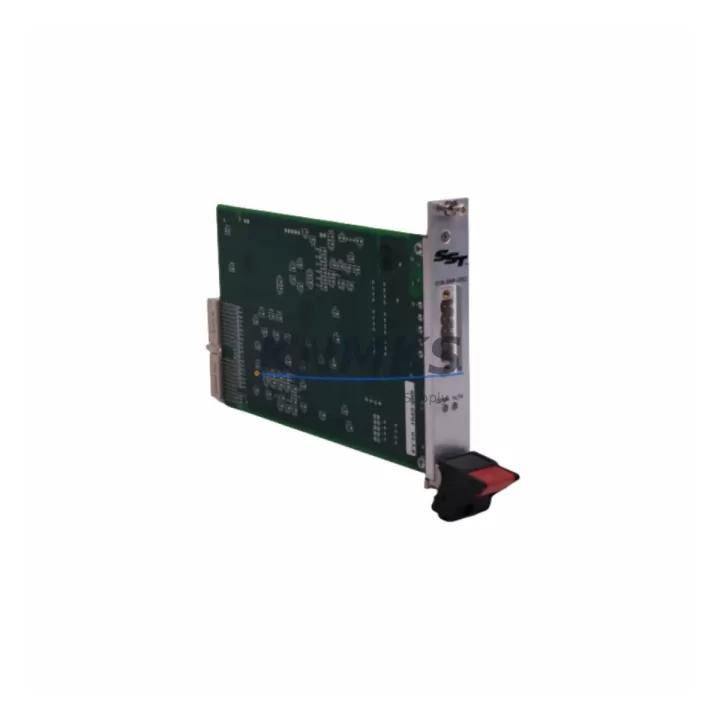
ABB 88VK01E GJR2312200R1010 Migration-Ready DO Module for Legacy Control Systems
The ABB 88VK01E (part number GJR2312200R1010) is a digital output module designed for the ABB AC500 PLC platform, widely deployed across industrial automation installations in process control, machine automation, and infrastructure management. As legacy AC500 configurations age and OEM support windows close, this module has become a critical component in retrofit and upgrade projects where maintaining operational continuity is the primary engineering objective.
For facilities running aging AC500 racks with original S500 I/O modules, the 88VK01E provides a verified drop-in replacement path. Its terminal wiring layout is compatible with standard AC500 field wiring practices, reducing the need for panel rewiring during module swap-out. Engineers undertaking a control cabinet upgrade should confirm the existing backplane slot assignment, module address configuration in the PS501 Control Builder programming environment, and the output channel count against the original I/O map before commissioning.
When integrating the 88VK01E into a retrofit project, the power supply capacity of the existing rack must be validated. AC500 systems typically use the PM5xx or PM5xx-ETH CPU modules paired with TB5xx terminal base units. If the existing terminal base is a TB511 or TB521, the 88VK01E slots directly without mechanical modification. Projects involving a full rack replacement should also account for the DC531 or DC532 communication modules if PROFIBUS DP or CANopen links are part of the existing control architecture — these communication modules must retain their node addresses and baud rate settings to avoid disrupting upstream SCADA or DCS integration.
In multi-rack installations, the 88VK01E is frequently deployed alongside the AI523 analog input module and the DI524 digital input module to complete a balanced I/O expansion. Where the legacy system relied on signal isolators between field devices and the PLC rack, the existing isolation barriers should be retained during the initial retrofit phase to protect the new module from transient voltages common in older panel environments. After a stabilization period, the isolation layer can be reviewed for removal if field wiring has been upgraded to current standards.
HMI screen mapping is another critical checkpoint. If the plant runs a CP600 or CP400 series HMI panel connected to the AC500 CPU via Modbus TCP or PROFINET, the output tag addresses associated with the replaced module must be verified against the HMI project database. A mismatch between the physical module slot and the HMI tag address will cause output status display errors without triggering a PLC fault — a condition that is easy to overlook during a rapid changeover window.
Firmware compatibility should be confirmed before installation. The 88VK01E is supported under AC500 firmware versions V2.x and V3.x. Projects running older V1.x firmware on PM554 or PM564 CPUs should plan a CPU firmware update as part of the broader migration scope. The firmware update procedure requires a programming cable connection to the CPU service port and a validated backup of the existing application program stored in the PS501 project archive.
All units supplied by KNMKS are tested prior to dispatch, covered by a support terms confirmed by quotation, and sourced from verified distribution channels. Stock availability is maintained to support both planned maintenance schedules and emergency replacement scenarios.
Migration Compatibility Table
| Parameter | Details |
|---|---|
| Module SKU | 88VK01E / GJR2312200R1010 |
| Compatible Platform | ABB AC500 PLC Series |
| Compatible Terminal Base | TB511, TB521 (S500 I/O family) |
| Compatible CPUs | PM554, PM564, PM572, PM581, PM591 |
| Output Type | Digital Output (DO) |
| Backplane Interface | AC500 S500 I/O bus |
| Communication Compatibility | PROFIBUS DP, CANopen, Modbus TCP (via CPU) |
| Firmware Support | AC500 V2.x, V3.x (V1.x requires CPU firmware update) |
| Wiring Compatibility | Drop-in compatible with standard AC500 field wiring |
| Installation Space | Standard S500 I/O slot — no mechanical modification required |
| Replacement Recommendation | Direct replacement for legacy 88VK01E units; verify slot address and I/O map |
| Commissioning Focus | Module address, output channel mapping, HMI tag verification, firmware version |
| Support terms | 12 months from date of dispatch |
Retrofit Planning for Existing Automation Systems
A structured retrofit plan for an AC500-based control system typically begins with a full audit of the existing rack configuration. The 88VK01E digital output module is most commonly replaced as part of a broader I/O refresh that also involves the AI523 analog input module for process variable monitoring and the DI524 digital input module for field device status feedback. In systems where the original rack includes a CI590-CS31-HA communication interface module for CS31 bus connectivity, the bus topology must be documented before any module is removed to avoid address conflicts during recommissioning.
Power distribution within the control cabinet should be reviewed before the retrofit begins. The TB5xx terminal base units draw power from the rack bus, and adding or replacing modules can shift the total current draw. If the existing power supply is a PS501 or PS560, its output capacity should be verified against the updated module load list. In cabinets where space is constrained, the physical dimensions of the 88VK01E should be confirmed against the available slot depth, particularly in retrofit scenarios where third-party DIN rail accessories have been added to the original panel layout.
For systems that include a CP600 HMI panel or a third-party SCADA interface, the output tag database must be exported and cross-referenced against the new module’s channel assignments before the cutover window begins. Programming cable access to the CPU service port — typically via a USB-to-serial adapter compatible with the PS501 Control Builder — should be arranged in advance to allow rapid program download if a logic correction is required during commissioning.
Downtime Control During System Migration
Minimizing unplanned downtime during an AC500 module replacement requires a disciplined pre-cutover checklist. Before removing the legacy 88VK01E, the existing application program should be uploaded from the CPU and archived with version control notation. The output force table in PS501 Control Builder can be used to hold critical outputs in their last known state during the physical swap, provided the CPU remains powered and in RUN mode throughout the exchange — a technique that is only viable when the module replacement is completed within the CPU watchdog timeout window.
For processes where even momentary output interruption is unacceptable, a parallel wiring strategy using a temporary relay bypass on the affected output channels allows the field devices to remain energized while the module is exchanged. After the new 88VK01E is seated and the terminal base latch is confirmed, the module address is verified in the PS501 hardware configuration, the program is downloaded, and the relay bypass is removed channel by channel while monitoring field device response.
Post-installation, a full I/O verification against the original signal list confirms that all output channels are responding correctly. Communication link status — particularly for PROFIBUS DP or CANopen segments connected through DC531 or DC532 modules — should be verified in the CPU diagnostic buffer before the system is returned to automatic control. Documenting the as-built configuration, including firmware version, module serial number, and slot position, supports future maintenance cycles and reduces diagnostic time during the next scheduled outage.
Retrofit Support FAQ
Q: Is the 88VK01E (GJR2312200R1010) a direct replacement for the original ABB AC500 digital output module?
A: Yes. The 88VK01E is a direct replacement for legacy AC500 S500 I/O digital output modules using the same terminal base (TB511 or TB521). No mechanical modification is required. Verify the module address and output channel mapping in PS501 Control Builder before commissioning.
Q: What wiring changes are needed when replacing the module?
A: In most cases, no wiring changes are required. The 88VK01E uses the same terminal layout as the original S500 DO modules. If field wiring has been modified since the original installation, a point-to-point continuity check against the original wiring diagram is recommended before powering the new module.
Q: How is compatibility with older AC500 firmware versions handled?
A: The 88VK01E is fully supported under AC500 firmware V2.x and V3.x. Systems running V1.x firmware on PM554 or PM564 CPUs should plan a CPU firmware update. KNMKS can advise on the firmware update procedure and supply the required programming cable if needed.
Q: What does the support terms confirmed by quotation cover, and how quickly can replacement stock be dispatched?
A: The support terms confirmed by quotation cover manufacturing defects and verified functional failures under normal operating conditions. KNMKS maintains buffer stock of the 88VK01E to support both planned maintenance and emergency replacement requirements. All units are tested before dispatch. Contact admin@knmks.com or +86 18359268345 for lead time confirmation and stock availability.
© 2026 KNMKS. All rights reserved.
Original Source: https://knmks.com
Contact: admin@knmks.com | +86 18359268345
Product Identification
- Brand / Ecosystem
-
ABB
ABB - Model / Series
-
88VK01E-GJR2312200R1010
AC500 Series - Product Family
- PLCs & Controllers
- Availability Status
- Available on request after model and quantity confirmation
- Inquiry Type
- B2B RFQ, replacement inquiry and project spare-part request
- Pre-Quote Check
- Exact SKU, brand, series, quantity, nameplate photos and destination country are checked before quotation
System Path
Where this product fits in the KNMKS automation structure.
Specification & Inquiry Focus
- Control platform
- PLC, PAC and modular controllers
- Common needs
- CPU, rack, power and I/O expansion
- Project support
- Replacement, cabinet build and maintenance
Buyer Confirmation
Information KNMKS checks before replying.
- Exact model
- 88VK01E-GJR2312200R1010
- Brand / ecosystem
- ABB
- Product family
- PLCs & Controllers
- Application note
- Replacement, maintenance, project build or spare-part list
- Useful photos
- Nameplate, installed unit, cabinet layout or connector side
- Delivery details
- Quantity, destination country and target schedule
Document Support
Files and notes can be confirmed during quotation.
- Product photos or nameplate confirmation when available
- Packing and delivery notes before quotation confirmation
- Support scope and delivery terms confirmed per inquiry
- Export document coordination for qualified B2B requests
Inquiry Support
- Model cross-checking before quotation
- CPU, power, rack and expansion module matching
- Support for replacement and project inquiry
What to Send Us
- Brand and exact model number: ABB 88VK01E-GJR2312200R1010
- Quantity and required delivery time
- Application, replacement requirement or nameplate photo
- Destination country and shipping preference
RFQ Preparation
This is a product inquiry page built for RFQ communication.
Fast Model Check
Send this model to KNMKS for confirmation.
Include quantity, destination country and photos if this is a maintenance replacement. The inquiry will be saved with a reference number after submission.
Brand & Compatibility Note
KNMKS displays automation product information for well-known industrial brand ecosystems and compatible replacement references. Brand names are used for product identification and compatibility reference only; final availability and commercial terms are confirmed per quotation.
 Manufacturing
 Machine Tools
 Packaging
 Energy & Power



 HMI & Displays
 Servo Systems
 Variable Frequency Drives
 Sensors