
Overview
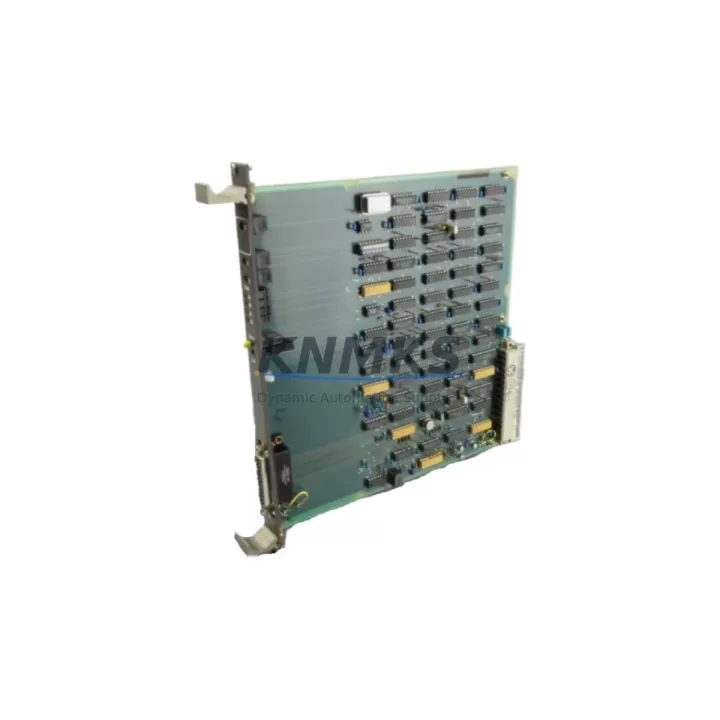
ABB 88FN02B-C Migration-Ready DI Module for AC500: Legacy System Retrofit & Compatibility Upgrade
The ABB 88FN02B-C is a digital input (DI) module designed for the ABB AC500 PLC platform, widely deployed across process automation, machine control, and utility infrastructure projects. As legacy AC500 configurations age and original DI modules reach end-of-life or become allocation-constrained, the 88FN02B-C serves as a verified migration-ready replacement that preserves existing wiring topology, rack addressing, and program logic without requiring a full control system redesign.
For maintenance engineers managing aging control cabinets, the 88FN02B-C offers a direct substitution path for discontinued or hard-to-source DI modules within the AC500 ecosystem. Its compatibility with the AC500 backplane and standard I/O bus architecture means that terminal wiring, module addressing, and CPU communication links remain intact during the swap — significantly reducing the engineering effort and downtime risk associated with unplanned module failures or scheduled system upgrades.
Before installing the 88FN02B-C as a replacement, engineers should verify the following: input voltage range and signal type (24 VDC sourcing/sinking), terminal block wiring layout against the existing field wiring schedule, module slot address assignment in the AC500 CPU configuration (PS501 Control Builder Plus), backplane compatibility with the TB5xx or TA5xx rack series, and firmware version alignment between the replacement module and the active CPU firmware. In mixed-generation AC500 installations, confirming that the replacement module’s hardware revision is recognized by the installed CPU firmware version is a critical pre-commissioning step.
The 88FN02B-C integrates directly into AC500 racks alongside companion modules commonly found in the same control cabinet — including the AC500 PM5xx CPU modules, the DC532 and DC522 digital output modules, the AI523 analog input module for process signal conditioning, and the CM589-PNIO PROFINET communication module where fieldbus connectivity is required. In retrofit scenarios involving communication protocol migration from PROFIBUS DP to PROFINET IO, the 88FN02B-C’s I/O data mapping remains consistent, allowing the HMI screen tag assignments and SCADA data point references to be preserved without remapping.
Migration Compatibility Table
| Parameter | Details |
|---|---|
| SKU / Part Number | 88FN02B-C |
| Brand / Manufacturer | ABB (Germany) |
| Series | AC500 |
| Module Type | Digital Input (DI) Module |
| Backplane Compatibility | AC500 TB5xx / TA5xx rack series |
| Communication Interface | AC500 internal I/O bus (PROFIBUS DP / PROFINET IO compatible rack) |
| Input Signal Type | 24 VDC digital inputs (sourcing/sinking) |
| Terminal Wiring | Compatible with existing AC500 DI module terminal block layout |
| Module Address Assignment | Configured via PS501 Control Builder Plus; slot-based addressing |
| Firmware Compatibility | Verify CPU firmware version supports hardware revision of replacement module |
| Replacement / Retrofit Scope | Drop-in replacement for legacy AC500 DI modules; no rewiring required |
| Commissioning Requirement | Module recognition check in Control Builder Plus; I/O force test recommended |
| Support terms | support terms confirmed by quotation — all units tested prior to shipment |
Retrofit Planning for Existing Automation Systems
Successful integration of the ABB 88FN02B-C into an existing AC500 control system requires a structured retrofit plan that accounts for both hardware and software dependencies. In a typical control cabinet housing an AC500 PM573 or PM583 CPU, the DI module occupies a defined slot on the TB511 or TB521 backplane. Before removing the failed or end-of-life module, engineers should document the slot number, I/O address range, and any force values active in the CPU program to avoid unintended process responses during the swap.
Terminal wiring should be photographed and cross-referenced against the field wiring schedule before disconnection. The 88FN02B-C uses the same terminal block pitch and connector type as standard AC500 DI modules, allowing the existing field cables to be reconnected without modification. Where signal isolation is required between field devices and the PLC input circuit — particularly in environments with high electrical noise from variable frequency drives or motor starters — an inline signal isolator or barrier module may be inserted between the field terminal and the DI input without affecting the module’s input impedance characteristics.
In installations where the AC500 rack also hosts a CM577-ETH Ethernet communication module or a CI590-CS31-HA CS31 bus coupler, the DI module replacement does not affect the communication link configuration. The CPU continues to poll the I/O bus independently of the fieldbus communication cycle, ensuring that the SCADA system and HMI panels connected via Modbus TCP or CS31 remain online during the module swap if the CPU is kept in RUN mode with appropriate program safeguards.
For systems undergoing a broader migration from legacy S500 I/O to AC500 architecture, the 88FN02B-C can serve as a bridging component — maintaining digital input functionality while analog input channels are migrated to the AI523 or AI531 modules and power supply capacity is verified against the updated load profile of the expanded rack. The TB5xx rack’s power budget should be recalculated whenever new modules are added, particularly if the existing PS501 or PS560 power supply module is already operating near its rated output current.
Downtime Control During System Migration
Minimizing unplanned downtime during a DI module replacement on an active AC500 system requires preparation at three levels: program protection, hardware staging, and commissioning sequencing. Before the maintenance window begins, the CPU program should be uploaded and archived from the live system using PS501 Control Builder Plus, ensuring that the latest online changes — including any modifications made directly to the running program without a full download — are captured in the backup.
Where process conditions allow, the affected input signals should be forced to their safe-state values in the CPU program before the module is physically removed. This prevents the CPU from detecting spurious input transitions during the swap and triggering unintended output responses or alarm conditions. In safety-instrumented systems or processes with interlocked sequences, the relevant safety function should be bypassed through the approved management-of-change procedure before any hardware intervention.
The 88FN02B-C is shipped fully tested and ready for installation, with each unit verified for input channel continuity, signal response time, and bus communication handshake prior to dispatch. Upon insertion into the rack, the CPU should recognize the module automatically if the hardware configuration in Control Builder Plus matches the installed module type. A forced I/O test — cycling each input channel through its active and inactive states using a test signal source — confirms field wiring integrity before the process is returned to automatic control. Total swap time for a prepared maintenance team, including wiring reconnection and I/O verification, is typically under 30 minutes for a single DI module replacement.
Retrofit Support FAQ
Q1: Is the ABB 88FN02B-C a direct drop-in replacement for other AC500 digital input modules?
The 88FN02B-C is designed for the AC500 platform and is compatible with the TB5xx and TA5xx backplane series. It can replace legacy AC500 DI modules of equivalent channel count and input voltage specification without rewiring, provided the slot address and CPU hardware configuration are updated to reflect the replacement module’s hardware revision. Confirm compatibility using the AC500 hardware catalog and the installed CPU firmware version before ordering.
Q2: What commissioning steps are required after installing the 88FN02B-C?
After physical installation, open PS501 Control Builder Plus and verify that the CPU hardware configuration recognizes the new module in the correct slot. Perform an online comparison between the stored configuration and the detected hardware. Execute a forced I/O test on each input channel to confirm field wiring continuity. Remove any forced values applied during the swap and return the CPU to normal RUN mode. Document the replacement in the system maintenance log.
Q3: Can the 88FN02B-C be used in a system migrating from PROFIBUS DP to PROFINET IO?
Yes. The 88FN02B-C connects to the AC500 internal I/O bus, which is independent of the fieldbus communication layer. Whether the AC500 rack communicates upstream via PROFIBUS DP (using a CM572-DP coupler) or PROFINET IO (using a CM589-PNIO coupler), the DI module’s input data is mapped to the CPU’s I/O image in the same way. HMI tag assignments and SCADA data point references linked to the DI channel addresses remain valid after the fieldbus migration.
Q4: What support terms and pre-shipment testing does the 88FN02B-C include?
Every ABB 88FN02B-C unit supplied by KNMKS is covered by a support terms confirmed by quotation from the date of shipment. Each module undergoes functional testing prior to dispatch, including input channel verification and bus communication handshake confirmation. Units are packaged in anti-static protective packaging with inspection documentation. In-stock units are available for same-week dispatch to support urgent maintenance and unplanned outage recovery scenarios.
© 2026 KNMKS. All rights reserved.
Original Source: https://knmks.com
Contact: admin@knmks.com | +86 18359268345
Product Identification
- Brand / Ecosystem
-
ABB
ABB - Model / Series
-
88FN02B-C
AC500 Series - Product Family
- PLCs & Controllers
- Availability Status
- Available on request after model and quantity confirmation
- Inquiry Type
- B2B RFQ, replacement inquiry and project spare-part request
- Pre-Quote Check
- Exact SKU, brand, series, quantity, nameplate photos and destination country are checked before quotation
System Path
Where this product fits in the KNMKS automation structure.
Specification & Inquiry Focus
- Control platform
- PLC, PAC and modular controllers
- Common needs
- CPU, rack, power and I/O expansion
- Project support
- Replacement, cabinet build and maintenance
Buyer Confirmation
Information KNMKS checks before replying.
- Exact model
- 88FN02B-C
- Brand / ecosystem
- ABB
- Product family
- PLCs & Controllers
- Application note
- Replacement, maintenance, project build or spare-part list
- Useful photos
- Nameplate, installed unit, cabinet layout or connector side
- Delivery details
- Quantity, destination country and target schedule
Document Support
Files and notes can be confirmed during quotation.
- Product photos or nameplate confirmation when available
- Packing and delivery notes before quotation confirmation
- Support scope and delivery terms confirmed per inquiry
- Export document coordination for qualified B2B requests
Inquiry Support
- Model cross-checking before quotation
- CPU, power, rack and expansion module matching
- Support for replacement and project inquiry
What to Send Us
- Brand and exact model number: ABB 88FN02B-C
- Quantity and required delivery time
- Application, replacement requirement or nameplate photo
- Destination country and shipping preference
RFQ Preparation
This is a product inquiry page built for RFQ communication.
Fast Model Check
Send this model to KNMKS for confirmation.
Include quantity, destination country and photos if this is a maintenance replacement. The inquiry will be saved with a reference number after submission.
Brand & Compatibility Note
KNMKS displays automation product information for well-known industrial brand ecosystems and compatible replacement references. Brand names are used for product identification and compatibility reference only; final availability and commercial terms are confirmed per quotation.
 Manufacturing
 Machine Tools
 Packaging
 Energy & Power



 HMI & Displays
 Servo Systems
 Variable Frequency Drives
 Sensors