
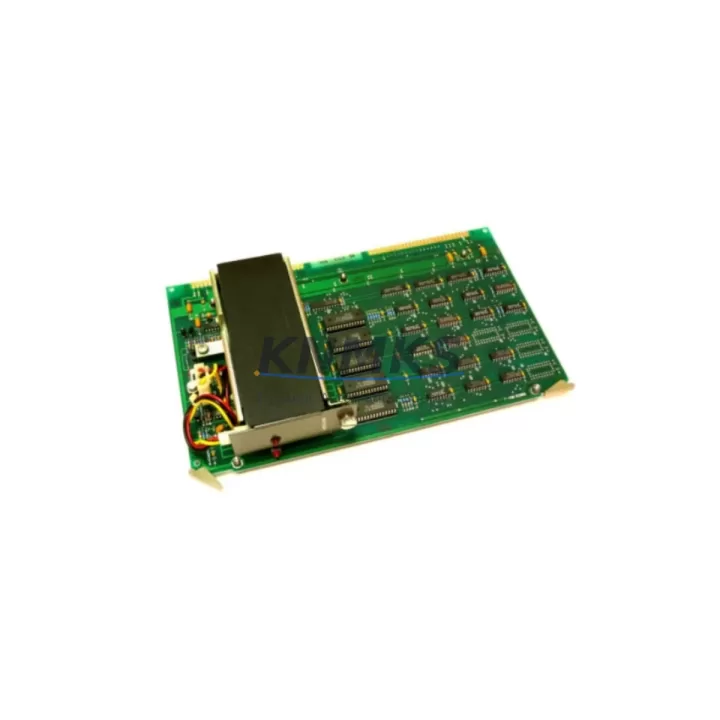
Overview
ABB 87WF01E GJR2372600R1515 Spare Part for Factory Uptime
The ABB 87WF01E (part number GJR2372600R1515) is an original analog input module designed for the ABB AC500 PLC platform — one of the most widely deployed programmable logic controller families in process automation, power distribution, and discrete manufacturing. When this module fails or degrades, the consequences extend beyond a single I/O channel: the entire control loop dependent on that analog signal is compromised, triggering alarms, forcing manual overrides, and in worst cases, initiating an unplanned production shutdown.
Stocking a verified replacement of the 87WF01E GJR2372600R1515 is a foundational element of any serious spare parts strategy for AC500-based control systems. This listing provides an original, pre-shipment tested unit backed by a support terms confirmed by quotation, available for fast global dispatch to minimize your mean time to repair (MTTR).
Spare Maintenance Table
| Parameter | Specification |
|---|---|
| Part Number | 87WF01E |
| Full Reference | GJR2372600R1515 |
| Brand | ABB |
| Series | AC500 |
| Module Type | Analog Input Module |
| Origin | Germany (DE) |
| Compatible Platform | ABB AC500 PLC System |
| Signal Type | Analog Input (voltage/current) |
| Installation | DIN rail, AC500 backplane slot |
| Application Environment | Industrial automation, process control, power distribution |
| Maintenance Recommendation | Replace on signal drift, calibration failure, or module fault alarm |
| Pre-Shipment Test | Yes — functional verification before dispatch |
| Support terms | 12 Months |
| Availability | availability confirmed by RFQ — ready for immediate shipment |
Maintenance Planning for Continuous Operation
Replacing the ABB 87WF01E GJR2372600R1515 in the field is rarely an isolated task. Maintenance engineers working on AC500 systems understand that an analog input fault often signals broader stress on the control cabinet. During any scheduled or emergency replacement of this module, a thorough inspection of adjacent components is strongly recommended to prevent repeat failures and ensure the restored system operates reliably.
Begin by verifying the AC500 CPU module — typically a PM573, PM583, or PM595 — for firmware version compatibility and active fault logs. A degraded analog input module can sometimes mask underlying CPU communication errors that only surface after the I/O is restored. Next, inspect the TB511 or TB521 terminal base units that the 87WF01E seats into: damaged terminal contacts or loose field wiring are a common root cause of analog signal instability that gets misdiagnosed as module failure.
The 24 VDC power supply feeding the AC500 rack — often an ABB CP series or equivalent industrial SMPS — should be load-tested during the maintenance window. Voltage sag under full I/O load can cause intermittent analog errors that are difficult to reproduce during bench testing. Similarly, check the SD802 or SD812 power distribution modules within the rack for signs of thermal stress or connector oxidation.
For systems with mixed analog and digital I/O, inspect neighboring digital input/output modules such as the DC532 or DA501 for cross-talk shielding integrity. Unshielded or improperly grounded analog signal cables running parallel to high-current digital outputs are a frequent source of noise-induced measurement errors. Signal isolators or barriers installed upstream of the 87WF01E should also be verified for correct range configuration and calibration date.
If the AC500 system communicates over PROFIBUS, Modbus TCP, or EtherNet/IP, confirm that the CM589 or CM579 communication module is operating without CRC errors after the I/O replacement — a module swap can occasionally trigger a network re-initialization that exposes pre-existing communication faults. Finally, review the control cabinet’s fuse and circuit protection inventory: F-series miniature circuit breakers protecting the analog input field circuits should be tested for correct trip characteristics and replaced if they show signs of aging.
Proactive spare parts stocking for the 87WF01E GJR2372600R1515 — alongside CPU modules, terminal bases, and communication modules — is the most cost-effective way to protect against extended downtime in aging AC500 installations.
Site Replacement Workflow
When the 87WF01E GJR2372600R1515 arrives on site, follow this sequence to minimize downtime and ensure a clean system handover:
1. Pre-replacement verification: Confirm the replacement unit’s part number and firmware label match the installed module. Cross-reference the GJR2372600R1515 reference against the system’s hardware configuration file in ABB Automation Builder to ensure no parameter mismatch.
2. Safe isolation: Place the AC500 CPU in STOP mode and isolate field power to the analog input circuits. Do not remove the module under live field voltage — analog input modules are sensitive to electrostatic discharge and transient overvoltage during hot-swap attempts on non-hot-swap-rated slots.
3. Module extraction and installation: Release the terminal base locking mechanism, extract the faulty 87WF01E, and seat the replacement unit firmly until the locking tab engages. Verify that the module’s LED status indicators cycle correctly on power-up.
4. Configuration restore: Using ABB Automation Builder, download the existing hardware configuration to confirm the replacement module is recognized without parameter errors. If the system uses module-specific calibration data, restore from the last verified backup.
5. Signal verification: Apply known reference signals to each analog input channel and verify measured values against expected engineering units. Document the as-found and as-left readings for the maintenance record.
6. Return to service: Place the CPU back in RUN mode, monitor for alarms for a minimum of 15 minutes, and confirm with the process operator that all controlled loops are stable before closing the work order.
This workflow applies equally to planned annual maintenance replacements and emergency fault-response scenarios, and is compatible with both legacy AC500 V1 and current AC500-eCo hardware generations.
Spare Parts Support FAQ
Q1: Is the 87WF01E GJR2372600R1515 compatible with all AC500 CPU generations?
The 87WF01E is designed for the ABB AC500 platform and is compatible with the standard AC500 terminal base and backplane architecture. Compatibility with specific CPU generations (V1, V2, AC500-eCo) should be confirmed against your system’s hardware configuration file in ABB Automation Builder. We recommend providing your CPU part number when ordering to allow our technical team to confirm fit before shipment.
Q2: What does the support terms confirmed by quotation cover?
The support terms confirmed by quotation cover manufacturing defects and functional failures under normal operating conditions. Each unit undergoes pre-shipment functional testing before dispatch. Support requests are supported with direct technical assistance and priority replacement dispatch to minimize your downtime exposure.
Q3: How do you manage long-term supply for discontinued or end-of-life ABB AC500 modules?
We maintain strategic stock of high-demand AC500 spare parts, including the 87WF01E GJR2372600R1515, sourced from authorized distribution channels and verified refurbishment programs. For customers with multi-year maintenance contracts or large installed bases, we offer reserved stock agreements to guarantee availability beyond standard market lead times.
Q4: Can I send my faulty 87WF01E for exchange or repair evaluation?
Yes. We support advance replacement and exchange programs for AC500 analog input modules. Contact our technical sales team with your fault description and system details. In many cases, a swap unit can be dispatched within 24–48 hours while your original module is evaluated, reducing total downtime to the minimum possible window.
© 2026 KNMKS. All rights reserved.
Original Source: https://knmks.com
Contact: admin@knmks.com | +86 18359268345
Product Identification
- Brand / Ecosystem
-
ABB
ABB - Model / Series
-
87WF01E GJR2372600R1515
AC500 Series - Product Family
- PLCs & Controllers
- Availability Status
- Available on request after model and quantity confirmation
- Inquiry Type
- B2B RFQ, replacement inquiry and project spare-part request
- Pre-Quote Check
- Exact SKU, brand, series, quantity, nameplate photos and destination country are checked before quotation
System Path
Where this product fits in the KNMKS automation structure.
Specification & Inquiry Focus
- Control platform
- PLC, PAC and modular controllers
- Common needs
- CPU, rack, power and I/O expansion
- Project support
- Replacement, cabinet build and maintenance
Buyer Confirmation
Information KNMKS checks before replying.
- Exact model
- 87WF01E GJR2372600R1515
- Brand / ecosystem
- ABB
- Product family
- PLCs & Controllers
- Application note
- Replacement, maintenance, project build or spare-part list
- Useful photos
- Nameplate, installed unit, cabinet layout or connector side
- Delivery details
- Quantity, destination country and target schedule
Document Support
Files and notes can be confirmed during quotation.
- Product photos or nameplate confirmation when available
- Packing and delivery notes before quotation confirmation
- Support scope and delivery terms confirmed per inquiry
- Export document coordination for qualified B2B requests
Inquiry Support
- Model cross-checking before quotation
- CPU, power, rack and expansion module matching
- Support for replacement and project inquiry
What to Send Us
- Brand and exact model number: ABB 87WF01E GJR2372600R1515
- Quantity and required delivery time
- Application, replacement requirement or nameplate photo
- Destination country and shipping preference
RFQ Preparation
This is a product inquiry page built for RFQ communication.
Fast Model Check
Send this model to KNMKS for confirmation.
Include quantity, destination country and photos if this is a maintenance replacement. The inquiry will be saved with a reference number after submission.
Brand & Compatibility Note
KNMKS displays automation product information for well-known industrial brand ecosystems and compatible replacement references. Brand names are used for product identification and compatibility reference only; final availability and commercial terms are confirmed per quotation.
 Manufacturing
 Machine Tools
 Packaging
 Energy & Power



 HMI & Displays
 Servo Systems
 Variable Frequency Drives
 Sensors