
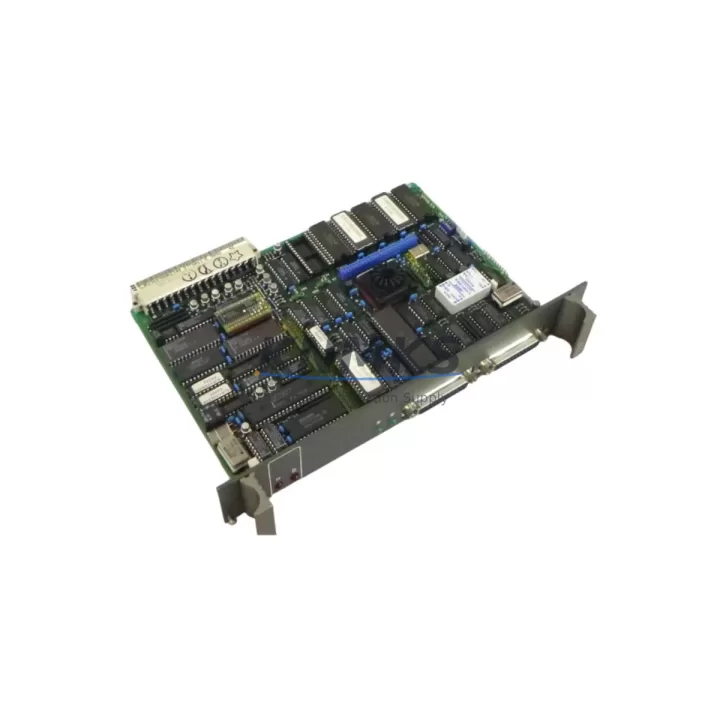
Overview
ABB 87TS01E Migration-Ready Bus Coupler for Legacy Control Systems
The ABB 87TS01E (GJR2368900R2340) is a migration-ready bus coupler module engineered for engineers and maintenance teams managing the transition from legacy ABB AC500 and S500 control architectures to modern automation platforms. As ABB progressively phases out older S500 I/O infrastructure, the 87TS01E serves as a critical bridge component — enabling facilities to extend the operational life of existing control cabinets, preserve validated program logic, and execute phased upgrades without full system shutdowns.
Whether you are replacing a failed coupler in a running production line, consolidating a multi-rack S500 installation, or migrating from a discontinued PROFIBUS DP segment to a current EtherNet/IP or Modbus TCP backbone, the 87TS01E provides the electrical and protocol compatibility required to maintain control continuity. Its compact DIN-rail form factor fits standard 35 mm mounting rails and integrates directly into existing S500 backplane assemblies without mechanical modification.
Migration Compatibility Table
| Parameter | Details |
|---|---|
| Replaces / Compatible With | ABB S500 series bus couplers; legacy AC500 I/O expansion racks |
| Backplane Interface | S500 parallel backplane bus; direct plug-in replacement for same-generation couplers |
| Communication Protocols | PROFIBUS DP (legacy); verify firmware revision for EtherNet/IP or Modbus TCP migration paths |
| Power Supply Requirement | 24 V DC nominal; confirm existing PSU capacity before installation (allow 10–15% headroom) |
| Terminal Wiring | Compatible with existing S500 terminal block layouts; no re-wiring required for drop-in swap |
| Module Addressing | DIP switch or software-configurable node address; verify address map against existing PLC program |
| Firmware Compatibility | Confirm firmware version matches AC500 CPU firmware to avoid GSD/EDS descriptor mismatch |
| Installation Space | Standard S500 rack slot; no additional clearance required |
| Commissioning | Re-import GSD/EDS file in engineering tool; verify I/O mapping before live switchover |
| Support terms | 12 months from date of shipment; covers manufacturing defects and functional failure |
Retrofit Planning for Existing Automation Systems
A successful retrofit begins well before the module arrives on site. When planning a bus coupler replacement in an S500 rack, engineers must audit the full I/O inventory of the affected rack — including digital input modules such as the ABB DI524 and analog output modules such as the AO523 — to confirm that the new coupler’s channel capacity and addressing scheme align with the existing program variable table. In multi-rack installations, the ABB TB521-ETH communication interface module or equivalent Ethernet adapter may also require a firmware update to maintain consistent network topology after the coupler swap.
Power budget verification is a non-negotiable step. The 87TS01E draws its operating power from the rack’s 24 V DC bus. If the existing ABB PS501 or PS560 power supply module is already operating near its rated output — particularly in high-density racks populated with mixed analog and digital I/O — adding or replacing a coupler without recalculating the load can trigger nuisance trips or intermittent communication faults. Always measure actual rail voltage under load before and after the swap.
For facilities migrating from PROFIBUS DP to a modern fieldbus, the 87TS01E retrofit is typically paired with an updated network segment design. This may involve introducing an ABB CI590-CS31-HA communication interface or a third-party protocol gateway to bridge legacy DP slaves to the new EtherNet/IP or PROFINET segment. Signal isolators may be required at field terminal points where legacy 4–20 mA loops interface with new digital I/O modules, ensuring signal integrity is maintained across the migration boundary.
HMI screen updates are often overlooked during coupler replacements. If the existing SCADA or HMI system — whether an ABB CP600 panel or a third-party visualization platform — references specific I/O addresses that shift as a result of the new coupler’s node configuration, operators will encounter incorrect tag readings or alarm suppression. A pre-migration tag audit and a parallel-run validation period (where both old and new coupler outputs are monitored simultaneously) significantly reduces commissioning risk.
Downtime Control During System Migration
Minimizing unplanned downtime during a bus coupler replacement requires a structured hot-swap or controlled-shutdown protocol. For processes that cannot tolerate a full rack power-down, the preferred approach is to migrate I/O in segments — transferring control of non-critical loops first while maintaining hardwired safety interlocks on critical outputs. The existing PLC program logic should be exported and version-controlled before any hardware change; this ensures that if the new coupler introduces an unexpected address offset, the original program can be restored within minutes rather than hours.
During the physical swap, document the existing DIP switch positions and terminal block wiring with photographs before disconnection. Re-import the updated GSD or EDS descriptor file into the engineering workstation (Automation Builder or equivalent), perform an offline simulation of the new I/O map, and only then initiate the live download. A staged restart — bringing up the coupler in diagnostic mode before enabling field outputs — allows the commissioning engineer to verify all channel states match expected values before returning the process to automatic control.
Post-installation, run a 24-hour monitoring period with enhanced alarm logging enabled. This catches intermittent communication errors caused by marginal cable termination, incorrect bus termination resistor placement, or firmware version mismatches between the new coupler and the CPU. All 87TS01E units shipped by KNMKS undergo pre-shipment functional testing against a reference S500 rack to confirm communication integrity, reducing the probability of field failures during the critical commissioning window.
Retrofit Support FAQ
Q1: Is the ABB 87TS01E a direct drop-in replacement for my existing S500 bus coupler?
In most S500 rack configurations, yes. The 87TS01E uses the same backplane connector and mechanical form factor as same-generation S500 couplers. However, you must verify the firmware revision of your AC500 CPU and confirm that the GSD/EDS file version supported by the 87TS01E matches your engineering tool’s hardware catalog. If your installation uses a customized node address scheme, re-configure the DIP switches before installation to avoid address conflicts.
Q2: What commissioning steps are required after installation?
After physical installation, re-import the updated GSD or EDS descriptor file into your engineering environment (ABB Automation Builder or equivalent). Perform an offline I/O map verification, then execute a controlled online download. Confirm all channel states in diagnostic view before enabling field outputs. A 24-hour monitoring period with enhanced alarm logging is recommended to detect any intermittent communication issues.
Q3: How do I verify wiring compatibility before swapping the coupler?
Document all existing terminal block connections with photographs and a wiring schedule before disconnection. The 87TS01E is compatible with standard S500 terminal block layouts, so no re-wiring is required for a like-for-like replacement. For installations where terminal blocks have been modified or extended, verify that field cable cross-sections and ferrule types meet the module’s rated specifications.
Q4: What does the support terms confirmed by quotation cover, and what is the typical lead time?
All 87TS01E units supplied by KNMKS carry a support terms confirmed by quotation from the date of shipment, covering manufacturing defects and functional failure under normal operating conditions. Units are pre-tested against a reference S500 rack prior to dispatch. Stock availability is maintained to support urgent replacement requirements; contact our team for current lead time confirmation. For critical spares programs, we recommend holding at least one unit in local inventory to eliminate lead-time risk during unplanned failures.
© 2026 KNMKS. All rights reserved.
Original Source: https://knmks.com
Contact: admin@knmks.com | +86 18359268345
Product Identification
- Brand / Ecosystem
-
ABB
ABB - Model / Series
-
87TS01E GJR2368900R2340
AC500 Series - Product Family
- PLCs & Controllers
- Availability Status
- Available on request after model and quantity confirmation
- Inquiry Type
- B2B RFQ, replacement inquiry and project spare-part request
- Pre-Quote Check
- Exact SKU, brand, series, quantity, nameplate photos and destination country are checked before quotation
System Path
Where this product fits in the KNMKS automation structure.
Specification & Inquiry Focus
- Control platform
- PLC, PAC and modular controllers
- Common needs
- CPU, rack, power and I/O expansion
- Project support
- Replacement, cabinet build and maintenance
Buyer Confirmation
Information KNMKS checks before replying.
- Exact model
- 87TS01E GJR2368900R2340
- Brand / ecosystem
- ABB
- Product family
- PLCs & Controllers
- Application note
- Replacement, maintenance, project build or spare-part list
- Useful photos
- Nameplate, installed unit, cabinet layout or connector side
- Delivery details
- Quantity, destination country and target schedule
Document Support
Files and notes can be confirmed during quotation.
- Product photos or nameplate confirmation when available
- Packing and delivery notes before quotation confirmation
- Support scope and delivery terms confirmed per inquiry
- Export document coordination for qualified B2B requests
Inquiry Support
- Model cross-checking before quotation
- CPU, power, rack and expansion module matching
- Support for replacement and project inquiry
What to Send Us
- Brand and exact model number: ABB 87TS01E GJR2368900R2340
- Quantity and required delivery time
- Application, replacement requirement or nameplate photo
- Destination country and shipping preference
RFQ Preparation
This is a product inquiry page built for RFQ communication.
Fast Model Check
Send this model to KNMKS for confirmation.
Include quantity, destination country and photos if this is a maintenance replacement. The inquiry will be saved with a reference number after submission.
Brand & Compatibility Note
KNMKS displays automation product information for well-known industrial brand ecosystems and compatible replacement references. Brand names are used for product identification and compatibility reference only; final availability and commercial terms are confirmed per quotation.
 Manufacturing
 Machine Tools
 Packaging
 Energy & Power



 HMI & Displays
 Servo Systems
 Variable Frequency Drives
 Sensors