
Overview
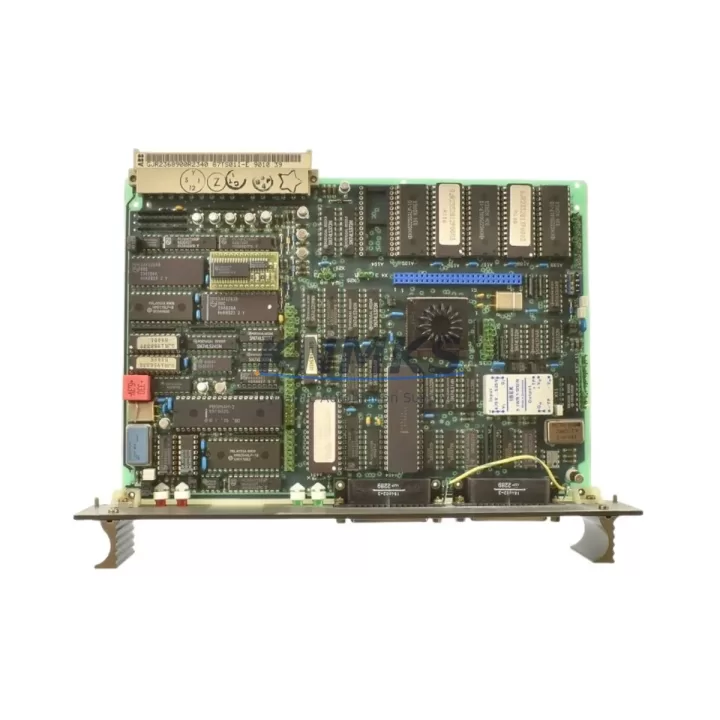
ABB 87TS01E GJR2368900R2340 Maintenance-Proven Spare Part for Factory Uptime
The ABB 87TS01E (catalog reference GJR2368900R2340, also listed as 87TS01K-E) is an original PROFIBUS DP coupler module designed for the ABB AC500 programmable logic controller platform. As a field-proven communication interface component, it bridges the AC500 CPU backplane to PROFIBUS DP networks, enabling deterministic, high-speed data exchange between the controller and distributed I/O stations, drives, and intelligent field devices. Maintaining a verified stock of this module is a critical element of any industrial maintenance program where AC500-based control systems govern continuous production, utilities, or process automation.
For maintenance engineers managing aging AC500 installations, the 87TS01E represents a single point of failure that, if left unspared, can halt an entire PROFIBUS segment and cascade into multi-hour or multi-day unplanned downtime. Procurement engineers sourcing this module should verify authenticity, confirm firmware compatibility with the installed CPU generation, and ensure the supplier provides documented pre-shipment functional testing. KNMKS supplies the 87TS01E as an original ABB component, tested before dispatch, with a support terms confirmed by quotation covering manufacturing defects and functional performance.
Spare Maintenance Table
| Parameter | Specification |
|---|---|
| Part Number | 87TS01E |
| Catalog / Order Number | GJR2368900R2340 |
| Alternate Reference | 87TS01K-E |
| Brand | ABB |
| Series | AC500 |
| Module Type | PROFIBUS DP Coupler |
| Communication Protocol | PROFIBUS DP (EN 50170) |
| Max. Baud Rate | Up to 12 Mbit/s |
| Backplane Interface | AC500 internal bus (S500 I/O bus compatible) |
| PROFIBUS Connector | 9-pin D-Sub (DB9), standard PROFIBUS pinout |
| Supply Voltage | Supplied via AC500 backplane (24 VDC system bus) |
| Operating Temperature | -25 °C to +60 °C |
| Storage Temperature | -40 °C to +70 °C |
| Humidity | 5–95% RH, non-condensing |
| Protection Class | IP20 (panel-mount, control cabinet installation) |
| Country of Origin | Germany |
| Compatibility | ABB AC500 CPU modules (PM571, PM581, PM591, PM595 series and compatible variants) |
| Installation | Snap-on to AC500 backplane; no tools required for module seating |
| Maintenance Recommendation | Inspect PROFIBUS cable termination resistors, DB9 connector pins, and backplane slot contacts during annual overhaul |
| Support terms | 12 months from shipment date (manufacturing defects and functional performance) |
| Pre-Shipment Test | Functional communication test performed before dispatch |
Maintenance Planning for Continuous Operation
When scheduling preventive maintenance or responding to a PROFIBUS segment fault on an AC500 system, the 87TS01E coupler is rarely the only component that warrants inspection. A disciplined site engineer will treat a PROFIBUS communication fault as a system-level event, not an isolated module failure, and will audit the entire communication chain before declaring root cause.
Begin with the AC500 CPU module (such as the PM581 or PM591) to confirm that the internal bus is healthy and that no CPU-side diagnostics indicate backplane errors. Next, inspect the AC500 backplane or terminal base (TB511, TB521, or equivalent) for oxidized contacts, mechanical damage, or improper module seating — a loose coupler seat is a common cause of intermittent PROFIBUS faults that are misdiagnosed as module failure. Check the 24 VDC power supply module feeding the AC500 rack; under-voltage conditions during motor starts or load surges can cause the coupler to drop off the PROFIBUS segment momentarily, generating nuisance alarms.
On the PROFIBUS cable side, verify that PROFIBUS DP bus termination resistors are correctly installed at both physical ends of the segment — missing or double termination is the leading cause of communication instability at baud rates above 1.5 Mbit/s. Inspect the DB9 PROFIBUS connectors at the coupler and at each slave device for bent pins, loose screws, or cable strain relief failures. If the segment includes variable frequency drives (such as ABB ACS series), drive communication option boards (FPBA-01 or RDNA-01) should be checked for firmware compatibility and address conflicts.
For installations where the AC500 system interfaces with remote I/O via PROFIBUS, the DP/PA segment coupler or link and any signal isolators in the field junction boxes should be included in the inspection scope. Finally, review the UPS or buffer module protecting the control cabinet power rail — a momentary power dip during a PROFIBUS reconfiguration cycle can corrupt the coupler’s internal state and require a cold restart to recover.
Stocking one spare 87TS01E per AC500 PROFIBUS node, alongside a spare CPU module and a set of pre-terminated PROFIBUS cables, reduces mean time to repair (MTTR) for communication faults from hours to under 30 minutes.
Site Replacement Workflow
Replacing the ABB 87TS01E in the field is a straightforward procedure when the correct spare is on hand and the replacement is planned. The following workflow is recommended for maintenance engineers performing a hot-swap or scheduled replacement:
1. Pre-Replacement Verification: Confirm the replacement module’s order number (GJR2368900R2340) and firmware label match the installed unit. Cross-reference the AC500 CPU firmware version against ABB’s compatibility matrix to ensure the coupler generation is supported. Download and archive the current PLC project from the CPU before any hardware change.
2. PROFIBUS Segment Isolation: If a live replacement is not possible, coordinate with operations to place the affected PROFIBUS segment in a safe state. For systems with redundant PROFIBUS masters, switch to the secondary master before removing the coupler. Notify downstream DCS or SCADA operators (such as ABB System 800xA or Freelance DCS consoles) that the segment will be temporarily offline.
3. Module Removal and Inspection: Power down the AC500 rack or follow the hot-swap procedure documented in ABB’s AC500 hardware manual. Remove the 87TS01E by releasing the backplane latch. Inspect the vacated backplane slot for debris, corrosion, or damaged bus contacts. Clean with dry compressed air if necessary.
4. New Module Installation: Seat the replacement 87TS01E firmly into the backplane slot until the latch clicks. Reconnect the PROFIBUS DB9 cable, ensuring the termination switch position matches the original (terminated or non-terminated). Power up the rack and observe the module’s LED status indicators — a steady green RUN LED confirms successful backplane communication.
5. Segment Commissioning: From the AC500 programming environment (Automation Builder or PS501 Control Builder), perform a PROFIBUS live list scan to confirm all slave devices are visible and responding. Verify I/O data exchange is active and that no GSD-related configuration errors are reported. Resume normal operations and document the replacement in the site maintenance log.
This workflow applies equally to emergency replacements following unplanned failures and to scheduled replacements during annual shutdowns. Having the 87TS01E pre-staged in the control cabinet spare parts kit eliminates the procurement lead time variable — which, for discontinued or allocation-constrained ABB modules, can extend to 8–16 weeks from standard distribution channels.
Spare Parts Support FAQ
Q1: Is the ABB 87TS01E (GJR2368900R2340) still in production, and what is the recommended stocking strategy?
The 87TS01E is a mature AC500 platform component. Availability through standard ABB distribution channels may be subject to allocation constraints or extended lead times depending on regional stock levels. KNMKS maintains buffer stock of this module to support emergency and planned procurement. The recommended stocking strategy is to hold a minimum of one spare per installed PROFIBUS coupler node, with a secondary buffer at the central warehouse for multi-site operations. For facilities with more than three AC500 PROFIBUS nodes, a 1:3 spare ratio (one spare per three installed units) is a practical starting point for annual budget planning.
Q2: How is the 87TS01E tested before shipment, and what does the support terms confirmed by quotation cover?
Every 87TS01E unit shipped by KNMKS undergoes a functional communication test on an AC500 test bench prior to dispatch. The test verifies backplane recognition, PROFIBUS DP address assignment, and data exchange at standard baud rates. The support terms confirmed by quotation cover manufacturing defects and functional performance failures under normal operating conditions. It does not cover damage resulting from incorrect installation, overvoltage events, or physical mishandling. Support requests are processed with a replacement-first policy to minimize customer downtime.
Q3: Can the 87TS01E replace older PROFIBUS coupler variants in the AC500 family, and how do I confirm compatibility?
The 87TS01E (GJR2368900R2340) is compatible with the AC500 V2 and V3 CPU generations, including PM571, PM581, PM591, and PM595 variants. For older AC500 V1 installations, compatibility should be verified against the CPU firmware version and the GSD file version used in the PROFIBUS configuration. ABB’s Automation Builder software provides a hardware catalog that lists supported coupler versions per CPU generation. If you are unsure about compatibility for your specific installation, contact KNMKS with your CPU order number and firmware version — our technical team will confirm before shipment.
Q4: What is the typical lead time for the 87TS01E, and does KNMKS support long-term supply agreements?
For in-stock units, KNMKS ships within 1–3 business days globally. For high-volume or recurring procurement requirements, KNMKS supports blanket purchase orders and long-term supply agreements with reserved stock allocation. This is particularly valuable for maintenance programs covering multiple plants or for OEMs integrating AC500 PROFIBUS couplers into standard machine builds. Contact our sales team to discuss volume pricing, consignment stock arrangements, and multi-year supply commitments.
© 2026 KNMKS. All rights reserved.
Original Source: https://knmks.com
Contact: admin@knmks.com | +86 18359268345
Product Identification
- Brand / Ecosystem
-
ABB
ABB - Model / Series
-
87TS01E GJR2368900R2340 87TS01K-E
AC500 Series - Product Family
- PLCs & Controllers
- Availability Status
- Available on request after model and quantity confirmation
- Inquiry Type
- B2B RFQ, replacement inquiry and project spare-part request
- Pre-Quote Check
- Exact SKU, brand, series, quantity, nameplate photos and destination country are checked before quotation
System Path
Where this product fits in the KNMKS automation structure.
Specification & Inquiry Focus
- Control platform
- PLC, PAC and modular controllers
- Common needs
- CPU, rack, power and I/O expansion
- Project support
- Replacement, cabinet build and maintenance
Buyer Confirmation
Information KNMKS checks before replying.
- Exact model
- 87TS01E GJR2368900R2340 87TS01K-E
- Brand / ecosystem
- ABB
- Product family
- PLCs & Controllers
- Application note
- Replacement, maintenance, project build or spare-part list
- Useful photos
- Nameplate, installed unit, cabinet layout or connector side
- Delivery details
- Quantity, destination country and target schedule
Document Support
Files and notes can be confirmed during quotation.
- Product photos or nameplate confirmation when available
- Packing and delivery notes before quotation confirmation
- Support scope and delivery terms confirmed per inquiry
- Export document coordination for qualified B2B requests
Inquiry Support
- Model cross-checking before quotation
- CPU, power, rack and expansion module matching
- Support for replacement and project inquiry
What to Send Us
- Brand and exact model number: ABB 87TS01E GJR2368900R2340 87TS01K-E
- Quantity and required delivery time
- Application, replacement requirement or nameplate photo
- Destination country and shipping preference
RFQ Preparation
This is a product inquiry page built for RFQ communication.
Fast Model Check
Send this model to KNMKS for confirmation.
Include quantity, destination country and photos if this is a maintenance replacement. The inquiry will be saved with a reference number after submission.
Brand & Compatibility Note
KNMKS displays automation product information for well-known industrial brand ecosystems and compatible replacement references. Brand names are used for product identification and compatibility reference only; final availability and commercial terms are confirmed per quotation.
 Manufacturing
 Machine Tools
 Packaging
 Energy & Power



 HMI & Displays
 Servo Systems
 Variable Frequency Drives
 Sensors