
Overview
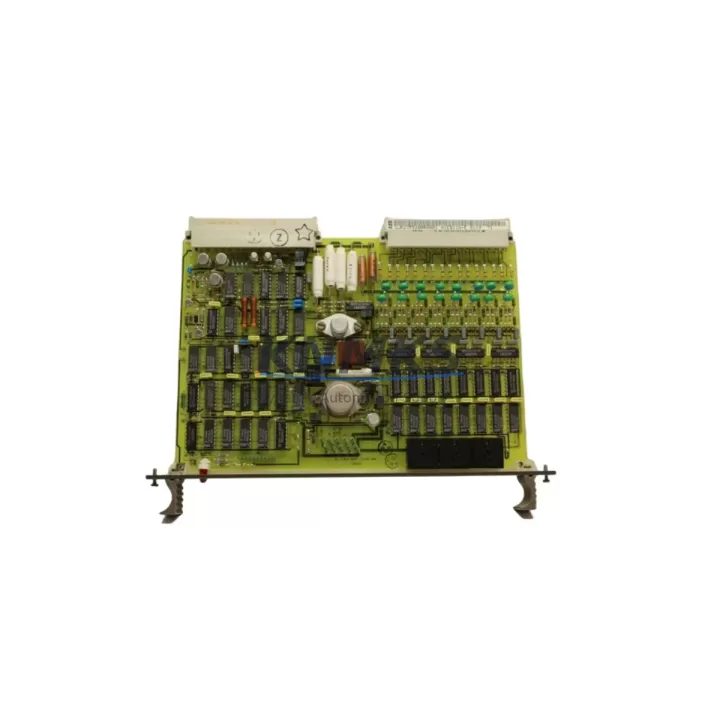
ABB 87TS01E GJR2368900R2313 Migration-Ready Bus Coupler for Legacy Control Systems
The ABB 87TS01E (part number GJR2368900R2313) is a migration-ready S500 Bus Coupler designed for the AC500 programmable logic controller platform. As legacy automation systems approach end-of-life, the 87TS01E serves as a critical interface module enabling engineers to extend the operational life of existing control cabinets or execute a structured migration to a modern AC500-based architecture. Whether you are replacing a discontinued coupler in a running production line or commissioning a new S500 I/O rack alongside retained field wiring, this module provides the electrical and protocol compatibility required to maintain system continuity.
The 87TS01E connects S500 I/O modules to the AC500 CPU backplane via the internal S500 bus, supporting high-speed cyclic data exchange between the controller and distributed I/O nodes. Its compact DIN-rail form factor fits standard 35 mm rails within existing control cabinet layouts, minimising the need for panel redesign during retrofit projects. The module is compatible with the full range of S500 digital and analog I/O modules, including the SM560-S Safety CPU expansion modules, AI523 analog input modules, and DO523 digital output modules commonly found in legacy installations.
When planning a retrofit, engineers must verify several key parameters before swapping the bus coupler. Power supply capacity is the first checkpoint: the S500 bus coupler draws its logic supply from the backplane, and the existing PM583 or PM591 power supply module must have sufficient residual capacity to support the coupler plus all attached I/O modules. Terminal wiring on the field side does not change when replacing a like-for-like bus coupler, but if the retrofit involves migrating from an older CS31 bus architecture to the S500 internal bus, field terminal blocks and cable routing will require re-mapping against the new I/O module addressing scheme.
Backplane slot assignment and module addressing are equally important. The AC500 CPU automatically detects S500 modules during startup, but the hardware configuration in Automation Builder must reflect the physical slot order of the new coupler and any repositioned I/O modules. Any mismatch between the physical rack layout and the software configuration will generate a hardware fault and prevent the CPU from entering RUN mode. Engineers should export and archive the existing Automation Builder project before beginning physical replacement to preserve the original I/O mapping as a reference baseline.
Program compatibility is generally maintained when replacing a bus coupler of the same type, as the coupler itself does not hold user program logic. However, if the migration involves upgrading from an older firmware revision, the CPU firmware version must be checked against the compatibility matrix published by ABB. Firmware mismatches between the CPU and the bus coupler can cause communication faults on the S500 internal bus. It is recommended to update the CPU firmware using the ABB TK503 programming cable and Automation Builder before installing the replacement coupler.
HMI screen layouts referencing I/O addresses tied to the original coupler configuration should be reviewed in parallel. If the plant uses a CP600 HMI panel communicating with the AC500 CPU over Modbus TCP or PROFINET, the variable address table in the HMI project must be validated against the updated I/O configuration after the coupler replacement. Communication links to upstream SCADA systems via the CM589-PNIO PROFINET communication module or CM578-CN CANopen module should also be tested under live conditions before returning the line to production.
Installation space confirmation is straightforward for like-for-like replacements: the 87TS01E occupies a single slot on the S500 backplane and requires no additional clearance beyond standard module spacing. For cabinet retrofits where the backplane is being replaced entirely, the TB723 terminal base or equivalent must be pre-wired before the coupler is seated to avoid disturbing field wiring during module insertion.
All units supplied by KNMKS undergo pre-shipment functional testing to verify bus communication integrity, power rail continuity, and module identification response. Each 87TS01E is covered by a support terms confirmed by quotation from the date of shipment. Stock is maintained across multiple regional warehouses to support urgent replacement orders with short lead times.
Migration Compatibility Table
| Parameter | Detail |
|---|---|
| SKU / Part Number | 87TS01E / GJR2368900R2313 |
| Brand / Series | ABB / AC500 S500 I/O |
| Module Function | S500 Internal Bus Coupler for AC500 CPU |
| Backplane Interface | S500 internal bus (single slot) |
| DIN Rail Mounting | 35 mm standard rail, TB723 terminal base compatible |
| Communication Protocol | S500 internal bus; upstream via CPU (PROFINET, Modbus TCP, CANopen) |
| Power Supply Compatibility | AC500 PM583, PM591 backplane power supply modules |
| Firmware Compatibility | Verify CPU firmware version via Automation Builder before installation |
| Programming Tool | ABB Automation Builder; TK503 programming cable for firmware update |
| Replacement Scope | Like-for-like S500 bus coupler replacement; CS31-to-S500 migration with re-mapping |
| Pre-Shipment Testing | Bus communication, power rail continuity, module ID response verified |
| Support terms | 12 months from date of shipment |
| Country of Origin | Germany |
| Commissioning Note | Validate Automation Builder hardware config and HMI variable table post-installation |
Retrofit Planning for Existing Automation Systems
A successful retrofit begins with a complete audit of the existing rack assembly. In a typical AC500 installation, the 87TS01E bus coupler sits at the left end of the S500 I/O rack, followed by a combination of digital and analog modules. Common companions in legacy racks include the DI524 24 VDC digital input module, the DO524 transistor output module, and the AI523 4-channel analog input module. When the bus coupler is replaced, each of these modules retains its slot address, and the Automation Builder hardware configuration must be re-confirmed to match the physical layout exactly.
Power budget verification is non-negotiable. The PM591 power supply module, frequently used in mid-size AC500 cabinets, provides a defined current budget for the S500 bus. Adding or repositioning I/O modules during a retrofit can push the bus current draw beyond the supply rating if not carefully calculated. Engineers should download the current power budget worksheet from the ABB documentation library and recalculate the total draw before energising the upgraded rack.
For sites migrating from older CS31 remote I/O architectures, the transition to S500 internal bus requires a full re-termination of field cables onto new S500-compatible terminal bases. The TB723 terminal base used with the 87TS01E provides screw-type terminals rated for standard 0.5–2.5 mm² field wiring, which is compatible with most existing cable cross-sections. Signal isolators may be required at the terminal level if the legacy field devices operate at voltage levels outside the S500 input range.
Communication module continuity must also be planned. If the existing cabinet uses a CM578-CN CANopen module or a CM589-PNIO PROFINET interface module for upstream network connectivity, these modules can be retained on the CPU backplane during the S500 rack retrofit, provided the CPU firmware supports the installed communication module versions. This allows the network topology and SCADA addressing to remain unchanged while the I/O layer is modernised.
Downtime Control During System Migration
Minimising unplanned downtime is the primary concern in any live-system retrofit. The recommended approach for replacing the 87TS01E in a running installation is to prepare a fully pre-configured and tested replacement rack offline before scheduling the maintenance window. This means loading the Automation Builder project onto the replacement CPU, verifying the hardware configuration matches the new rack layout, and performing a bench-level power-on test to confirm all S500 modules are recognised before the rack is transported to the plant floor.
During the maintenance window, the original CPU program should be uploaded and saved as a backup before any hardware is disturbed. The TK503 programming cable provides a direct USB connection to the CPU for this purpose. Once the backup is confirmed, the field wiring can be transferred to the new terminal bases using the pre-labelled cable schedule prepared during the audit phase. Retaining the original terminal labelling scheme eliminates re-identification errors and accelerates the reconnection process.
After physical installation, the CPU should be powered on in STOP mode to allow the hardware configuration to be verified before entering RUN. Any unrecognised modules will appear as faults in the Automation Builder diagnostic view, allowing targeted correction without triggering process upsets. Once the hardware configuration is confirmed clean, the program can be downloaded and the CPU transitioned to RUN mode under supervised conditions. HMI screens and SCADA alarm lists should be monitored for the first full production cycle to confirm all I/O signals are mapped correctly and communication links are stable.
Retrofit Support FAQ
Q: Is the ABB 87TS01E (GJR2368900R2313) a direct drop-in replacement for an existing S500 bus coupler in an AC500 rack?
A: Yes, for like-for-like replacements within the S500 series, the 87TS01E is a direct slot-compatible substitute. No field wiring changes are required. The Automation Builder hardware configuration should be re-downloaded to the CPU after replacement to clear any stored fault states.
Q: What commissioning steps are required after installing the 87TS01E?
A: Power on the CPU in STOP mode, verify all S500 modules are recognised in the Automation Builder hardware configuration view, confirm no bus communication faults are present, then download the program and transition to RUN. Validate HMI variable mapping and upstream communication links before returning to production.
Q: Can the 87TS01E be used in a migration from a CS31 bus system to an S500 I/O architecture?
A: Yes, but this is not a plug-and-play swap. CS31-to-S500 migration requires re-termination of field cables onto S500-compatible terminal bases, re-mapping of I/O addresses in the Automation Builder project, and re-validation of HMI and SCADA variable tables. KNMKS can provide pre-shipment configuration support on request.
Q: What support terms and testing does KNMKS provide with the 87TS01E?
A: Every unit undergoes pre-shipment functional testing covering bus communication integrity, power rail continuity, and module identification response. A support terms confirmed by quotation is included from the date of shipment. Replacement or repair is provided for any unit that fails under normal operating conditions within the confirmed support period.
© 2026 KNMKS. All rights reserved.
Original Source: https://knmks.com
Contact: admin@knmks.com | +86 18359268345
Product Identification
- Brand / Ecosystem
-
ABB
ABB - Model / Series
-
87TS01E-GJR2368900R2313
AC500 Series - Product Family
- PLCs & Controllers
- Availability Status
- Available on request after model and quantity confirmation
- Inquiry Type
- B2B RFQ, replacement inquiry and project spare-part request
- Pre-Quote Check
- Exact SKU, brand, series, quantity, nameplate photos and destination country are checked before quotation
System Path
Where this product fits in the KNMKS automation structure.
Specification & Inquiry Focus
- Control platform
- PLC, PAC and modular controllers
- Common needs
- CPU, rack, power and I/O expansion
- Project support
- Replacement, cabinet build and maintenance
Buyer Confirmation
Information KNMKS checks before replying.
- Exact model
- 87TS01E-GJR2368900R2313
- Brand / ecosystem
- ABB
- Product family
- PLCs & Controllers
- Application note
- Replacement, maintenance, project build or spare-part list
- Useful photos
- Nameplate, installed unit, cabinet layout or connector side
- Delivery details
- Quantity, destination country and target schedule
Document Support
Files and notes can be confirmed during quotation.
- Product photos or nameplate confirmation when available
- Packing and delivery notes before quotation confirmation
- Support scope and delivery terms confirmed per inquiry
- Export document coordination for qualified B2B requests
Inquiry Support
- Model cross-checking before quotation
- CPU, power, rack and expansion module matching
- Support for replacement and project inquiry
What to Send Us
- Brand and exact model number: ABB 87TS01E-GJR2368900R2313
- Quantity and required delivery time
- Application, replacement requirement or nameplate photo
- Destination country and shipping preference
RFQ Preparation
This is a product inquiry page built for RFQ communication.
Fast Model Check
Send this model to KNMKS for confirmation.
Include quantity, destination country and photos if this is a maintenance replacement. The inquiry will be saved with a reference number after submission.
Brand & Compatibility Note
KNMKS displays automation product information for well-known industrial brand ecosystems and compatible replacement references. Brand names are used for product identification and compatibility reference only; final availability and commercial terms are confirmed per quotation.
 Manufacturing
 Machine Tools
 Packaging
 Energy & Power



 HMI & Displays
 Servo Systems
 Variable Frequency Drives
 Sensors