
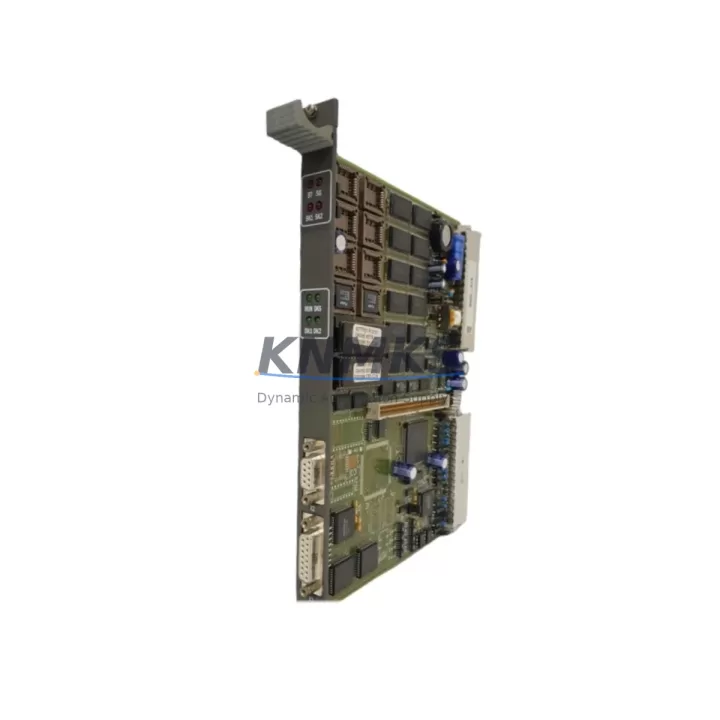
Overview
ABB 87TP01 Migration-Ready PROFIBUS DP Coupler: Legacy System Retrofit & Compatibility Upgrade
The ABB 87TP01 is a PROFIBUS DP coupler module designed for the AC500 and S500 automation platforms, widely deployed across energy, petrochemical, manufacturing, and infrastructure control systems. As legacy fieldbus architectures approach end-of-life and original ABB spare parts become increasingly difficult to source, the 87TP01 serves as a critical migration-ready replacement that preserves existing PROFIBUS DP network topology while enabling a controlled, low-risk transition to modernized control infrastructure.
For maintenance engineers and system integrators managing aging distributed control systems, the 87TP01 provides a direct, wiring-compatible substitution path. It retains the same backplane interface, terminal block layout, and DP address configuration as the original coupler, minimizing the need for panel rewiring or PLC program restructuring during replacement. This is particularly valuable in facilities where control cabinet space is constrained and downtime windows are measured in hours, not days.
When planning a retrofit involving the 87TP01, engineers must verify several key parameters before committing to a replacement schedule. Power supply capacity at the rack level is the first checkpoint — the S500 I/O bus draws from the local power supply module (such as the PS501 or PS502 series), and adding or swapping coupler modules may affect total bus current budget. Terminal wiring must be cross-referenced against the original installation drawings, particularly for shielded PROFIBUS cable connections at the DB9 or terminal-block interface. Backplane slot addressing must be confirmed in the PLC configuration tool (typically ABB Automation Builder or the legacy Control Builder) to ensure the module address matches the existing hardware configuration file.
Program compatibility is another critical factor. If the host controller is an AC500 CPU module (such as the PM573 or PM591), the existing IEC 61131-3 program logic referencing the PROFIBUS DP slave devices should remain intact provided the GSD file and slave address assignments are preserved. HMI screens built on CP600 or CP400 operator panels that reference PROFIBUS-connected I/O tags will continue to function without modification if the network topology is maintained. Communication link integrity — including baud rate settings (typically 1.5 Mbps or 12 Mbps), termination resistor status, and cable segment length — must be validated before and after the swap.
Installation space confirmation is straightforward for like-for-like replacements: the 87TP01 occupies a standard S500 module slot on the TB511, TB521, or TB541 terminal base, and no additional mounting hardware is required. Firmware version compatibility should be checked against the AC500 CPU firmware release notes, as certain coupler features may require a minimum CPU firmware version. Field commissioning typically involves a cold restart of the affected rack, followed by a PROFIBUS network scan to confirm all slave devices are recognized and communicating correctly.
Migration Compatibility Table
| Parameter | Specification / Requirement |
|---|---|
| Compatible Platform | ABB AC500, S500 I/O System |
| Fieldbus Protocol | PROFIBUS DP (EN 50170) |
| Backplane Interface | S500 I/O bus — standard slot, no adapter required |
| Terminal Base Compatibility | TB511, TB521, TB541 |
| Supported Baud Rates | 9.6 kbps – 12 Mbps (auto-detect) |
| DP Address Configuration | Hardware rotary switch or software-assigned (1–125) |
| Power Supply Requirement | Supplied via S500 backplane; verify PS501/PS502 current budget |
| Installation Space | 1 × S500 module slot; standard DIN rail mounting |
| Firmware Compatibility | AC500 CPU firmware V2.x and above recommended |
| Communication Link Check | Verify termination resistors, cable length, and baud rate post-swap |
| Replacement Recommendation | Direct drop-in for legacy 87TP01; confirm GSD file version |
| Commissioning Procedure | Cold rack restart → PROFIBUS network scan → slave device verification |
| Support terms | support terms confirmed by quotation — covers manufacturing defects and functional failure |
Retrofit Planning for Existing Automation Systems
A successful retrofit involving the 87TP01 rarely occurs in isolation. In most legacy AC500 or S500 installations, the PROFIBUS DP coupler operates alongside a range of I/O and communication modules that must be assessed as part of the overall upgrade plan. Digital input modules such as the DI524 and digital output modules such as the DO524 are commonly found in the same rack and may themselves be approaching end-of-life, making it practical to evaluate their replacement status during the same maintenance window.
The rack or backplane assembly — typically a TB511 or TB541 terminal base — should be inspected for mechanical wear, connector oxidation, and bus contact integrity before the new coupler is installed. If the existing power supply module (PS501 or PS502) is operating near its rated output current, adding a replacement coupler with slightly different inrush characteristics may require a power budget recalculation. In installations where the AC500 CPU (such as the PM573-ETH or PM591) communicates with remote I/O over both PROFIBUS DP and Modbus TCP simultaneously, the coupler replacement must not disrupt the secondary communication path.
For systems that include analog I/O modules such as the AI523 or AO523, signal isolation and loop integrity should be verified after the coupler swap, as PROFIBUS DP bus resets can temporarily interrupt analog process values. Where signal isolators or repeaters are installed in the PROFIBUS segment to extend cable reach, their termination and power status must be confirmed as part of the post-installation commissioning checklist. Programming cables (such as the TK503 USB programming cable) and a laptop running ABB Automation Builder should be on-site during the swap to allow immediate program upload verification and online diagnostics if unexpected faults occur.
Downtime Control During System Migration
Minimizing unplanned downtime is the primary operational concern when replacing a PROFIBUS DP coupler in a live production environment. The recommended approach is to pre-configure the replacement 87TP01 offline — setting the DP node address via the rotary switch and verifying the module’s physical condition and firmware label — before the maintenance window begins. This eliminates configuration time during the actual swap and reduces the risk of address conflicts on the live network.
The original PLC program should be backed up to a secure location (local PC and network storage) before any hardware is disturbed. If the AC500 CPU supports online program retention across a rack power cycle, this feature should be confirmed and enabled in the project settings. For systems where a cold restart is unavoidable, the sequence should be: isolate the affected PROFIBUS segment, remove the failed coupler, install the 87TP01, restore power, and perform a controlled network scan before returning the segment to automatic operation.
Field control continuity can be maintained in some architectures by temporarily routing critical I/O signals through a parallel path or by placing the affected PLC section in manual override mode at the DCS or SCADA level. HMI operators should be notified of the maintenance window and expected recovery time. Post-swap, all PROFIBUS slave devices on the affected segment should be individually verified for correct data exchange before the system is returned to automatic control. A full functional test — including analog loop checks, digital I/O verification, and communication watchdog timeout testing — should be completed and documented before sign-off.
Retrofit Support FAQ
Q1: Is the ABB 87TP01 a direct replacement for the original coupler in my AC500 system?
Yes. The 87TP01 is designed as a drop-in replacement for the original PROFIBUS DP coupler in AC500 and S500 installations. The backplane interface, terminal base compatibility, and DP address configuration method are identical to the original module. No panel rewiring or PLC program modification is required in standard like-for-like replacement scenarios, provided the GSD file version and slave address assignments are preserved in the Automation Builder project.
Q2: What commissioning steps are required after installing the 87TP01?
After physical installation, perform a cold restart of the affected rack. Use ABB Automation Builder or the legacy Control Builder to initiate a PROFIBUS network scan and confirm all slave devices are recognized at their correct addresses. Verify that analog and digital I/O values are updating correctly in the PLC program. Check communication watchdog timers and confirm no bus fault LEDs are active on the coupler or connected I/O modules. Document the commissioning results before returning the system to automatic operation.
Q3: Do you provide pre-shipment testing and what does the support terms confirmed by quotation cover?
Yes. Every 87TP01 unit undergoes functional testing prior to shipment, including PROFIBUS DP communication verification and backplane interface checks. The support terms confirmed by quotation cover manufacturing defects and functional failure under normal operating conditions. Support requests are supported by our technical team at admin@knmks.com. Replacement or repair is arranged with minimal lead time to reduce impact on your production schedule.
Q4: What if my existing PROFIBUS cable or termination setup is non-standard?
The 87TP01 supports all standard PROFIBUS DP baud rates from 9.6 kbps to 12 Mbps with auto-detection. If your installation uses non-standard cable lengths, active repeaters, or optical fiber segments, our technical team can advise on compatibility and termination requirements before you commit to the replacement. Contact us with your network topology details and we will provide a pre-sales compatibility assessment at no charge.
© 2026 KNMKS. All rights reserved.
Original Source: https://knmks.com
Contact: admin@knmks.com | +86 18359268345
Product Identification
- Brand / Ecosystem
-
ABB
ABB - Model / Series
-
87TP01
AC500 Series - Product Family
- PLCs & Controllers
- Availability Status
- Available on request after model and quantity confirmation
- Inquiry Type
- B2B RFQ, replacement inquiry and project spare-part request
- Pre-Quote Check
- Exact SKU, brand, series, quantity, nameplate photos and destination country are checked before quotation
System Path
Where this product fits in the KNMKS automation structure.
Specification & Inquiry Focus
- Control platform
- PLC, PAC and modular controllers
- Common needs
- CPU, rack, power and I/O expansion
- Project support
- Replacement, cabinet build and maintenance
Buyer Confirmation
Information KNMKS checks before replying.
- Exact model
- 87TP01
- Brand / ecosystem
- ABB
- Product family
- PLCs & Controllers
- Application note
- Replacement, maintenance, project build or spare-part list
- Useful photos
- Nameplate, installed unit, cabinet layout or connector side
- Delivery details
- Quantity, destination country and target schedule
Document Support
Files and notes can be confirmed during quotation.
- Product photos or nameplate confirmation when available
- Packing and delivery notes before quotation confirmation
- Support scope and delivery terms confirmed per inquiry
- Export document coordination for qualified B2B requests
Inquiry Support
- Model cross-checking before quotation
- CPU, power, rack and expansion module matching
- Support for replacement and project inquiry
What to Send Us
- Brand and exact model number: ABB 87TP01
- Quantity and required delivery time
- Application, replacement requirement or nameplate photo
- Destination country and shipping preference
RFQ Preparation
This is a product inquiry page built for RFQ communication.
Fast Model Check
Send this model to KNMKS for confirmation.
Include quantity, destination country and photos if this is a maintenance replacement. The inquiry will be saved with a reference number after submission.
Brand & Compatibility Note
KNMKS displays automation product information for well-known industrial brand ecosystems and compatible replacement references. Brand names are used for product identification and compatibility reference only; final availability and commercial terms are confirmed per quotation.
 Manufacturing
 Machine Tools
 Packaging
 Energy & Power



 HMI & Displays
 Servo Systems
 Variable Frequency Drives
 Sensors