
Overview
ABB 83SR51 Migration-Ready Relay Output Module for Legacy PLCs: Retrofit and Compatibility Upgrade Guide
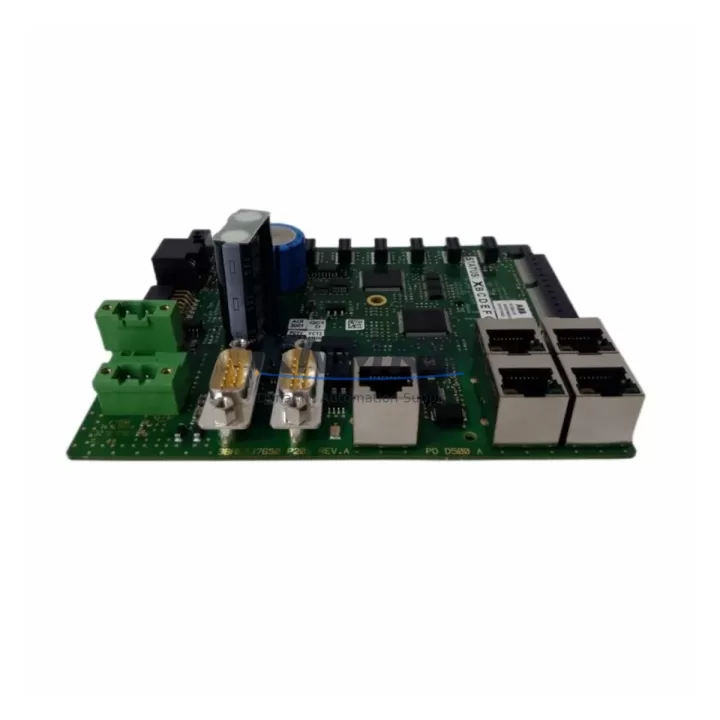
The ABB 83SR51 is a relay output module designed for integration within the ABB AC500 PLC platform, widely deployed across industrial automation environments including process control, machine building, and infrastructure management. As legacy control systems approach end-of-life or require capacity expansion, the 83SR51 serves as a proven, migration-ready replacement for discontinued relay output modules in older AC500 and compatible control cabinet configurations. This guide covers the critical technical and procedural considerations engineers and maintenance teams must address when incorporating the 83SR51 into retrofit, upgrade, or system recovery projects.
Migration Compatibility Table
| Parameter | Details |
|---|---|
| Module Type | Relay Output Module |
| Compatible Platform | ABB AC500 PLC Series (PM571, PM581, PM591, PM595 CPUs) |
| Backplane / Rack Interface | AC500 S500 I/O bus; direct backplane slot insertion |
| Installation Method | DIN rail mount; snap-fit terminal block connection |
| Terminal Wiring | Screw-type removable terminal block; verify wire gauge compatibility (0.2–2.5 mm²) |
| Communication Compatibility | Local I/O bus; compatible with PROFIBUS DP, Modbus RTU, CANopen via AC500 CPU |
| Module Address Configuration | Slot-based addressing; confirm slot assignment in CPU configuration tool (Automation Builder) |
| Firmware Compatibility | Compatible with AC500 firmware V2.x and V3.x; verify CPU firmware version before installation |
| Replacement Recommendation | Direct replacement for discontinued ABB relay output modules in AC500 S500 I/O range |
| Commissioning Focus | Verify relay contact ratings, output channel mapping, and program variable assignments in Automation Builder |
| Installation Space | Standard S500 module width; confirm available rack slots before ordering |
| Pre-Shipment Testing | Each unit tested for relay switching function, contact integrity, and bus communication before dispatch |
| Support terms | support terms confirmed by quotation — covers manufacturing defects and functional failure under normal operating conditions |
Retrofit Planning for Existing Automation Systems
Integrating the ABB 83SR51 into an existing control cabinet requires a structured pre-retrofit assessment. Begin by auditing the current rack configuration: identify the number of occupied S500 I/O slots, confirm available backplane positions, and verify that the AC500 CPU — whether a PM571, PM581, or PM591 — has sufficient I/O capacity to address the additional relay output channels introduced by the 83SR51.
Power budget verification is a mandatory step. The 83SR51 draws supply current from the S500 I/O bus; when adding this module alongside existing digital input modules, analog input modules, or communication modules such as the CM572-DP PROFIBUS master, the total bus current draw must remain within the power module’s rated output. If the existing AC500 power supply module (e.g., PS501 or PS502) is operating near capacity, a supplementary power module may be required before the retrofit proceeds.
Terminal wiring adaptation is another key consideration. If the 83SR51 is replacing a module with a different terminal block layout or contact configuration, field wiring must be re-mapped accordingly. Removable terminal blocks on the S500 platform simplify this process, but engineers should document the original wiring schedule and verify relay contact ratings — particularly NO/NC contact assignments — against the load requirements of the connected field devices.
For systems that also incorporate HMI panels — such as ABB CP600 series operator panels or third-party SCADA interfaces — screen objects linked to relay output status bits must be reviewed. If the 83SR51 replaces a module at a different slot address, the corresponding I/O variable addresses in the HMI project will require updating to reflect the new module mapping. This is especially relevant in installations where the HMI communicates with the AC500 CPU via Modbus TCP or OPC UA.
Communication link integrity should be validated after module insertion. In distributed I/O configurations where the AC500 CPU communicates with remote S500 I/O stations via the CM589-PNIO PROFINET I/O coupler or a PROFIBUS DP coupler, confirm that the GSD/GSDML device description files are current and that the new module’s slot assignment is correctly reflected in the network configuration. A bus scan using Automation Builder will confirm that the 83SR51 is recognized and communicating correctly on the I/O bus before the system is returned to production.
Downtime Control During System Migration
Minimizing production downtime during a relay output module replacement requires preparation that begins well before the maintenance window. The most effective approach is to export and archive the current Automation Builder project — including all PLC program logic, I/O variable tables, and hardware configuration — before any physical changes are made to the control cabinet. This archived project serves as the recovery baseline if commissioning issues arise during the retrofit.
Where the process allows, a staged cutover strategy reduces risk. If the control system supports partial I/O reconfiguration without a full CPU restart, the 83SR51 can be inserted into an unoccupied slot and its output channels mapped to standby logic blocks while the original module remains active. Once the new module is confirmed operational, the control logic can be switched over with minimal interruption to field device control.
For systems where a full shutdown is unavoidable, pre-staging the 83SR51 with its terminal block pre-wired and the Automation Builder hardware configuration updated offline significantly compresses the active downtime window. Relay contact continuity testing using a multimeter prior to installation confirms module integrity before the cabinet is energized. Following power-up, a systematic output force test — channel by channel — verifies that each relay is switching correctly and that field devices respond as expected before the system is returned to automatic control.
Maintaining a spare 83SR51 unit in local inventory is strongly recommended for facilities operating critical processes. With a support terms confirmed by quotation and pre-shipment functional testing on every unit, the 83SR51 is supplied ready for immediate installation, reducing the lead time risk associated with emergency spare part procurement.
Retrofit Support FAQ
Q1: Is the ABB 83SR51 a direct drop-in replacement for discontinued relay output modules in the AC500 S500 I/O range?
In most cases, yes. The 83SR51 is designed for the AC500 S500 I/O platform and occupies a standard module slot. However, engineers should verify the relay contact configuration (NO/NC channel count), terminal block pin layout, and output channel count against the module being replaced. If the original module had a different channel density, the PLC program’s I/O variable assignments will need to be updated in Automation Builder before the replacement is commissioned.
Q2: What commissioning steps are required after installing the 83SR51 in an existing AC500 system?
After physical installation, connect to the AC500 CPU via Automation Builder and perform a hardware scan to confirm the module is recognized at the correct slot address. Verify that all relay output variables are correctly mapped in the program. Perform a forced output test on each channel to confirm relay switching and field device response. If the system includes an HMI or SCADA interface, validate that output status displays are updating correctly before releasing the system to automatic operation.
Q3: How should terminal wiring be handled when replacing an older relay output module with the 83SR51?
Document the existing wiring schedule before disconnecting any field wiring. The S500 platform uses removable screw-type terminal blocks, which simplifies the swap. Map the original wiring to the 83SR51’s terminal layout, paying particular attention to relay common terminals and contact polarity. Verify that wire gauges are within the 83SR51’s specified range and that all connections are torqued to the manufacturer’s specification to ensure reliable contact under vibration and thermal cycling conditions.
Q4: What support terms and pre-shipment testing does the 83SR51 include?
Every ABB 83SR51 unit supplied by KNMKS is covered by a support terms confirmed by quotation against manufacturing defects and functional failure under normal operating conditions. Prior to shipment, each module undergoes functional testing including relay switching verification, contact integrity checks, and I/O bus communication validation. Units are dispatched only after passing all pre-shipment test criteria, ensuring that the module is ready for immediate installation upon arrival at site.
© 2026 KNMKS. All rights reserved.
Original Source: https://knmks.com
Contact: admin@knmks.com | +86 18359268345
Product Identification
- Brand / Ecosystem
-
ABB
ABB - Model / Series
-
83SR51
AC500 Series - Product Family
- PLCs & Controllers
- Availability Status
- Available on request after model and quantity confirmation
- Inquiry Type
- B2B RFQ, replacement inquiry and project spare-part request
- Pre-Quote Check
- Exact SKU, brand, series, quantity, nameplate photos and destination country are checked before quotation
System Path
Where this product fits in the KNMKS automation structure.
Specification & Inquiry Focus
- Control platform
- PLC, PAC and modular controllers
- Common needs
- CPU, rack, power and I/O expansion
- Project support
- Replacement, cabinet build and maintenance
Buyer Confirmation
Information KNMKS checks before replying.
- Exact model
- 83SR51
- Brand / ecosystem
- ABB
- Product family
- PLCs & Controllers
- Application note
- Replacement, maintenance, project build or spare-part list
- Useful photos
- Nameplate, installed unit, cabinet layout or connector side
- Delivery details
- Quantity, destination country and target schedule
Document Support
Files and notes can be confirmed during quotation.
- Product photos or nameplate confirmation when available
- Packing and delivery notes before quotation confirmation
- Support scope and delivery terms confirmed per inquiry
- Export document coordination for qualified B2B requests
Inquiry Support
- Model cross-checking before quotation
- CPU, power, rack and expansion module matching
- Support for replacement and project inquiry
What to Send Us
- Brand and exact model number: ABB 83SR51
- Quantity and required delivery time
- Application, replacement requirement or nameplate photo
- Destination country and shipping preference
RFQ Preparation
This is a product inquiry page built for RFQ communication.
Fast Model Check
Send this model to KNMKS for confirmation.
Include quantity, destination country and photos if this is a maintenance replacement. The inquiry will be saved with a reference number after submission.
Brand & Compatibility Note
KNMKS displays automation product information for well-known industrial brand ecosystems and compatible replacement references. Brand names are used for product identification and compatibility reference only; final availability and commercial terms are confirmed per quotation.
 Manufacturing
 Machine Tools
 Packaging
 Energy & Power



 HMI & Displays
 Servo Systems
 Variable Frequency Drives
 Sensors