
Overview
ABB 83SR06E GJR2388300R1010 Migration-Ready I/O Module for Legacy Control Systems
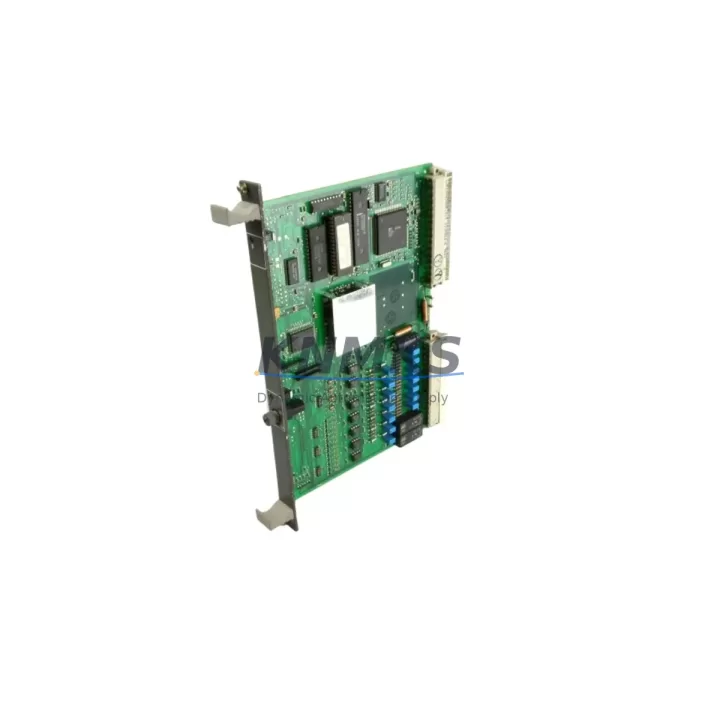
The ABB 83SR06E (part number GJR2388300R1010) is a migration-ready digital I/O module designed for the ABB AC500 programmable logic controller platform. As legacy automation infrastructure ages and original equipment manufacturers discontinue support for older I/O hardware, the 83SR06E provides a verified drop-in replacement path for facilities operating aging AC500 racks, control cabinets, and distributed I/O networks. Whether you are managing a planned retrofit or responding to an unplanned failure of a discontinued module, this unit ships from in-stock inventory with pre-shipment functional testing completed and a support terms confirmed by quotation covering parts and workmanship.
Sourced from Germany and manufactured to ABB’s industrial-grade quality standards, the 83SR06E is built for continuous-duty environments including process automation, machine control, power distribution panels, and safety-adjacent control architectures. Its compatibility with the AC500 backplane and terminal wiring conventions means that experienced automation engineers can complete a module swap without redesigning the control cabinet layout or rewriting core PLC logic blocks.
Migration Compatibility Table
| Parameter | Details |
|---|---|
| SKU / Part Number | 83SR06E / GJR2388300R1010 |
| Brand & Series | ABB AC500 |
| Module Type | Digital I/O Module |
| Backplane Interface | AC500 standard backplane slot — compatible with S500 I/O bus |
| Terminal Wiring | Screw-terminal block; wiring layout matches legacy AC500 I/O pinout |
| Communication Compatibility | Integrated via AC500 CPU backplane; supports PROFIBUS, Modbus, and CANopen when paired with corresponding CM modules |
| Installation Requirement | Standard DIN rail or rack-mount within AC500 chassis; no additional mounting hardware required |
| Replacement Recommendation | Direct replacement for discontinued 83SR06E variants; verify firmware revision on host CPU before installation |
| Commissioning Notes | Confirm module address assignment in Automation Builder; validate I/O mapping in existing PLC program before live switchover |
| Support terms | support terms confirmed by quotation — covers manufacturing defects and functional failure under normal operating conditions |
| Pre-Shipment Testing | Full functional test completed prior to dispatch |
| Origin | Germany (DE) |
Retrofit Planning for Existing Automation Systems
A successful retrofit of the ABB 83SR06E into an existing AC500 control system requires a structured pre-installation review. Before removing the failed or end-of-life module, engineers should document the current terminal wiring layout using the existing cabinet drawings or perform a field trace if drawings are unavailable. The 83SR06E uses the same screw-terminal block convention as earlier AC500 I/O generations, which significantly reduces rewiring risk during the swap.
Power budget verification is a critical step that is frequently overlooked during emergency replacements. The AC500 backplane distributes 24 VDC to all installed I/O modules, and adding or replacing modules can shift the total current draw. Confirm that the installed ABB PS501 or PS502 power supply module has sufficient headroom to support the 83SR06E alongside other modules in the rack. If the existing power supply is already operating near capacity, a parallel power supply or load redistribution across multiple racks may be required before the new module is commissioned.
For systems that include communication modules such as the ABB CM572-DP PROFIBUS master or the CM589-PNIO PROFINET interface module, verify that the I/O module address configured in the network topology matches the slot assignment in the physical rack. Address conflicts between the 83SR06E and adjacent modules — particularly when replacing a module that previously occupied a different slot position — can cause the CPU to generate fault codes during startup. These conflicts are resolved in ABB Automation Builder by updating the hardware configuration and performing a full download to the AC500 CPU, such as the PM573 or PM591 series.
HMI screens connected to the AC500 via the CP600 or CP400 panel series may reference I/O tags that are mapped directly to the module’s channel addresses. After the physical replacement, validate that all HMI tag bindings remain intact and that no channel offset has been introduced by the slot change. In systems where the SCADA or DCS layer reads process values from the AC500 via OPC or Modbus TCP, a brief communication link test should be performed before returning the system to automatic mode.
If the retrofit involves expanding I/O capacity rather than a like-for-like replacement, consider whether the existing TB521 or TB523 terminal base units in the rack can accommodate the additional module without requiring a new rack segment. For larger expansions, the AC500 supports distributed I/O via the S500 field bus coupler, allowing additional 83SR06E modules to be installed in remote I/O stations without running new backplane cables to the main control cabinet.
Downtime Control During System Migration
Minimizing unplanned downtime during an AC500 I/O module replacement depends on preparation completed before the maintenance window begins. The most effective approach is to perform a full program backup from the AC500 CPU using ABB Automation Builder prior to any hardware change. This backup preserves the existing ladder logic, function block diagrams, variable declarations, and retain data values that would otherwise be lost if the CPU loses power unexpectedly during the swap.
For facilities that cannot tolerate a complete process shutdown, a staged migration approach is recommended. Non-critical I/O channels can be temporarily reassigned to spare channels on adjacent modules while the 83SR06E is installed and verified. Once the new module passes its channel-by-channel functional check — confirming that each digital input and output responds correctly to field signals — the temporary reassignments are reversed and the system is returned to its normal operating configuration.
Firmware compatibility between the 83SR06E and the host CPU should be confirmed before the maintenance window. ABB periodically releases firmware updates for AC500 CPUs that affect I/O module recognition and diagnostic behavior. If the installed CPU firmware is significantly older than the module’s production date, a firmware update may be required to ensure stable operation. This update should be performed and validated in a test environment or during a separate, lower-risk maintenance window rather than simultaneously with the module replacement.
Field commissioning after installation should follow a structured sequence: power-on self-test confirmation, CPU recognition of the new module in the hardware configuration, channel-by-channel I/O verification against the field wiring schedule, and a final review of the CPU diagnostic buffer to confirm no persistent fault codes remain. With pre-shipment testing already completed on each 83SR06E unit shipped from our inventory, the risk of receiving a non-functional module is eliminated, and commissioning time is reduced to the field verification steps described above.
Retrofit Support FAQ
Q: Is the ABB 83SR06E GJR2388300R1010 a direct replacement for my existing AC500 I/O module?
A: Yes. The 83SR06E GJR2388300R1010 is designed as a direct slot-compatible replacement within the AC500 rack. Terminal wiring and backplane interface are consistent with the AC500 I/O standard. Verify the module address assignment in your Automation Builder hardware configuration after installation to ensure the CPU maps the new module to the correct I/O channels.
Q: Has this unit been tested before shipment?
A: Every 83SR06E unit shipped from our inventory undergoes a full functional pre-shipment test. This test confirms that all I/O channels, backplane communication, and diagnostic indicators operate within ABB’s published specifications. A support terms confirmed by quotation is included with each unit, covering manufacturing defects and functional failure under normal operating conditions.
Q: What should I check regarding wiring compatibility before installing the 83SR06E?
A: Confirm that the existing terminal block wiring matches the channel pinout for the GJR2388300R1010 revision. If your cabinet drawings reference an earlier revision of the 83SR06E, compare the terminal assignment tables in the ABB AC500 I/O module documentation to identify any channel numbering differences. In most cases, the wiring is directly compatible, but a field verification against the wiring schedule before energizing the new module is always recommended.
Q: What is the lead time and stock availability?
A: The ABB 83SR06E GJR2388300R1010 is available from in-stock inventory and ships promptly after order confirmation. For time-critical maintenance situations, contact our sales team directly to confirm current stock levels and arrange priority dispatch. Our inventory is maintained specifically to support legacy system maintenance and emergency replacement scenarios where lead times from the original manufacturer are no longer viable.
© 2026 KNMKS. All rights reserved.
Original Source: https://knmks.com
Contact: admin@knmks.com | +86 18359268345
Product Identification
- Brand / Ecosystem
-
ABB
ABB - Model / Series
-
83SR06E GJR2388300R1010
AC500 Series - Product Family
- PLCs & Controllers
- Availability Status
- Available on request after model and quantity confirmation
- Inquiry Type
- B2B RFQ, replacement inquiry and project spare-part request
- Pre-Quote Check
- Exact SKU, brand, series, quantity, nameplate photos and destination country are checked before quotation
System Path
Where this product fits in the KNMKS automation structure.
Specification & Inquiry Focus
- Control platform
- PLC, PAC and modular controllers
- Common needs
- CPU, rack, power and I/O expansion
- Project support
- Replacement, cabinet build and maintenance
Buyer Confirmation
Information KNMKS checks before replying.
- Exact model
- 83SR06E GJR2388300R1010
- Brand / ecosystem
- ABB
- Product family
- PLCs & Controllers
- Application note
- Replacement, maintenance, project build or spare-part list
- Useful photos
- Nameplate, installed unit, cabinet layout or connector side
- Delivery details
- Quantity, destination country and target schedule
Document Support
Files and notes can be confirmed during quotation.
- Product photos or nameplate confirmation when available
- Packing and delivery notes before quotation confirmation
- Support scope and delivery terms confirmed per inquiry
- Export document coordination for qualified B2B requests
Inquiry Support
- Model cross-checking before quotation
- CPU, power, rack and expansion module matching
- Support for replacement and project inquiry
What to Send Us
- Brand and exact model number: ABB 83SR06E GJR2388300R1010
- Quantity and required delivery time
- Application, replacement requirement or nameplate photo
- Destination country and shipping preference
RFQ Preparation
This is a product inquiry page built for RFQ communication.
Fast Model Check
Send this model to KNMKS for confirmation.
Include quantity, destination country and photos if this is a maintenance replacement. The inquiry will be saved with a reference number after submission.
Brand & Compatibility Note
KNMKS displays automation product information for well-known industrial brand ecosystems and compatible replacement references. Brand names are used for product identification and compatibility reference only; final availability and commercial terms are confirmed per quotation.
 Manufacturing
 Machine Tools
 Packaging
 Energy & Power



 HMI & Displays
 Servo Systems
 Variable Frequency Drives
 Sensors