
Overview
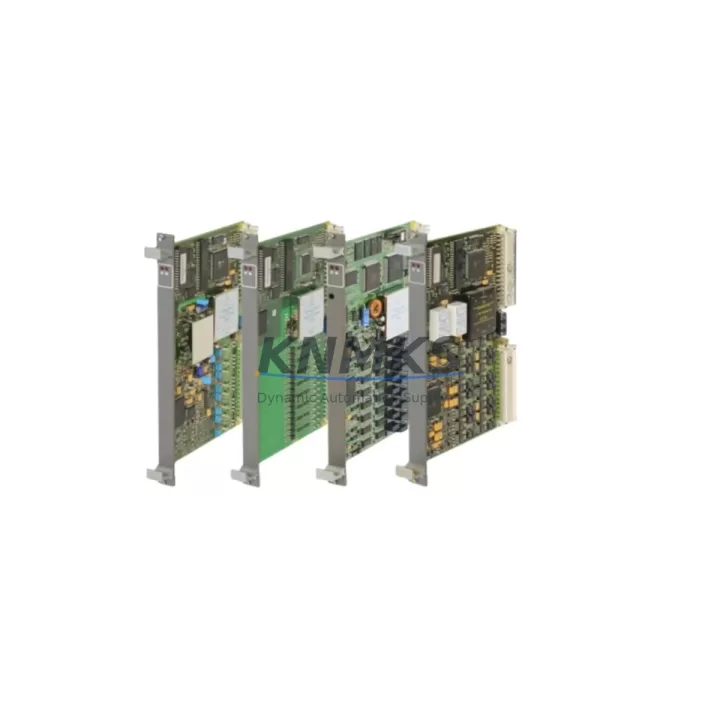
ABB 81ET03 GJR2403500R3010 Maintenance-Proven Spare Part for Factory Uptime
The ABB 81ET03 (GJR2403500R3010) is an original temperature input module designed for the ABB AC500 PLC platform — one of the most widely deployed programmable automation controllers in process industries, utilities, and discrete manufacturing. For maintenance engineers managing aging control cabinets, this module represents a critical spare: it handles thermocouple and RTD signal acquisition, feeding real-time thermal data to the CPU for process regulation, alarm triggering, and safety interlocking. When this module fails or degrades, the consequences range from inaccurate temperature readings to full process shutdown. Stocking a verified replacement unit is the single most effective way to reduce mean time to repair (MTTR) and protect factory uptime.
At KNMKS, every ABB 81ET03 GJR2403500R3010 unit is sourced from authorized supply chains, individually tested before shipment, and backed by a support terms confirmed by quotation. We maintain buffer stock to support emergency procurement, planned annual overhauls, and long-term spare parts programs for facilities running AC500-based control architectures.
Spare Maintenance Table
| Part Number | 81ET03 |
| Reference Number | GJR2403500R3010 |
| Brand | ABB |
| Series | AC500 |
| Module Type | Temperature Input Module (Thermocouple / RTD) |
| Compatible Platform | ABB AC500 PLC System (PM5xx, PM5xx-ETH CPU families) |
| Signal Types Supported | Thermocouple (Type J, K, T, E, R, S, B), RTD (Pt100, Pt1000, Ni100) |
| Number of Channels | 8 channels (configurable per channel) |
| Resolution | 16-bit |
| Supply Voltage | 24 V DC (via AC500 backplane) |
| Operating Temperature | -25°C to +60°C |
| Protection Class | IP20 |
| Mounting | AC500 I/O bus terminal unit (TA5xx series) |
| Country of Origin | Germany |
| Condition | Original, New / Tested Surplus |
| Pre-shipment Test | Yes — functional verification before dispatch |
| Support terms | 12 Months |
| Lead Time | availability confirmed by RFQ — ships within 1–3 business days |
Maintenance Planning for Continuous Operation
Replacing the ABB 81ET03 GJR2403500R3010 in the field is rarely an isolated task. Experienced maintenance engineers know that a temperature input module failure is often a symptom of broader stress in the control cabinet — and a planned replacement is the right moment to inspect adjacent components before returning the system to service.
Start with the TA524 or TA526 terminal unit that the 81ET03 mounts onto. Inspect the bus connector pins for oxidation or mechanical damage; a degraded terminal unit can cause intermittent channel faults that are difficult to diagnose remotely. Next, verify the AC500 CPU module (PM564 or PM573) firmware version — some older firmware revisions have known issues with RTD linearization on the ET03 channel type, and a firmware update during the maintenance window eliminates a future fault vector.
Check the 24 V DC power supply module (CP502 or equivalent) feeding the I/O bus. Temperature input modules are sensitive to supply ripple; a power supply operating near end-of-life can introduce noise that manifests as erratic temperature readings rather than a hard fault. If the cabinet also contains analog output modules (AO5xx series) driving control valves or heaters based on the temperature feedback loop, verify their calibration and wiring integrity at the same time — a miscalibrated output can mask a correctly functioning input module during commissioning checks.
For cabinets in humid or high-vibration environments, inspect the TB5xx communication bus cables connecting I/O modules to the CPU. Loose or corroded bus connectors are a leading cause of module recognition errors after a replacement. Also review any signal isolators or barriers installed between field thermocouples and the 81ET03 input terminals — these components age independently and can introduce offset errors that appear to originate from the module itself.
Finally, if the control system includes an AC500 HMI panel (CP600 series) displaying temperature trends, use the replacement event as an opportunity to verify that alarm setpoints and engineering unit scaling are correctly configured in the application program. Documenting the as-found and as-left channel readings in the maintenance log supports future fault analysis and spare parts lifecycle planning.
Site Replacement Workflow
Step 1 — Isolate and de-energize. Follow your site LOTO procedure. The AC500 I/O bus is hot-swap capable on supported CPU configurations, but confirm your specific system configuration before attempting live replacement. When in doubt, perform a controlled shutdown.
Step 2 — Document current configuration. Before removing the 81ET03, use ABB Automation Builder or the CP600 HMI to export or photograph the current channel configuration (sensor type, range, filter settings, alarm limits). This eliminates re-commissioning errors after installation.
Step 3 — Remove the module from the terminal unit. Release the locking lever on the TA5xx terminal unit and slide the 81ET03 out of the bus connector. Inspect the bus connector on the terminal unit for bent pins or contamination before inserting the replacement.
Step 4 — Insert the replacement 81ET03 GJR2403500R3010. Align the module with the terminal unit guide rails and press firmly until the locking lever engages. The AC500 CPU will automatically recognize the new module and load the stored channel configuration if the application program uses symbolic addressing.
Step 5 — Verify channel readings. After power-up, compare live temperature readings against a calibrated reference or known process value. Check all 8 channels before returning the system to automatic control. Log the replacement date, module serial number, and as-left readings in the equipment maintenance record.
Step 6 — Update spare parts inventory. Replenish your on-site stock of the 81ET03 GJR2403500R3010 immediately after use. For facilities with multiple AC500 cabinets, maintaining a minimum of one spare per site — and two for critical process lines — is the recommended inventory posture.
Spare Parts Support FAQ
Q1: Is the ABB 81ET03 GJR2403500R3010 still available as a new original part?
Yes. KNMKS maintains stock of original ABB 81ET03 units sourced from authorized distribution channels. Each unit undergoes functional testing before shipment. We support both immediate emergency orders and scheduled procurement for annual maintenance programs. Contact admin@knmks.com for current availability and lead times.
Q2: How do I verify compatibility with my existing AC500 system before ordering?
The 81ET03 GJR2403500R3010 is compatible with all AC500 I/O terminal units in the TA5xx series and is supported by AC500 CPU modules from the PM5xx family running Automation Builder firmware. If you are unsure of your terminal unit type or CPU firmware version, share your cabinet nameplate data or project configuration file with our technical team and we will confirm compatibility before shipment.
Q3: What does the support terms confirmed by quotation cover, and what is the claims process?
The support terms confirmed by quotation cover manufacturing defects and functional failures under normal operating conditions. It does not cover damage caused by incorrect installation, overvoltage, or environmental conditions outside the module’s rated specification. To initiate a support terms claim, contact admin@knmks.com with your order number, a description of the fault, and the module serial number. We will arrange return shipping and provide a replacement or repair within an agreed timeframe.
Q4: Can KNMKS support long-term supply agreements for the 81ET03 and other AC500 spare parts?
Yes. For facilities with ongoing AC500 maintenance programs, KNMKS offers long-term supply agreements that include reserved stock allocation, priority order processing, and consolidated shipment scheduling. This is particularly valuable for sites managing obsolescence risk on legacy AC500 installations where OEM lead times have extended. Reach out to discuss a tailored spare parts support contract.
© 2026 KNMKS. All rights reserved.
Original Source: https://knmks.com
Contact: admin@knmks.com | +86 18359268345
Product Identification
- Brand / Ecosystem
-
ABB
ABB - Model / Series
-
81ET03 GJR2403500R3010
AC500 Series - Product Family
- PLCs & Controllers
- Availability Status
- Available on request after model and quantity confirmation
- Inquiry Type
- B2B RFQ, replacement inquiry and project spare-part request
- Pre-Quote Check
- Exact SKU, brand, series, quantity, nameplate photos and destination country are checked before quotation
System Path
Where this product fits in the KNMKS automation structure.
Specification & Inquiry Focus
- Control platform
- PLC, PAC and modular controllers
- Common needs
- CPU, rack, power and I/O expansion
- Project support
- Replacement, cabinet build and maintenance
Buyer Confirmation
Information KNMKS checks before replying.
- Exact model
- 81ET03 GJR2403500R3010
- Brand / ecosystem
- ABB
- Product family
- PLCs & Controllers
- Application note
- Replacement, maintenance, project build or spare-part list
- Useful photos
- Nameplate, installed unit, cabinet layout or connector side
- Delivery details
- Quantity, destination country and target schedule
Document Support
Files and notes can be confirmed during quotation.
- Product photos or nameplate confirmation when available
- Packing and delivery notes before quotation confirmation
- Support scope and delivery terms confirmed per inquiry
- Export document coordination for qualified B2B requests
Inquiry Support
- Model cross-checking before quotation
- CPU, power, rack and expansion module matching
- Support for replacement and project inquiry
What to Send Us
- Brand and exact model number: ABB 81ET03 GJR2403500R3010
- Quantity and required delivery time
- Application, replacement requirement or nameplate photo
- Destination country and shipping preference
RFQ Preparation
This is a product inquiry page built for RFQ communication.
Fast Model Check
Send this model to KNMKS for confirmation.
Include quantity, destination country and photos if this is a maintenance replacement. The inquiry will be saved with a reference number after submission.
Brand & Compatibility Note
KNMKS displays automation product information for well-known industrial brand ecosystems and compatible replacement references. Brand names are used for product identification and compatibility reference only; final availability and commercial terms are confirmed per quotation.
 Manufacturing
 Machine Tools
 Packaging
 Energy & Power



 HMI & Displays
 Servo Systems
 Variable Frequency Drives
 Sensors