
Overview
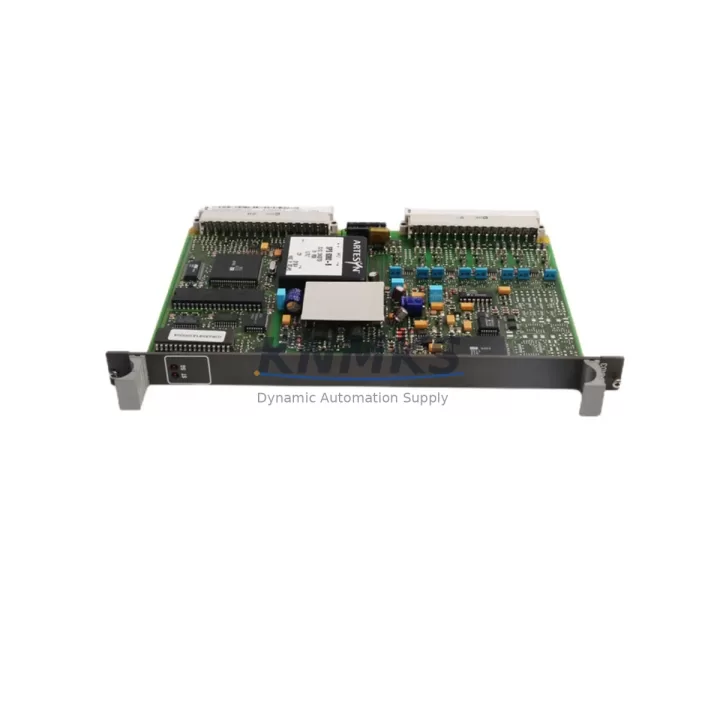
ABB 81AA03A-E GJR2394100R1210 Migration-Ready Digital Output Module for Legacy Control Systems
The ABB 81AA03A-E (GJR2394100R1210) is a digital output module designed for the ABB AC500 PLC platform, one of the most widely deployed modular control systems in industrial automation. As legacy AC500 installations age and original spare parts become increasingly difficult to source, the 81AA03A-E serves as a verified, migration-ready replacement for discontinued DO modules in existing control cabinets, retrofit projects, and system modernization programs.
This module is commonly specified in retrofit engineering packages where the original digital output hardware has reached end-of-life, where the OEM no longer supports the installed firmware revision, or where the plant engineering team is consolidating I/O architecture across multiple control zones. Whether you are replacing a failed output card in a running production line or pre-staging spares for a scheduled shutdown, the 81AA03A-E provides a reliable, drop-in-compatible solution with full support for the AC500 backplane interface and standard terminal wiring conventions.
Verified stock is available for immediate dispatch. All units are subject to pre-shipment functional testing and carry a support terms confirmed by quotation from the date of delivery.
Migration Compatibility Table
| Parameter | Detail |
|---|---|
| SKU / Order Reference | 81AA03A-E / GJR2394100R1210 |
| Platform Compatibility | ABB AC500 PLC Series (PM5xx, PM5xx-ETH, PM5xx-2ETH) |
| Module Type | Digital Output (DO) |
| Backplane Interface | AC500 S500 I/O bus — direct slot insertion, no adapter required |
| Terminal Wiring | Compatible with standard AC500 terminal block wiring; no rewiring required for like-for-like replacement |
| Communication Compatibility | Supports PROFIBUS DP, Modbus RTU, CANopen, and Ethernet-based variants depending on CPU configuration |
| Installation Requirement | Standard DIN rail or panel-mount AC500 rack; confirm slot count and rack expansion before ordering |
| Firmware Compatibility | Compatible with AC500 firmware revisions in active support; verify CPU firmware version prior to installation |
| Replacement Recommendation | Direct replacement for discontinued or end-of-life AC500 DO modules of equivalent channel count and output type |
| Commissioning Notes | Re-import I/O configuration in Automation Builder; verify module address assignment and output forcing disabled |
| Country of Origin | Germany |
| Support terms | 12 months from delivery date, covering manufacturing defects and functional failure under normal operating conditions |
Retrofit Planning for Existing Automation Systems
Successful integration of the ABB 81AA03A-E GJR2394100R1210 into an existing control system requires a structured pre-installation review. The following considerations apply to the majority of AC500-based retrofit and upgrade projects.
Power Budget Verification: Before installing any additional I/O module, confirm that the AC500 power supply module — typically a PS501 or PS502 series power supply — has sufficient residual capacity to support the additional output load. Digital output modules draw current from both the backplane bus and the field-side supply. Overloading the power supply is a common cause of intermittent faults during post-retrofit commissioning.
Rack and Backplane Capacity: The AC500 modular architecture uses the TB5xx terminal base system to mount I/O modules onto the backplane. Confirm that the target rack has an available slot and that the terminal base type matches the 81AA03A-E footprint. In systems where the rack is fully populated, an AC500 expansion rack with a dedicated coupler module may be required before the new DO module can be added.
Module Address and I/O Mapping: In Automation Builder, each I/O module is assigned a logical address based on its physical slot position. When replacing a failed module in an existing slot, the address mapping is typically preserved. However, if the module is being installed in a new slot — for example, as part of an I/O expansion — the program logic must be updated to reflect the new address range. Failure to update the I/O map is one of the most common causes of commissioning delays in retrofit projects.
Communication Protocol Continuity: AC500 systems may use PROFIBUS DP, Modbus RTU, CANopen, or EtherNet/IP depending on the CPU variant and network topology. When upgrading from an older CPU — such as migrating from a PM554 to a PM564 or PM573 — verify that the communication module, such as a CM572-DP PROFIBUS master or CM589-PNIO PROFINET adapter, remains compatible with the new CPU firmware and that the network configuration files are re-imported correctly.
HMI Screen and Tag Binding: In systems where an HMI panel — such as an ABB CP600 series operator panel — is connected to the AC500 CPU, any changes to I/O addresses or variable names must be reflected in the HMI project. Failure to update tag bindings after a module replacement or address change will result in incorrect display values or non-functional control buttons on the operator interface.
Signal Isolation and Field Wiring: In legacy installations where the original DO module drove inductive loads such as solenoid valves or motor contactors, verify that appropriate surge suppression or signal isolation is in place. If the existing field wiring includes a signal isolator or relay output module between the PLC output and the field device, confirm that the output voltage and current ratings of the 81AA03A-E are compatible with the isolator input specifications.
Programming Cable and Firmware Access: During commissioning, a USB or Ethernet programming cable connected to the AC500 CPU is required to download the updated project, force outputs for loop testing, and verify the module status in the I/O diagnostic view. Ensure that the engineering workstation has the correct version of Automation Builder installed and that the CPU firmware is at a revision level that supports the 81AA03A-E module type.
Downtime Control During System Migration
Minimizing unplanned downtime is the primary operational constraint in any live-system retrofit. The following approach is recommended for installations where the AC500 system cannot be taken offline for extended periods.
Pre-Stage and Pre-Test: Before the scheduled maintenance window, configure the replacement 81AA03A-E module in a bench environment using a spare CPU or a test rack. Download the production program, verify that the module is recognized correctly, and confirm that all output channels respond to forced commands. This eliminates the risk of discovering a configuration error during the live cutover.
Program Backup: Export a full backup of the Automation Builder project — including the hardware configuration, I/O mapping, and communication settings — before making any changes to the live system. Store the backup on a separate device, not only on the engineering workstation. If the retrofit introduces an unexpected fault, the original program can be restored within minutes.
Phased Output Migration: In systems with a large number of digital outputs, consider migrating outputs in groups rather than replacing all DO modules simultaneously. This approach allows the control system to remain partially operational during the retrofit and reduces the risk of a complete production stoppage if a commissioning issue is encountered.
Field Loop Testing: After installation, perform a systematic output-by-output loop test to verify that each channel drives the correct field device. Use the Automation Builder force function to activate each output individually and confirm the response at the field terminal. Document the test results before returning the system to automatic mode.
Commissioning Handover: Upon completion of the retrofit, provide the site maintenance team with an updated wiring diagram, the revised Automation Builder project file, and a record of the module serial number and firmware version. This documentation supports future troubleshooting and reduces the risk of incorrect module substitution during the next maintenance cycle.
Retrofit Support FAQ
Q: Is the ABB 81AA03A-E GJR2394100R1210 a direct replacement for my existing AC500 digital output module?
A: In most cases, yes. The 81AA03A-E is designed for the AC500 S500 I/O platform and uses the standard TB5xx terminal base system. If your existing module occupies the same slot type and has the same output channel configuration, the 81AA03A-E can be installed without rewiring. Confirm the channel count, output voltage range, and current rating against your existing module specification before ordering.
Q: What commissioning steps are required after installing the replacement module?
A: After physical installation, connect to the AC500 CPU using Automation Builder, verify that the module is recognized in the hardware configuration, and confirm that the I/O address mapping matches the original assignment. If the module is installed in a new slot, update the program logic to reflect the new address range. Perform a full output loop test before returning the system to automatic operation.
Q: Has this unit been tested before shipment?
A: Yes. All units undergo pre-shipment functional testing to verify output channel operation, backplane communication, and power consumption within specification. A test record is available upon request. Units are shipped in anti-static packaging with physical protection for the terminal base connectors.
Q: What support terms and after-sales support is provided?
A: The ABB 81AA03A-E GJR2394100R1210 carries a support terms confirmed by quotation from the date of delivery, covering manufacturing defects and functional failure under normal operating conditions. In the event of a support terms claim, contact our technical team with the unit serial number and a description of the fault. Replacement or repair will be arranged within the confirmed support period. Verified stock is maintained for rapid dispatch to minimize your system downtime.
—
© 2026 KNMKS. All rights reserved.
Original Source: https://knmks.com
Contact: admin@knmks.com | +86 18359268345
Product Identification
- Brand / Ecosystem
-
ABB
ABB - Model / Series
-
81AA03A-E GJR2394100R1210
AC500 Series - Product Family
- PLCs & Controllers
- Availability Status
- Available on request after model and quantity confirmation
- Inquiry Type
- B2B RFQ, replacement inquiry and project spare-part request
- Pre-Quote Check
- Exact SKU, brand, series, quantity, nameplate photos and destination country are checked before quotation
System Path
Where this product fits in the KNMKS automation structure.
Specification & Inquiry Focus
- Control platform
- PLC, PAC and modular controllers
- Common needs
- CPU, rack, power and I/O expansion
- Project support
- Replacement, cabinet build and maintenance
Buyer Confirmation
Information KNMKS checks before replying.
- Exact model
- 81AA03A-E GJR2394100R1210
- Brand / ecosystem
- ABB
- Product family
- PLCs & Controllers
- Application note
- Replacement, maintenance, project build or spare-part list
- Useful photos
- Nameplate, installed unit, cabinet layout or connector side
- Delivery details
- Quantity, destination country and target schedule
Document Support
Files and notes can be confirmed during quotation.
- Product photos or nameplate confirmation when available
- Packing and delivery notes before quotation confirmation
- Support scope and delivery terms confirmed per inquiry
- Export document coordination for qualified B2B requests
Inquiry Support
- Model cross-checking before quotation
- CPU, power, rack and expansion module matching
- Support for replacement and project inquiry
What to Send Us
- Brand and exact model number: ABB 81AA03A-E GJR2394100R1210
- Quantity and required delivery time
- Application, replacement requirement or nameplate photo
- Destination country and shipping preference
RFQ Preparation
This is a product inquiry page built for RFQ communication.
Fast Model Check
Send this model to KNMKS for confirmation.
Include quantity, destination country and photos if this is a maintenance replacement. The inquiry will be saved with a reference number after submission.
Brand & Compatibility Note
KNMKS displays automation product information for well-known industrial brand ecosystems and compatible replacement references. Brand names are used for product identification and compatibility reference only; final availability and commercial terms are confirmed per quotation.
 Manufacturing
 Machine Tools
 Packaging
 Energy & Power



 HMI & Displays
 Servo Systems
 Variable Frequency Drives
 Sensors