
Overview
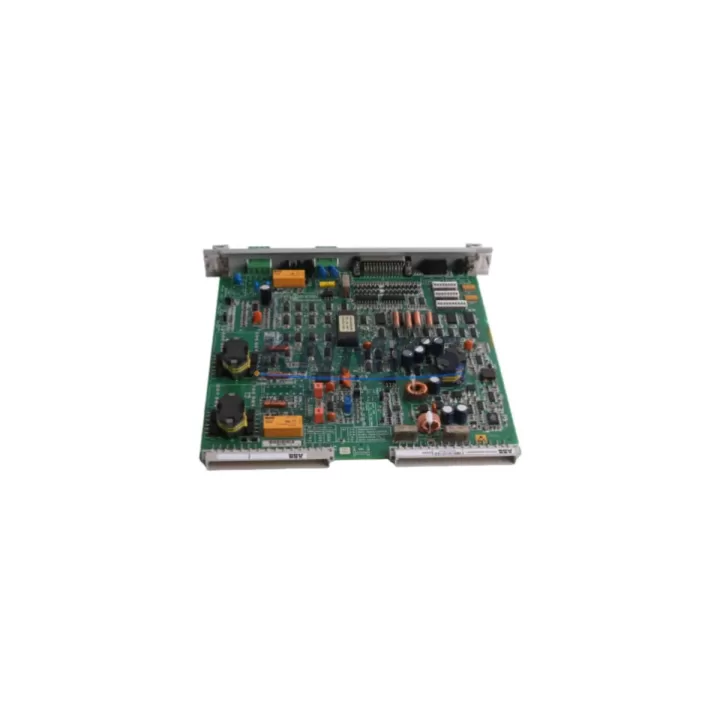
ABB 70BK06a-E HESG332194 R1 Maintenance-Proven Spare Part for Factory Uptime
The ABB 70BK06a-E (part number HESG332194 R1) is an original Bus Coupling Module designed for the ABB AC500 PLC platform — one of the most widely deployed modular automation systems in process control, discrete manufacturing, and utility infrastructure. This module serves as the critical communication bridge between the AC500 CPU and its I/O expansion modules, enabling deterministic data exchange across the internal bus backplane. When this component fails or degrades, the entire I/O subsystem becomes unreachable, triggering immediate production loss. Maintaining a verified spare in your on-site inventory is the single most effective strategy for minimizing unplanned downtime.
Each unit supplied by KNMKS is sourced from original manufacturing channels, subjected to pre-shipment functional testing, and backed by a support terms confirmed by quotation. Global dispatch is available for emergency replacement orders, with same-day processing for in-stock units.
Spare Maintenance Table
| Parameter | Specification |
|---|---|
| Part Number | 70BK06a-E / HESG332194 R1 |
| Brand | ABB |
| Series | AC500 |
| Module Type | Bus Coupling Module |
| Compatible Platform | ABB AC500 PLC (PM5xx / PM5xx-ETH CPU families) |
| Bus Interface | AC500 internal I/O expansion bus |
| Mounting | DIN rail, snap-fit onto AC500 terminal base |
| Operating Voltage | 24 VDC (supplied via backplane) |
| Operating Temperature | -25°C to +60°C |
| Protection Rating | IP20 |
| Origin | Germany |
| Weight | 360 g |
| Pre-Shipment Testing | Yes — functional bus communication verified |
| Support terms | 12 Months |
| Availability | availability confirmed by RFQ — Fast Global Dispatch |
Maintenance Planning for Continuous Operation
The 70BK06a-E HESG332194 R1 sits at the heart of the AC500 I/O architecture. When planning a scheduled inspection or responding to a bus communication fault, maintenance engineers should treat this module as part of a broader system health review rather than an isolated replacement. A failed or intermittent bus coupler often masks upstream or downstream faults that, if left unaddressed, will cause repeat failures after the module swap.
During any replacement procedure, inspect the AC500 terminal base (TB5xx series) for cracked locking tabs, corroded bus contacts, or mechanical deformation — a damaged terminal base will cause the new coupler to fail within weeks. Verify the 24 VDC power supply module (CP-E 24/x.x) output voltage under load; bus couplers are sensitive to supply ripple and undervoltage conditions. Check all AC500 digital and analog I/O modules (DA501, DA502, DC532, AX521 series) seated in the same rack for loose connectors or firmware version mismatches that may prevent bus re-enumeration after the coupler is replaced.
For systems using AC500 communication modules such as the CM572-DP (PROFIBUS) or CM589-PNIO (PROFINET), confirm that the network configuration in Automation Builder matches the physical slot assignments after any bus coupler replacement. A configuration mismatch will prevent the CPU from recognizing the I/O expansion rack even with a fully functional new coupler installed. Additionally, inspect AC500 power distribution terminal blocks and fuse holders within the control cabinet — a blown fuse on the 24 VDC rail feeding the I/O rack is frequently misdiagnosed as a bus coupler fault. Signal isolators on analog input channels should also be checked for drift or saturation if process values appear frozen or erratic following a bus fault event.
Site Replacement Workflow
Step 1 — Fault Isolation: Use the AC500 CPU diagnostic LEDs and Automation Builder online diagnostics to confirm the bus coupler as the fault source. Check for ERR LED illumination on the 70BK06a-E and verify that the CPU reports I/O expansion bus communication loss rather than a module-specific fault code.
Step 2 — Safe Isolation: Place the CPU in STOP mode via Automation Builder or the local keyswitch. De-energize the 24 VDC supply to the I/O expansion rack. Do not remove the coupler under power — bus connector damage is common when hot-swapping is attempted on non-hot-swap-rated hardware.
Step 3 — Module Removal: Release the locking lever on the terminal base, slide the 70BK06a-E upward and away from the base. Inspect the bus connector pins on both the module and the terminal base for contamination or mechanical damage before installing the replacement unit.
Step 4 — Replacement Installation: Seat the new HESG332194 R1 module firmly onto the terminal base until the locking lever clicks. Restore 24 VDC power and return the CPU to RUN mode. Confirm all I/O modules re-enumerate correctly in Automation Builder and that process values are within expected ranges.
Step 5 — Documentation: Record the replacement date, serial number of the removed unit, and any associated fault codes in your maintenance log. Schedule a follow-up inspection of the terminal base and power supply within 30 days to confirm system stability.
This workflow is compatible with legacy AC500 V1 hardware and current AC500 V2 / AC500-eCo platforms. The HESG332194 R1 revision designation ensures backward compatibility across PM554, PM564, PM572, and PM581 CPU variants.
Spare Parts Support FAQ
Q1: Is the 70BK06a-E HESG332194 R1 compatible with both AC500 V1 and V2 hardware generations?
Yes. The HESG332194 R1 revision is designed for cross-generation compatibility within the AC500 platform. It is compatible with PM5xx series CPUs across both V1 and V2 hardware generations. Always verify the terminal base model (TB5xx) is in serviceable condition before installation, as the terminal base is not interchangeable between V1 and V2 in all configurations.
Q2: What pre-shipment testing is performed on each unit?
Every 70BK06a-E HESG332194 R1 unit dispatched by KNMKS undergoes functional bus communication testing prior to shipment. This includes power-on verification, bus enumeration confirmation, and visual inspection of connector integrity. A test report is available upon request for critical infrastructure procurement.
Q3: How should this spare be stored in a long-term inventory program?
Store the module in its original anti-static packaging in a dry environment between -25°C and +70°C with relative humidity below 95% non-condensing. Avoid storage near strong electromagnetic sources. Inspect the unit annually for connector oxidation and replace anti-static packaging if damaged. KNMKS recommends a maximum storage period of 5 years before functional re-verification.
Q4: What is the support terms coverage and what does it include?
All units carry a support terms confirmed by quotation from the date of dispatch. Coverage includes functional failure under normal operating conditions, DOA (dead on arrival) replacement, and technical support for installation verification. Support requests are processed within 5 business days. Physical damage caused by incorrect installation, overvoltage, or environmental exposure outside rated conditions is excluded from coverage.
—
© 2026 KNMKS. All rights reserved.
Original Source: https://knmks.com
Contact: admin@knmks.com | +86 18359268345
Product Identification
- Brand / Ecosystem
-
ABB
ABB - Model / Series
-
70BK06a-E HESG332194 R1
AC500 Series - Product Family
- PLCs & Controllers
- Availability Status
- Available on request after model and quantity confirmation
- Inquiry Type
- B2B RFQ, replacement inquiry and project spare-part request
- Pre-Quote Check
- Exact SKU, brand, series, quantity, nameplate photos and destination country are checked before quotation
System Path
Where this product fits in the KNMKS automation structure.
Specification & Inquiry Focus
- Control platform
- PLC, PAC and modular controllers
- Common needs
- CPU, rack, power and I/O expansion
- Project support
- Replacement, cabinet build and maintenance
Buyer Confirmation
Information KNMKS checks before replying.
- Exact model
- 70BK06a-E HESG332194 R1
- Brand / ecosystem
- ABB
- Product family
- PLCs & Controllers
- Application note
- Replacement, maintenance, project build or spare-part list
- Useful photos
- Nameplate, installed unit, cabinet layout or connector side
- Delivery details
- Quantity, destination country and target schedule
Document Support
Files and notes can be confirmed during quotation.
- Product photos or nameplate confirmation when available
- Packing and delivery notes before quotation confirmation
- Support scope and delivery terms confirmed per inquiry
- Export document coordination for qualified B2B requests
Inquiry Support
- Model cross-checking before quotation
- CPU, power, rack and expansion module matching
- Support for replacement and project inquiry
What to Send Us
- Brand and exact model number: ABB 70BK06a-E HESG332194 R1
- Quantity and required delivery time
- Application, replacement requirement or nameplate photo
- Destination country and shipping preference
RFQ Preparation
This is a product inquiry page built for RFQ communication.
Fast Model Check
Send this model to KNMKS for confirmation.
Include quantity, destination country and photos if this is a maintenance replacement. The inquiry will be saved with a reference number after submission.
Brand & Compatibility Note
KNMKS displays automation product information for well-known industrial brand ecosystems and compatible replacement references. Brand names are used for product identification and compatibility reference only; final availability and commercial terms are confirmed per quotation.
 Manufacturing
 Machine Tools
 Packaging
 Energy & Power



 HMI & Displays
 Servo Systems
 Variable Frequency Drives
 Sensors