
Overview
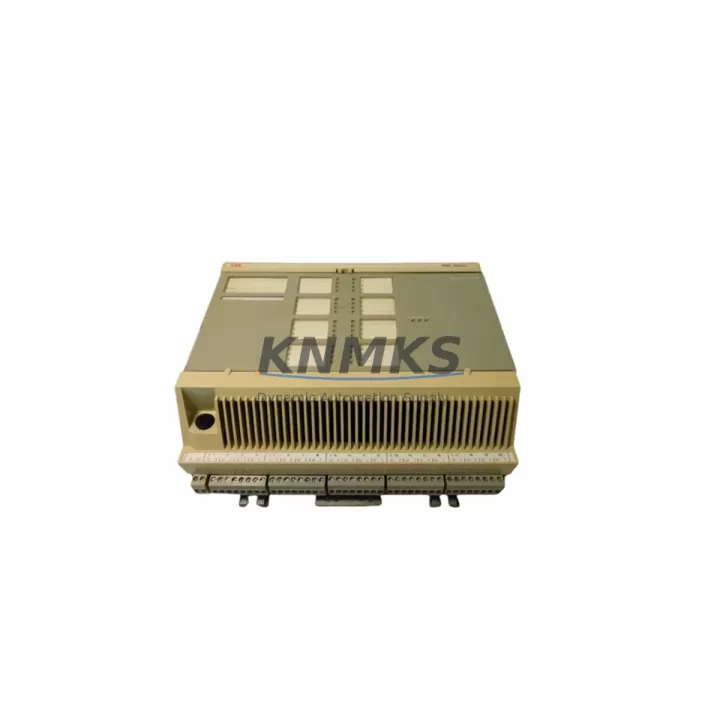
ABB 5716075-P Migration-Ready I/O Module for Legacy Control Systems
The ABB 5716075-P is a distributed I/O module engineered for seamless integration into AC500 PLC platforms and legacy automation environments undergoing modernization. As industrial facilities transition away from end-of-life control architectures, the 5716075-P provides a verified drop-in replacement path that preserves existing wiring infrastructure, terminal layouts, and communication protocols — dramatically reducing retrofit risk and unplanned downtime. Whether you are replacing a discontinued I/O module in a DCS cabinet, expanding signal capacity in a legacy control panel, or migrating from an older fieldbus topology to a current PROFIBUS or Modbus network, the 5716075-P is stocked, pre-shipment tested, and covered by a support terms confirmed by quotation.
Engineers managing aging AC500 installations frequently encounter obsolete I/O modules that are no longer available through OEM channels. The 5716075-P addresses this supply gap directly. It is compatible with standard DIN rail mounting configurations used across ABB AC500 control cabinets, and its terminal block pinout aligns with legacy wiring schemes, minimizing the need for field rewiring during replacement. Power supply requirements match the 24 VDC rail standards common to AC500 backplane assemblies, and the module’s firmware is compatible with existing PLC program logic without requiring code restructuring.
For facilities running mixed-generation control systems — where an AC500 CPU module such as the PM573 or PM591 coexists with older I/O expansion racks — the 5716075-P integrates without disrupting the existing backplane address map. Module addressing is preserved through hardware DIP switch configuration, allowing maintenance teams to restore I/O functionality without modifying the PLC program or HMI screen tag assignments. This is particularly valuable in process industries where HMI graphics are tightly coupled to I/O channel addresses and any tag remapping would require extensive validation.
Migration Compatibility Table
| Parameter | Details |
|---|---|
| Compatible Platform | ABB AC500 PLC Series (PM573, PM591, PM595 and legacy variants) |
| Module Type | Distributed I/O Module |
| Mounting | DIN Rail (standard 35 mm) |
| Communication Protocols | Modbus RTU, PROFIBUS DP |
| Power Supply | 24 VDC (backplane or external rail) |
| Terminal Compatibility | Compatible with legacy AC500 terminal block wiring layouts |
| Backplane Interface | AC500 standard backplane bus connector |
| Module Addressing | Hardware DIP switch configurable; preserves existing address map |
| Firmware Compatibility | Compatible with existing AC500 PLC program logic; no code restructuring required |
| HMI Tag Impact | None — channel addresses preserved; no HMI screen remapping required |
| Installation Space | Standard AC500 module footprint; fits existing cabinet cutouts |
| Replacement Recommendation | Direct drop-in replacement for discontinued AC500 I/O modules |
| Pre-Shipment Testing | Yes — 100% functional test before dispatch |
| Support terms | 12 Months |
| Stock Status | availability confirmed by RFQ — global dispatch available |
Retrofit Planning for Existing Automation Systems
A successful retrofit using the ABB 5716075-P begins with a systematic audit of the existing control cabinet. Maintenance engineers should document the current backplane slot assignments, verify the 24 VDC power rail capacity, and confirm that the existing TB511 or TB521 terminal base units are compatible with the replacement module. In many AC500 installations, the terminal base remains serviceable even when the I/O module itself has failed or reached end-of-life, allowing the 5716075-P to be installed without disturbing field wiring.
Communication link integrity is a critical checkpoint during migration. If the legacy system uses a PROFIBUS DP segment, the GSD file for the 5716075-P should be loaded into the engineering workstation before the module is physically installed. For Modbus RTU configurations, baud rate, parity, and station address settings must be verified against the existing network parameters. In multi-drop Modbus networks, incorrect station addressing is a common source of post-replacement communication faults that can be avoided with pre-installation configuration review.
In control cabinets where the AC500 system interfaces with an ABB CP600 or CP620 HMI panel, engineers should confirm that I/O channel tag assignments in the HMI project file match the physical channel layout of the 5716075-P before commissioning. Similarly, if the cabinet includes an ABB CI590 PROFIBUS communication interface module or a CI501 CANopen interface, the network topology should be re-validated after module replacement to confirm that the new I/O module is correctly enumerated on the fieldbus segment.
For installations that include ABB DC532 digital output modules or AI531 analog input modules in adjacent backplane slots, the 5716075-P replacement should be sequenced to minimize disruption to adjacent I/O channels. A phased replacement approach — replacing one module at a time while maintaining partial system operation — is recommended for continuous-process environments where full shutdown is not feasible. Power supply modules such as the ABB PS501 should be checked for available current headroom before adding or replacing I/O modules in the rack.
Downtime Control During System Migration
Minimizing control system downtime during I/O module replacement requires preparation that begins well before the maintenance window. For the ABB 5716075-P retrofit, the recommended approach is to complete all configuration work — including module addressing, GSD file loading, and HMI tag verification — in advance, so that the physical swap can be completed within a single planned outage window.
Before removing the legacy module, the existing PLC program should be uploaded and archived from the AC500 CPU using ABB Automation Builder or the legacy PS501 programming environment. This backup preserves the current I/O configuration, function block assignments, and communication parameters, providing a recovery baseline if the replacement module requires troubleshooting. Field wiring should be photographed and terminal assignments documented before any disconnection.
During installation, the 5716075-P should be inserted into the terminal base with the system powered down. After mechanical installation, power can be restored and the PLC program downloaded to confirm correct I/O channel recognition. In PROFIBUS configurations, the DP master should be monitored for correct slave enumeration before returning the system to automatic mode. For Modbus networks, a brief communication test using a portable Modbus scanner can confirm correct station response before full handover.
Post-replacement commissioning should include a functional I/O test of all channels — verifying both digital and analog signal integrity — before releasing the system to production. The 5716075-P is pre-shipment tested at our facility, which significantly reduces the risk of field commissioning failures attributable to the replacement module itself. With proper preparation, most AC500 I/O module replacements using the 5716075-P can be completed within a two-to-four hour maintenance window.
Retrofit Support FAQ
Q: Is the ABB 5716075-P a direct replacement for discontinued AC500 I/O modules?
A: Yes. The 5716075-P is designed as a drop-in replacement for compatible discontinued AC500 distributed I/O modules. Terminal base compatibility, backplane interface, and module addressing are preserved, allowing replacement without field rewiring or PLC program modification in most installations.
Q: Does replacing the 5716075-P require changes to the HMI or PLC program?
A: In standard AC500 configurations, no program changes are required. The module’s I/O channel addresses are preserved through DIP switch configuration, and HMI tag assignments remain valid. Engineers should verify tag mapping in the HMI project file before commissioning as a precaution.
Q: What communication protocols does the 5716075-P support, and are they compatible with legacy fieldbus networks?
A: The 5716075-P supports Modbus RTU and PROFIBUS DP, both of which are widely used in legacy AC500 installations. For PROFIBUS networks, the GSD file should be loaded into the engineering workstation prior to installation. Baud rate and station address settings should be verified against the existing network configuration.
Q: What support terms and pre-shipment testing does the 5716075-P include?
A: Every 5716075-P unit is functionally tested before dispatch and covered by a support terms confirmed by quotation. Stock is maintained for immediate global shipment, supporting both planned maintenance schedules and emergency replacement requirements.
© 2026 KNMKS. All rights reserved.
Original Source: https://knmks.com
Contact: admin@knmks.com | +86 18359268345
Product Identification
- Brand / Ecosystem
-
ABB
ABB - Model / Series
-
5716075-P
AC500 Series - Product Family
- PLCs & Controllers
- Availability Status
- Available on request after model and quantity confirmation
- Inquiry Type
- B2B RFQ, replacement inquiry and project spare-part request
- Pre-Quote Check
- Exact SKU, brand, series, quantity, nameplate photos and destination country are checked before quotation
System Path
Where this product fits in the KNMKS automation structure.
Specification & Inquiry Focus
- Control platform
- PLC, PAC and modular controllers
- Common needs
- CPU, rack, power and I/O expansion
- Project support
- Replacement, cabinet build and maintenance
Buyer Confirmation
Information KNMKS checks before replying.
- Exact model
- 5716075-P
- Brand / ecosystem
- ABB
- Product family
- PLCs & Controllers
- Application note
- Replacement, maintenance, project build or spare-part list
- Useful photos
- Nameplate, installed unit, cabinet layout or connector side
- Delivery details
- Quantity, destination country and target schedule
Document Support
Files and notes can be confirmed during quotation.
- Product photos or nameplate confirmation when available
- Packing and delivery notes before quotation confirmation
- Support scope and delivery terms confirmed per inquiry
- Export document coordination for qualified B2B requests
Inquiry Support
- Model cross-checking before quotation
- CPU, power, rack and expansion module matching
- Support for replacement and project inquiry
What to Send Us
- Brand and exact model number: ABB 5716075-P
- Quantity and required delivery time
- Application, replacement requirement or nameplate photo
- Destination country and shipping preference
RFQ Preparation
This is a product inquiry page built for RFQ communication.
Fast Model Check
Send this model to KNMKS for confirmation.
Include quantity, destination country and photos if this is a maintenance replacement. The inquiry will be saved with a reference number after submission.
Brand & Compatibility Note
KNMKS displays automation product information for well-known industrial brand ecosystems and compatible replacement references. Brand names are used for product identification and compatibility reference only; final availability and commercial terms are confirmed per quotation.
 Manufacturing
 Machine Tools
 Packaging
 Energy & Power



 HMI & Displays
 Servo Systems
 Variable Frequency Drives
 Sensors