
Overview
ABB 560CMD11 Migration-Ready Ethernet Module for AC500: Legacy System Upgrade & Retrofit Guide
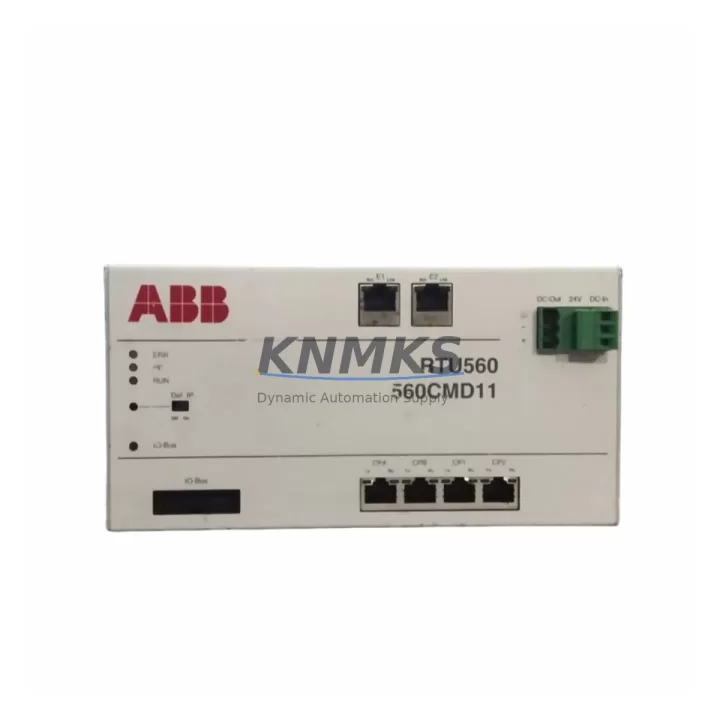
The ABB 560CMD11 (order reference 1KGT023400R0001) is a dedicated Ethernet communication module engineered for the ABB AC500 PLC platform. As legacy control architectures face increasing pressure from obsolescence, discontinued firmware support, and incompatible field protocols, the 560CMD11 provides a validated, drop-in migration path for facilities operating older AC500 configurations or transitioning from third-party DCS/PLC systems. Whether your plant is replacing a failed communication card, upgrading from serial-based fieldbus to Ethernet-based protocols, or consolidating multiple I/O networks onto a single backbone, the 560CMD11 is engineered to reduce integration risk and shorten commissioning time.
This module supports Modbus TCP, PROFINET IO, and EtherNet/IP simultaneously, making it one of the most protocol-flexible Ethernet modules available for the AC500 rack. It mounts directly into the AC500 CPU left-side expansion slot and communicates via the internal backplane bus — no external wiring harness or protocol converter required. For sites migrating from older ABB CS31 serial bus architectures or from Modbus RTU-based remote I/O, the 560CMD11 eliminates the need for intermediate gateways and allows direct Ethernet integration with SCADA, DCS, and HMI layers.
Before installation, engineers should verify the following during retrofit planning: power budget on the AC500 CPU rack (the 560CMD11 draws from the backplane supply; confirm total module current does not exceed the PM5xx power module rating), slot assignment and module addressing in Automation Builder, IP address scheme for the plant Ethernet segment, and firmware version compatibility between the 560CMD11 and the installed CPU firmware. Facilities running ABB PM554 or PM564 CPUs should confirm the minimum firmware revision supports the 560CMD11 feature set, particularly for PROFINET IO controller/device mode selection.
Migration Compatibility Table
| Parameter | 560CMD11 (1KGT023400R0001) | Retrofit Notes |
|---|---|---|
| Supported Protocols | Modbus TCP, PROFINET IO, EtherNet/IP | Replaces serial Modbus RTU or CS31 bus without gateway |
| Physical Interface | RJ45 Ethernet (10/100 Mbps) | Standard Cat5e/Cat6 patch cable; no special wiring adapter |
| Backplane Bus | AC500 internal expansion bus | Left-side CPU slot; confirm slot count with PM5xx CPU model |
| Power Consumption | Supplied via backplane | Verify PM5xx power module budget before adding module |
| Compatible CPUs | PM554, PM564, PM572, PM581, PM591, PM592 | Confirm minimum firmware revision per CPU model in Automation Builder |
| HMI / SCADA Integration | Modbus TCP / EtherNet/IP tag-based | Update HMI driver from serial to Ethernet; remap tag addresses if required |
| Programming Tool | ABB Automation Builder (IEC 61131-3) | Existing PLC program logic retained; only communication configuration updated |
| Installation Space | Standard AC500 module width (1 slot) | Confirm available slot in existing control cabinet layout |
| Firmware Compatibility | Requires AC500 CPU firmware ≥ V2.x | Update CPU firmware via Automation Builder before module insertion |
| Support terms | 12 Months | Covers manufacturing defects; pre-shipment functional test included |
Retrofit Planning for Existing Automation Systems
A successful 560CMD11 retrofit begins well before the module arrives on-site. The first step is a full audit of the existing communication architecture: identify every device currently connected via serial Modbus RTU, CS31 bus, or proprietary fieldbus that will transition to Ethernet. In most AC500 installations, this includes ABB TB5xx terminal base units paired with digital and analog I/O modules such as the DC532 (digital input) and DA501 (analog output), which remain fully compatible with the AC500 backplane after the communication upgrade — no I/O rewiring is required.
For facilities also upgrading their HMI layer, the transition from serial-connected panels to Ethernet-based HMI is straightforward when the 560CMD11 is in place. Panels communicating via Modbus TCP can be reconfigured in the HMI project to point to the 560CMD11’s IP address, with tag address mapping preserved if the Modbus register layout in the PLC program is unchanged. Sites using ABB CP600 series HMI panels will find native Modbus TCP and EtherNet/IP driver support, eliminating the need for third-party protocol converters.
Where the existing control cabinet includes a CM572-DP PROFIBUS DP master module for legacy field device communication, the 560CMD11 can coexist in the same AC500 rack, allowing a phased migration: PROFIBUS devices remain online while new Ethernet-capable instruments are commissioned in parallel. This dual-bus approach is particularly valuable in continuous process environments where a full cutover is not operationally feasible. Similarly, if the plant uses ABB S500 remote I/O stations connected via CS31, these can be migrated to Ethernet-based remote I/O using the 560CMD11 as the network master, with the CS31 bus decommissioned progressively.
Power supply integrity is a critical checkpoint. The ABB PM5xx power module feeding the CPU rack must have sufficient headroom to support the 560CMD11 alongside existing expansion modules. Engineers should calculate the total backplane current draw — including CPU, communication modules, and any I/O modules in the same rack — and compare against the PM5xx rated output. If the budget is tight, a secondary PS501 power supply module can be added to the rack to provide additional capacity without replacing the primary power module.
Finally, confirm that the plant’s Ethernet switch infrastructure supports the required VLAN segmentation and QoS settings for PROFINET IO real-time traffic if that protocol is being used. Industrial-grade managed switches with PROFINET-aware firmware are recommended to avoid packet loss during time-critical I/O cycles.
Downtime Control During System Migration
Minimizing unplanned downtime is the primary concern in any live control system retrofit. For the 560CMD11 installation, the recommended approach is a staged cutover: prepare the new Automation Builder project with the 560CMD11 configured and all communication parameters set (IP address, protocol mode, device names) while the existing system remains in production. Use the offline simulation mode in Automation Builder to validate the new communication configuration against the existing PLC program logic before any physical changes are made.
On the day of cutover, the sequence should be: power down the AC500 rack in a controlled shutdown (not an emergency stop), insert the 560CMD11 into the designated expansion slot, reconnect the Ethernet cable, power up the rack, and download the updated project from Automation Builder. The existing IEC 61131-3 program logic — ladder, FBD, or structured text — does not need to be rewritten; only the communication function blocks and network configuration parameters are updated. This approach typically reduces the active intervention window to under 30 minutes for a single-rack installation.
To protect original program logic, always export and archive the current Automation Builder project before beginning the retrofit. Store the backup on a separate drive or version control system. If the cutover encounters an unexpected issue, the original project can be reloaded to restore the previous communication configuration within minutes, maintaining plant control continuity. For multi-rack systems or distributed AC500 architectures, coordinate the cutover sequence rack by rack, validating each 560CMD11 installation before proceeding to the next segment.
Pre-shipment functional testing of the 560CMD11 is performed before dispatch, covering Ethernet link establishment, protocol handshake verification, and backplane communication integrity. This reduces the risk of receiving a non-functional module and eliminates one variable from the on-site commissioning checklist.
Retrofit Support FAQ
Q1: Can the ABB 560CMD11 directly replace an older CM572-DP PROFIBUS module in the same AC500 rack?
The 560CMD11 and CM572-DP serve different protocol layers — PROFIBUS DP versus Ethernet-based protocols. They can coexist in the same rack during a phased migration, but the 560CMD11 is not a pin-compatible drop-in for the CM572-DP slot. If the goal is to retire PROFIBUS entirely, field devices must first be migrated to Ethernet-capable variants or connected via a PROFIBUS-to-Ethernet gateway before the CM572-DP is removed.
Q2: What wiring changes are required when installing the 560CMD11?
The 560CMD11 connects to the plant Ethernet network via a standard RJ45 patch cable. No terminal block rewiring on the AC500 rack is required — the module draws power and communicates with the CPU entirely through the backplane bus. The only field wiring change is routing the Ethernet cable from the nearest managed switch to the module’s RJ45 port.
Q3: How is compatibility between the 560CMD11 and the installed AC500 CPU firmware verified?
Open the Automation Builder hardware catalog and locate the 560CMD11 entry. The catalog entry specifies the minimum CPU firmware version required. Connect to the AC500 CPU via USB or Ethernet, read the current firmware version from the device properties dialog, and compare. If an update is needed, download the firmware package from the ABB Library and apply it via Automation Builder’s firmware update function before inserting the 560CMD11.
Q4: What does the support terms confirmed by quotation cover, and is pre-shipment testing included?
Every 560CMD11 unit dispatched is subject to pre-shipment functional testing covering Ethernet link integrity, backplane communication, and protocol initialization. The support terms confirmed by quotation cover manufacturing defects and functional failures under normal operating conditions. Units are dispatched with test documentation available on request. In-stock units are available for same-week dispatch to support emergency replacement and unplanned maintenance scenarios.
© 2026 KNMKS. All rights reserved.
Original Source: https://knmks.com
Contact: admin@knmks.com | +86 18359268345
Product Identification
- Brand / Ecosystem
-
ABB
ABB - Model / Series
-
560CMD11 1KGT023400R0001
AC500 Series - Product Family
- PLCs & Controllers
- Availability Status
- Available on request after model and quantity confirmation
- Inquiry Type
- B2B RFQ, replacement inquiry and project spare-part request
- Pre-Quote Check
- Exact SKU, brand, series, quantity, nameplate photos and destination country are checked before quotation
System Path
Where this product fits in the KNMKS automation structure.
Specification & Inquiry Focus
- Control platform
- PLC, PAC and modular controllers
- Common needs
- CPU, rack, power and I/O expansion
- Project support
- Replacement, cabinet build and maintenance
Buyer Confirmation
Information KNMKS checks before replying.
- Exact model
- 560CMD11 1KGT023400R0001
- Brand / ecosystem
- ABB
- Product family
- PLCs & Controllers
- Application note
- Replacement, maintenance, project build or spare-part list
- Useful photos
- Nameplate, installed unit, cabinet layout or connector side
- Delivery details
- Quantity, destination country and target schedule
Document Support
Files and notes can be confirmed during quotation.
- Product photos or nameplate confirmation when available
- Packing and delivery notes before quotation confirmation
- Support scope and delivery terms confirmed per inquiry
- Export document coordination for qualified B2B requests
Inquiry Support
- Model cross-checking before quotation
- CPU, power, rack and expansion module matching
- Support for replacement and project inquiry
What to Send Us
- Brand and exact model number: ABB 560CMD11 1KGT023400R0001
- Quantity and required delivery time
- Application, replacement requirement or nameplate photo
- Destination country and shipping preference
RFQ Preparation
This is a product inquiry page built for RFQ communication.
Fast Model Check
Send this model to KNMKS for confirmation.
Include quantity, destination country and photos if this is a maintenance replacement. The inquiry will be saved with a reference number after submission.
Brand & Compatibility Note
KNMKS displays automation product information for well-known industrial brand ecosystems and compatible replacement references. Brand names are used for product identification and compatibility reference only; final availability and commercial terms are confirmed per quotation.
 Manufacturing
 Machine Tools
 Packaging
 Energy & Power



 HMI & Displays
 Servo Systems
 Variable Frequency Drives
 Sensors