
Overview
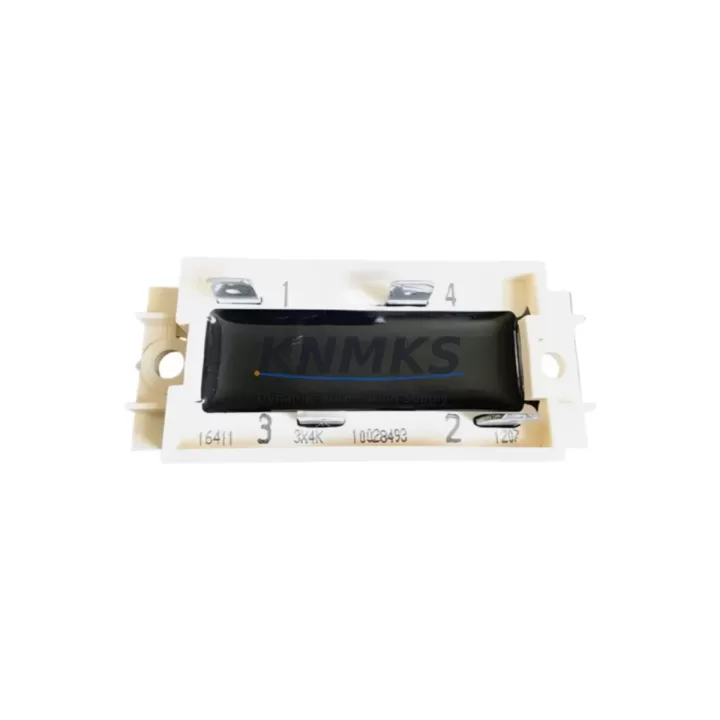
ABB 3X4K7 Migration-Ready I/O Module for Legacy Control Systems
The ABB 3X4K7 is a migration-ready digital I/O module designed for integration into ABB AC500 PLC platforms and legacy control architectures requiring a verified, drop-in replacement. As industrial facilities face increasing pressure to retire end-of-life control hardware, the 3X4K7 provides a reliable upgrade path that preserves existing wiring infrastructure, backplane slot assignments, and program logic without requiring a full system redesign. Whether you are replacing a discontinued module in a running production line or building out a spare-parts buffer for a multi-year maintenance program, the 3X4K7 is engineered to meet the demands of continuous-process environments where unplanned downtime is not an option.
Before committing to a retrofit using the ABB 3X4K7, engineers should verify several critical compatibility parameters. Power supply capacity at the rack level must be confirmed — the AC500 CPU modules and associated SM560 or PM590 processor units draw defined current budgets from the backplane bus, and adding or swapping I/O modules can shift the load balance. Terminal wiring assignments should be cross-referenced against the original I/O list to ensure field signal mapping is preserved. Backplane interface compatibility with the TB5xx terminal base units used in the existing installation must also be confirmed, as the 3X4K7 is designed for specific terminal base pairings within the AC500 ecosystem.
Module address configuration is another area requiring attention during migration. In AC500 systems, I/O module addresses are typically assigned through the Automation Builder programming environment, and any replacement module must be configured to match the original address map to avoid forcing a full program re-download or HMI screen remapping. If the facility uses a CP600 or CP400 series HMI panel linked to the AC500 controller, screen tag bindings referencing the replaced module’s I/O addresses must be validated before returning the system to automatic mode. Communication links — whether via PROFIBUS DP, Modbus RTU, or CS31 fieldbus — should be tested end-to-end after module installation to confirm that the fieldbus master still recognizes the node without requiring a topology reconfiguration.
Physical installation space is a practical constraint that is often overlooked in retrofit planning. The 3X4K7 occupies a standard AC500 backplane slot and is compatible with the modular rack architecture used across the AC500 S500 I/O family. If the control cabinet has been retrofitted with additional DIN rail components such as signal isolators, DC/DC converters, or surge protection devices adjacent to the PLC rack, clearance for module extraction and reinsertion should be confirmed before scheduling the maintenance window. Firmware version compatibility between the 3X4K7 and the installed CPU firmware should also be verified in Automation Builder prior to commissioning — mismatched firmware revisions can cause diagnostic faults that mask real field signal issues during startup.
Every ABB 3X4K7 unit supplied by KNMKS undergoes pre-shipment functional testing covering channel-level I/O verification, backplane communication handshake, and diagnostic LED response. Units are shipped with a support terms confirmed by quotation covering manufacturing defects and functional failures under normal operating conditions. Stock is maintained in our Xiamen warehouse to support urgent replacement requirements with short lead times.
Migration Compatibility Table
| Parameter | Details |
|---|---|
| SKU / Part Number | ABB 3X4K7 |
| Compatible Platform | ABB AC500 PLC (S500 I/O Family) |
| Terminal Base Compatibility | TB5xx series terminal bases (verify specific suffix) |
| Backplane Interface | AC500 S500 backplane bus — standard slot form factor |
| Communication Protocols | CS31, PROFIBUS DP (via CM572-DP), Modbus RTU (via CM577-ETH) |
| Address Configuration | Configured via ABB Automation Builder; must match original I/O map |
| Firmware Compatibility | Verify CPU firmware version in Automation Builder before commissioning |
| Installation Footprint | Standard AC500 backplane slot; confirm cabinet clearance for extraction |
| Replacement Recommendation | Direct slot replacement for discontinued AC500 I/O modules of equivalent type |
| Commissioning Focus | I/O address map, HMI tag binding, fieldbus node recognition, diagnostic LED check |
| Pre-Shipment Testing | Channel-level I/O verification, backplane handshake, diagnostic LED response |
| Support terms | 12 months — manufacturing defects and functional failures under normal use |
Retrofit Planning for Existing Automation Systems
A successful retrofit using the ABB 3X4K7 typically begins with a full audit of the existing AC500 rack configuration. Engineers should document the current slot population, noting which positions are occupied by CPU modules such as the PM590 or PM595, which slots carry digital or analog I/O modules, and which positions hold communication modules like the CM572-DP for PROFIBUS or the CM577-ETH for Ethernet-based protocols. This baseline inventory prevents slot conflicts during the replacement procedure and ensures that the new 3X4K7 is inserted into the correct backplane position.
Power distribution within the control cabinet deserves particular attention. The AC500 system draws 24 VDC from an external power supply unit — commonly a PS501 or equivalent DIN rail PSU — and the total current draw across all installed modules must remain within the supply’s rated output. Adding the 3X4K7 to a rack that is already near its power budget may require upgrading the power supply or redistributing modules across a second rack segment. Signal isolators installed between field devices and the I/O module terminals can also affect loop power budgets and should be factored into the load calculation.
For facilities running legacy CS31 fieldbus networks, the 3X4K7’s integration into the existing bus topology requires confirming that the CS31 master — typically embedded in the AC500 CPU — still recognizes the replacement module’s node address after the swap. If the original module used a hardware DIP switch for address assignment, the replacement must be set to the identical address before power-up to avoid a bus fault that could trip the entire fieldbus segment. Similarly, any PROFIBUS DP network connected via a CM572-DP communication module should be tested with a PROFIBUS diagnostic tool after the replacement to confirm that the GSD file configuration still matches the physical hardware.
HMI integration is a common source of post-retrofit issues. CP600 series panels linked to the AC500 controller via internal Ethernet or serial links reference I/O data by tag name and address. If the replacement module occupies the same slot and address as the original, HMI screens should function without modification. However, if the slot address has changed — for example, due to a rack reconfiguration — all affected HMI tags must be remapped in the CP600 project before the panel is reconnected to the live controller. Programming cables such as the TK501 USB programming cable are required to push updated configurations to both the AC500 CPU and the CP600 HMI during commissioning.
Downtime Control During System Migration
Minimizing downtime during an AC500 I/O module replacement requires a structured pre-maintenance preparation sequence. Before the maintenance window opens, the existing PLC program should be backed up from the CPU using Automation Builder and stored on a secure engineering workstation. This backup preserves the complete I/O configuration, function block logic, and communication settings, ensuring that the program can be restored to the CPU if the replacement procedure encounters an unexpected fault.
Where process conditions allow, a partial shutdown strategy can reduce the scope of the maintenance window. If the 3X4K7 replacement affects only a subset of the I/O channels in the rack, it may be possible to place the affected process section in manual control mode — using the DCS or SCADA supervisory layer to hold output states — while the module is swapped. This approach keeps the remainder of the control system in automatic mode and limits the production impact to the specific process section being serviced.
After the 3X4K7 is installed and the rack is powered up, the commissioning sequence should follow a defined checklist: confirm that the CPU recognizes the new module in the Automation Builder hardware configuration, verify that all I/O channels report correct diagnostic status, test each field signal individually against the I/O list, and confirm that the SCADA or DCS faceplate displays match the expected field states before returning the section to automatic control. This structured approach reduces the risk of latent wiring errors or address mismatches causing a process trip after the maintenance window closes.
KNMKS maintains ready stock of the ABB 3X4K7 to support emergency replacement scenarios where lead time is the primary constraint. Units can be dispatched within 24–48 hours of order confirmation, and our technical team can provide pre-shipment configuration support to reduce on-site commissioning time.
Retrofit Support FAQ
Q1: Is the ABB 3X4K7 a direct replacement for discontinued AC500 I/O modules?
The 3X4K7 is designed as a migration-ready replacement within the ABB AC500 S500 I/O family. Compatibility depends on the specific terminal base suffix and backplane slot type in your installation. We recommend providing your existing module part number and terminal base reference so our team can confirm the replacement path before shipment.
Q2: What commissioning steps are required after installing the 3X4K7?
After physical installation, verify the module address in Automation Builder, confirm that all I/O channels report correct diagnostic status, test field signal continuity against the original I/O list, and validate HMI tag bindings if the slot address has changed. For PROFIBUS or CS31 networks, run a bus diagnostic to confirm node recognition before returning the system to automatic mode.
Q3: Does the 3X4K7 require firmware updates before use?
Firmware compatibility between the 3X4K7 and the installed AC500 CPU firmware version should be verified in Automation Builder prior to commissioning. In most cases, units supplied by KNMKS are tested against current firmware releases. If your CPU is running an older firmware version, our team can advise on compatibility before shipment.
Q4: What support terms and stock availability does KNMKS offer for the ABB 3X4K7?
All units carry a support terms confirmed by quotation covering manufacturing defects and functional failures under normal operating conditions. Pre-shipment testing includes channel-level I/O verification and backplane communication checks. Stock is maintained in our Xiamen warehouse for short lead-time dispatch. Contact admin@knmks.com or +86 18359268345 for current availability and pricing.
© 2026 KNMKS. All rights reserved.
Original Source: https://knmks.com
Contact: admin@knmks.com | +86 18359268345
Product Identification
- Brand / Ecosystem
-
ABB
ABB - Model / Series
-
3X4K7
AC500 Series - Product Family
- PLCs & Controllers
- Availability Status
- Available on request after model and quantity confirmation
- Inquiry Type
- B2B RFQ, replacement inquiry and project spare-part request
- Pre-Quote Check
- Exact SKU, brand, series, quantity, nameplate photos and destination country are checked before quotation
System Path
Where this product fits in the KNMKS automation structure.
Specification & Inquiry Focus
- Control platform
- PLC, PAC and modular controllers
- Common needs
- CPU, rack, power and I/O expansion
- Project support
- Replacement, cabinet build and maintenance
Buyer Confirmation
Information KNMKS checks before replying.
- Exact model
- 3X4K7
- Brand / ecosystem
- ABB
- Product family
- PLCs & Controllers
- Application note
- Replacement, maintenance, project build or spare-part list
- Useful photos
- Nameplate, installed unit, cabinet layout or connector side
- Delivery details
- Quantity, destination country and target schedule
Document Support
Files and notes can be confirmed during quotation.
- Product photos or nameplate confirmation when available
- Packing and delivery notes before quotation confirmation
- Support scope and delivery terms confirmed per inquiry
- Export document coordination for qualified B2B requests
Inquiry Support
- Model cross-checking before quotation
- CPU, power, rack and expansion module matching
- Support for replacement and project inquiry
What to Send Us
- Brand and exact model number: ABB 3X4K7
- Quantity and required delivery time
- Application, replacement requirement or nameplate photo
- Destination country and shipping preference
RFQ Preparation
This is a product inquiry page built for RFQ communication.
Fast Model Check
Send this model to KNMKS for confirmation.
Include quantity, destination country and photos if this is a maintenance replacement. The inquiry will be saved with a reference number after submission.
Brand & Compatibility Note
KNMKS displays automation product information for well-known industrial brand ecosystems and compatible replacement references. Brand names are used for product identification and compatibility reference only; final availability and commercial terms are confirmed per quotation.
 Manufacturing
 Machine Tools
 Packaging
 Energy & Power



 HMI & Displays
 Servo Systems
 Variable Frequency Drives
 Sensors