
Overview
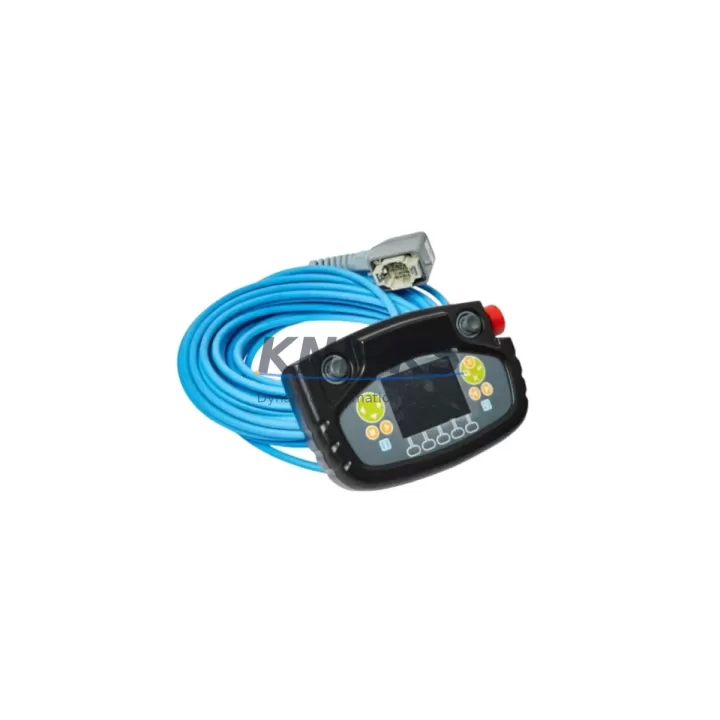
ABB 3HNA024941-001 Migration-Ready Teach Pendant for Legacy IRC5P Paint Control Systems
The ABB 3HNA024941-001 FlexPendant is a migration-ready teach pendant engineered as a direct replacement for legacy IRC5P Paint robot controller installations. As ABB progressively phases out older HMI and pendant hardware, facilities running IRC5P Paint systems face increasing pressure to source verified, drop-in compatible replacements that preserve existing program logic, HMI screen layouts, and communication links without requiring full controller overhauls. The 3HNA024941-001 addresses this challenge by maintaining full electrical and software compatibility with the IRC5P Paint platform, enabling engineers to execute pendant replacements during planned maintenance windows with minimal disruption to production continuity.
Before initiating a pendant swap, engineers should confirm several critical parameters: the power supply rail feeding the teach pendant port (typically 24 VDC from the IRC5P cabinet’s internal PSU), the cable harness connector type and pin-out at the controller’s X9 or equivalent pendant interface, and the firmware revision currently running on the IRC5P main computer. The 3HNA024941-001 is compatible with IRC5P Paint controller firmware versions that support the standard FlexPendant communication protocol over the integrated Ethernet link. If the existing controller runs an older firmware baseline, a firmware update on the IRC5P main computer module may be required prior to pendant commissioning — this step should be planned into the retrofit schedule to avoid unexpected downtime extension.
Physical installation is straightforward: the pendant connects via the standard IRC5P hot-plug pendant cable, and the controller automatically detects the new unit upon power-up. However, engineers should verify that the installation space within the control cabinet or on the pendant arm bracket accommodates the 3HNA024941-001’s dimensions and cable routing. In retrofit scenarios where the original pendant bracket was designed for an earlier FlexPendant generation, minor bracket adaptation may be needed. The unit’s weight and cable strain relief should also be assessed to prevent connector wear during daily operation in paint booth environments, where vibration and chemical exposure are common stressors.
Migration Compatibility Table
| Parameter | Details |
|---|---|
| SKU / Part Number | 3HNA024941-001 |
| Compatible Controller | ABB IRC5P Paint |
| Interface / Connector | Standard IRC5P FlexPendant hot-plug port (Ethernet-based) |
| Communication Protocol | IRC5P integrated Ethernet (FlexPendant protocol) |
| Power Supply Requirement | 24 VDC via pendant cable from IRC5P cabinet PSU |
| Firmware Compatibility | IRC5P Paint firmware supporting FlexPendant standard protocol |
| Installation Space | Standard IRC5P pendant arm / bracket mount; verify cable routing clearance |
| Replacement Scope | Drop-in replacement for legacy 3HNA024941-001 and compatible FlexPendant variants |
| Commissioning Requirement | Firmware version check on IRC5P main computer; HMI screen layout verification |
| Origin | Germany (DE) |
| Support terms | support terms confirmed by quotation — all units ship after functional and communication verification |
Retrofit Planning for Existing Automation Systems
A successful IRC5P Paint pendant retrofit requires coordinated planning across multiple system layers. The teach pendant is the primary operator interface for robot program editing, jogging, I/O monitoring, and safety acknowledgment — meaning its replacement touches nearly every aspect of daily robot operation. Engineers planning a retrofit should begin by auditing the full IRC5P cabinet configuration, including the IRC5P main computer module, the axis computer boards, and the paint process interface modules that manage spray gun triggering, color change valve sequencing, and atomizer control signals.
The IRC5P Paint controller’s internal backplane connects the main computer, drive units, and I/O modules through a defined slot architecture. When replacing the teach pendant, it is important to confirm that no backplane communication errors are present before the swap — a pre-existing fault on the IRC5P’s internal bus can be misattributed to the new pendant if not cleared beforehand. The IRC5P’s system diagnostics, accessible through the existing pendant or via RobotStudio connected over the service port, should be reviewed and all active faults logged and resolved prior to the replacement procedure.
In facilities where the IRC5P Paint system is integrated with a supervisory SCADA or MES layer via DeviceNet or Profibus-DP, engineers should verify that the communication adapter modules — such as the DSQC 378 DeviceNet adapter or equivalent Profibus interface — remain unaffected by the pendant swap. The teach pendant replacement does not alter the controller’s fieldbus configuration, but a controller restart during commissioning will briefly interrupt the communication link, which should be coordinated with the production control room to prevent false alarms or unplanned line stops.
For facilities also managing I/O expansion through additional DSQC I/O modules mounted in the IRC5P cabinet, the pendant replacement is an opportune moment to verify I/O module addressing and confirm that all digital and analog signal assignments remain consistent with the robot program’s I/O configuration table. Any discrepancy between the physical I/O wiring and the program’s signal map should be corrected before returning the system to production. Similarly, if the facility uses an ABB CP600 or equivalent operator panel for process-level HMI alongside the teach pendant, the panel’s communication link to the IRC5P should be tested post-restart to confirm uninterrupted process visibility.
Programming cable access is another consideration: if the retrofit plan includes a firmware update on the IRC5P main computer, engineers will need the appropriate service laptop with RobotStudio and the correct IRC5P service cable. Firmware update procedures should be executed with the robot in a safe, de-energized state, and the updated firmware version should be documented in the facility’s maintenance log for future reference and support terms compliance.
Downtime Control During System Migration
Minimizing downtime during a teach pendant replacement on an IRC5P Paint system requires a structured pre-shutdown checklist and a clear restoration sequence. Before powering down the controller, the existing robot program — including all module files, system parameters, and I/O configuration data — should be backed up to a USB memory device via the current pendant’s backup function or through RobotStudio. This backup preserves the complete program logic, tool data, work object definitions, and safety configuration, ensuring that if any issue arises during commissioning of the new pendant, the system can be restored to its last known good state without data loss.
The physical swap itself is brief: disconnect the existing pendant cable at the IRC5P hot-plug port, connect the 3HNA024941-001, and power up the controller. The IRC5P will detect the new pendant and load the operating system onto the FlexPendant display. Engineers should then verify that the HMI screen layout — including the production program selector, I/O status screens, and paint process monitoring views — loads correctly and matches the pre-swap configuration. Any custom FlexPendant application screens developed for the facility’s paint process should be tested for correct display and touch response before releasing the robot to production.
Post-commissioning, a controlled test cycle — running the robot through its full paint path in a dry-run mode with spray guns disabled — confirms that program execution, axis motion, and process signal sequencing are functioning correctly. This test cycle should be witnessed by both the maintenance engineer and the production supervisor before the system is returned to live production. Documenting the commissioning date, firmware versions, and test results in the facility’s maintenance record supports the support terms confirmed by quotation coverage and provides a clear audit trail for future inspections.
Retrofit Support FAQ
Q: Is the ABB 3HNA024941-001 a direct drop-in replacement for the original IRC5P Paint teach pendant?
A: Yes. The 3HNA024941-001 is designed as a direct replacement for the original FlexPendant used in IRC5P Paint controller installations. It uses the same hot-plug pendant port and communication protocol, requiring no hardware modification to the controller cabinet. A firmware version check on the IRC5P main computer is recommended before installation to confirm compatibility.
Q: What pre-shipment testing is performed on the 3HNA024941-001?
A: Every unit undergoes functional verification and communication interface testing before shipment. The pendant’s display, touch panel, enable device (deadman switch), emergency stop button, and Ethernet communication link are all tested against IRC5P protocol standards. A test report is available upon request. All units are covered by a support terms confirmed by quotation from the date of shipment.
Q: Do I need to update the IRC5P firmware before installing the new pendant?
A: In most cases, no firmware update is required if the IRC5P Paint controller is already running a firmware version that supports the standard FlexPendant protocol. However, if the controller is running a very early firmware baseline, a firmware update may be necessary. We recommend confirming the current firmware version via RobotStudio or the existing pendant’s system information screen before ordering, and our technical team can advise on compatibility if needed.
Q: What is the stock availability and lead time for the 3HNA024941-001?
A: The 3HNA024941-001 is maintained availability confirmed by RFQ to support urgent replacement and planned maintenance requirements. Standard orders ship within 1–3 business days. For large-quantity orders or multi-site retrofit programs, please contact our sales team to confirm availability and arrange priority allocation. All units are supplied with a support terms confirmed by quotation and full documentation.
© 2026 KNMKS. All rights reserved.
Original Source: https://knmks.com
Contact: admin@knmks.com | +86 18359268345
Product Identification
- Brand / Ecosystem
-
ABB
ABB - Model / Series
-
3HNA024941-001
IRC5 Series - Product Family
- Other Components
- Availability Status
- Available on request after model and quantity confirmation
- Inquiry Type
- B2B RFQ, replacement inquiry and project spare-part request
- Pre-Quote Check
- Exact SKU, brand, series, quantity, nameplate photos and destination country are checked before quotation
System Path
Where this product fits in the KNMKS automation structure.
Specification & Inquiry Focus
- Component range
- Breakers, terminals and cabinet accessories
- Common needs
- Model, photo and installation requirement
- Project support
- Maintenance and mixed spare-part inquiry
Buyer Confirmation
Information KNMKS checks before replying.
- Exact model
- 3HNA024941-001
- Brand / ecosystem
- ABB
- Product family
- Other Components
- Application note
- Replacement, maintenance, project build or spare-part list
- Useful photos
- Nameplate, installed unit, cabinet layout or connector side
- Delivery details
- Quantity, destination country and target schedule
Document Support
Files and notes can be confirmed during quotation.
- Product photos or nameplate confirmation when available
- Packing and delivery notes before quotation confirmation
- Support scope and delivery terms confirmed per inquiry
- Export document coordination for qualified B2B requests
Inquiry Support
- Mixed automation spare parts inquiry
- Cabinet component and accessory support
- Model identification from photos or labels
What to Send Us
- Brand and exact model number: ABB 3HNA024941-001
- Quantity and required delivery time
- Application, replacement requirement or nameplate photo
- Destination country and shipping preference
RFQ Preparation
This is a product inquiry page built for RFQ communication.
Fast Model Check
Send this model to KNMKS for confirmation.
Include quantity, destination country and photos if this is a maintenance replacement. The inquiry will be saved with a reference number after submission.
Brand & Compatibility Note
KNMKS displays automation product information for well-known industrial brand ecosystems and compatible replacement references. Brand names are used for product identification and compatibility reference only; final availability and commercial terms are confirmed per quotation.
 Manufacturing
 Machine Tools
 Packaging
 Energy & Power

 PLCs & Controllers
 HMI & Displays
 Servo Systems
 Variable Frequency Drives