
Overview
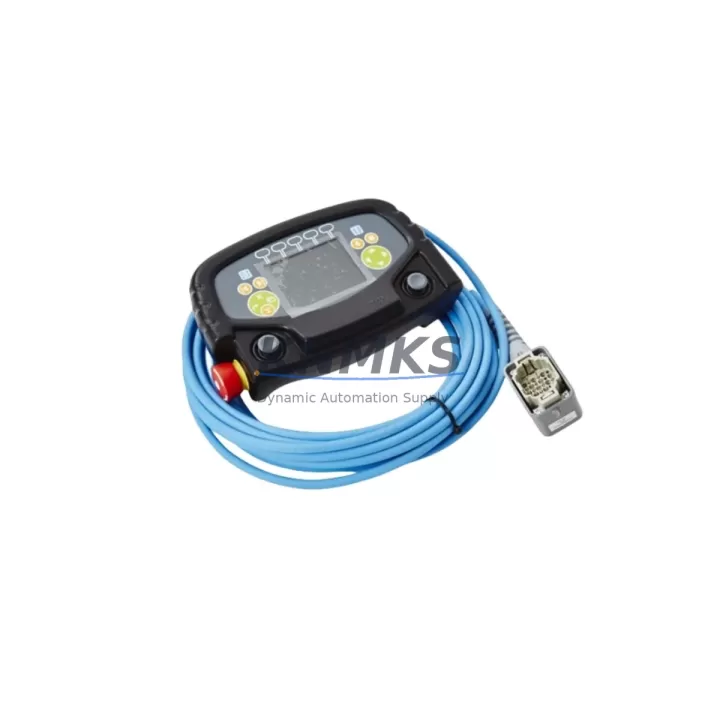
ABB 3HNA024941-001 Migration-Ready Teach Pendant for Legacy Control Systems
The ABB 3HNA024941-001 is a migration-ready teach pendant engineered for direct replacement of the discontinued 3HNA012283-001 unit within ABB IRC5 FlexPainter robot control systems. As legacy painting lines face increasing pressure from obsolescence, spare part shortages, and end-of-support timelines, the 3HNA024941-001 provides a validated upgrade path that preserves existing program logic, operator familiarity, and system uptime. Whether you are managing a scheduled retrofit or responding to an unplanned failure, this pendant is stocked and ready for immediate dispatch with a support terms confirmed by quotation.
Before proceeding with installation, engineers should confirm power supply compatibility at the IRC5 controller cabinet — the pendant draws from the standard 24 VDC teach pendant port and does not require a separate power feed. Terminal wiring at the teach pendant cable connector (X4 on the IRC5 panel) follows the same pinout as the 3HNA012283-001, eliminating the need for harness modifications in most installations. Backplane interface and axis computer communication remain fully compatible with the IRC5 M2004 and M2006 controller generations.
Module addressing is handled automatically through the IRC5 FlexPendant protocol stack — no manual node configuration is required. However, firmware version alignment is critical: the controller must be running RobotWare 5.12 or later to ensure full feature parity with the 3HNA024941-001 hardware revision. Sites running earlier RobotWare builds should schedule a firmware update as part of the retrofit plan to avoid HMI screen rendering issues or safety chain interruptions.
Migration Compatibility Table
| Parameter | 3HNA012283-001 (Legacy) | 3HNA024941-001 (Replacement) |
|---|---|---|
| Compatible Controller | IRC5 M2004 / M2006 | IRC5 M2004 / M2006 / M2016 |
| Robot Series | IRB 6700, IRB 4600 | IRB 6700, IRB 4600, IRB 6640 |
| Communication Protocol | FlexPendant (Ethernet/IP) | FlexPendant (Ethernet/IP) |
| Power Input | 24 VDC via X4 connector | 24 VDC via X4 connector |
| Terminal / Pinout | Standard IRC5 pinout | Fully compatible — no rewiring |
| Backplane Interface | IRC5 standard backplane | IRC5 standard backplane |
| Minimum RobotWare | 5.08+ | 5.12+ (recommended) |
| HMI Screen Compatibility | FlexPendant UI v1 | FlexPendant UI v1 & v2 |
| Installation Space | Standard IRC5 cabinet door mount | Same form factor — direct fit |
| Retrofit Recommendation | End-of-life — replace immediately | Drop-in replacement confirmed |
| Commissioning Requirement | Full calibration required | Plug-and-play; verify E-stop chain |
| Support terms | N/A (discontinued) | support terms confirmed by quotation included |
Retrofit Planning for Existing Automation Systems
A successful IRC5 teach pendant retrofit involves more than a direct hardware swap. Engineers planning a FlexPainter line upgrade should begin by auditing the full control cabinet configuration. The IRC5 controller typically houses an axis computer (DSQC 668 or DSQC 679), a drive unit, an I/O module such as the DSQC 652 digital I/O board, and a power distribution module. Each of these components interacts with the teach pendant through the controller’s internal Ethernet switch — confirming that the switch firmware is current prevents communication dropouts after pendant replacement.
For lines integrating Profibus or DeviceNet field buses, the DSQC 612 Profibus adapter or DSQC 615 DeviceNet module should be inspected for firmware compatibility before the pendant is swapped. Communication link integrity between the IRC5 controller and upstream SCADA or DCS systems must be verified post-installation, particularly where the teach pendant is used to trigger production mode transitions or recipe changes.
Sites operating IRB 6700 or IRB 4600 robots in paint spray applications should also confirm that the safety controller — typically the IRC5 SafeMove module — retains its configuration after the pendant replacement. SafeMove parameters are stored on the axis computer, not the pendant itself, so program logic and speed supervision zones are preserved. However, a supervised test run at reduced speed is strongly recommended before returning the robot to full production speed.
If the retrofit is part of a broader control cabinet upgrade that includes replacing the DSQC 1000 main computer or adding an additional DSQC 652 I/O expansion module, the teach pendant swap should be sequenced last to allow full system verification before the operator interface is reconnected. Programming cables (IRC5 USB service port) and RobotStudio offline programming software should be on-site during commissioning to support any RAPID program adjustments required after the hardware change.
Downtime Control During System Migration
Minimizing production downtime during a teach pendant replacement on an active FlexPainter line requires a structured pre-shutdown checklist. Before powering down the IRC5 controller, the full RAPID program — including module files, system parameters, and I/O configuration — should be backed up to a USB drive via the FlexPendant file manager or RobotStudio. This backup protects against data loss in the event of an unexpected controller fault during the swap.
The physical replacement takes approximately 15–30 minutes: disconnect the teach pendant cable at the X4 port, release the cable strain relief, mount the 3HNA024941-001, reconnect and torque the connector, then restore power. On first boot, the IRC5 will detect the new pendant and perform a hardware handshake — this process takes under 60 seconds. The operator should then verify that all HMI screens load correctly, that the E-stop button on the new pendant triggers the expected safety chain response, and that jogging functions respond normally across all six axes.
For sites where continuous production is critical, a pre-staged spare pendant — already confirmed on firmware and tested on a reference IRC5 unit — reduces mean time to repair (MTTR) to under one hour. KNMKS maintains ready stock of the 3HNA024941-001 with pre-shipment functional testing completed, supporting same-day or next-day dispatch to minimize line stoppages. All units ship with a support terms confirmed by quotation and a test report confirming E-stop, communication link, and display function verification.
Retrofit Support FAQ
Q1: Is the ABB 3HNA024941-001 a direct drop-in replacement for the 3HNA012283-001?
Yes. The 3HNA024941-001 uses the same X4 connector pinout, identical mounting dimensions, and the same FlexPendant communication protocol as the 3HNA012283-001. No cable modifications or bracket changes are required for IRC5 M2004 and M2006 controllers. Verify RobotWare version is 5.12 or later before installation.
Q2: Will my existing RAPID programs and I/O configurations be preserved after the swap?
Yes. RAPID programs, system parameters, and I/O mappings are stored on the IRC5 axis computer and main computer — not on the teach pendant. Replacing the pendant does not alter stored program logic. A pre-swap backup to USB is still recommended as standard practice before any hardware change.
Q3: What commissioning steps are required after installation?
After mounting and powering up, verify: (1) FlexPendant UI loads without errors, (2) E-stop on the new pendant triggers the IRC5 safety chain correctly, (3) all jog directions respond on each axis, (4) any SafeMove supervised zones are active and unmodified. A supervised low-speed test cycle should be completed before returning to full production speed.
Q4: What support terms and stock availability does KNMKS provide?
All 3HNA024941-001 units supplied by KNMKS carry a support terms confirmed by quotation covering manufacturing defects and functional failures under normal operating conditions. Units are pre-tested prior to dispatch — covering E-stop function, display integrity, and communication link verification. Stock is maintained across regional hubs to support urgent retrofit and breakdown replacement requirements. Contact admin@knmks.com or +86 18359268345 for lead time and availability confirmation.
© 2026 KNMKS. All rights reserved.
Original Source: https://knmks.com
Contact: admin@knmks.com | +86 18359268345
Product Identification
- Brand / Ecosystem
-
ABB
ABB - Model / Series
-
IRB67003HAC043455-003 lRB46003HAC029236-003/06 3HNA024941-001 3HNA012283-001
IRC5 Series - Product Family
- Other Components
- Availability Status
- Available on request after model and quantity confirmation
- Inquiry Type
- B2B RFQ, replacement inquiry and project spare-part request
- Pre-Quote Check
- Exact SKU, brand, series, quantity, nameplate photos and destination country are checked before quotation
System Path
Where this product fits in the KNMKS automation structure.
Specification & Inquiry Focus
- Component range
- Breakers, terminals and cabinet accessories
- Common needs
- Model, photo and installation requirement
- Project support
- Maintenance and mixed spare-part inquiry
Buyer Confirmation
Information KNMKS checks before replying.
- Exact model
- IRB67003HAC043455-003 lRB46003HAC029236-003/06 3HNA024941-001 3HNA012283-001
- Brand / ecosystem
- ABB
- Product family
- Other Components
- Application note
- Replacement, maintenance, project build or spare-part list
- Useful photos
- Nameplate, installed unit, cabinet layout or connector side
- Delivery details
- Quantity, destination country and target schedule
Document Support
Files and notes can be confirmed during quotation.
- Product photos or nameplate confirmation when available
- Packing and delivery notes before quotation confirmation
- Support scope and delivery terms confirmed per inquiry
- Export document coordination for qualified B2B requests
Inquiry Support
- Mixed automation spare parts inquiry
- Cabinet component and accessory support
- Model identification from photos or labels
What to Send Us
- Brand and exact model number: ABB IRB67003HAC043455-003 lRB46003HAC029236-003/06 3HNA024941-001 3HNA012283-001
- Quantity and required delivery time
- Application, replacement requirement or nameplate photo
- Destination country and shipping preference
RFQ Preparation
This is a product inquiry page built for RFQ communication.
Fast Model Check
Send this model to KNMKS for confirmation.
Include quantity, destination country and photos if this is a maintenance replacement. The inquiry will be saved with a reference number after submission.
Brand & Compatibility Note
KNMKS displays automation product information for well-known industrial brand ecosystems and compatible replacement references. Brand names are used for product identification and compatibility reference only; final availability and commercial terms are confirmed per quotation.
 Manufacturing
 Machine Tools
 Packaging
 Energy & Power

 PLCs & Controllers
 HMI & Displays
 Servo Systems
 Variable Frequency Drives