
Overview
ABB 3HNA006144-001/02 Migration-Ready PIB for Legacy IRC5: Retrofit and Compatibility Upgrade
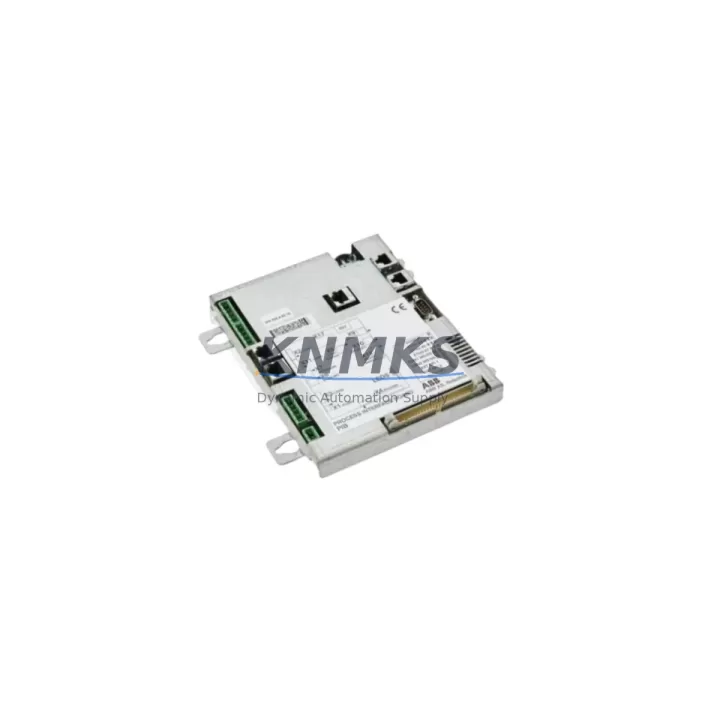
The ABB 3HNA006144-001/02 is a Process Interface Board (PIB) designed for use within the ABB IRC5 robot controller platform. As legacy IRC5 systems approach end-of-support milestones and original spare parts become increasingly difficult to source, the 3HNA006144-001/02 serves as a critical migration component for maintenance engineers and system integrators managing aging robotic automation lines. This unit is available from verified stock, pre-shipment tested, and backed by a support terms confirmed by quotation — making it a reliable choice for both emergency replacement and planned retrofit projects.
The PIB functions as the primary interface layer between the IRC5 controller’s main computer and the robot’s process I/O signals. It handles analog and digital signal conditioning, coordinates communication between the controller cabinet’s internal modules, and supports the real-time data exchange required for precise motion control and process synchronization. When this board fails or degrades, the entire robot cell is typically taken offline — making fast, verified replacement essential to minimizing production disruption.
For facilities running multi-robot IRC5 installations, the 3HNA006144-001/02 is often a shared spare across multiple cells. Engineers should confirm the firmware revision on the replacement unit matches the installed controller software version, as mismatches between the PIB firmware and the IRC5 main computer can cause initialization errors or communication faults on startup. In most cases, the board is a direct drop-in replacement with no hardware modification required, though post-installation parameter verification via RobotStudio or the FlexPendant teach pendant is recommended before returning the cell to production.
Migration Compatibility Table
| Parameter | Details |
|---|---|
| Compatible Platform | ABB IRC5 Robot Controller (Single Cabinet & Dual Cabinet) |
| Module Type | Process Interface Board (PIB) |
| Replaces / Supersedes | 3HNA006144-001 (earlier revision); compatible with IRC5 M2004 and later |
| Backplane Interface | Internal IRC5 controller backplane connector; no external rack required |
| Communication Protocol | Internal ABB proprietary bus; compatible with DeviceNet, PROFIBUS, and EtherNet/IP option boards |
| Installation Requirement | Controller power-off required; ESD precautions mandatory |
| Firmware Compatibility | Verify RobotWare version alignment before installation |
| Commissioning | Post-swap I/O verification via FlexPendant; no re-programming required in standard replacement |
| Support terms | support terms confirmed by quotation — covers manufacturing defects and functional failure under normal operating conditions |
| Pre-Shipment Testing | Functional test performed prior to dispatch; test record available on request |
Retrofit Planning for Existing Automation Systems
A successful IRC5 retrofit involving the 3HNA006144-001/02 typically requires a coordinated review of the surrounding controller architecture. The PIB does not operate in isolation — it interfaces directly with the IRC5 drive system, the DSQC series main computer board, and the I/O expansion modules mounted within the controller cabinet. Before ordering a replacement, maintenance teams should document the current wiring harness routing, confirm the terminal block assignments on the process I/O connector, and verify that the cabinet’s 24VDC power supply unit is delivering within specification, as an under-voltage condition is a common root cause of PIB failure rather than the board itself.
In multi-axis installations, the PIB also coordinates with the axis computer boards responsible for individual servo drive management. If the retrofit is part of a broader controller upgrade — for example, migrating from an older IRC5 M2004 variant to a more recent hardware revision — engineers should also assess whether the DSQC 679 teach pendant interface and any installed fieldbus adapter boards (such as PROFIBUS or DeviceNet option modules) remain compatible with the updated PIB revision. Communication link integrity between the PIB and any connected PROFIBUS DP master or DeviceNet scanner should be validated after replacement using the controller’s built-in diagnostic tools.
For facilities integrating the IRC5 into a broader plant network, the replacement process is also an opportunity to audit the Ethernet switch connections feeding the controller’s service port and WAN interface, and to confirm that the HMI screens — whether running on a dedicated panel PC or a SCADA workstation — are correctly mapped to the I/O addresses managed by the PIB. Address mapping errors introduced during a board swap are a common source of post-maintenance alarms that can delay return-to-production.
Downtime Control During System Migration
Minimizing unplanned downtime during a PIB replacement on an IRC5 system requires preparation before the controller is powered down. The recommended approach is to perform a full system backup via RobotStudio prior to any hardware intervention, capturing the current RAPID program, system parameters, I/O configuration, and safety controller settings. This backup ensures that if any configuration data is lost during the swap — which is rare but possible if the controller’s battery-backed memory is depleted — the system can be restored to its pre-maintenance state without manual re-entry of parameters.
Once the replacement 3HNA006144-001/02 is installed and the controller is powered on, the recommended commissioning sequence is to first verify that the controller reaches the “Motors Off” state without generating hardware fault codes, then confirm I/O signal states match expected values before enabling motor power. If the robot cell is connected to a safety PLC or safety relay chain — for example, an ABB SafeMove2 configuration or an external safety controller managing the cell’s light curtains and door interlocks — the safety circuit should be validated independently before the robot is returned to automatic mode. This staged approach keeps the surrounding production line operational while the robot cell is being restored, reducing the impact on overall equipment effectiveness (OEE).
Retrofit Support FAQ
Q: Is the ABB 3HNA006144-001/02 a direct replacement for the earlier 3HNA006144-001 revision?
A: In most IRC5 installations, yes. The /02 revision is the current production variant and is backward compatible with the /01 hardware in standard IRC5 single and dual cabinet configurations. Confirm the RobotWare software version installed on your controller is supported by the replacement board revision before installation.
Q: What commissioning steps are required after installing the replacement PIB?
A: After physical installation, power on the controller and verify it reaches the “Motors Off” state without hardware faults. Use the FlexPendant to check I/O signal states, confirm communication with any connected fieldbus modules, and run a slow-speed test cycle before returning the robot to full automatic operation. A RobotStudio backup restore may be required if system parameters were not retained.
Q: How do I confirm the unit has been tested before shipment?
A: All units are functionally tested prior to dispatch. A test record is available on request at the time of order. Units are shipped with ESD-protective packaging to prevent damage during transit.
Q: What is covered under the support terms confirmed by quotation?
A: The support terms confirmed by quotation cover manufacturing defects and functional failure under normal operating conditions from the date of shipment. It does not cover damage resulting from incorrect installation, overvoltage events, or physical mishandling. Support requests are supported by our technical team with replacement or repair as applicable.
© 2026 KNMKS. All rights reserved.
Original Source: https://knmks.com
Contact: admin@knmks.com | +86 18359268345
Product Identification
- Brand / Ecosystem
-
ABB
ABB - Model / Series
-
3HNA006144-001/02
IRC5 Series - Product Family
- PLCs & Controllers
- Availability Status
- Available on request after model and quantity confirmation
- Inquiry Type
- B2B RFQ, replacement inquiry and project spare-part request
- Pre-Quote Check
- Exact SKU, brand, series, quantity, nameplate photos and destination country are checked before quotation
System Path
Where this product fits in the KNMKS automation structure.
Specification & Inquiry Focus
- Control platform
- PLC, PAC and modular controllers
- Common needs
- CPU, rack, power and I/O expansion
- Project support
- Replacement, cabinet build and maintenance
Buyer Confirmation
Information KNMKS checks before replying.
- Exact model
- 3HNA006144-001/02
- Brand / ecosystem
- ABB
- Product family
- PLCs & Controllers
- Application note
- Replacement, maintenance, project build or spare-part list
- Useful photos
- Nameplate, installed unit, cabinet layout or connector side
- Delivery details
- Quantity, destination country and target schedule
Document Support
Files and notes can be confirmed during quotation.
- Product photos or nameplate confirmation when available
- Packing and delivery notes before quotation confirmation
- Support scope and delivery terms confirmed per inquiry
- Export document coordination for qualified B2B requests
Inquiry Support
- Model cross-checking before quotation
- CPU, power, rack and expansion module matching
- Support for replacement and project inquiry
What to Send Us
- Brand and exact model number: ABB 3HNA006144-001/02
- Quantity and required delivery time
- Application, replacement requirement or nameplate photo
- Destination country and shipping preference
RFQ Preparation
This is a product inquiry page built for RFQ communication.
Fast Model Check
Send this model to KNMKS for confirmation.
Include quantity, destination country and photos if this is a maintenance replacement. The inquiry will be saved with a reference number after submission.
Brand & Compatibility Note
KNMKS displays automation product information for well-known industrial brand ecosystems and compatible replacement references. Brand names are used for product identification and compatibility reference only; final availability and commercial terms are confirmed per quotation.
 Manufacturing
 Machine Tools
 Packaging
 Energy & Power



 HMI & Displays
 Servo Systems
 Variable Frequency Drives
 Sensors