
Overview
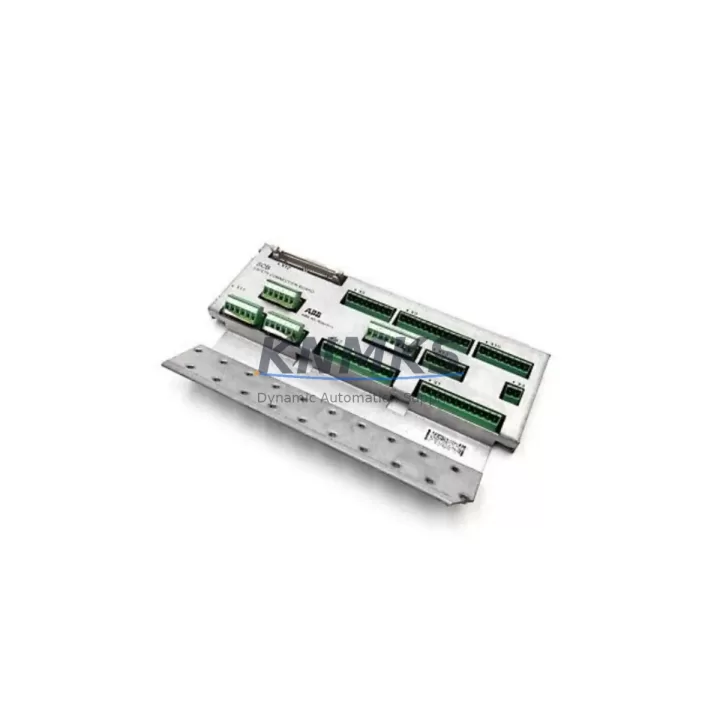
ABB 3HAC7998-1 Migration-Ready SCB-01 for Legacy Control Systems
The ABB 3HAC7998-1 SCB-01 (Safety Connection Board) is a critical interface module within the IRC5 robot controller architecture, responsible for managing safety-rated I/O signals between the robot manipulator, the controller cabinet, and external safety devices such as emergency stop circuits, enabling devices, and safety-rated PLCs. As ABB progressively phases out S4C+ and early IRC5 hardware generations, the 3HAC7998-1 has become one of the most sought-after spare parts for maintenance engineers managing legacy IRB2400, IRB4400, IRB6600, and IRB7600 installations.
For facilities running multi-robot cells on IRC5 single-cabinet or dual-cabinet configurations, the SCB-01 board interfaces directly with the DSQC 400 power distribution unit and the DSQC 611 axis computer. When planning a retrofit or unscheduled replacement, engineers must verify the backplane connector alignment, confirm the 24VDC safety bus voltage tolerance, and cross-reference the firmware revision on the existing DSQC 1000 main computer to ensure compatibility with the replacement SCB-01 board. Mismatched firmware between the axis computer and the safety board is a common source of SafeMove configuration faults post-replacement.
In migration scenarios where a facility is transitioning from S4C+ to IRC5, the 3HAC7998-1 is often paired with the 3HAC4790-1 teach pendant cable assembly and the 3HNA011334-001 FlexPendant interface unit to complete the control cabinet upgrade. The SCB-01 board’s terminal block layout is compatible with existing field wiring from S4C+ installations in most cases, but engineers should audit the 24-pin safety connector pinout against the original S4C+ DSQC 326 safety board wiring diagram before energizing the upgraded cabinet. Retaining the original field wiring harness significantly reduces retrofit labor hours and minimizes the risk of wiring errors during commissioning.
Migration Compatibility Table
| Parameter | 3HAC7998-1 SCB-01 | Notes / Retrofit Guidance |
|---|---|---|
| Compatible Controllers | IRC5 Single / Dual Cabinet | Verify cabinet generation (M2004–M2016) |
| Replaces | DSQC 326 (S4C+), early SCB-01 revisions | Confirm PCB revision label before ordering |
| Backplane Interface | IRC5 standard backplane slot | No mechanical adapter required for IRC5 |
| Safety Bus Voltage | 24VDC ±10% | Measure bus voltage before installation |
| Communication Protocol | Internal IRC5 safety bus (proprietary) | Not compatible with external EtherNet/IP safety |
| Firmware Dependency | RobotWare 5.x / 6.x | Match RobotWare version to DSQC 1000 revision |
| Terminal Block | 24-pin safety I/O connector | Audit against original wiring diagram |
| Installation Space | Standard IRC5 card slot | No chassis modification required |
| Commissioning Requirement | SafeMove re-validation required | Run safety parameter backup before swap |
| Support terms | 12 Months | Covered from date of shipment |
Retrofit Planning for Existing Automation Systems
A successful SCB-01 replacement begins well before the maintenance window opens. The first step is to export a full system backup from the IRC5 FlexPendant, capturing the RAPID program, system parameters, SafeMove configuration, and I/O signal definitions. This backup is stored on the DSQC 1000 main computer’s CompactFlash card and should be copied to an external USB drive as a secondary archive. Engineers working on multi-robot lines should also document the DeviceNet or PROFIBUS node addresses assigned to each robot’s I/O modules, as these addresses are referenced in the safety parameter files and must be consistent after the board swap.
During the physical replacement, the 3HAC7998-1 board is extracted from its backplane slot after de-energizing the IRC5 cabinet and discharging the capacitor bank on the DSQC 400 power unit — a step that is frequently skipped under time pressure and is a leading cause of ESD damage to replacement boards. The new SCB-01 should be handled with anti-static precautions and seated firmly into the backplane before any terminal block reconnection. If the facility uses a DSQC 652 digital I/O module or a DSQC 378 fieldbus adapter for external PLC communication, these modules should remain in their slots during the SCB-01 swap to avoid disturbing the backplane bus continuity.
After physical installation, the system backup is restored via the FlexPendant boot sequence. Engineers should monitor the SafeMove status LED on the SCB-01 during the first power-on cycle — a steady green indicates successful safety parameter loading, while a flashing amber indicates a configuration mismatch that requires re-running the SafeMove Configurator tool in RobotStudio. HMI screens connected via the FlexPendant or an external operator panel should be verified for correct safety status display before returning the robot to automatic mode.
Downtime Control During System Migration
Minimizing unplanned downtime during an SCB-01 replacement requires a structured pre-maintenance protocol. The most effective approach is to stage the replacement board on-site at least 48 hours before the scheduled maintenance window, allowing time to verify the part number, PCB revision, and physical condition of the replacement unit. A pre-tested, powered-on bench verification — connecting the SCB-01 to a spare IRC5 cabinet or a test rig — confirms board functionality before the production robot is taken offline.
During the maintenance window, the recommended sequence is: (1) export system backup, (2) photograph all terminal block wiring, (3) de-energize and discharge the cabinet, (4) swap the SCB-01, (5) restore the system backup, (6) run SafeMove validation, (7) perform a dry-run cycle in manual mode before releasing to automatic. This sequence, when followed without shortcuts, typically completes within 90–120 minutes for a single IRC5 cabinet. For dual-cabinet configurations managing a high-payload robot such as the IRB7600, allow an additional 30 minutes for the extended SafeMove parameter set and the secondary cabinet power sequencing check.
Facilities that maintain a local spare parts inventory with at least one 3HAC7998-1 SCB-01 on the shelf reduce mean time to repair (MTTR) by eliminating the lead time variable entirely. Given the global supply constraints on legacy ABB IRC5 components, maintaining a buffer stock of critical boards — including the SCB-01, the DSQC 1000 main computer, and the DSQC 400 power unit — is a standard recommendation for any facility with more than three IRC5 robots in production.
Retrofit Support FAQ
Q: Is the 3HAC7998-1 a direct drop-in replacement for the DSQC 326 safety board from an S4C+ system?
A: The 3HAC7998-1 SCB-01 is designed for the IRC5 controller architecture and is not a direct plug-in replacement for the DSQC 326 used in S4C+ cabinets. However, in S4C+ to IRC5 migration projects, the SCB-01 is the correct safety board for the new IRC5 cabinet. Field wiring from the S4C+ installation can often be re-terminated to the SCB-01’s 24-pin connector with minimal modification, depending on the original wiring configuration.
Q: What pre-shipment testing is performed on the 3HAC7998-1?
A: Each unit undergoes functional power-on verification and visual inspection for PCB damage, connector integrity, and component condition before shipment. Units are shipped in anti-static packaging with a test record. The support terms confirmed by quotation cover functional failure under normal operating conditions from the date of shipment.
Q: Do I need to re-validate SafeMove after replacing the SCB-01?
A: Yes. ABB’s SafeMove safety system stores validated parameters that are linked to the specific hardware configuration of the IRC5 cabinet. Replacing the SCB-01 requires re-running the SafeMove validation procedure in RobotStudio and re-signing the safety configuration. This step cannot be bypassed and must be completed before returning the robot to automatic mode in any safety-rated application.
Q: What is the typical lead time and stock availability?
A: We maintain ready stock of the 3HAC7998-1 SCB-01 for immediate shipment. Standard lead time from order confirmation to dispatch is 1–3 business days. For urgent requirements, same-day dispatch is available for orders confirmed before 14:00 local time. Contact admin@knmks.com or +86 18359268345 to confirm current stock levels before placing your order.
© 2026 KNMKS. All rights reserved.
Original Source: https://knmks.com
Contact: admin@knmks.com | +86 18359268345
Product Identification
- Brand / Ecosystem
-
ABB
ABB - Model / Series
-
3HAC7998-1 3HAC7998-2 IRB2400 3HAC4790-1 3HNA011334-001SCB-01
IRC5 Series - Product Family
- Other Components
- Availability Status
- Available on request after model and quantity confirmation
- Inquiry Type
- B2B RFQ, replacement inquiry and project spare-part request
- Pre-Quote Check
- Exact SKU, brand, series, quantity, nameplate photos and destination country are checked before quotation
System Path
Where this product fits in the KNMKS automation structure.
Specification & Inquiry Focus
- Component range
- Breakers, terminals and cabinet accessories
- Common needs
- Model, photo and installation requirement
- Project support
- Maintenance and mixed spare-part inquiry
Buyer Confirmation
Information KNMKS checks before replying.
- Exact model
- 3HAC7998-1 3HAC7998-2 IRB2400 3HAC4790-1 3HNA011334-001SCB-01
- Brand / ecosystem
- ABB
- Product family
- Other Components
- Application note
- Replacement, maintenance, project build or spare-part list
- Useful photos
- Nameplate, installed unit, cabinet layout or connector side
- Delivery details
- Quantity, destination country and target schedule
Document Support
Files and notes can be confirmed during quotation.
- Product photos or nameplate confirmation when available
- Packing and delivery notes before quotation confirmation
- Support scope and delivery terms confirmed per inquiry
- Export document coordination for qualified B2B requests
Inquiry Support
- Mixed automation spare parts inquiry
- Cabinet component and accessory support
- Model identification from photos or labels
What to Send Us
- Brand and exact model number: ABB 3HAC7998-1 3HAC7998-2 IRB2400 3HAC4790-1 3HNA011334-001SCB-01
- Quantity and required delivery time
- Application, replacement requirement or nameplate photo
- Destination country and shipping preference
RFQ Preparation
This is a product inquiry page built for RFQ communication.
Fast Model Check
Send this model to KNMKS for confirmation.
Include quantity, destination country and photos if this is a maintenance replacement. The inquiry will be saved with a reference number after submission.
Brand & Compatibility Note
KNMKS displays automation product information for well-known industrial brand ecosystems and compatible replacement references. Brand names are used for product identification and compatibility reference only; final availability and commercial terms are confirmed per quotation.
 Manufacturing
 Machine Tools
 Packaging
 Energy & Power

 PLCs & Controllers
 HMI & Displays
 Servo Systems
 Variable Frequency Drives