
Overview
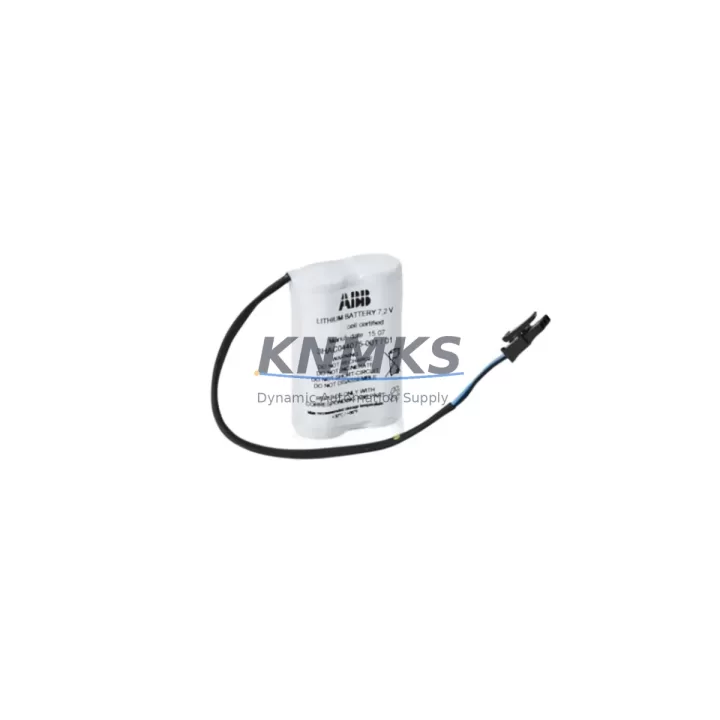
ABB 3HAC16831-1 Migration-Ready Battery for Legacy IRC5 Systems
The ABB 3HAC16831-1 is a direct-replacement backup battery designed for ABB IRC5 robot controller cabinets, including the IRC5 Single Cabinet, IRC5 Compact, and IRC5 Panel Mounted Controller variants. As ABB progressively phases out legacy IRC5 hardware in favor of the OmniCore platform, the 3HAC16831-1 remains a critical spare for facilities that continue to operate IRC5-based robot cells — particularly in automotive body shops, arc welding lines, material handling systems, and precision assembly environments where controller downtime carries significant production cost.
This battery maintains the SRAM memory backup for the IRC5 controller’s program storage, preserving robot calibration data, tool center point (TCP) offsets, system parameters, and I/O configuration across power cycles and planned shutdowns. Loss of battery integrity can result in full program loss on the next cold start, requiring a complete system restore from backup — a process that can extend unplanned downtime from minutes to hours. Stocking a verified 3HAC16831-1 replacement eliminates this risk and supports a controlled, low-disruption maintenance cycle.
Migration Compatibility Table
| Parameter | Specification / Compatibility |
|---|---|
| Compatible Controller | ABB IRC5 Single Cabinet, IRC5 Compact, IRC5 Panel Mounted Controller |
| Replaces / Supersedes | 3HAC16831-1 (OEM), earlier IRC5 SRAM backup battery assemblies |
| Battery Chemistry | Lithium (3.6 V nominal) |
| Connector Interface | OEM-matched plug-and-play connector — no wiring modification required |
| Installation Space | Fits standard IRC5 battery compartment; no bracket or adapter required |
| Firmware Compatibility | Compatible with RobotWare 5.x and RobotWare 6.x |
| Communication Impact | No effect on DeviceNet, PROFIBUS, EtherNet/IP, or PROFINET links during swap |
| Retrofit Recommendation | Replace during planned maintenance window; back up system parameters via FlexPendant or RobotStudio before swap |
| Commissioning Note | Verify battery voltage reading in IRC5 Service Information Panel post-installation; confirm no “Battery Low” fault on restart |
| Support terms | support terms confirmed by quotation | Pre-shipment functional test included |
Retrofit Planning for Existing Automation Systems
When planning a battery replacement within a broader IRC5 system retrofit or control cabinet upgrade, the 3HAC16831-1 swap is typically one step in a coordinated maintenance sequence. Facilities migrating from older IRC5 hardware to newer OmniCore-based cells often stage the transition by first stabilizing the existing IRC5 fleet — replacing worn consumables, updating firmware, and verifying all I/O module assignments — before committing to a full platform migration.
In practice, a battery replacement is often performed alongside other IRC5 maintenance tasks. The DSQC 1000 main computer board, which houses the SRAM that the 3HAC16831-1 protects, should be inspected for capacitor condition and firmware revision during the same maintenance window. If the controller is running RobotWare 5.x and the facility is evaluating an upgrade to RobotWare 6.x, the battery replacement is an ideal checkpoint — the system backup taken before the battery swap serves double duty as the pre-upgrade restore point.
For IRC5 cabinets that also include axis computer boards such as the DSQC 668 or DSQC 669, verifying the integrity of the drive system during the battery maintenance window reduces the risk of discovering additional faults during the subsequent power-on sequence. Similarly, if the cabinet includes a DSQC 652 digital I/O board or a DSQC 378B fieldbus adapter for DeviceNet or PROFIBUS communication, confirming that all module addresses and network node IDs are documented before the battery swap ensures that any accidental parameter loss can be recovered quickly from the pre-swap backup.
Facilities operating IRC5 Compact controllers in tight installation spaces should confirm physical access to the battery compartment before scheduling the replacement. The IRC5 Compact’s battery is accessible from the front panel, but surrounding cable harnesses — particularly those serving the SMB (Serial Measurement Board) and the teach pendant connection — should be routed clear of the work area to avoid connector stress during the procedure. If the cell also includes a FlexPendant (IRC5 teach pendant), the pendant should be disconnected and stored safely before opening the controller cabinet.
Downtime Control During System Migration
Minimizing unplanned downtime during a battery replacement or broader IRC5 migration requires a structured pre-maintenance protocol. Before initiating any work on the IRC5 controller, the following steps are recommended to protect program logic and maintain field control continuity:
1. Full System Backup: Use the FlexPendant’s Backup & Restore function or RobotStudio’s online backup feature to capture a complete system snapshot — including RAPID programs, system parameters, I/O configuration, tool data, and work object definitions. Store the backup on both the controller’s internal storage and an external USB drive or network share.
2. Document Network Configuration: Record all active communication links — DeviceNet node addresses, PROFIBUS DP slave addresses, EtherNet/IP adapter settings, or PROFINET device names — before powering down. This is especially important if the IRC5 is integrated with a Siemens S7 PLC, a Rockwell ControlLogix system, or a third-party safety controller via hardwired I/O or fieldbus.
3. Coordinate with Upstream Controls: Notify the line PLC or DCS operator before taking the robot offline. In cells where the IRC5 communicates robot status (ready, fault, program running) to a supervisory controller via digital outputs on the DSQC 652 or a similar I/O board, the upstream system should be placed in a safe hold state to prevent false fault alarms or unintended line stops.
4. Controlled Power Sequence: After installing the 3HAC16831-1 replacement battery, restore power in the correct sequence — main breaker first, then controller power — and monitor the IRC5 startup log on the FlexPendant for any battery-related fault codes. Confirm that the system clock, calibration offsets, and I/O assignments are intact before releasing the robot to automatic mode.
5. Post-Swap Verification: Run a dry-cycle (motors off, program execution only) to verify that all RAPID routines execute without path errors or missing data references. Confirm HMI screen data — if the cell uses a Panel PC or operator terminal linked to the IRC5 via OPC-UA or a serial link — reflects correct robot status before resuming production.
Following this sequence, a 3HAC16831-1 battery replacement can typically be completed within a single planned maintenance shift, with zero program loss and minimal impact on overall equipment effectiveness (OEE).
Retrofit Support FAQ
Q1: Is the 3HAC16831-1 a direct drop-in replacement for the original ABB IRC5 battery?
Yes. The 3HAC16831-1 uses the same OEM connector and physical form factor as the original IRC5 backup battery. No wiring modification, adapter, or bracket is required. The replacement is a plug-and-play swap compatible with all IRC5 cabinet variants running RobotWare 5.x or 6.x.
Q2: What pre-shipment testing is performed on the 3HAC16831-1?
Each unit undergoes a functional pre-shipment test to verify open-circuit voltage, connector integrity, and cell condition before dispatch. Units that do not meet specification are rejected. A support terms confirmed by quotation is included from the date of shipment, covering manufacturing defects and premature capacity loss under normal operating conditions.
Q3: Can I replace the battery while the IRC5 controller is powered on?
ABB’s standard procedure requires the controller to be powered down before replacing the backup battery. Performing a hot-swap without a full system backup risks SRAM data corruption. Always complete a system backup via FlexPendant or RobotStudio before initiating the replacement, and follow the controlled power-down and power-up sequence described above.
Q4: What is the typical lead time and stock availability?
The 3HAC16831-1 is maintained availability confirmed by RFQ for immediate dispatch. Standard international shipping typically delivers within 5–10 business days depending on destination. For urgent requirements or bulk orders supporting a multi-cell retrofit program, contact our sales team to confirm current inventory levels and expedited shipping options.
© 2026 KNMKS. All rights reserved.
Original Source: https://knmks.com
Contact: admin@knmks.com | +86 18359268345
Product Identification
- Brand / Ecosystem
-
ABB
ABB - Model / Series
-
3HAC16831-1
IRC5 Series - Product Family
- PLCs & Controllers
- Availability Status
- Available on request after model and quantity confirmation
- Inquiry Type
- B2B RFQ, replacement inquiry and project spare-part request
- Pre-Quote Check
- Exact SKU, brand, series, quantity, nameplate photos and destination country are checked before quotation
System Path
Where this product fits in the KNMKS automation structure.
Specification & Inquiry Focus
- Control platform
- PLC, PAC and modular controllers
- Common needs
- CPU, rack, power and I/O expansion
- Project support
- Replacement, cabinet build and maintenance
Buyer Confirmation
Information KNMKS checks before replying.
- Exact model
- 3HAC16831-1
- Brand / ecosystem
- ABB
- Product family
- PLCs & Controllers
- Application note
- Replacement, maintenance, project build or spare-part list
- Useful photos
- Nameplate, installed unit, cabinet layout or connector side
- Delivery details
- Quantity, destination country and target schedule
Document Support
Files and notes can be confirmed during quotation.
- Product photos or nameplate confirmation when available
- Packing and delivery notes before quotation confirmation
- Support scope and delivery terms confirmed per inquiry
- Export document coordination for qualified B2B requests
Inquiry Support
- Model cross-checking before quotation
- CPU, power, rack and expansion module matching
- Support for replacement and project inquiry
What to Send Us
- Brand and exact model number: ABB 3HAC16831-1
- Quantity and required delivery time
- Application, replacement requirement or nameplate photo
- Destination country and shipping preference
RFQ Preparation
This is a product inquiry page built for RFQ communication.
Fast Model Check
Send this model to KNMKS for confirmation.
Include quantity, destination country and photos if this is a maintenance replacement. The inquiry will be saved with a reference number after submission.
Brand & Compatibility Note
KNMKS displays automation product information for well-known industrial brand ecosystems and compatible replacement references. Brand names are used for product identification and compatibility reference only; final availability and commercial terms are confirmed per quotation.
 Manufacturing
 Machine Tools
 Packaging
 Energy & Power



 HMI & Displays
 Servo Systems
 Variable Frequency Drives
 Sensors