
Overview
ABB 3HAC14279-1 Maintenance-Proven Spare Part for Factory Uptime
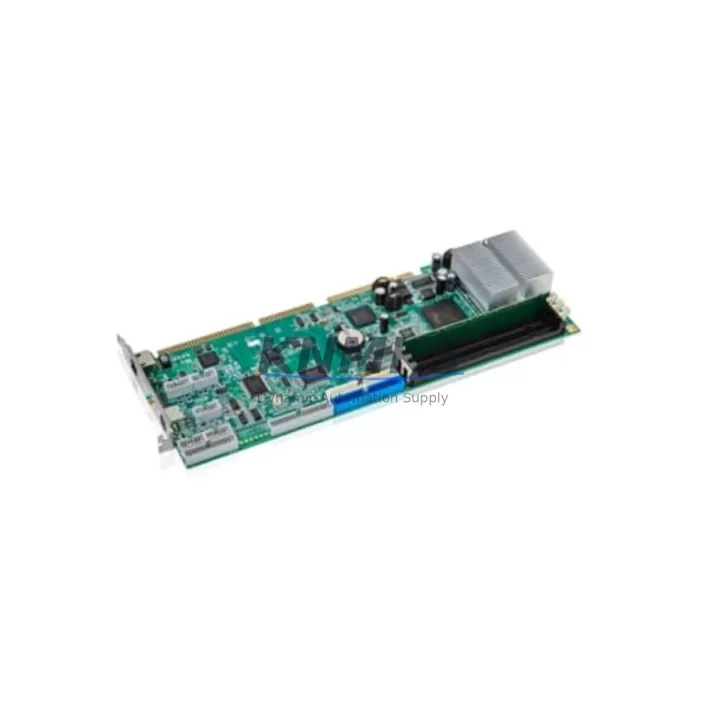
The ABB 3HAC14279-1 is the Main Computer Unit (MCU) for the IRC5 robot controller family — the central processing core that governs motion planning, I/O coordination, program execution, and real-time communication across the entire robot cell. When this module fails, the robot stops. Sourcing a verified, tested replacement is the fastest path back to production uptime. KNMKS stocks the 3HAC14279-1 as a ready-to-ship spare, pre-tested before dispatch, backed by a support terms confirmed by quotation, and supported by a global logistics network for rapid delivery to manufacturing sites worldwide.
Spare Maintenance Table
| Parameter | Specification |
|---|---|
| Part Number | 3HAC14279-1 |
| Brand | ABB Robotics |
| Series | IRC5 Robot Controller |
| Module Type | Main Computer Unit (MCU) |
| Compatible Controllers | IRC5 Single Cabinet, IRC5 Compact, IRC5 Panel Mounted Controller |
| Compatible Robot Models | IRB 1600, IRB 2400, IRB 4400, IRB 6600, IRB 6640, IRB 7600 series (IRC5-based) |
| Operating Voltage | 24 VDC (supplied via IRC5 backplane) |
| Communication Interfaces | Ethernet, DeviceNet, PROFIBUS (configuration-dependent) |
| Operating Temperature | 0°C to +55°C |
| Mounting | DIN rail / IRC5 backplane slot |
| Condition | Original OEM spare, new or refurbished-to-spec |
| Pre-Shipment Testing | Yes — functional verification before dispatch |
| Support terms | 12 Months from date of shipment |
| Lead Time | availability confirmed by RFQ — same-day or next-business-day dispatch available |
| Origin | CN (global supply chain) |
Maintenance Planning for Continuous Operation
The 3HAC14279-1 Main Computer Unit sits at the heart of the IRC5 controller architecture. A disciplined maintenance strategy around this module requires maintenance engineers to treat it not as an isolated component, but as the hub of a tightly integrated electrical and communication ecosystem. When planning a replacement or conducting a scheduled cabinet inspection, the following associated components should be evaluated in parallel to prevent secondary failures and reduce repeat downtime events.
The DSQC 661 / 3HAC026254-001 Axis Computer works in direct coordination with the Main Computer Unit to manage servo drive commands and encoder feedback. If the MCU has experienced a fault event — particularly one involving power surges or communication errors — the Axis Computer should be inspected for latent damage before the replacement MCU is commissioned. Similarly, the DSQC 662 / 3HAC026253-001 I/O Computer handles all digital and analog I/O routing within the IRC5 cabinet; a corrupted MCU can leave residual configuration errors in the I/O Computer that manifest as phantom faults after the MCU swap.
Power integrity is critical. The IRC5 Power Supply Unit (DSQC 663 / 3HAC024488-001) provides regulated 24 VDC to the backplane and all logic boards. Before installing the 3HAC14279-1, verify that the PSU output voltage is within specification under load. An under-voltage condition is a common root cause of MCU failures and will damage a replacement module if left uncorrected. Inline fuse blocks and circuit protection components on the 24 VDC rail should also be inspected and replaced if any signs of thermal stress or discoloration are present.
Communication continuity must be verified post-replacement. If the IRC5 system uses PROFIBUS or DeviceNet fieldbus modules (DSQC 510 or DSQC 532 series), confirm that the fieldbus configuration files are backed up and restored correctly after the MCU swap — the new module will require re-initialization of the fieldbus master parameters. For cells integrated with a FlexPendant (IRC5 teach pendant), verify that the pendant firmware version is compatible with the replacement MCU’s software revision to avoid HMI communication faults.
Backplane integrity is frequently overlooked. The IRC5 backplane connector and card cage should be inspected for bent pins, oxidation, or debris before seating the replacement 3HAC14279-1. A damaged backplane connector is a common cause of intermittent MCU faults that are misdiagnosed as module failures. Finally, signal isolation modules and terminal blocks on the I/O wiring side should be checked for correct torque and insulation resistance, particularly in high-vibration or high-humidity environments where connection integrity degrades over time.
Procurement engineers managing multi-robot facilities should consider holding at least one 3HAC14279-1 as a forward-stocked spare per IRC5 controller cluster. Given ABB’s product lifecycle management policies and the extended lead times for legacy IRC5 components through standard distribution channels, maintaining a local buffer stock is the most reliable strategy for meeting internal uptime SLAs and avoiding emergency freight costs.
Site Replacement Workflow
Replacing the 3HAC14279-1 in an IRC5 cabinet follows a structured sequence to ensure system integrity and minimize recommissioning time:
- Backup system configuration: Use RobotStudio or the FlexPendant to perform a full system backup (including RAPID programs, I/O configuration, safety parameters, and fieldbus settings) before powering down the controller.
- Power isolation: Switch the IRC5 main disconnect to OFF and verify zero-energy state with a voltage tester on the 24 VDC backplane rail before opening the cabinet.
- Document cable routing: Photograph all cable connections to the MCU slot — Ethernet, fieldbus, and backplane connectors — before removal to ensure correct reinstallation.
- Remove the faulty MCU: Release the module retention clips, disconnect all cables in sequence, and extract the 3HAC14279-1 from the backplane slot. Inspect the slot and backplane connector for damage.
- Install the replacement 3HAC14279-1: Seat the new module firmly into the backplane slot, reconnect all cables per the documented routing, and secure retention clips.
- Power-up and system restore: Apply power, allow the IRC5 to complete its boot sequence, then restore the system backup via RobotStudio or FlexPendant. Verify that all I/O, fieldbus, and motion parameters are correctly loaded.
- Functional verification: Run a dry-cycle test of the robot program at reduced speed before returning the cell to full production. Confirm that all axes respond correctly and no fault codes are active.
This workflow is compatible with IRC5 Single Cabinet, Compact, and Panel Mounted Controller variants. For systems running RobotWare 5.x or 6.x, confirm software license transfer requirements with ABB service before commissioning the replacement module.
Spare Parts Support FAQ
Q1: Is the 3HAC14279-1 compatible with all IRC5 controller variants?
The 3HAC14279-1 is the standard Main Computer Unit for the IRC5 family, including Single Cabinet, Compact, and Panel Mounted Controller configurations. Compatibility with specific RobotWare software versions should be confirmed against the controller’s existing software revision. KNMKS technical support can assist with compatibility verification prior to order.
Q2: What testing is performed before shipment?
Every 3HAC14279-1 unit dispatched by KNMKS undergoes functional verification testing prior to shipment. This includes power-on self-test, communication interface checks, and visual inspection for physical damage. A test report is available upon request. All units are covered by a support terms confirmed by quotation from the date of shipment.
Q3: How should I manage long-term supply risk for this module?
The IRC5 platform has an extended installed base globally, but OEM availability of legacy MCU modules can be subject to allocation constraints and extended lead times through standard channels. KNMKS recommends establishing a forward stock agreement for critical spare modules — particularly for facilities operating multiple IRC5 controllers. Contact our procurement team to discuss volume pricing and buffer stock programs.
Q4: What is the support terms coverage and return policy?
The 3HAC14279-1 is covered by a support terms confirmed by quotation from the date of shipment. Support terms covers manufacturing defects and functional failures under normal operating conditions. Units that fail within the confirmed support period will be replaced or credited at KNMKS’s discretion. Returns require prior authorization — contact admin@knmks.com with the order reference and fault description to initiate a support terms claim.
© 2026 KNMKS. All rights reserved.
Original Source: https://knmks.com
Contact: admin@knmks.com | +86 18359268345
Product Identification
- Brand / Ecosystem
-
ABB
ABB - Model / Series
-
3HAC14279-1
IRC5 Series - Product Family
- PLCs & Controllers
- Availability Status
- Available on request after model and quantity confirmation
- Inquiry Type
- B2B RFQ, replacement inquiry and project spare-part request
- Pre-Quote Check
- Exact SKU, brand, series, quantity, nameplate photos and destination country are checked before quotation
System Path
Where this product fits in the KNMKS automation structure.
Specification & Inquiry Focus
- Control platform
- PLC, PAC and modular controllers
- Common needs
- CPU, rack, power and I/O expansion
- Project support
- Replacement, cabinet build and maintenance
Buyer Confirmation
Information KNMKS checks before replying.
- Exact model
- 3HAC14279-1
- Brand / ecosystem
- ABB
- Product family
- PLCs & Controllers
- Application note
- Replacement, maintenance, project build or spare-part list
- Useful photos
- Nameplate, installed unit, cabinet layout or connector side
- Delivery details
- Quantity, destination country and target schedule
Document Support
Files and notes can be confirmed during quotation.
- Product photos or nameplate confirmation when available
- Packing and delivery notes before quotation confirmation
- Support scope and delivery terms confirmed per inquiry
- Export document coordination for qualified B2B requests
Inquiry Support
- Model cross-checking before quotation
- CPU, power, rack and expansion module matching
- Support for replacement and project inquiry
What to Send Us
- Brand and exact model number: ABB 3HAC14279-1
- Quantity and required delivery time
- Application, replacement requirement or nameplate photo
- Destination country and shipping preference
RFQ Preparation
This is a product inquiry page built for RFQ communication.
Fast Model Check
Send this model to KNMKS for confirmation.
Include quantity, destination country and photos if this is a maintenance replacement. The inquiry will be saved with a reference number after submission.
Brand & Compatibility Note
KNMKS displays automation product information for well-known industrial brand ecosystems and compatible replacement references. Brand names are used for product identification and compatibility reference only; final availability and commercial terms are confirmed per quotation.
 Manufacturing
 Machine Tools
 Packaging
 Energy & Power



 HMI & Displays
 Servo Systems
 Variable Frequency Drives
 Sensors