
Overview
ABB 3HAC061403-001 Migration-Ready Precision Reducer for IRB 6700: Legacy System Retrofit & Compatibility Upgrade
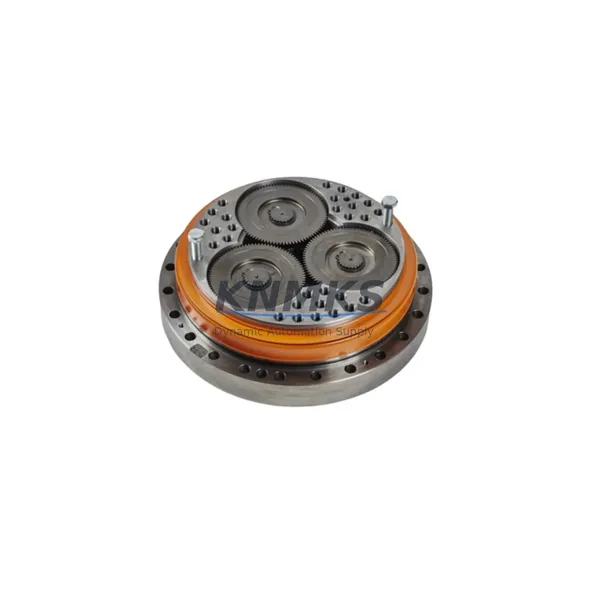
The ABB 3HAC061403-001 is a precision planetary reducer engineered for Axis 3 of the ABB IRB 6700 series industrial robot. As automation facilities worldwide face the challenge of maintaining aging robot fleets, this reducer serves as a verified, migration-ready replacement for worn or discontinued drivetrain components — enabling production lines to extend operational life without committing to full robot replacement. Whether you are managing a scheduled overhaul, responding to an unplanned gearbox failure, or executing a phased modernization of your welding, palletizing, or material-handling cell, the 3HAC061403-001 provides a structurally and kinematically compatible drop-in solution.
Facilities running IRB 6700-150/3.2, IRB 6700-200/2.6, IRB 6700-235/2.65, and adjacent payload variants will find this reducer directly applicable to Axis 3 drivetrain restoration. The unit is dimensionally identical to the original factory specification, preserving existing mounting bolt patterns, input shaft interfaces, and output flange geometry — eliminating the need for custom adapter plates or mechanical rework during installation.
Migration Compatibility Table
| Parameter | Specification / Compatibility Detail |
|---|---|
| Part Number | 3HAC061403-001 |
| Compatible Robot Models | ABB IRB 6700 series (all payload variants), Axis 3 |
| Replaces / Supersedes | Earlier Axis 3 reducer assemblies on IRB 6700 pre-2018 builds; verify robot serial number against ABB spare parts bulletin |
| Mounting Interface | Drop-in compatible; original bolt pattern and flange geometry retained |
| Input Shaft Interface | Matches ABB IRB 6700 Axis 3 motor coupling; no adapter required |
| Lubrication | Pre-filled at factory; confirm grease type compatibility with existing maintenance schedule (typically Mobilux EP2 or equivalent) |
| Weight | Approx. 25 kg |
| Origin | Sweden (ABB Robotics OEM supply chain) |
| Communication / Control Compatibility | Mechanical component; compatible with IRC5 and OmniCore controller platforms without software modification |
| Firmware Dependency | None — purely mechanical; no firmware update required post-installation |
| Commissioning Requirement | Axis calibration via RobotStudio or teach pendant required after installation; update fine calibration data in system parameters |
| Pre-Shipment Testing | Yes — dimensional inspection and rotational resistance verified before dispatch |
| Support terms | support terms confirmed by quotation from date of shipment |
Retrofit Planning for Existing Automation Systems
A successful Axis 3 reducer replacement on the IRB 6700 requires coordinated planning across mechanical, electrical, and software domains. Before scheduling the maintenance window, engineers should retrieve the robot’s current fine calibration data from the IRC5 or OmniCore controller — this data, stored in the system parameters under the MOC.cfg file, defines the exact axis zero position and must be restored after the new reducer is installed and torqued to specification.
On the mechanical side, confirm that the ABB IRB 6700 Axis 3 servo motor (typically an ABB MU series motor paired with this axis) is in serviceable condition before proceeding. A worn motor combined with a new reducer will not resolve vibration or positioning drift issues, and replacing both components in the same window minimizes repeat downtime. Inspect the motor brake, encoder cable routing, and connector condition at the same time.
For facilities using the ABB IRC5 controller with DSQC boards managing I/O and safety, verify that the axis configuration in RobotStudio matches the physical robot variant. If the cell has been upgraded from an older M2000 or M2004 controller platform to IRC5, confirm that the axis parameter file reflects the correct gear ratio for the 3HAC061403-001 — mismatched gear ratio parameters will cause immediate position errors on first motion after commissioning.
Cells integrating ABB SafeMove2 safety supervision modules should note that Axis 3 speed and position limits defined in the SafeMove configuration will need re-validation after the reducer swap. The SafeMove2 configuration tool within RobotStudio provides a guided re-validation workflow; plan for an additional 1–2 hours of safety function testing beyond the mechanical installation time.
If the robot communicates with a PLC or SCADA system via PROFINET or EtherNet/IP using an ABB DSQC688 or DSQC1030 fieldbus adapter, no changes to the network configuration are required — the reducer replacement is transparent to the communication layer. However, if the cell uses an older DeviceNet DSQC658 adapter and the migration plan includes a simultaneous controller upgrade, coordinate the fieldbus migration with the mechanical work to avoid two separate production interruptions.
Facilities managing multiple IRB 6700 units should consider stocking the 3HAC061403-001 as a critical spare alongside the ABB IRB 6700 Axis 1 and Axis 2 reducers (3HAC057546-001 and 3HAC058663-001 respectively) to cover the full lower-arm drivetrain. A consolidated spare parts strategy across all three lower axes significantly reduces mean time to repair (MTTR) for the most mechanically stressed joints in the robot’s working envelope.
Downtime Control During System Migration
Minimizing production interruption during an Axis 3 reducer replacement begins with pre-staging all components and tooling before the robot is taken offline. The 3HAC061403-001 should be on-site and inspected at least 48 hours before the scheduled maintenance window. Confirm that the replacement unit’s serial number and revision level are logged in your CMMS against the robot asset record.
Before powering down the robot, use RobotStudio or the IRC5 teach pendant to jog Axis 3 to its calibration mark position and record the current joint angle. This step preserves a reference point that accelerates post-installation calibration and reduces the risk of gross calibration errors. Back up the full system — including RAPID programs, EIO.cfg, MOC.cfg, SYS.cfg, and MMC.cfg — to a USB drive or network share before any mechanical work begins.
During installation, follow the ABB service manual torque sequence for the reducer mounting bolts. Over-torquing or uneven torque application is a leading cause of premature bearing failure in precision reducers. Use a calibrated torque wrench and apply thread-locking compound only where specified by ABB documentation.
After mechanical reassembly, restore the system backup and perform a fine calibration update using the calibration pendulum or the robot’s built-in calibration routine. Run the robot through its full working envelope at reduced speed (10–25%) for a minimum of 30 minutes before returning to production speed. Monitor Axis 3 motor current and temperature during this run-in period — values significantly above baseline may indicate a misalignment or insufficient lubrication condition that should be addressed before full-speed production resumes.
For cells with tight cycle time requirements, consider programming a temporary reduced-speed production mode in RAPID that can be activated immediately after calibration, allowing partial production output while the run-in period completes during live production rather than during the maintenance window itself.
Retrofit Support FAQ
Q1: Is the 3HAC061403-001 a direct replacement for the original Axis 3 reducer on all IRB 6700 variants?
The 3HAC061403-001 is the current ABB spare part number for the IRB 6700 Axis 3 reducer and covers the full IRB 6700 payload range. However, always cross-reference the robot’s serial number and the ABB spare parts catalog or your ABB service representative to confirm applicability for your specific build date and configuration, particularly for early-production units manufactured before 2016.
Q2: What calibration steps are required after installation?
After mechanical installation, a fine calibration update is mandatory. Use the ABB calibration pendulum tool with the IRC5 or OmniCore controller’s calibration routine, or perform a manual fine calibration via the teach pendant. Update the MOC.cfg axis calibration parameters and verify the calibration mark alignment before running any RAPID programs. Do not skip this step — operating without updated calibration data will result in path deviation and potential collision with tooling or fixtures.
Q3: Has this unit been tested before shipment, and what support terms is provided?
Yes. Every 3HAC061403-001 unit dispatched from our inventory undergoes pre-shipment dimensional inspection and rotational resistance verification. Units are shipped with a support terms confirmed by quotation from the date of shipment, covering manufacturing defects and premature failure under normal operating conditions. Support requests are supported by our technical team at admin@knmks.com.
Q4: What is the typical lead time, and do you maintain stock?
We maintain in-stock inventory of the 3HAC061403-001 to support urgent replacement requirements. Standard orders ship within 1–3 business days. For large-quantity orders or multi-unit spare parts programs covering an entire robot fleet, contact our sales team to discuss volume pricing and reserved stock arrangements. Emergency same-day dispatch may be available for critical production-down situations — contact us directly at +86 18359268345 to confirm availability.
© 2026 KNMKS. All rights reserved.
Original Source: https://knmks.com
Contact: admin@knmks.com | +86 18359268345
Product Identification
- Brand / Ecosystem
-
ABB
ABB - Model / Series
-
3HAC061403-001
IRC5 Series - Product Family
- Other Components
- Availability Status
- Available on request after model and quantity confirmation
- Inquiry Type
- B2B RFQ, replacement inquiry and project spare-part request
- Pre-Quote Check
- Exact SKU, brand, series, quantity, nameplate photos and destination country are checked before quotation
System Path
Where this product fits in the KNMKS automation structure.
Specification & Inquiry Focus
- Component range
- Breakers, terminals and cabinet accessories
- Common needs
- Model, photo and installation requirement
- Project support
- Maintenance and mixed spare-part inquiry
Buyer Confirmation
Information KNMKS checks before replying.
- Exact model
- 3HAC061403-001
- Brand / ecosystem
- ABB
- Product family
- Other Components
- Application note
- Replacement, maintenance, project build or spare-part list
- Useful photos
- Nameplate, installed unit, cabinet layout or connector side
- Delivery details
- Quantity, destination country and target schedule
Document Support
Files and notes can be confirmed during quotation.
- Product photos or nameplate confirmation when available
- Packing and delivery notes before quotation confirmation
- Support scope and delivery terms confirmed per inquiry
- Export document coordination for qualified B2B requests
Inquiry Support
- Mixed automation spare parts inquiry
- Cabinet component and accessory support
- Model identification from photos or labels
What to Send Us
- Brand and exact model number: ABB 3HAC061403-001
- Quantity and required delivery time
- Application, replacement requirement or nameplate photo
- Destination country and shipping preference
RFQ Preparation
This is a product inquiry page built for RFQ communication.
Fast Model Check
Send this model to KNMKS for confirmation.
Include quantity, destination country and photos if this is a maintenance replacement. The inquiry will be saved with a reference number after submission.
Brand & Compatibility Note
KNMKS displays automation product information for well-known industrial brand ecosystems and compatible replacement references. Brand names are used for product identification and compatibility reference only; final availability and commercial terms are confirmed per quotation.
 Manufacturing
 Machine Tools
 Packaging
 Energy & Power

 PLCs & Controllers
 HMI & Displays
 Servo Systems
 Variable Frequency Drives