
Overview
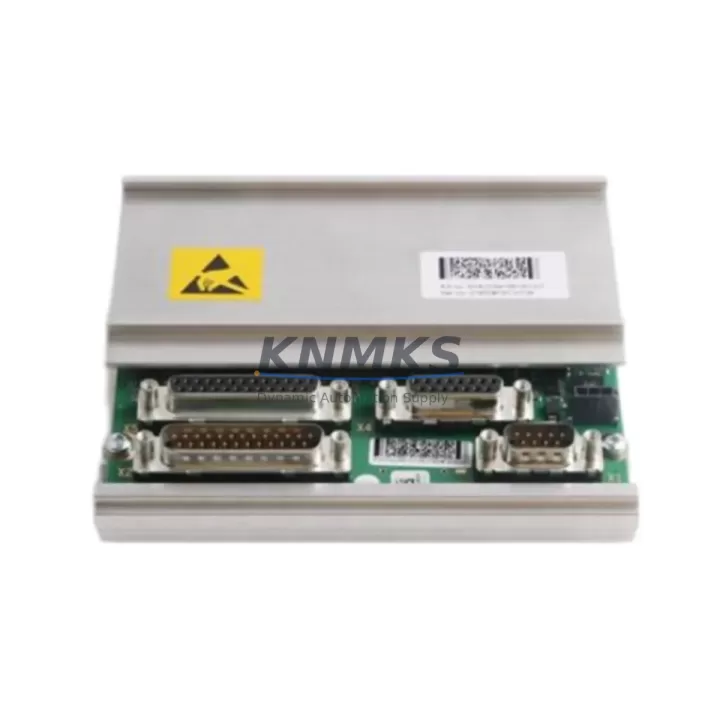
ABB 3HAC044168-001 RMU102 Maintenance-Proven Spare Part for Factory Uptime
The ABB 3HAC044168-001 RMU102 (Robot Measurement Unit) is a critical safety and measurement component within the ABB IRC5 robot controller platform. Designed to monitor axis positions and provide real-time feedback to the IRC5 main computer, the RMU102 is integral to safe robot operation, emergency stop logic, and axis supervision. When this unit fails or degrades, the entire robot cell is at risk of unplanned downtime — making a verified, original spare immediately available in your maintenance inventory an essential part of any proactive uptime strategy.
At KNMKS, we supply the 3HAC044168-001 RMU102 as a tested, original ABB spare part sourced from authorized channels. Each unit undergoes pre-shipment functional verification and ships with a support terms confirmed by quotation, giving maintenance engineers and procurement teams the confidence to act fast when a fault code appears or a scheduled replacement is due.
Spare Maintenance Table
| Parameter | Specification |
|---|---|
| Part Number | 3HAC044168-001 |
| Module Designation | RMU102 (Robot Measurement Unit) |
| Compatible Platform | ABB IRC5 Robot Controller (Single Cabinet, Dual Cabinet, Panel Mounted) |
| Compatible Robot Series | IRB 120, IRB 140, IRB 1600, IRB 2600, IRB 4600, IRB 6640, IRB 6650S and other IRC5-based models |
| Function | Axis position measurement, safety supervision, emergency stop monitoring |
| Communication Interface | Internal IRC5 backplane / safety bus |
| Supply Voltage | 24 VDC (supplied via IRC5 controller backplane) |
| Operating Temperature | 0°C to +55°C |
| Origin | Germany (DE) |
| Weight | Approx. 420 g |
| Condition | Original New / Tested Surplus |
| Support terms | 12 Months |
| Pre-Shipment Test | Yes — functional verification before dispatch |
| Maintenance Recommendation | Replace at first axis supervision fault; inspect every 3–5 years in high-cycle environments |
Maintenance Planning for Continuous Operation
The RMU102 does not operate in isolation. Within the IRC5 controller cabinet, it works in close coordination with several other modules and components. When planning a replacement or conducting a scheduled cabinet inspection, maintenance engineers should simultaneously verify the condition of the following:
The DSQC 661 / DSQC 662 axis computer board communicates directly with the RMU102 to process position data — a degraded axis computer can produce symptoms that mimic RMU102 failure, so both should be evaluated together. The IRC5 main computer (DSQC 639 or DSQC 1000) receives safety signals from the RMU102; if the main computer’s firmware is outdated, even a new RMU102 may not initialize correctly. Inspect the 24 VDC power supply module (3HAC025562-001 or equivalent) that feeds the controller backplane — voltage fluctuations are a leading cause of premature RMU102 failure.
The safety panel and emergency stop circuit (including the DSQC 400 safety board) should be tested after any RMU102 swap to confirm that the E-stop chain is intact and that the new unit is correctly recognized by the safety supervisor. Check all resolver cables and SMB (Serial Measurement Board) connections — the 3HAC031683-001 SMB box is the upstream data source for the RMU102, and a damaged resolver cable or corroded SMB connector will cause recurring faults even after a successful RMU102 replacement.
For facilities running multiple IRC5 cells, it is best practice to maintain at least one spare DSQC 643 I/O module and one spare DSQC 378 fieldbus adapter alongside the RMU102 in your cabinet spare kit. These components share the same maintenance cycle and are frequently replaced together during annual overhauls. Finally, inspect the IRC5 backplane connector and ribbon cables for signs of heat stress or mechanical wear — a loose backplane connection is often misdiagnosed as an RMU102 fault.
Site Replacement Workflow
Step 1 — Fault Isolation: When an IRC5 controller generates an axis supervision error (e.g., Error 50024 or 50025), use ABB RobotStudio or the FlexPendant to read the active error log. Confirm that the fault is linked to the RMU102 and not to a resolver cable, SMB box, or axis computer issue before ordering a replacement.
Step 2 — Safe Shutdown: Place the robot in manual mode, engage the E-stop, and isolate the IRC5 cabinet from mains power following your site LOTO (Lockout/Tagout) procedure. Allow the capacitors in the drive module to discharge fully (minimum 5 minutes) before opening the cabinet.
Step 3 — Module Removal: The RMU102 is typically mounted on the controller backplane inside the IRC5 cabinet. Disconnect the backplane ribbon connector and any resolver/SMB signal cables. Note the cable routing and connector positions before removal — photograph if necessary.
Step 4 — Installation of 3HAC044168-001: Seat the new RMU102 firmly on the backplane, reconnect all cables in the original configuration, and secure any retaining clips. Do not force connectors — misaligned pins are a common installation error.
Step 5 — Power-On and Verification: Restore power to the IRC5 cabinet. The controller should perform a self-test and recognize the new RMU102 automatically. Use the FlexPendant to confirm that all axes are visible and that no axis supervision faults are active. Run a slow-speed test cycle before returning the robot to production.
Step 6 — Documentation: Record the replacement in your CMMS (Computerized Maintenance Management System), including the part number, serial number, installation date, and technician name. Update your spare parts inventory accordingly.
Spare Parts Support FAQ
Q1: Is the 3HAC044168-001 RMU102 compatible with all IRC5 controller variants?
The RMU102 is designed for the ABB IRC5 platform and is compatible with Single Cabinet, Dual Cabinet, and Panel Mounted IRC5 variants. It supports a wide range of IRC5-based robot models including the IRB 120, IRB 140, IRB 1600, IRB 2600, IRB 4600, and IRB 6640 series. Always verify your controller’s hardware revision against ABB’s compatibility matrix before installation, particularly for older IRC5 cabinets manufactured before 2010.
Q2: What does the support terms confirmed by quotation cover, and what is the claims process?
Our support terms confirmed by quotation cover manufacturing defects and functional failures under normal operating conditions. If the unit fails within the confirmed support period, contact admin@knmks.com with your order number and a description of the fault. We will arrange a replacement or repair at no additional cost. Support terms does not cover damage caused by incorrect installation, overvoltage, or physical impact.
Q3: How do you verify the unit before shipment, and what documentation is provided?
Every 3HAC044168-001 RMU102 is powered on and functionally tested prior to dispatch. We provide a test report confirming the unit passed pre-shipment verification. Units are packed in anti-static ESD packaging with foam protection to prevent transit damage. A packing list and invoice are included with every shipment.
Q4: Can you support long-term supply for fleet maintenance programs?
Yes. KNMKS maintains stock of high-demand IRC5 spare parts including the RMU102 to support customers with multi-robot facilities and annual maintenance contracts. For fleet orders of 3 units or more, contact us at admin@knmks.com or +86 18359268345 to discuss reserved stock arrangements, volume pricing, and scheduled delivery programs that align with your planned maintenance windows.
© 2026 KNMKS. All rights reserved.
Original Source: https://knmks.com
Contact: admin@knmks.com | +86 18359268345
Product Identification
- Brand / Ecosystem
-
ABB
ABB - Model / Series
-
3HAC044168-001 RMU102
IRC5 Series - Product Family
- Other Components
- Availability Status
- Available on request after model and quantity confirmation
- Inquiry Type
- B2B RFQ, replacement inquiry and project spare-part request
- Pre-Quote Check
- Exact SKU, brand, series, quantity, nameplate photos and destination country are checked before quotation
System Path
Where this product fits in the KNMKS automation structure.
Specification & Inquiry Focus
- Component range
- Breakers, terminals and cabinet accessories
- Common needs
- Model, photo and installation requirement
- Project support
- Maintenance and mixed spare-part inquiry
Buyer Confirmation
Information KNMKS checks before replying.
- Exact model
- 3HAC044168-001 RMU102
- Brand / ecosystem
- ABB
- Product family
- Other Components
- Application note
- Replacement, maintenance, project build or spare-part list
- Useful photos
- Nameplate, installed unit, cabinet layout or connector side
- Delivery details
- Quantity, destination country and target schedule
Document Support
Files and notes can be confirmed during quotation.
- Product photos or nameplate confirmation when available
- Packing and delivery notes before quotation confirmation
- Support scope and delivery terms confirmed per inquiry
- Export document coordination for qualified B2B requests
Inquiry Support
- Mixed automation spare parts inquiry
- Cabinet component and accessory support
- Model identification from photos or labels
What to Send Us
- Brand and exact model number: ABB 3HAC044168-001 RMU102
- Quantity and required delivery time
- Application, replacement requirement or nameplate photo
- Destination country and shipping preference
RFQ Preparation
This is a product inquiry page built for RFQ communication.
Fast Model Check
Send this model to KNMKS for confirmation.
Include quantity, destination country and photos if this is a maintenance replacement. The inquiry will be saved with a reference number after submission.
Brand & Compatibility Note
KNMKS displays automation product information for well-known industrial brand ecosystems and compatible replacement references. Brand names are used for product identification and compatibility reference only; final availability and commercial terms are confirmed per quotation.
 Manufacturing
 Machine Tools
 Packaging
 Energy & Power

 PLCs & Controllers
 HMI & Displays
 Servo Systems
 Variable Frequency Drives